Gateway versuib 2926.2.2.0 not working

Yesterday we updates Devolutions Server and Gateway to the latest version.
When I try to open an asset through the gateway I get this error: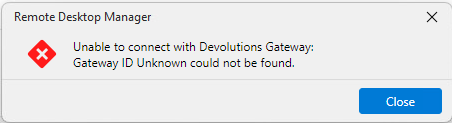
Also when I try to edit the settings in Devolutions Server Console I get an error: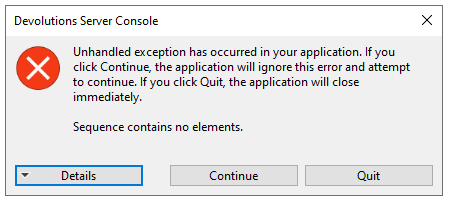
Attached the details of the error.
Is this a known issue and what can I do to fix this?
3b09ebf5-6ff0-4dca-99b0-6829fe4e4200.png
c473aec8-1533-4f88-8746-9c0c4c8e34fa.png
Error Details.txt
All Comments (24)
Hello,
Thank you for reaching to our forum, both errors are related and have a known root cause: your gateway.json contains a WebApp section that the DVLS Console can no longer parse correctly after the upgrade, which triggers that unhandled exception when you click Edit on the Gateway. That same broken config state is also what is causing the "Gateway ID Unknown" error when RDM tries to open a session through it.
The fix is straightforward:
- Stop the Devolutions Gateway service on the Gateway host (open Services.msc, find "Devolutions Gateway", stop it).
- Open C:\ProgramData\Devolutions\Gateway\gateway.json in a text editor.
- Find the "WebApp" block and delete it entirely, along with the comma that immediately precedes the opening brace of that section.
- Save the file, then start the Devolutions Gateway service again.
- In DVLS Console, try editing the Gateway settings again. The exception should be gone.
- In the DVLS web interface, go to Administration > Devolutions Gateway and confirm the Gateway shows as Online.
- Try opening a session from RDM.
If the "Gateway ID Unknown" error in RDM persists after all of that, please reply with the DVLS and Gateway versions you upgraded from and to, and we can look at whether a re-pairing step is needed.
Best regards,
Michel Audi
Hi Michel,
Removing the WebApp section solved the problem with editing the settings but we still get the Gateway ID error.
We upgraded from these versions:
DVLS: 2026.1.16.0 => 2026.2.5.0
Gateway: 2026.1.0 => 2026.2.2
RDM: 2026.1.10.0 => 2026.2.8.0
I also got the Gateway ID error before updating the gateway to 2026.2.2 after I updated DVLS.
Today I upgraded to DVLS version 2026.2.7.0 and still the same problem.
Please let me know what the next steps are to fix this problem.
Hi hjbos,
Thanks for the follow-up, and good to hear the WebApp change cleared the Console error.
For the Gateway ID error, let's confirm the ID first, since that error usually means the ID the server has for the Gateway and the one in the Gateway's own config no longer line up. Could you do the following:
- In the DVLS web interface, go to Administration > Devolutions Gateway, open the Gateway entry, and note the Gateway ID shown there.
- On the Gateway host, open gateway.json and compare the Id value against what DVLS shows. They should match exactly.
- From the same Administration > Devolutions Gateway screen, use the ellipsis (More) menu and select Publish revocation list to all gateways. If a Publish Gateway configuration option is offered, run that one first, then the revocation list.
If the IDs do not match, or step 3 doesn't clear it, the cleanest fix is to remove the Gateway from the list in the web interface and add it back, then ping it to confirm it shows online. These two pages walk through the Add flow and the publish steps if you want a reference:
https://docs.devolutions.net/server/web-interface/administration/modules/gateway/
https://docs.devolutions.net/gateway/getting-started/devolutions-server/devolutions-gateway-configuration-with-devolutions-server/
If the error still persists after re-adding, let me know and we can open a support case to collect your server logs and gateway.json, or jump on a short session if it isn't clear from the logs.
Best regards,
Michel Audi
Hi Michel,
De Id was the same, after publish revocation list still the same problem. After I removed the gateway from the web interface and I tried to add the gateway I get the following error: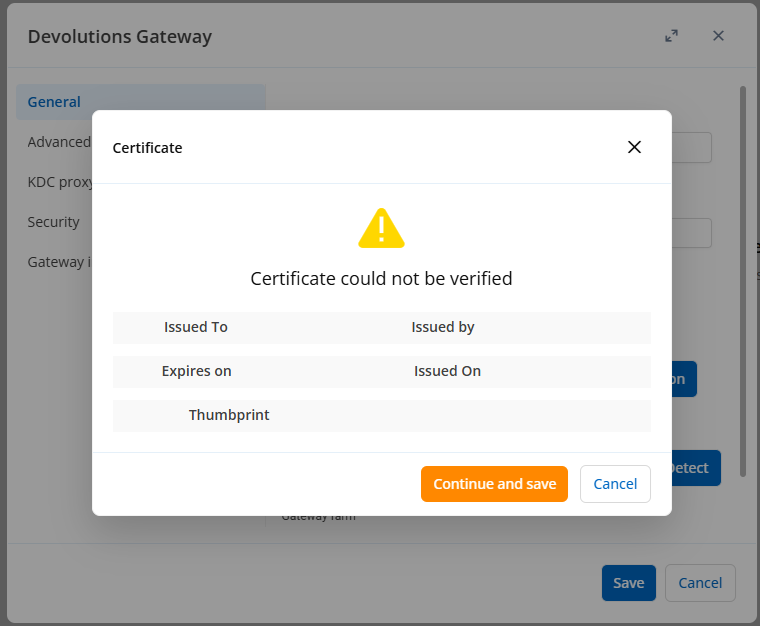
Pressing continue and save did not work, I get a more detailed error: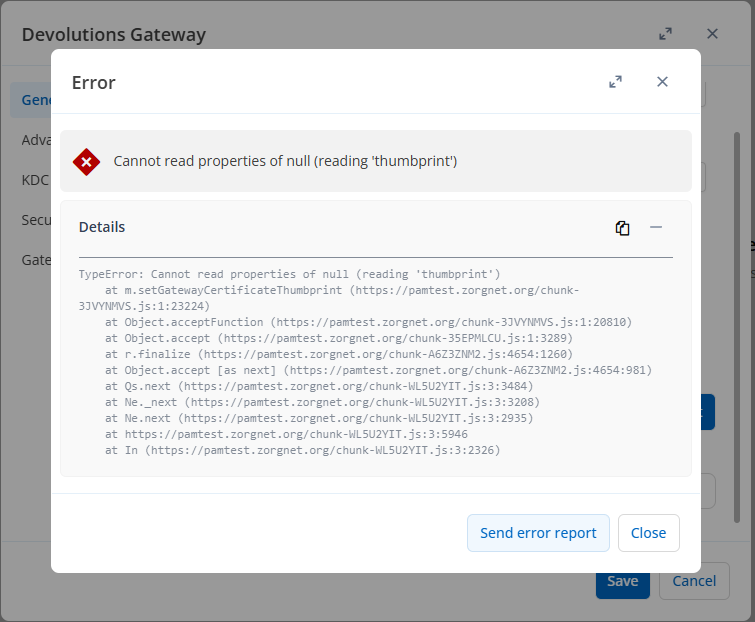
e2964075-0e4b-4be6-8c27-bc2560621c68.png
772d1b20-5a29-4f74-a755-2105dfe30f12.png
Hi hjbos,
Thanks for the update and the two screenshots. They point straight to the cause, which is the certificate. When you re-add the Gateway, the server cannot validate the Gateway's TLS certificate, so the dialog comes up empty and the save fails. That same failure is why the Gateway ID still reads as unknown, since a Gateway the server cannot verify is treated as unreachable. The error on "Continue and save" is a separate display issue on our side that I am flagging internally. The certificate is the breaking point, so the goal is to get the Gateway serving a valid certificate on its own before configuring it in Devolutions Server again.
On the Gateway machine, please confirm the certificate matches what the Gateway configuration requires:
- The Gateway is configured with its fully qualified domain name as its hostname, and that same FQDN is the URL used everywhere.
- The certificate is a full chain certificate that includes the intermediate and root certificates.
- The certificate's SAN matches that FQDN exactly, and the CN should match it as well.
- The private key is present, and the account the Devolutions Gateway service runs under has read permission on it.
- The Devolutions Gateway service is running.
The quickest way to confirm all of this at once is to request https://your-gateway-fqdn:7171/jet/health from the Devolutions Server machine and check that you get a health response and that the certificate it serves shows the full chain and the correct FQDN. If that request fails or the certificate is not right, the problem is on the Gateway and needs to be corrected there first. Once that endpoint responds cleanly with a valid certificate, adding the Gateway in Devolutions Server will go through without the certificate prompt, and the Gateway should come back online and clear the ID error. If it is easier, I can open a support case to go through the gateway.json, the certificate, and the logs with you directly.
Best regards,
Michel
Michel Audi
For what it's worth, I get the exact same error message and the health page looks fine and secured with https.
TypeError: Cannot read properties of null (reading 'thumbprint')
at Object.acceptFunction (https://test.internal.local/dvls/chunk-UIUVVVBZ.js:89:158555)
at Object.accept (https://test.internal.local/dvls/chunk-4F5ISJSR.js:1:3289)
at r.finalize (https://test.internal.local/dvls/chunk-EWMDJ2PR.js:4654:1260)
at Object.accept [as next] (https://test.internal.local/dvls/chunk-EWMDJ2PR.js:4654:981)
at Qs.next (https://test.internal.local/dvls/chunk-WL5U2YIT.js:3:3484)
at Ne._next (https://test.internal.local/dvls/chunk-WL5U2YIT.js:3:3208)
at Ne.next (https://test.internal.local/dvls/chunk-WL5U2YIT.js:3:2935)
at https://test.internal.local/dvls/chunk-WL5U2YIT.js:3:5946
at In (https://test.internal.local/dvls/chunk-WL5U2YIT.js:3:2326)
at Ml.next (https://test.internal.local/dvls/chunk-WL5U2YIT.js:3:5785)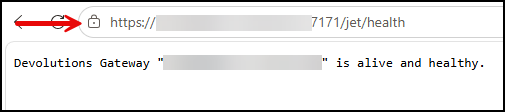
6c9e3139-3e99-4333-a540-a93adb9806a2.png
Same here,
Healthpage gives ok and certificate is also good. Seems there are more users with the same problem and this is a bug related to the latest update.
Hi hjobs,
Thanks for the follow-up, and for the stack trace and screenshots. You are right, this is a bug on our side and not your certificate. The gateway is healthy and the certificate is valid, your health check confirms that. The error is in how the Devolutions Server web interface reads the gateway certificate in the trust dialog: the certificate details come back empty, and pressing Continue and save then throws the "Cannot read properties of null (reading 'thumbprint')" error you are both seeing. Our development team has this logged, and retrying the add in the web interface will keep hitting the same point until a corrected build is out.
To line this up with the right fix on our side, could you confirm your environment: the exact Devolutions Server version you are on now, and whether the server is running under IIS or self-hosted. I will follow up here as soon as I have an update on the fix.
Best regards,
Michel
Michel Audi
We run the latest versions for both server as gateway.
Hi Michel,
Any news on this issue? This is taking far too long. We are unable to update Devolutions because if this issue.
Hello hjobs,
Thank you for the update and for the version details.
Just to clarify where we stand: the Console exception when editing the Gateway is resolved following the configuration change, so the remaining issue is the "Gateway ID Unknown" error when opening a session.
To investigate this properly we need to review your logs and Gateway configuration, so I am opening a support case for you — you will receive an email shortly with the case number. We will request the required information there rather than on the forum, as logs and configuration files can contain host names and user details that should not be posted publicly.
I will follow up with you directly in the case.
Best regards,
Michel Audi
Hello hjobs,
Thank you for the update and for the version details.
Just to clarify where we stand: the Console exception when editing the Gateway is resolved following the configuration change, so the remaining issue is the "Gateway ID Unknown" error when opening a session.
To investigate this properly we need to review your logs and Gateway configuration, so I am opening a support case for you — you will receive an email shortly with the case number. We will request the required information there rather than on the forum, as logs and configuration files can contain host names and user details that should not be posted publicly.
I will follow up with you directly in the case.
Best regards,
@Michel Audi
Hey Michel
Any News regarding this Bug?
We have the same Certificate Issue since 2026.2.2.0 Gateway Version. Downgrade to GW to 2026.1.2.0 immediately fixed the Issue.
Looks like a GW Bug for me; maybe only with CA Certs?
Best Regards
Andreas
Hi Andreas,
The crash is a confirmed defect on our side and is in development. No released build has the fix yet I will post here when it ships.
Your downgrade result suggests you may have a second, fixable problem. Devolutions Server checks the certificate the Gateway sends, and unlike a browser it cannot fill in a missing intermediate. So a Gateway sending the leaf alone shows a perfect health page and still returns nothing to DVLS your empty dialog. That hits CA-issued certificates, not self-signed ones, which matches what you saw.
Please run this (not a browser check) against the failing version:
openssl s_client -connect <gateway-fqdn>:7171 -servername <gateway-fqdn> -showcerts
Send back just the "Certificate chain" block and the "Verify return code" line.
Also: certificate from the Windows store or from a file, and was 2026.2.2.0 an upgrade?
Best regards, Michel
Michel Audi
Hi @Michel Audi
Update from our side. We tracked both problems down and want to share the findings, because in each case the Gateway itself knew the exact cause while the UI did not show it.
Answers to your questions
- Certificate source: originally file-based (TlsCertificateFile / TlsPrivateKeyFile). We have since moved to the Windows certificate store (TlsCertificateSource: System).
- Was 2026.2.2.0 an upgrade? Yes - upgraded from 2026.1.2.0.
- Certificate: unchanged throughout. Issued by our internal CA, valid until 2029, Server Authentication EKU, SANs covering both the public FQDN and the internal machine FQDN. No certificate was re-issued at any point.
Root cause 1 - private key not accessible to the service account
After switching to the certificate store, the Gateway found the certificate but could not use it:
ERROR devolutions_gateway::tls::windows: Failed to resolve TLS certificate
error="no usable certificate found in the system store;
key acquisition failures: cert[0]: failed to acquire key: Error code 80090016"

ERROR devolutions_gateway::listener: handle_https_peer failed
error="TLS handshake failed: unexpected error: no server certificate chain resolved"
0x80090016 is NTE_BAD_KEYSET. The Gateway service runs as NT AUTHORITY\NetworkService, which had no read access to the certificate's private key. Granting that account read permission on the private key resolved it immediately - the HTTPS listener then completed handshakes normally.
Root cause 2 - recording storage not writable
After upgrading to 2026.2.4, session recording failed:
WARN  devolutions_gateway::api::jrec: Refusing JREC push:
      recording storage is not writable
ERROR devolutions_gateway::http: error=507 Insufficient Storage
      at devolutions-gateway/src/api/jrec.rs:92:20: recording storage is not writable
Our RecordingPath is a drive root (E:\). The default ACL of a Windows data volume grants BUILTIN\Users the right to create folders in the root but not to create files there:
BUILTIN\Users:(OI)(CI)(RX)
BUILTIN\Users:(CI)(AD)
BUILTIN\Users:(IO)(WD)
The pre-flight writability check therefore failed even though ~11 GB were free. Granting NETWORK SERVICE modify rights on the path resolved it.
Worth noting: this only surfaced after the upgrade, because the "refuse JREC push when recording storage reaches capacity" check was introduced in 2026.2.0. The underlying permission gap had presumably been there all along.
Current state
Production is running 2026.2.4 with TlsCertificateSource: System, HTTPS listener on 7171, TCP listener on 8181. Certificate validation, Gateway diagnostics and session recording all work.
Still open
We have not yet retested the original failure with TlsCertificateSource: External (file-based) on a 2026.2.x build. Until we do, we cannot say whether the original 2026.2.2.0 regression is actually resolved or merely bypassed by moving to the certificate store. We will run that test and report back.
On the certificate chain: it turned out not to be chain-related at all, so we did not need to share the s_client output.
Product feedback - please improve these error messages
This is the part we would really like to see acted on. In both cases the Gateway log contained a precise, actionable error message, while the UI showed something generic that actively pointed us in the wrong direction.
Devolutions Server displayed "Certificate could not be verified" with Issued To, Issued by, Expires on, Issued On and Thumbprint all empty, at the exact moment the Gateway log said failed to acquire key: Error code 80090016. An empty dialog reads as "this certificate is broken" and sends people straight into a trust and chain investigation — which is where this thread started. The actual cause was a file ACL.
Remote Desktop Manager displayed "Unable to connect to the recording server" in response to an HTTP 507 whose body already said recording storage is not writable. The connection had in fact succeeded — the storage was rejected. "Unable to connect" is not just vague here, it is wrong.
What we would ask for
- Pass the Gateway's own error string through to the UI. The Gateway already produces exactly the right text. Even a collapsible "Details" section containing the raw error would be enough, and it costs nothing to implement.
- Distinguish the failure modes instead of collapsing them into one message. "Certificate could not be verified" currently covers at least three completely different situations: no certificate was served at all, a certificate was served but the chain is incomplete, and a certificate was served but is not trusted. Each needs a different fix. When all the fields come back empty, the Gateway did not send a certificate — the dialog should say that, not imply the certificate failed verification.
- Add a hint about likely causes. For example:
- "The Gateway did not present a certificate. It may not have been able to load it - check the Gateway log and verify that the service account has read access to the certificate's private key."
- "The Gateway rejected the recording (HTTP 507): recording storage is not writable. Check the permissions on the configured RecordingPath."
Either of these would have taken us from symptom to cause in minutes instead of most of a day. We would also expect it to reduce your support load: the empty certificate dialog appears in other forum reports too, and every one of those users will reasonably conclude that their certificate is at fault - because that is what the message tells them.
Best regards,
Andreas
Hi Andreas,
Thank you for that write-up. Both causes hold up against our source at the build you are
running.
The first one also settles the chain theory I put to you, which was wrong: an incomplete chain cannot produce a dialog with every field blank. The "failed to acquire key: 80090016" line comes from the Gateway's own certificate loading, and when that step fails the listener presents no certificate at all. Devolutions Server then has nothing to display and falls over on the thumbprint. Empty fields mean no certificate was presented, exactly as you concluded.
Why it caught you on the move to the store: the installer grants Network Service read on the private key, but only when the certificate is chosen through the installer with the store option selected. Editing gateway.json from the file-based source to System never runs that step, so the permission is missing on a certificate the installer never touched. It is documented here:
https://docs.devolutions.net/gateway/knowledge-base/how-to-articles/use-windows-certificate-store-for-devolutions-gateway/#giving-the-devolutions-gateway-service-read-permission-on-the-certificate-private-key
Your open question is worth answering properly, and I agree with how you framed it: the private key permission explains what you saw after you moved to the certificate store, not the original failure on 2026.2.2.0. Those are two different problems and only one of them is accounted for.
You confirmed the upgrade was 2026.1.2.0 to 2026.2.2.0, so I compared those two builds directly. Nothing in how the Gateway loads and presents its own certificate changed between them: the TLS module is byte for byte identical, and no line touching the certificate or private key settings changed anywhere in the service. The Windows installer is a different story, and that is where the private-key grant, chain checking and a new certificate selection flow were added.
So if the file-based failure reproduces on 2026.2.x, the Gateway's certificate code is not what changed under you, and the installer's handling of an existing configuration is where we would look first. What your retest settles is whether it reproduces at all, and I would like to see it either way.
On the error messages: your first request, passing the rejection reason through to that dialog, is already logged with the product team, though not scheduled. Your other two go further and are the stronger ones. No certificate presented, an incomplete chain, and an untrusted certificate are three different fixes behind one sentence, and the hints you drafted name the thing to go and look at. Both will carry more weight posted in the feature request section of this forum under your own name than relayed by me, and I would rather they land there properly than as a line in my summary.
Remote Desktop Manager has since gained a separate path for a storage refusal, distinct from a connection failure. I will not tell you that fixes your case, because I cannot show that it does:
the wording it uses says the recording server is out of storage space, which would still have been wrong for you at 11 GB free with a permissions problem, and I have not confirmed that a not-writable refusal even reaches that path rather than the old message. Your point stands.
The Devolutions Server crash is in development and nothing is released yet. I will post here when it ships.
Best regards,
Michel
Michel Audi
Hi @Michel Audi
Thank you — that is a straight answer, and the build comparison is genuinely useful. Your conclusion that the service's certificate code did not change, and that the installer is where the changes landed, matches what we observed.
I do have to be direct about the retest, though: we are not going to run it.
Production is stable on 2026.2.4 and we are not going to put it through another upgrade and downgrade cycle to reproduce a fault we have already worked around. Building the scenario cleanly in a lab is a meaningful piece of work — install the old build, configure a file-based certificate, verify, upgrade, capture and compare — and it is not work we have capacity for. We have spent a full day on this already, and the diagnosis we did produce, including both root causes and the exact log lines, was handed over in full.
You are also better placed to run it than we are. You have both builds, the installer and the source; we have neither. If the question is whether the 2026.2.x installer alters an existing file-based configuration during an upgrade, that is answerable on your side in a controlled environment without touching a customer's production system.
What you have from us
For reproduction, everything we know:
- Upgrade path: 2026.1.2.0 → 2026.2.2.0, in place
- Certificate source at the time: file-based (`TlsCertificateFile` / `TlsPrivateKeyFile`)
- Certificate: issued by our internal CA, Server Authentication EKU, SANs covering both the public FQDN and the internal machine FQDN, valid until 2029, unchanged throughout
- Listener: HTTPS on 7171 before and after the upgrade — this was not a listener that silently reverted to plaintext
- Symptom: Devolutions Server showed "Certificate could not be verified" with every field blank
- Downgrade to 2026.1.2.0 resolved it immediately, with no other change made
- hjobs reports the same behaviour at the same version boundary in a separate environment, which is a second data point you can work from
If we happen to come across a pre-upgrade backup of the production `gateway.json` in the course of normal work, I will post the diff here. I am not planning to go looking for it.
What we will do
I will post the two error-message proposals in the feature request section under my own name, with the log excerpts. That costs us nothing and benefits every user who hits the same empty dialog.
One further suggestion on the same theme: the Gateway could detect an unusable certificate at startup rather than at the first handshake. It already knows at load time that it cannot acquire the private key. Failing loudly at service start — naming the certificate subject and the account it tried to use — would be considerably more useful than reporting the listener as up and then logging the same error once per incoming connection.
On Remote Desktop Manager
Appreciated that you did not overstate it. For the record: in our case the storage was not full — 11 GB free — the path simply was not writable by the service account. A message about being out of space would have misdirected us just as effectively as the old one did. Worth passing on to whoever owns that wording.
Happy to answer questions about our environment if that helps you reproduce it.
Best regards,
Andreas
Hey @Andreas
That is a fair call, and I will not ask again. Your list is enough to work from, including the second environment in this thread. I will not tell you a reproduction is queued here, because I do not know that it is.
I also have to correct what I told you last time. The installer's handling of an existing configuration is not where I would look now: the step that writes the certificate settings into gateway.json is enabled by a switch the installer only sets when it finds no existing installation, and that code is identical in 2026.1.2.0 and 2026.2.2.0 - so on an in-place upgrade the installer does not set it and leaves those settings alone. The only way it could still have touched them is if that switch was supplied explicitly, on an unattended or scripted upgrade that passed it. If you remember which yours was, that is the last thing this theory hangs on.
Your startup suggestion is a good one. With a file-based certificate the Gateway already fails at start rather than per connection: it reads and binds the certificate at startup, so one it cannot read, parse or bind stops the service, and the failure is written to a boot.stacktrace file next to gateway.json:
https://docs.devolutions.net/gateway/knowledge-base/troubleshooting-articles/devolutions-gateway-troubleshooting/#service-fails-to-start
With the certificate store it is not quite as you put it: nothing reads the store at startup at all. The lookup and the key acquisition both happen inside a callback that runs for each incoming handshake, which is why you saw the error repeat per connection. At load time the Gateway has not looked, so it does not yet know it cannot acquire the key. Your request is therefore a real change, not moving an error we already have - and the file-based path is the precedent to cite when you post it.
On the recording message: I will pass it on with your correction - 11 GB free, not full, simply not writable by the service account.
The Devolutions Server crash fix is closed on our side, against a version that has not been released. Nothing to install yet; I will post here when it ships.
Best regards,
Michel
Michel Audi
Hi @Michel Audi
Thank you - and noted that you have now corrected your own reasoning twice in this thread rather than letting it stand. That is worth more to us than a fast answer would have been.
On the upgrade method
It was neither of the two you had in mind. The upgrade was performed remotely from Devolutions Server, through the Devolutions Agent - not by running the MSI interactively on the host, and not by any script of ours.
That is worth dwelling on, because it means we never constructed a command line. Whatever properties reached the installer were assembled by the Agent, which is your code, not ours. If that switch can be supplied explicitly on an unattended install, the Agent's update path is the one place in our environment where it could have been supplied without anyone deciding to.
Two details that may matter:
- The Agent on that host was 2025.2.1, against a 2026.2.x Gateway MSI. An Agent of that vintage building the command line for a newer installer is exactly where a stale or mismatched property set would come from.
- Remote upgrade through Devolutions Server is the standard route, not an unusual one. If the Agent does pass that switch, it would be passed on every in-place upgrade performed this way - which would fit multiple environments hitting the same behaviour at the same version boundary considerably better than the CA-certificate theory did.
This is answerable entirely on your side, by reading what the Agent's update path passes to `msiexec`. No test in our environment would tell you anything you cannot establish from your own source.
On the startup behaviour
Thank you for the correction - that changes the request materially, and I would have posted it wrongly otherwise. I had assumed the Gateway resolves the certificate at load time and merely reports the failure late. If nothing reads the store until the first handshake, then what I am asking for is a new step, not a relocated message.
I have worded the feature request accordingly and cited the file-based path as the precedent: it reads and binds at startup, stops the service, and writes `boot.stacktrace`. The request is simply to bring the certificate-store path in line with that. Framing it as consistency between the two sources is considerably more persuasive than how I had it, so thank you for that as well.
Both requests are posted separately, since they belong to different products:
- Devolutions Server - surface the actual reason behind "Certificate could not be verified"
- Devolutions Gateway - resolve the TLS certificate at service startup when using the certificate store
One observation on the other environments in this thread
You said my list is enough to work from, including the second environment here. I would be careful with that, because I do not think our cases are as alike as they look, and I would rather flag it than have it cost you time.
Two things in the earlier posts do not line up with mine:
hjbos saw the problem before upgrading the Gateway. In his third post he states that he had the Gateway ID error after upgrading Devolutions Server but while the Gateway was still on 2026.1.0. Ours behaved the opposite way round: a Gateway downgrade to 2026.1.2.0 cleared it immediately, with Devolutions Server untouched. If his trigger is on the server side and ours is on the Gateway side, then treating both as one Gateway-version regression may be pointing the investigation at the wrong component.
The evidence that his certificate is fine is a browser check. In your reply to him you concluded the Gateway is healthy and the certificate valid, on the basis of the `/jet/health` page. Later, in your reply to me, you specifically asked for a check that was not a browser check, because a browser fills in what a server will not. That reservation was never applied to his environment or to kts's. As far as I can see from the thread, nobody has yet confirmed what those two Gateways actually present to Devolutions Server on the wire.
There is also a tension between the two explanations given in this thread. In your reply to hjbos and kts, the certificate was valid and the fault was in how the Devolutions Server web interface reads it in the trust dialog. In your reply to me, empty fields mean no certificate was presented at all. Both are plausible, but they cannot both be the general explanation for the same empty dialog, and which one applies to their environments looks unresolved.
If it helps them: the check that settled it for us was reading the Gateway log during a failed attempt. `C:\ProgramData\Devolutions\Gateway`, filter for `tls` or `handle_https_peer`. If the Gateway is presenting a certificate and Devolutions Server still shows the dialog empty, the log will be silent at that moment - and that distinguishes your two explanations in about thirty seconds, without anyone posting a certificate chain in public.
On the rest
Appreciated that you are passing on the recording correction as stated, and that you are telling me the crash fix is closed against an unreleased build rather than implying it is available. Both are more useful than optimism.
Best regards,
Andreas
Hi Andreas,
You were right that this is answerable on our side, and the answer is no: the Agent did not supply it.
The Agent builds that command line itself, and it is the same line at the version you report and in today's source: the MSI path, quiet mode, a log path, and at most one property - the one restoring the service start mode, added only when the service was set to start automatically. Nothing else is appended in either. The switch that enables the configuration step is not among them, it defaults to false, and every installer action that writes certificate settings or touches the private key requires it to be true. Whichever build ran the upgrade, none of them supplies it, so all of those actions were inert.
Nor could Devolutions Server have supplied it through the Agent: what the server sends for an update is a single field, the target version, and that contract has no room for a property.
If you would rather check than take my word, the Agent installs with a verbose MSI log, written beside the downloaded package in the service account's temp folder. It is deleted at the next reboot, so it is likely gone; if that host has not restarted since, the command line is on its first page.
So the installer theory is finished, and it was the last one this thread had. I would rather say that than reach for a replacement: I have no explanation for the original failure at the moment. What is left is a reproduction in a lab on our side, and I am not going to tell you it is scheduled.
On the other environments you are right on all three points. hjbos reported the error after upgrading Devolutions Server, while the Gateway was still on the old build; the evidence that his certificate is sound is a browser health page, the exact check I later told you not to rely on; and my two explanations cannot both be the general one. hjbos was moved to a support case, and the log check you posted is the right first step for his environment and for kts's.
The crash fix is still closed against a build that has not been released I checked again today.
Best regards,
Michel
Michel Audi
Hi Michel,
Any news on this issue? This is taking far too long. We are unable to update Devolutions because if this issue.
Hi hjbos,
Thank you for the nudge, and I am sorry this has run as long as it has. There is news, and one piece of it is smaller than it looks.
The crash itself is fixed. The "Cannot read properties of null (reading 'thumbprint')" error reported in this thread is a missing null check in the web interface, and the fix went into Devolutions Server 2026.3.0.0 on 24 August.
The part to be aware of: 2026.3 is currently the Beta channel. The Current channel is 2026.2.16.0, the fix is not in it, and there is no 2026.2 build carrying it today. 2026.3 is on track to become a general release, and I would rather you waited for that than moved a production server onto a beta for this. I will post here when it ships.
I also do not want to oversell what the fix does. It stops the page from crashing. In our verification of the failing case it did not make the Gateway trusted: the dialog still opened with every field empty and the Gateway still showed as unavailable, the difference being that Continue and save closes cleanly instead of throwing. Upgrading alone will very likely not clear your "Gateway ID Unknown" error.
Two corrections I owe you directly. On 26 June I cleared your certificate and put the fault entirely on our side. That rested on your browser health page, and I later said in this thread that a browser check does not settle what a Gateway actually presents on the wire. It does not settle yours either, so your Gateway goes back on the list of things to rule out. And on 27 July I said we would take this into a support case rather than the forum, because logs can carry host names. I am asking here because the check below needs no log contents at all.
On the Gateway host, open C:\ProgramData\Devolutions\Gateway and read the log while you attempt the add, filtering for tls or handle_https_peer:
1. If lines appear at that moment, the Gateway could not load or present its certificate. For Andreas the cause was the service account having no read access to the certificate's private key.
2. If the log stays silent, the Gateway did present a certificate, and the problem is on the Devolutions Server side.
3. If the Devolutions Gateway service is not running at all, look for a boot.stacktrace file next to gateway.json and tell me whether it is there. A file-based certificate the Gateway cannot read stops the service outright instead of failing per connection.
Reply with just which of the three you see. No log contents and no certificate details please, those belong in a case rather than a public thread.
Best regards,
Michel
Michel Audi
Just wanted to share an update on the certificate issue I had with Gateway. In the end, I simply had to append :7171 to my Devolutions Gateway URL, and now everything works fine. I might just have missed something, but the error message didn't really point me in the right direction. Maybe you could add a field for the HTTP listening port, pre-filled with 7171, similar to the TCP port field just below it.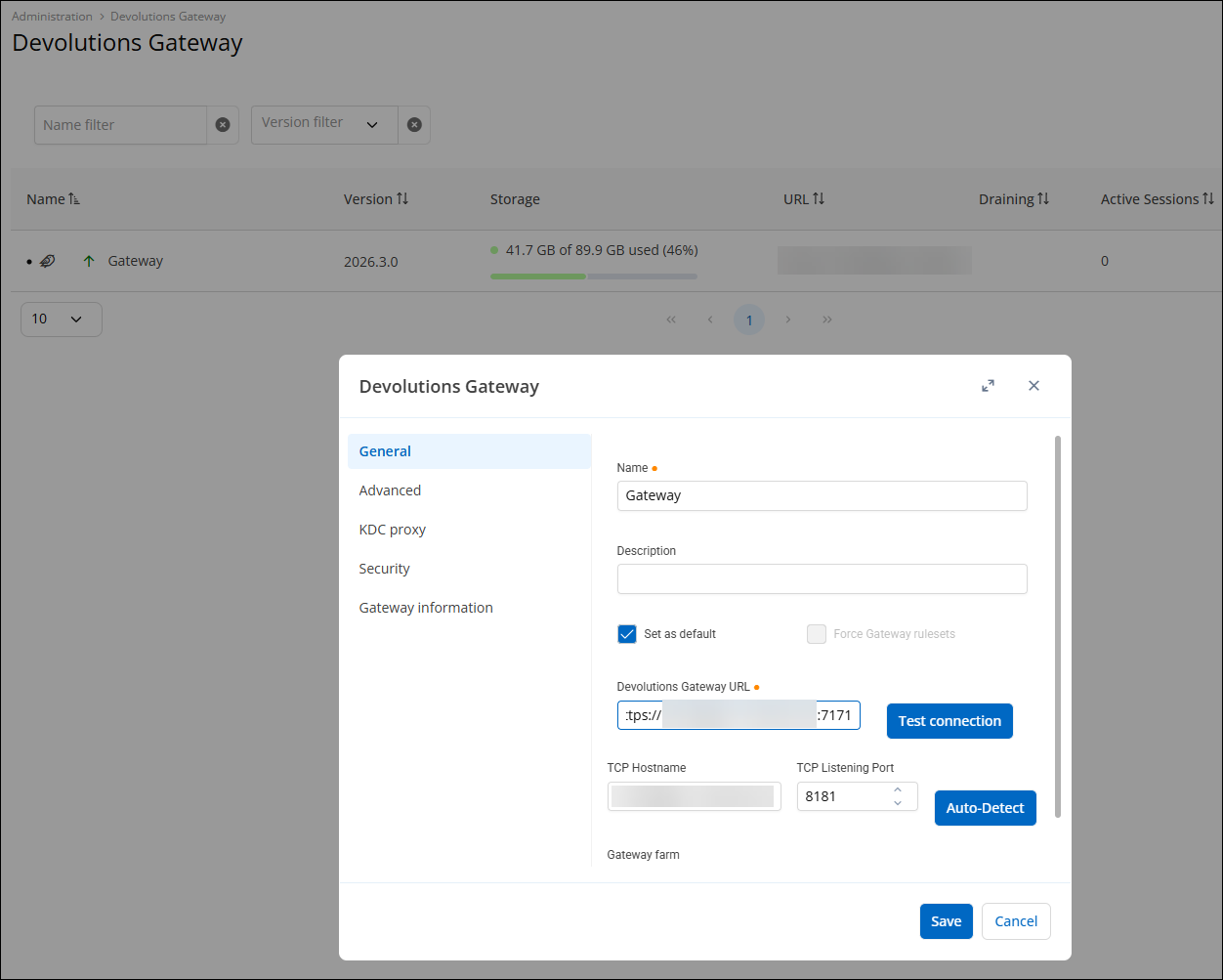
The warning I got when I tried without :7171 appended to the URL.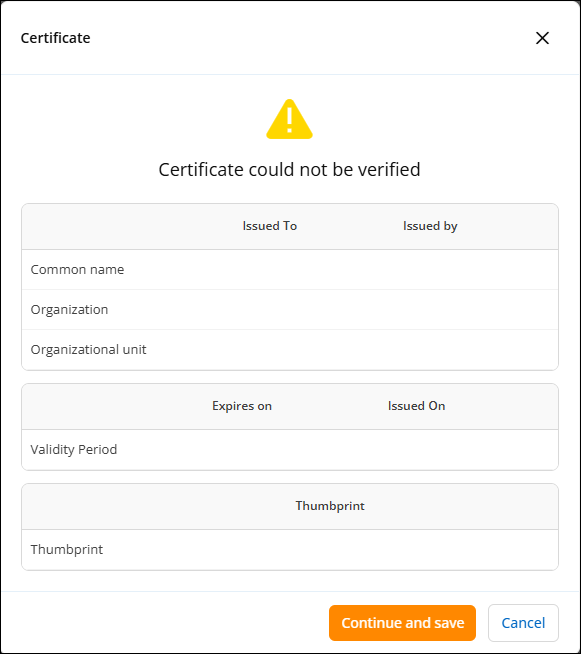
961ffe5d-6ab6-40d4-8bf3-761a0d730bfa.png
ae4ca722-a280-4fa2-a4f6-1baf410e6ec0.png
@kts Thanks for this update, this also solved the problem on our side!