RMD: Unwanted VPN Session close

RDM: 2025.2.23.0
DVLS: 2025.2.7.0
Hi All
Please move this Thread if it is a Bug!
We have for several connections Folders with specified SSH Tunnels. All Sessions will go through those Tunnels.
SSH Settings: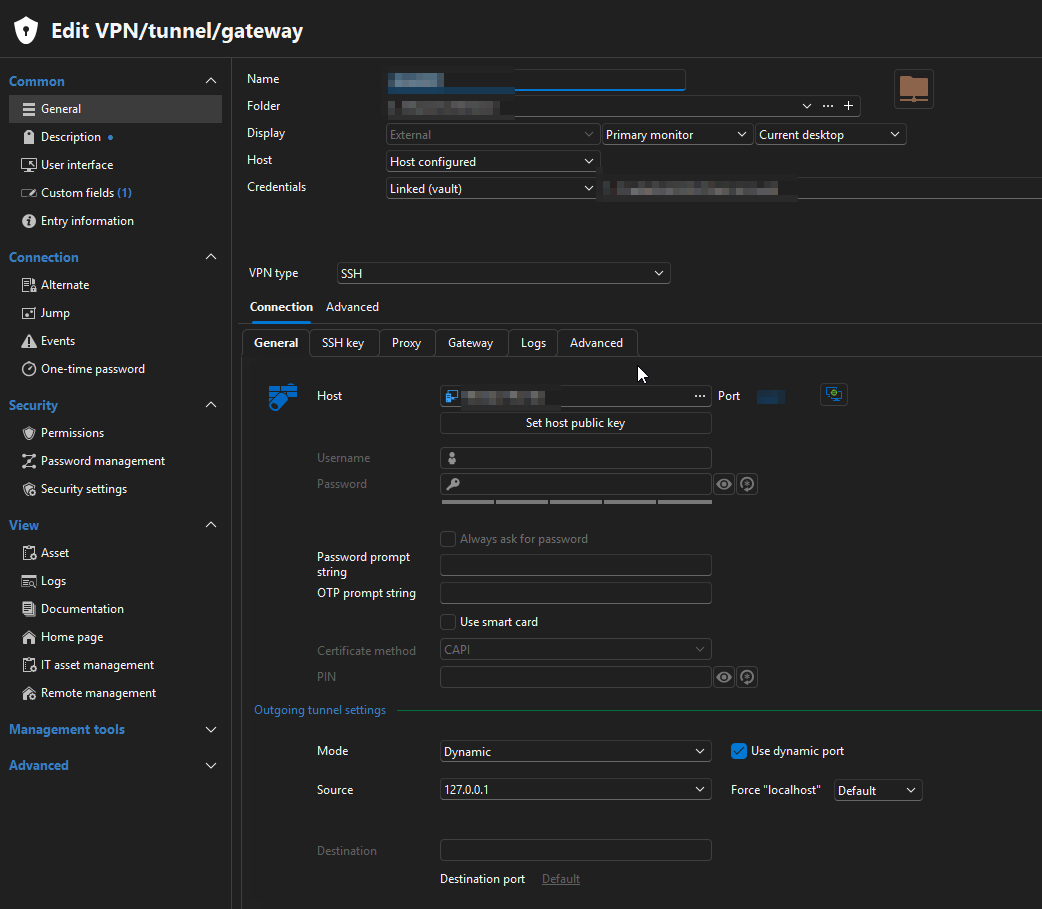
Folder Settings (which contains all Sessions):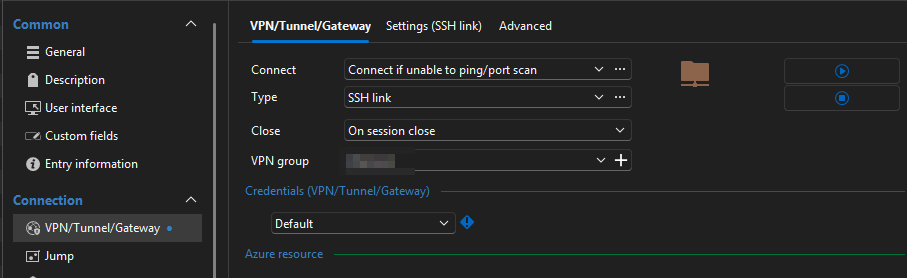
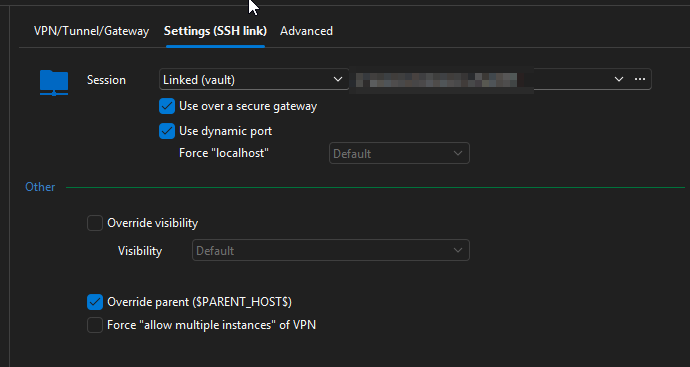
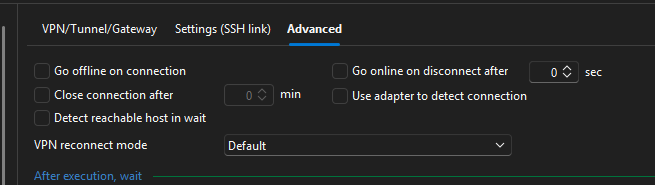
All Sessions in the Sessions Folder has VPN Settings set to "Inherited".
This Solutions worked without Problems since 2021. But since ive updated to RDM 2025.2.x there is the Problem, that when i connect to a RDP Host and getting a connection error like this:
...then RDM forces to close the opened Tunnel and all other allready openede Sessions loses connection.
Best Regards
Andreas
Edit: I tried this as Workaround. But it is simply ignored. Tunnel will be closed forcely by RDM.
88b8efea-67f1-416c-a959-9db1f8b5fbc7.png
5d25ac58-66d1-4871-a53b-8812e3756542.png
213461f8-1e39-49b0-baf8-369b01e51266.png
420f49b2-df14-45c9-8bef-be2dfefaba56.png
6cb2635a-69a0-48a8-aaf7-4263e300447c.png
c3ab55c1-e761-4ce7-aebc-fd93e3c7fb01.png
All Comments (57)
We've been starting to experience the exact same behaviour on our install as well -- we have a SSH tunnel / link where all of our RDP sessions are tunneled through, and when we close one of the RDP session, it kills the SSH tunnel, and all of the other RDPs die as a result.
I've tried the same 'Confirm Disconnect' to no avail.
I updated to 2025.2.23.0 64-bit (JIT) this morning and this started happening.
Hello,
Thank you for reaching out to us regarding this,
I have been able to reproduce the behavior on my end, I will open a case with our development team regarding this and will keep you updated with any news I receive,
If you go under "Help" -> "About" -> "Update History," could you confirm which version you were on previously, where it was working?
Let me know,
Best regards,
Samuel Dery
Hi Samuel!
According to the Update History, my previous version was 2025.2.20.0. 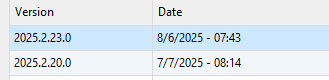
Thanks!
Eric.
f89e2d24-c5fd-4433-8665-4c2fc9a86f41.png
Hello,
Thank you for your patience,
To clarify, currently, on the Parent folder where the SSH tunnel is configured, you have the "Close" field set to "Confirm Disconnection." Is that correct?
Let me know,
Best regards,
Samuel Dery
Normally I have it set to "Manually Later", but for testing (similar to OP), I tried to set it 'Confirm disconnection' to see if there would be a prompt, but no prompt was ever given and the SSH link ended.
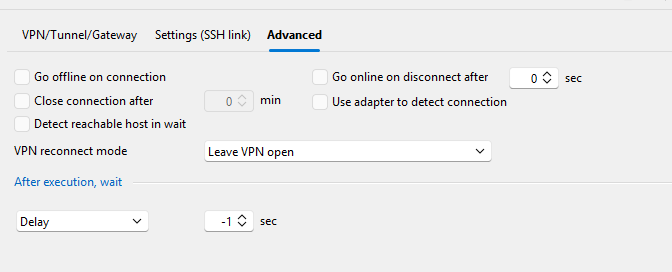
On the SSH link's VPN/tunnel/Gateway -> General -> Advanced tab, I even set the 'Disconnect action' to 'Keep open' in hopes, but that didn't do anything either: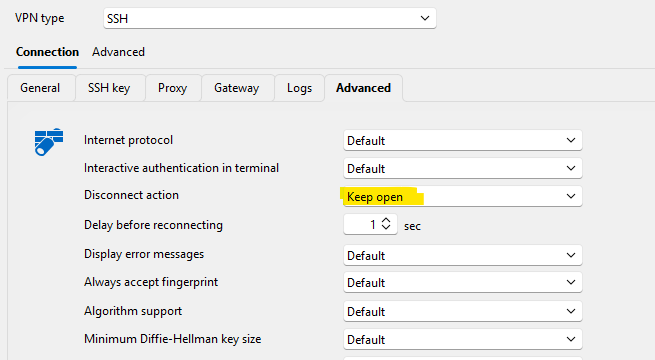
I had also tried to enable logging but nothing stood out (regarding errors triggering the close).
d724d863-6af3-4f35-8b1a-0c7fd97ab6c7.png
Hello,
Thank you for your reply,
The latest version of RDM 2025.2.25.0 was just released, could you confirm if you still encounter the behavior with this version?
https://devolutions.net/remote-desktop-manager/downloadenterprise/
From testing on my end, with the Confirm disconnection option configured, I'm having issues reproducing the problem,
Let me know,
Best regards,
Samuel Dery
Unfortunately, I'm still experiencing the same issue (I've tried on two machines)
Can I provide some logging (if so, I may need some guidance on how to properly capture what you would need).
Thanks!
Eric.
I've also tried a full uninstall/reinstall, and deletion of the Local Data Source. The SSH connection disconnects still after any RDP session that is using it, is closed.
One more note, I'm using the Solo edition not the Enterprise edition you linked above (unsure if that would make a difference)
Hello,
Thank you for your reply,
Is your configuration the same as Andreas? If not, could you provide me with some screenshots of your configuration? Feel free to blur anything sensitive.
Best regards,
Samuel Dery
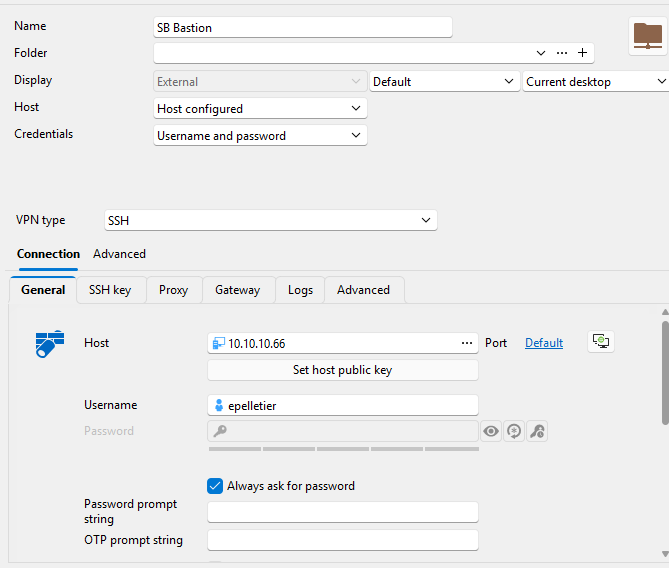
My configuration is similar, but with a few differences in my attempts to have the SSH/VPN link remain open:
SSH Gateway (SB Bastion) located at the "Local Data Source" level: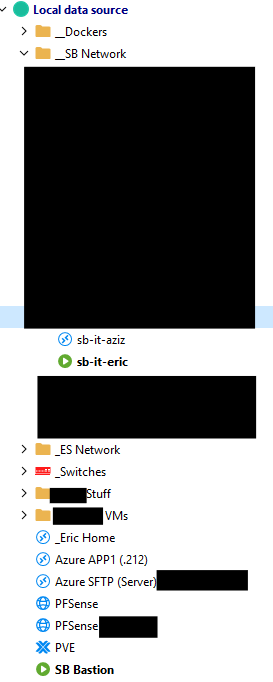
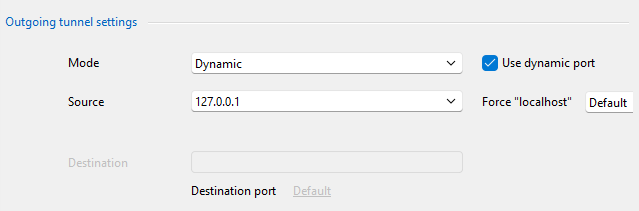
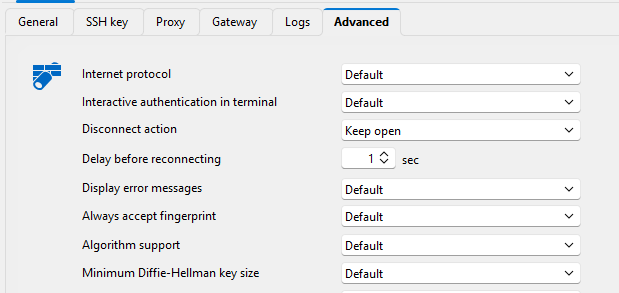
SB Network node: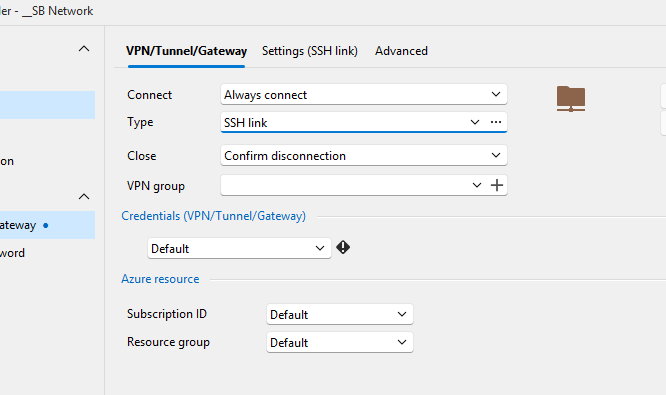
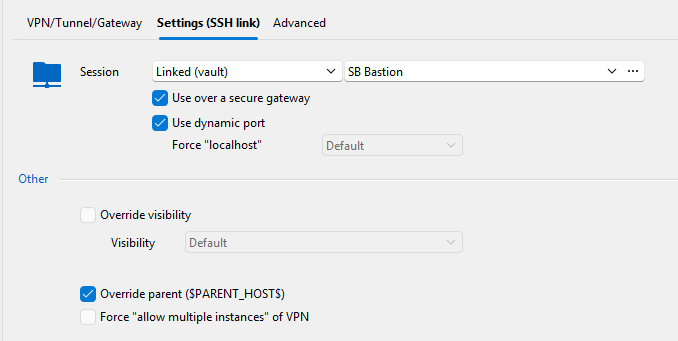
SB-IT-Eric node: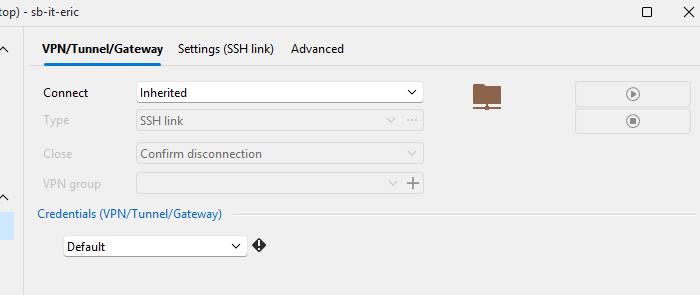
Small gif highlighting the behaviour I'm seeing: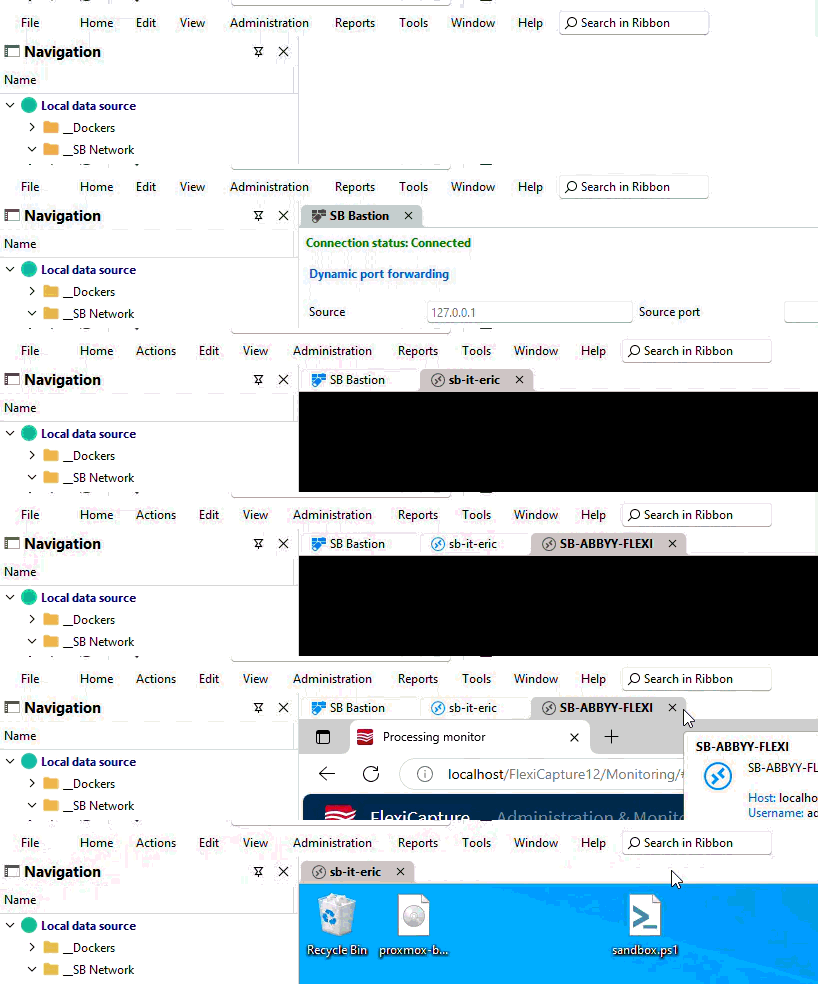
Hope this helps :)
1cb93bce-800b-45dd-8d69-d4093bc34989.png
c117f82a-4a91-4a09-b31d-bbd578d625c2.png
2667a2a5-63d5-4ce2-be64-81252727f650.png
2de29d40-588a-4c5b-a6b4-c75186e088a7.png
2ffd3b17-249d-49fa-bcac-8c663dcacf2f.png
26575fce-36d4-47ab-8e0a-810a84c8bcba.png
aeac46b4-d5ba-479a-a08f-831eb51df64e.png
efb70b87-3434-4b62-ab1f-fdb2dd892ac2.png
Recording 2025-08-07 122914.gif
I noticed that it doesnt matter if the RDP Host has an error or no.
It also happens when simply closing another Host which is using the same SSH Tunnel.
Hello,
Thank you for your replies,
I have created a case with our QA department to see if they can reproduce the behavior,
I will keep you updated with any news I receive regarding this,
Best regards,
Samuel Dery
For what it's worth, thinking it might have been a weird upgrade bug, I've completely uninstalled RDM, cleared out the %appdata% folder, and installed fresh 2025.2.25.
Created 3 entries:
- SSH Tunnel
- Machine1
- Machine2
The issue still persists. I then downgraded to .22 (problem still persisted), then downgraded again to .21 and it is working as expected.
One thing I noticed in .21, is when I start a new session, the title bar of the tab briefly changes from <machine name> to <machine name> (Gateway). I didn't notice that behaviour in later versions.
Has the QA dept reproduced it?
For others that are having the same issue, downgrading your install to 2025.2.21 gets you the expected behaviour.
Hello,
Thank you for your reply,
Could you confirm if you encounter the same behavior when adding a "VPN Group" to your configuration under "VPN/Tunnel/Gateway"?
Let me know,
Best regards,
Samuel Dery
Adding a VPN group had no effect (still disconnects the tunnel when an RDP session closes).
Hello,
Thank you for your reply,
I see, I will keep you updated with any news I receive,
For now, it is still working for you while using 2025.2.21.0. Is that correct?
Best regards,
Samuel Dery
That's correct -- 2025.2.21.0 is the last version that works for me.
@Samuel Dery it would be nice if you could race this bug to a higher criticality to get a fast fix for it!
Hello,
Thank you for the follow-up.
Could you please confirm where you configured the VPN group?
Our investigation team has observed that the issue appears to be resolved when the VPN group is created at the folder level.
When possible, please test this setup on your end and let us know if it helps resolve the issue.
If the problem persists, we would appreciate it if you could provide a screen recording demonstrating the behavior. Additionally, please include a brief overview of the entry properties for the affected entries.
I will send you a private message shortly with a secure link to upload the file.
Best regards,
Jacob Lafrenière
Hi Jacob,
edit: I've configured the VPN Group at the folder level
I've uploaded 3 files to the secured site:
- an exported test profile/.rdm file with my current tests/setup
- a video recording of said profile in 2025.2.21 (which works as expected)
- a video recording of said profile in 2025.2.25 (which closes the VPN)
Thanks,
Eric.
Hello,
Thank you for the follow-up and for providing the recordings.
Could you please confirm that the .rdm file you sent does not contain any of your real passwords?
If it does, I will need to delete it immediately for security reasons.
I look forward to your reply.
Best regards,
Jacob Lafrenière
There should be no password --- I was sure to set up the Test Profile with 'Prompt for Password'/'Always ask for password' for each node for that reason ;-)
Hello,
Thank you for confirming.
We will investigate the issue using the files you provided and will follow up here with further information once available.
Best regards,
Jacob Lafrenière
Hey Jacob
Because of the questions, im pretty sure you did not read my first post, also not your investigation team, because all your needed informations are allready there and its a bit frustrating when we keep going around in circles and losing more days with this problem because of this. Since the License costs double every few years, i think we can expect a bit more innovation from development and investigation Team.
Best Regards,
Andreas
Hello,
Thank you for your follow-up.
I’m sorry for missing that information earlier. I received this topic only recently and was following our investigation team’s request.
On another note, we were able to consistently reproduce the issue, and our team will begin working on a fix shortly. I will follow up here as soon as the fix is deployed in a future update.
Best regards,
Jacob Lafrenière
Hey Jacob
Just saw that 2025.2.27.0 is released but still no fix.
When will be the fix available?
Our employees are upset, because the work as an IT service provider, the daily use of various servers in the same environment is massively restricted by this problem.
Best Regards
Andreas
Hello,
Thank you for the follow-up.
You are correct; version 2025.2.27.0 does not include a fix for the issue encountered here.
There is currently no ETA for a resolution, but I can assure you that our development team is actively working on it.
I sincerely apologize for the inconvenience this is causing your users.
I will ask the development team if it’s possible to raise the priority of this issue.
Best regards,
Jacob Lafrenière
Hey Jacob
I think it would be a good start when somebody could handle this Thread as a Bug Report and not as a Feature Request while moving it to Bugs and remove the "Backlog" Tag from this Thread.
I opened it 19 Days ago, 3 new RDM releases in the meantime and still no sight for a fix.
We are really looking forward for a ASAP fix for this Problem.
Many thanks.
Best Regards
Andreas
Hello Andreas,
I wanted to let you know we've increased the priority of this ticket. It's assigned to a developer and it's his top priority at the moment. We're hoping to be able to make a fix for this relatively quickly. Sorry about the wait.
Regards,
Hubert Mireault
Hi @Hubert Mireault
The Problem with RDP Sessions is now fixed.
But together with SSH Sessions it still exists.
How to reproduce:
- Open SSH multiple SSH Sessions (or at least 1 RDP and 1 SSH Session)
- Close the SSH Session
The SSH Tunnel will be closed then - it ignores to check if there are still other Sessions open like RDP.
I also noticed that when you have multiple SSH Sessions opened over the same SSH Tunnel, then it also closed when you exit the second last SSH Session. This looks like an array 0/1 Problem for me.
Best regards
Andreas
Hello Andreas,
Just to confirm with you, are you at least on version 2025.2.28.0? Looking at our internal ticket, this is when it was fixed. If you still reproduce this issue on that version or a more recent one, I will reopen our ticket.
Regards,
Hubert Mireault
Hello Andreas,
Just to confirm with you, are you at least on version 2025.2.28.0? Looking at our internal ticket, this is when it was fixed. If you still reproduce this issue on that version or a more recent one, I will reopen our ticket.
Regards,
@Hubert Mireault
Im currently at 2025.3.20.0
Hello Andreas,
Thank you for the confirmation. I checked with our QA team and we believe we managed to reproduce the issue as well. We must have fixed part of the problem but not the specific part you were encountering. We have reopened our internal ticket.
Regards,
Hubert Mireault
Hello Andreas,
I'd like your help in confirming a few things. I can see you mentioned issues with SSH entries, but not RDP. I assume that these SSH entries are also set to inherited (VPN/Gateway), inside the same folder as the RDP entries? For the tunnel to not be closed prematurely, it's important that all entries using the same Tunnel have the same VPN group. I just wanted to confirm that the SSH session closed (which causes the Tunnel to close pre-maturely) did have the same VPN group as the others. (If it doesn't, or lacks one at all, that would explain why the tunnel closed)
After further investigation, we haven't managed to replicate your issue, and we're looking to make sure that we're all on the same page.
If the SSH entries in question are also all part of the same folder, and are all set to the same VPN group (and the issue still persists), we will need to figure out what specifically in your setup is causing the issue so we can fix it.
Regards,
Jafran Majeau
Hello Andreas,
I'd like your help in confirming a few things. I can see you mentioned issues with SSH entries, but not RDP. I assume that these SSH entries are also set to inherited (VPN/Gateway), inside the same folder as the RDP entries? For the tunnel to not be closed prematurely, it's important that all entries using the same Tunnel have the same VPN group. I just wanted to confirm that the SSH session closed (which causes the Tunnel to close pre-maturely) did have the same VPN group as the others. (If it doesn't, or lacks one at all, that would explain why the tunnel closed)
After further investigation, we haven't managed to replicate your issue, and we're looking to make sure that we're all on the same page.
If the SSH entries in question are also all part of the same folder, and are all set to the same VPN group (and the issue still persists), we will need to figure out what specifically in your setup is causing the issue so we can fix it.
Regards,
@Jafran Majeau
Yes, same Folder, same Tunnel, same VPN Group.
No Problem with RDP Sessions anymore, but as i wrote, still available with SSH Connections.
You will reproduce the Problem if you follow my steps above by simply opening SSH Connections and close them.
Hello,
I have tried the setup with SSH connections. I have 3 SSH terminal entries, all set to Inherited (VPN). The folder itself has its VPN linked to an SSH Tunnel, and a VPN group name. I can open all 3 terminals, and close them one by one, the tunnel only closes after all 3 terminals are closed.
Which leads me to believe that there is something else going on.
If it's not too much trouble could you try setting up a fresh config, with minimal changes (as in, create a new folder, new tunnel entry, etc) and set only the bare minimum to test the structure? It's possible there is a rogue setting that's somehow interfering with the process or causing a special exception in handling. We will also attempt to replicate your issue as best we can in the mean time.
Any information as to the environment you are using would be helpful too. I'm assuming you're using a DVLS datasource so far, if that's incorrect, please let me know.
Regards,
Jafran Majeau
Hello Jafran
And the SSH Tunnel keeps open on your side, even if all Linux Sessions are closed and there are still other Session Types connected like RDP?
Best Regards
Andreas
Edit: I just noticed something very strange.
Here are some Details.
Current RDM Version: 2025.3.21.0
DVLS: 2025.3.4.0
I configured on all SSH VPN an additional Gateway, so all users are connecting trough this GW (for IP restrictions on destination side).
It still works, but via RDM, the GW config is set to none: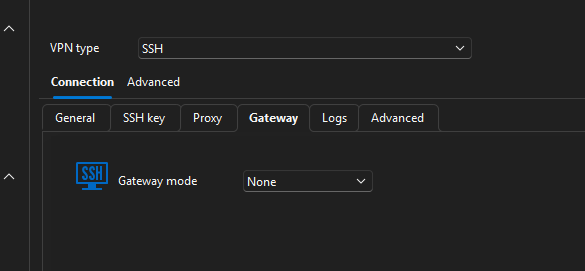
When i set it to custom and insert all details, it is still set to none.
When i check it via Powershell, the Data.Connection object still contains the SSH Gateway config: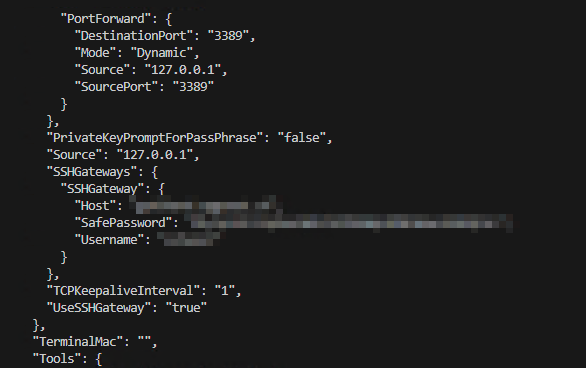
And now the strange thing: when i update the SSHGateway, it is still the current setting (no change).
Is there maybe something broken with all SSH Entries since the past updates? It seems that all SSH Tunnels are affected. Maybe its just another Problem not related with the session close Problem.
Best Regards
Andreas
1bf3c168-ebd4-4a5b-86c1-1deb109b8ef7.png
8913a4c0-5f5a-4789-a3be-b6b8d163ad02.png
Hello @Jafran Majeau
Okay i think i know now why youre not able to reproduce it on your side.
There are ssh Sessions which have Session recording active and it looks like, the Server which have Session recording activated are not handled the same way as all other Servers.
So just activate Session recording on one of your Test Servers and check again. SSH Tunnel will be closed then.
Best Regards
Andreas
Hello @Andreas
Thank you for taking the time to help us troubleshoot your issue. This additional information should be helpful. We will investigate this and come back to you.
Regards,
Jafran Majeau
Thanks @Jafran Majeau
Can you please also take a look at the Problem with the Gateway Setting?
Ive just installed new RDM 2025.3.22.0 and both Problems still exists (SSH Tunnel Clos & Gateway set to none).
The Problem now is, im not able to create new SSH Tunnels with Gateway specified which is necessary for us.
Thanks and best Regards
Andreas
Hello,
For your Gateway saving/loading issue. I can confirm I have replicated this behavior, and I am currently investigating it.
For the VPN closing issue, I am still unable to replicate your issue. I've tested several combinations (with Recordings, RDPs, SSHs), and I've never encountered the problem where the tunnel/VPN closes before all the entries are closed.
Currently, my testing includes using:
A single folder entry, in which all sessions manually launched and closed are located. This folder contains the VPN settings (linked) and the VPNGroup.
In the mentioned folder, I have (Screenshot at the end for clarity):
RDP Entries (With and without recording, both local and remote)
SSH Entries (same as above)
Outside of the folder, I have 2 test entries I've been using (SSH Tunnel, and VPN SSH). These entries are the ones linked to the folder.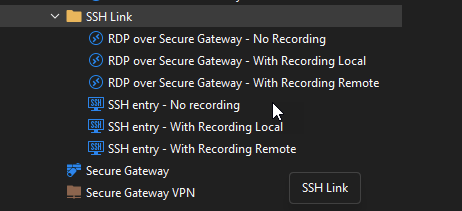
I have tried used both the SSH Tunnel and the VPN SSH as linked VPN in the folder. I have launched all 6 entries, and closed them in every order I can, as well as launched sub-sets of these 6 entries. And I still haven't been able to repicate your issue with the Tunnel closing prematurely.
If I am missing something, or if anything is different in your layout, please let me know.
If you can't find a reason why I can't replicate your issue, I would ask you to make a "bare-bones" entry setup (with no recording, or any other setting beyond simply being in the folder and being set to inherited), and then tweak the entry's setting until you encounter your exact issue, to help us pinpoint the problem. Sometimes it can be an odd setting (such as the specific Recording Type you are using, or an "on disconnect" specific action) that might be causing an unexpected conflict.
Regards,
Jafran Majeau
4d55d37e-95b6-4d66-829e-ee0fbf41f278.png
Hey @Jafran Majeau
To be honest and without offense, i think i invested allready enough time in Troubleshooting this Problem.
If youre not able to reproduce the Problem its wrong to ask the Customer to create a new Environment and doing the Devolutions employees Job.
The only thing i can offer you is to start a remote Session in which you can check our Environment and see how the Problem exists.
Please contact me in a different Channel to schedule an Event.
Best Regards
Andreas
Hello,
The Gateway saving issue has been fixed. You can expect this to take effect with the upcoming 2025.3.23 version.
Someone will contact you for the next steps concerning the VPN/Tunnel closing prematurely.
Regards,
Jafran Majeau
Hello!
Since a few versions we are facing the same issue "VPN/Tunnel closing prematurely". (RDP / SSH / Telnet over SSH link)
Is there an actual status? When this is getting repaired and will work again??
Greetings!
Hello,
We are still in the process of investigating this, as we haven't been able to reproduce the issue on our side since the first fix (version 2025.2.28). If your current version is lower that this one, I would suggest upgrading to see if the fix implemented works for you. If you are still experiencing the issue, then any information you have in re-creating the setup to replicate it would be helpful (you can refer to my previous comments for the best steps to help us find the issue).
Regards,
Jafran Majeau
Hello!
I am using version 2025.3.23.0 - the problem actually persists.
The config is similar to the above mentioned ones.
We are using session types RDP / SSH / Telnet over SSH link
Greeting!
Hello,
we've managed to reproduce the issue with SSH sessions. A ticket has been sent to the Engineering Team.
Best regards,
Antoine Mauger
Hello,
We've implemented a new fix for this particular issue. This change will be in the upcoming 2025.3.26 version.
Regards,
Jafran Majeau
Hello,
We've implemented a new fix for this particular issue. This change will be in the upcoming 2025.3.26 version.
Regards,
@Jafran Majeau
Great News, thanks a lot!
Hello,
Thank you for being so patient!
I'm pleased to inform you that a new version of RDM (2025.3.26.0) has been released, featuring the fix for your issue.
Latest Version: Download RDM
Please let us know if this works or if you encounter any issues.
Best regards,
Maxim Robert
Hey @Maxim Robert
Looks good so far, the Session Close Bug seems fixed.
But there is another Problem which has been available on almost all Computers with 2025.3.26.0.
RDM Is running normaly, and after some Time, RDM starts to be unresponsible and the whole Computer begins to Lag. After about 30 to 60seconds, RDM Closes directly and Windows Error Reporting Process will be started.
Eventlog:
Application: RemoteDesktopManager.exe
CoreCLR Version: 9.0.1125.51716
.NET Version: 9.0.11
Description: The process was terminated due to an unhandled exception.
Exception Info: System.ObjectDisposedException: The CancellationTokenSource has been disposed.
   at System.Threading.CancellationTokenSource.Cancel()
   at Devolutions.Protocols.Core.SshClient.Disconnect()
   at Devolutions.Protocols.XtermSsh.Disconnect()
   at Devolutions.Protocols.XtermSsh.Dispose(Boolean disposing)
   at System.ComponentModel.Component.Finalize()
   at System.GC.RunFinalizers()
To bad, that ive allready deployed this Version to the whole Company.
Any chance for a fast Hotfix for this Problem?
Best Regards
Andreas
Hello Andreas,
I've directly contacted our terminal expert as this crash seems to occur when disconnecting from an SSH session. I've opened a ticket.
Can you see if you reproduce this issue any time you close an SSH entry? Any other pattern to reproducing the crash?
Regards,
Hubert Mireault
Hi @Hubert Mireault
Im able to reproduce when i open and close an SSH Tunnel - not every Time, but when it happens, the whole Computer lags and is almost unable to work with until RDM is closed (my setup has 20 cores and 32gb ram).
Best Regards
Andreas
Edit: It also happens when you open an SSH Tunnel, let it open, switching a Vault and open another SSH Tunnel
Andreas,
Just letting you know we have an internal fix that we're hoping will fix this issue. This will be available starting with 2025.3.27.0, and we'll try to release it tomorrow or Friday if QA testing goes well.
Regards,
Hubert Mireault
Hi @Hubert Mireault
Thanks a lot for the fast fix.
If you want, you can send me the Release via PN and i will also test it on our Side.
Best Regards
Andreas
Hello Andreas,
Version 2025.3.27.0 should now be available and with it a fix for this issue. We weren't able to reproduce it but we had a good idea of what was causing this, so we're relatively confident it should fix the crash for you.
Can you let us know if this update fixes the issue for you?
Regards,
Hubert Mireault