
Leakie
"Add to Task view" option
Hi Hurbert,
Sorry for the late reply. Yes, I do use that current functionality of RDM, and it is helpful to be able to pin an application to another virtual desktop. This is almost there with what the windows app does. Basically, how the windows app works, is that when you pin the app to the task view, it effectively adds a new entry that is always visible in task view, but can be used to launch the session without having to open the app first... almost like a shortcut to a session.
Attached is a screenshot of when the app is pinned but not started...
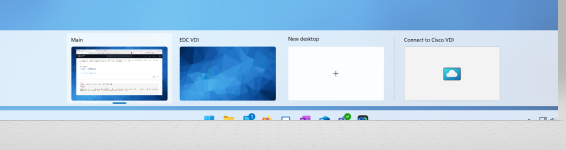
The last entry is the item I am referring to. When you select that entry, it starts the windows app and launches that session into that virtual desktop.
This feature of task view doesn't appear to be documented anywhere, so Im not sure how you could do something similar with RDM. I did do a registry compare of when the entry is pinned and when it isn't, and it seems to create some reg keys that look like they create the shortcut, but I have no idea how that is used by the app to launch the session.
It would be good to be able to do something similar to effectively launch a session in RDM via a shortcut which gets triggered by moving onto that virtual desktop.
"Add to Task view" option
So I would love to see RDM rip off the feature in the "Windows App" of being able to add a session to the "Task View". This basically means that you don't have to script or set options of a session to move it to a different desktop. In Windows App, when you use the "Add to Task view", that machine becomes a shortcut on the task view meaning that its always available and easy to launch.
Not sure how this is done, as it doesn't appear to be something that MS has advertised in regards to adding an app to it, but there must be something that can be done to mimic the same behaviour. I am guessing it is the case of adding a shortcut into the registry, and then the app supporting a particular shortcut launch. Would need some R&D thats for sure.
Undocked, windows virtual desktops
Hi Team... did you get an answer from Dev on this in the end, with regards to what should happen with specifying what display to open an external application on if the config had been set that way? Thanks
Undocked, windows virtual desktops
Correct. If RDM has the MSTSC window in its window, everything is fine. As soon as the MSTSC window is external to that, be it running the session as an external display, or as undocked display, but full screen, then the logic RDM has doesn't appear to kick in and move/open the window on the right virtual display.
Thanks
Undocked, windows virtual desktops
So the issue still happens on the latest version as well. I changed the display setting from external to undocked, and it then works. I guess this is because when the microsoft remote desktop connection program is used for the connection, it doesn't control that application window, but only the undocked window.
When I set it to undocked, how do I get that undocked window to be fullscreen, as if I select full screen, it triggers MS RDC to be used and opens the session outside of the undocked window, which then ignores my desktop setting. I have to use "current screen size", but that isnt full screen.
Undocked, windows virtual desktops
Yep, I still have the issue with 2024.1.19.0 64-bit
Undocked, windows virtual desktops
Did this ever get resolved in the end?
Best Settings for SSH Terminal use on Chromebook using Android App
Thats true, and that does work for me, but when I issue "sudo", I get asked for a password, hence the need to move between the vault and the session.
Anyway, I think my problem was having the setting open up in full screen. Disabling this seems to keep the tabs visible, meaning I can switch back to the vault.
Best Settings for SSH Terminal use on Chromebook using Android App
So the issues I have aren't really related to the keyboard, but more like the display. I have set the double click of an entry to open the session, which then opens in full screen, but then when it is in that full screen display, I am unable to easily get back to the vault... i.e. if I want to get the sessions password to apply into the SSH session.
Best Settings for SSH Terminal use on Chromebook using Android App
The title says it all really. I am really struggling to get a good user experience using the Android App on a chromebook that has a keyboard.
Are there any recommended settings that I should be using for the App to make it as good as possible? Ideally I would use the linux app, but it isnt compatible with my CB.
moonlight support?
Fair enough. Was just a random thought. Moonlight seems to do a blooming good job of being a better solution that RDP for remote desktop streaming, so I thought I would ask.
moonlight support?
Its a lib....
If you are implementing your own Moonlight game streaming client that can use a C library, you probably want the code here.
moonlight support?
This is probably a bit of an odd support, but moonlight is a great way of getting fast, low latency streaming support of a desktop. I was wondering if it is possible to potentially add it as a protocol support option for setting a new session up?
The moonlight team have a common c component that could potentially be used to implement such a session option...
https://github.com/moonlight-stream/moonlight-common-c
It might not be a sesnible option, but would love to hear thoughts.
Update buttons in Help menu, missing
There are two cases where the button is not displayed
If you have the "No Internet Connection" option enabled
That was the badger! Unchecked, and now all sorted. No idea why it was checked though.
Update buttons in Help menu, missing
Hi all... Im not sure if I am being a bit daft, but I am sure that there is an update button in the help menu, however on my system, it is missing. I assumed it was to do with some of my option settings, but in the update options, my app is set to display update messages, and to check for updates on startup, so its not this.
Is there some other setting that I am not actually seeing?
Undocked, windows virtual desktops
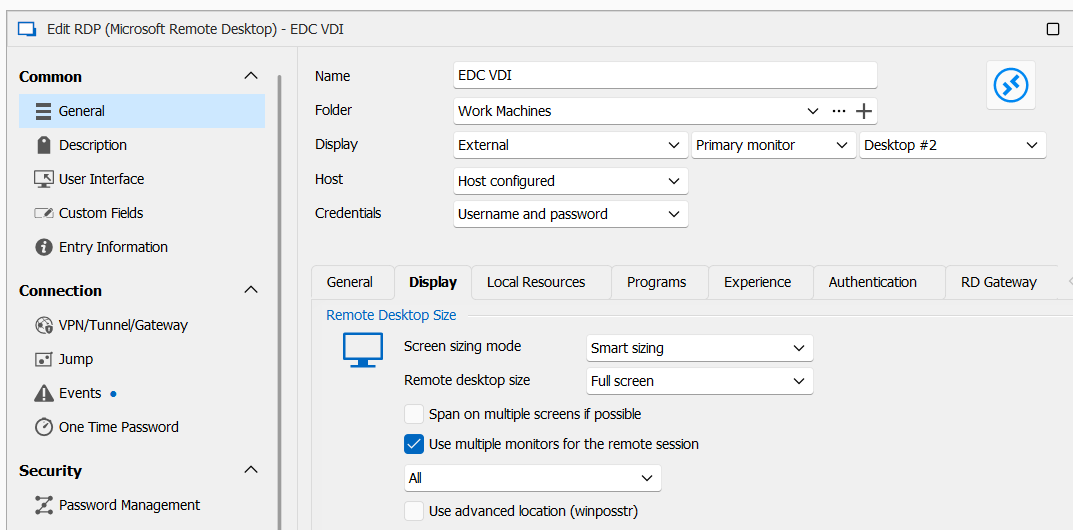
Hi there, so I am using RDM 2023.1.23. This is the options for the seeion, which is a Microsoft Remote Desktop connection. I also see the same issue regardless of session.

Undocked, windows virtual desktops
I am trying to use a windows virtual desktop to open an undocked RDP session to. In the session options, I select undocked, and then default monitor, and ask which desktop I want the session to open up in. Then when I open/start the session, Remote Desktop Manager asks me which desktop I want it opened to, I select my virtual desktop I want it running in, however it just opens on the current desktop. Is this a known issue?
raspbian arm64 support?
Any updates?
raspbian arm64 support?
Would love to know how this is going? I have a chrome book that uses ARM64 architecture (mediatek chip), and would love to try and run this in the linux container that allows to run linux apps instead of running the android app.
Google Drive Data Source Broke?
Yep, that has seemed to have fixed the issue. I exported the machines list to an rdm file, and then opened the GDrive data source and imported them in. They are all now showing and are persisting a close and open of RDM. Many thanks for your help!!!
Google Drive Data Source Broke?
Hi,
Thanks for the help. Here is the Data Source diagnostics text...
Data source type:            Google Drive
Data source size:            0 Bytes
Data source settings size:   157 Bytes
User specific settings size: 0 Bytes
Connection protocol:
Offline:                     False
Allow connection states:     True

Repositories:         1
Entries/Items:        0/0
  Sessions:           0
  Data entries:       0
  Credentials:        0
  Sub connections:    0
  Documents:          0
  Contacts:           0
  -->Sub total:       0

  Session tools:      0
  Folders:            0
  --> Total:          0

Virtual folders:            0
Custom images:              0
RTF notes:                  0

Connection client version:  0x0000000000000000
The logs don't appear to be showing anything, so not sure if logging is enabled. What do I need to do to turn that on/up to sufficient logging?
The tree looks like:

Google Drive Data Source Broke?
Hi,
The issue started occurring on Monday for me, and at that point I was using 2020.3.something or other, so I then upgraded to 2021.1.19.0 and it didn't resolve my issue.
Thanks
Google Drive Data Source Broke?
So I have been using GDrive as a source for my XML file for a while now, but in the last couple of days it has just stopped working. I have deleted the source and readded the same XML file from GDrive, and it just doesn't seem to work. It doesn't show any error and doesn't list any connections in the tree. I have taken a copy of the xml file from GDrive and copied it locally and added that as a source, and using the same master key, I am able to open that up and view my connections.
Any ideas? What else should I try?