Undocked, windows virtual desktops

I am trying to use a windows virtual desktop to open an undocked RDP session to. In the session options, I select undocked, and then default monitor, and ask which desktop I want the session to open up in. Then when I open/start the session, Remote Desktop Manager asks me which desktop I want it opened to, I select my virtual desktop I want it running in, however it just opens on the current desktop. Is this a known issue?
All Comments (13)
Hello,
Thank you for reaching out to us regarding this,
I have a few questions which you can hopefully answer.
- Which version of RDM are you using?
- Which type of data source are you using?
I'm also wondering if you're encountering this issue wit other hosts or only with this specific RDP session?
Let me know,
Best regards,
Samuel Dery
Hi there, so I am using RDM 2023.1.23. This is the options for the seeion, which is a Microsoft Remote Desktop connection. I also see the same issue regardless of session.
30f8e177-4ee4-43b8-82e2-b7cba89ebe75.png
Hello,
Thank you for your reply,
From testing on my end, I've been able to reproduce this behavior,
I've opened a case regarding this with our engineering department which I've linked to this topic and will keep you updated with any news I receive.
Best regards,
Samuel Dery
Did this ever get resolved in the end?
Hello,
Thank you for your patience,
Indeed, the fix for this issue should have been included in RDM 2023.1.29.0, my apologies for the oversight!
Let me know if this problem persists for you,
Best regards,
Samuel Dery
Yep, I still have the issue with 2024.1.19.0 64-bit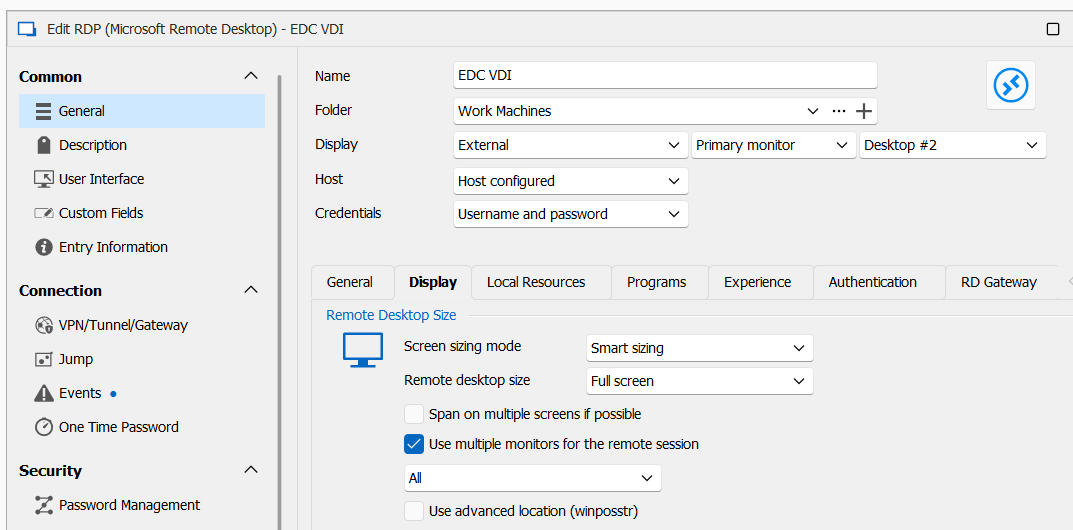
e12772c3-29bd-4d33-a125-f25b8cc7c0d7.png
Hello,
Thank you for your reply,
Could you update to the latest version, 2024.2.13.0, and let me know if the problem persists?
Best regards,
Samuel Dery
So the issue still happens on the latest version as well. I changed the display setting from external to undocked, and it then works. I guess this is because when the microsoft remote desktop connection program is used for the connection, it doesn't control that application window, but only the undocked window.
When I set it to undocked, how do I get that undocked window to be fullscreen, as if I select full screen, it triggers MS RDC to be used and opens the session outside of the undocked window, which then ignores my desktop setting. I have to use "current screen size", but that isnt full screen.
Hello,
Thank you for your reply,
I see to clarify the Undocked window is opening on the expected Virtual Desktop, however when you change the view to fullscreen the MSTSC Window is opened on the wrong desktop is that correct?
Let me know,
Best regards,
Samuel Dery
Correct. If RDM has the MSTSC window in its window, everything is fine. As soon as the MSTSC window is external to that, be it running the session as an external display, or as undocked display, but full screen, then the logic RDM has doesn't appear to kick in and move/open the window on the right virtual display.
Thanks
Hello,
Thank you for your reply,
I see, when going into fullscreen/External display from my understanding RDM is simply using command lines to start the session in MSTSC, I'm not sure what the expected behavior would be in this case, I will confirm with our development team and keep you updated.
Best regards,
Samuel Dery
Hi Team... did you get an answer from Dev on this in the end, with regards to what should happen with specifying what display to open an external application on if the config had been set that way? Thanks
Hello,
Thank you for your reply,
My apologies for the oversight, I am afraid that performing this with the External display mode would not currently be possible,
We recommend you use Undocked mode in this case,
Let me know if you have further questions,
Best regards,
Samuel Dery