
matthiaspohl
Duplicate folder with Entries
I've created a folder with several credential entries. Is there a way to duplicate the folder including all the entries?
The "Copy entries" option is greyed out..
DVLS to support SSO with Active Directory
Hello Devolution Team,
we would like to use DVLS as access control for our RDM. Right now it is not possible to implement an SSO login with ActiveDirectory on prem.
Our goal is that macOS users can use Integrated Security as login method for our MS-SQL datasource in RDM.
Kind regards
Matthias
Get-RDMSessionPassword: Access Denied
Hello,
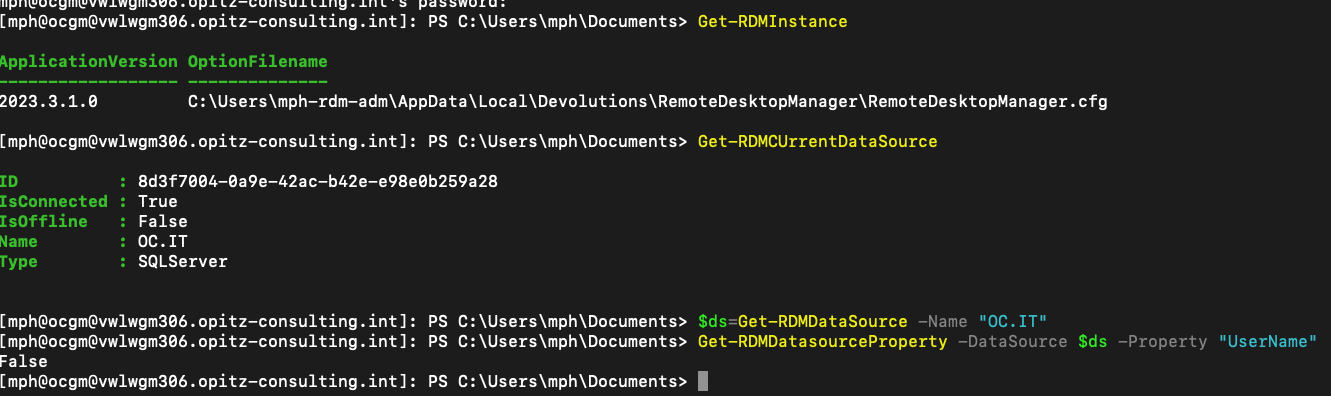
in PowerShell I am connected with User1. Isn´t it possible to pass the username which connects to the data source?
Get-RDMSessionPassword: Access Denied
Hello Erica,
it is a Microsoft SQL Server Datasource.
The Authenticaton method is "Integrated Security (Active Directory)
Get-RDMSessionPassword: Access Denied
User1 has no permissions in RDM, the User2 is Administrator.
If I ssh to the vm with user2 and issue the same command, everything works fine.
Get-RDMSessionPassword: Access Denied
I establish a ssh-session to my windows vm, where RDM is installed. The session is established with user1.
The user configured in RDM is user2. So I did a Set-RDMPowerShellOverride and changed the OptionFilePath to the configfile for user2.
I´m able to get the RDMDatasource and to set the RDMCurrentDatasource. But when I try to use the command Get-RDMSessionPassword I get "access denied".
Any ideas?
Create a CredentialEntry via Powershell fails
Good morning everybody,
in the past I used the following script to create a credential entry with user and password:
$pass=ConvertTo-SecureString -String $pass -AsPlainText -Force
$UserName="XXX"
$datasource = Get-RDMDataSource -Name "YYY"
Set-RDMCurrentDataSource -ID $datasource.ID
$Entry = New-RDMSession -Type Credential -Name $UserName -Group "ZZZ\ZZZ"
$Entry.Credentials.UserName = $UserName
$Entry.Credentials.Password
Set-RDMSession $Entry
Update-RDMUI
Set-RDMSessionPassword -ID $Entry.ID -Password $pass
Update-RDMUI
This was working fine, but now I get following error:
$Entry.Credentials.Password
InvalidOperation: Cannot get property value because "Password" is a write-only property.
I'm not sure what has changed, since the script is the same...
RDM Crash on Parallels VM after Update
Hello Richard,
thx a lot. This solved my issue! Everything works fine again.
Kind regards,
Matthias
RDM Crash on Parallels VM after Update
Hi everybody,
I´ve installed the RDM in my Parallels VM on my MacBook. I can´t use the Mac Version, cause we integrated security (active directory) as login mode for our data sources.
Everything was working fine so far. Now we´ve update the RDM to version 2022.3.23.0 64-bit. If I now try to open a RDP session inside RDM, RDM crashes. In the event viewer I see the following message:
Protokollname: Application
Quelle: Application Error
Datum: 23.11.2022 17:01:32
Ereignis-ID: 1000
Aufgabenkategorie:(100)
Ebene: Fehler
Schlüsselwörter:Klassisch
Benutzer: Nicht zutreffend
Computer: vPLWGM001.opitz-consulting.int
Beschreibung:
Name der fehlerhaften Anwendung: RemoteDesktopManager.exe, Version: 2022.3.23.0, Zeitstempel: 0xce6b654d
Name des fehlerhaften Moduls: mstscax.dll, Version: 10.0.22000.1219, Zeitstempel: 0x6b04fe62
Ausnahmecode: 0xc0000005
Fehleroffset: 0x0000000000a9dcc4
ID des fehlerhaften Prozesses: 0xd24
Startzeit der fehlerhaften Anwendung: 0x01d8ff54bb946ee8
Pfad der fehlerhaften Anwendung: C:\Program Files\Devolutions\Remote Desktop Manager\RemoteDesktopManager.exe
Pfad des fehlerhaften Moduls: C:\Windows\system32\mstscax.dll
Berichtskennung: 5cdb014a-d7ee-47c9-872b-961d7e20ee04
Vollständiger Name des fehlerhaften Pakets:
Anwendungs-ID, die relativ zum fehlerhaften Paket ist:
Ereignis-XML:
<Event xmlns="http://schemas.microsoft.com/win/2004/08/events/event">
<System>
<Provider Name="Application Error" />
<EventID Qualifiers="0">1000</EventID>
<Version>0</Version>
<Level>2</Level>
<Task>100</Task>
<Opcode>0</Opcode>
<Keywords>0x80000000000000</Keywords>
<TimeCreated SystemTime="2022-11-23T16:01:32.4810240Z" />
<EventRecordID>9297</EventRecordID>
<Correlation />
<Execution ProcessID="11584" ThreadID="0" />
<Channel>Application</Channel>
<Computer>vPLWGM001.opitz-consulting.int</Computer>
<Security />
</System>
<EventData>
<Data>RemoteDesktopManager.exe</Data>
<Data>2022.3.23.0</Data>
<Data>ce6b654d</Data>
<Data>mstscax.dll</Data>
<Data>10.0.22000.1219</Data>
<Data>6b04fe62</Data>
<Data>c0000005</Data>
<Data>0000000000a9dcc4</Data>
<Data>d24</Data>
<Data>01d8ff54bb946ee8</Data>
<Data>C:\Program Files\Devolutions\Remote Desktop Manager\RemoteDesktopManager.exe</Data>
<Data>C:\Windows\system32\mstscax.dll</Data>
<Data>5cdb014a-d7ee-47c9-872b-961d7e20ee04</Data>
<Data>
</Data>
<Data>
</Data>
</EventData>
</Event>
Any ideas?
Get-RDMDatasource only showing local Datasource
It wasn´t the same path. Now everything works fine! Thx for your support!
Get-RDMDatasource only showing local Datasource
The PowerShell Command "Get-RDMDatasource" only shows the local datasource.
When I start the PS-Menu inside the RDM (Tools>RDM CmdLet) I get the error: WARNING: Data source not found
Any idea why my datasources aren´t listed by the Get-RDMDatasource command?
Update Vault Description via Powershell
Problem solved :-)
Set-RDMCurrentVault -ID $vault.ID
Get-RDMCurrentVault
Description ID IsAllowedOffline Name
----------- -- ---------------- ----
XXXX False MPH-Test
$vault = Get-RDMCurrentVault
$vault.Description = "Test Description"
Set-RDMVault $vault
Get-RDMCurrentVault
Description ID IsAllowedOffline Name
----------- -- ---------------- ----
Test Description XXX False MPH-Test
Update-RDMUI
Update Vault Description via Powershell
Hello,
$vault = GetRDM-Vault -Name "MPH-Test"
GetRDM-Vault : The term 'GetRDM-Vault' is not recognized as the name of a cmdlet, function, script file, or operable program. Check the spelling of the name, or if a
path was included, verify that the path is correct and try again.
Update Vault Description via Powershell
I would like to update the Description of my vault.
I am able to get the actual value:
Set-RDMCurrentVault -ID $vault.ID
$Entry = Get-RDMCurrentVault
$Entry.Description is the value I would like to modify, but I can´t find a solution....
Powershell: Get-RDMDataSource -Name "xxx" not working from Powershell
Hello Erica,
I´ve tested the module and everything works fine now.
Kind regards
Matthias
Powershell: Get-RDMDataSource -Name "xxx" not working from Powershell
Hello,
sure no problem. I can test the version.
Kind regards
Matthias
Powershell: Get-RDMDataSource -Name "xxx" not working from Powershell
Hi,
I´ve removed the old module and reinstalled the new module. But I still get the same error:
PS C:\Users\mph> Get-RDMDiagnostic
PSArgumentException - Das Argument kann nicht verarbeitet werden, da der Wert von "activity" nicht NULL oder leer sein darf.
bei System.Management.Automation.ProgressRecord..ctor(Int32 activityId, String activity, String statusDescription)
bei Devolutions.RemoteDesktopManager.Managers.UIManager.ShowWaitProgress(String message, Action action)
bei Devolutions.RemoteDesktopManager.Managers.ConnectionManager.ShowFirstLoadWaitInProgress()
bei Devolutions.RemoteDesktopManager.Managers.ConnectionManager.LoadConnections(BaseConnectionDataSource dataSource)
PSArgumentException - Das Argument kann nicht verarbeitet werden, da der Wert von "activity" nicht NULL oder leer sein darf.
bei System.Management.Automation.ProgressRecord..ctor(Int32 activityId, String activity, String statusDescription)
bei Devolutions.RemoteDesktopManager.Managers.UIManager.HideWaitProgress()
bei Devolutions.RemoteDesktopManager.Managers.RepositoryManager.Refresh(Boolean force)
bei Devolutions.RemoteDesktopManager.Managers.SecurityManager.LoadSecurity(BaseConnectionDataSource dataSource)
bei Devolutions.RemoteDesktopManager.Managers.ConnectionManager.LoadConnectionsFromDataSource(ConnectionEngine engine, Boolean hasChanged)
bei Devolutions.RemoteDesktopManager.Managers.ConnectionManager.LoadConnections(BaseConnectionDataSource dataSource)
PSArgumentException - Das Argument kann nicht verarbeitet werden, da der Wert von "activity" nicht NULL oder leer sein darf.
bei System.Management.Automation.ProgressRecord..ctor(Int32 activityId, String activity, String statusDescription)
bei Devolutions.RemoteDesktopManager.Managers.UIManager.HideWaitProgress()
bei Devolutions.RemoteDesktopManager.Managers.RepositoryManager.Refresh(Boolean force)
bei Devolutions.RemoteDesktopManager.Managers.SecurityManager.LoadSecurity(BaseConnectionDataSource dataSource)
bei Devolutions.RemoteDesktopManager.Managers.ConnectionManager.LoadConnectionsFromDataSource(ConnectionEngine engine, Boolean hasChanged)
bei Devolutions.RemoteDesktopManager.Managers.ConnectionManager.LoadConnections(BaseConnectionDataSource dataSource)
Serial LicenseType IsLicenseValid IsLicenseExpired
------ ----------- -------------- ----------------
Xyz...... Global True False
PS C:\Users\mph> Get-RDMInstance
PSArgumentException - Cannot process the argument because the value of activity cannot be null or empty.
at System.Management.Automation.ProgressRecord..ctor(Int32 activityId, String activity, String statusDescription)
at Devolutions.RemoteDesktopManager.Managers.UIManager.HideWaitProgress()
at Devolutions.RemoteDesktopManager.Managers.RepositoryManager.Refresh(Boolean force)
at Devolutions.RemoteDesktopManager.Managers.SecurityManager.LoadSecurity(BaseConnectionDataSource dataSource)
at Devolutions.RemoteDesktopManager.Managers.ConnectionManager.LoadConnectionsFromDataSource(ConnectionEngine engine, Boolean hasChanged)
at Devolutions.RemoteDesktopManager.Managers.ConnectionManager.LoadConnections(BaseConnectionDataSource dataSource)
ApplicationVersion OptionFilename
------------------ --------------
2022.1.1.0 C:\Users\mph\AppData\Local\Devolutions\RemoteDesktopManager\RemoteDesktopManager.cfg
PS C:\Users\mph> Get-RDMDataSource
PSArgumentException - Cannot process the argument because the value of activity cannot be null or empty.
at System.Management.Automation.ProgressRecord..ctor(Int32 activityId, String activity, String statusDescription)
at Devolutions.RemoteDesktopManager.Managers.UIManager.HideWaitProgress()
at Devolutions.RemoteDesktopManager.Managers.RepositoryManager.Refresh(Boolean force)
at Devolutions.RemoteDesktopManager.Managers.SecurityManager.LoadSecurity(BaseConnectionDataSource dataSource)
at Devolutions.RemoteDesktopManager.Managers.ConnectionManager.LoadConnectionsFromDataSource(ConnectionEngine engine, Boolean hasChanged)
at Devolutions.RemoteDesktopManager.Managers.ConnectionManager.LoadConnections(BaseConnectionDataSource dataSource)
ID : Xyz......
IsConnected : False
IsOffline : False
Name : Xyz......
Type : SQLServer
ID : Xyz......
IsConnected : False
IsOffline : False
Name : Xyz......
Type : SQLServer
Powershell: Get-RDMDataSource -Name "xxx" not working from Powershell
Hello,
the output:
Get-RDMInstance
PSArgumentException - Cannot process the argument because the value of activity cannot be null or empty.
at System.Management.Automation.ProgressRecord..ctor(Int32 activityId, String activity, String statusDescription)
at Devolutions.RemoteDesktopManager.Managers.UIManager.HideWaitProgress()
at Devolutions.RemoteDesktopManager.Managers.RepositoryManager.Refresh(Boolean force)
at Devolutions.RemoteDesktopManager.Managers.SecurityManager.LoadSecurity(BaseConnectionDataSource dataSource)
at Devolutions.RemoteDesktopManager.Managers.ConnectionManager.LoadConnectionsFromDataSource(ConnectionEngine engine, Boolean hasChanged)
at Devolutions.RemoteDesktopManager.Managers.ConnectionManager.LoadConnections(BaseConnectionDataSource dataSource)
ApplicationVersion OptionFilename
------------------ --------------
2022.1.0.5 C:\Users\mph\AppData\Local\Devolutions\RemoteDesktopManager\RemoteDesktopManager.cfg
Powershell: Get-RDMDataSource -Name "xxx" not working from Powershell
Remote Desktop Manager Enterprise Version
2022.1.16.0 64-bit
Powershell: Get-RDMDataSource -Name "xxx" not working from Powershell
Hi,
the data source type is SQL-Server.
PowerShell version:
Name Value
---- -----
PSVersion 5.1.22000.282
PSEdition Desktop
PSCompatibleVersions {1.0, 2.0, 3.0, 4.0...}
BuildVersion 10.0.22000.282
CLRVersion 4.0.30319.42000
WSManStackVersion 3.0
PSRemotingProtocolVersion 2.3
SerializationVersion 1.1.0.1
Get-RDMDiagnostic : The term 'Get-RDMDiagnostic' is not recognized as the name of a cmdlet, function, script file, or operable program. Check the spelling of the name,
or if a path was included, verify that the path is correct and try again.
Kind regards,
Matthias
Powershell: Get-RDMDataSource -Name "xxx" not working from Powershell
I have a strange behaviour with the PowerShell-Module. If i run the command "Get-RDMDataSource -Name "OC" from the PowerShell i get the error message:
PSArgumentException - Cannot process the argument because the value of activity cannot be null or empty.
at System.Management.Automation.ProgressRecord..ctor(Int32 activityId, String activity, String statusDescription)
at Devolutions.RemoteDesktopManager.Managers.UIManager.HideWaitProgress()
at Devolutions.RemoteDesktopManager.Managers.RepositoryManager.Refresh(Boolean force)
at Devolutions.RemoteDesktopManager.Managers.SecurityManager.LoadSecurity(BaseConnectionDataSource dataSource)
at Devolutions.RemoteDesktopManager.Managers.ConnectionManager.LoadConnectionsFromDataSource(ConnectionEngine engine, Boolean hasChanged)
at Devolutions.RemoteDesktopManager.Managers.ConnectionManager.LoadConnections(BaseConnectionDataSource dataSource)
When I run the command in PowerShell as adminsitrator I get the error message:
Get-RDMDataSource : Cannot validate argument on parameter 'Name'. The argument "OC" does not belong to the set "Local Data Source" specified by the ValidateSet
attribute. Supply an argument that is in the set and then try the command again.
At line:1 char:25
+ Get-RDMDataSource -Name "OC"
+ ~~~~
+ CategoryInfo : InvalidData: (:) [Get-RDMDataSource], ParameterBindingValidationException
+ FullyQualifiedErrorId : ParameterArgumentValidationError,RemoteDesktopManager.PowerShellModule.GetRDMDatasourceCommand
If i run the the command inside the ISE everything works fine.
Get-RDMDataSource -Name "OC"
ID : xxxxxxxx-xxxx-xxxx-xxxx-xxxxxxxxxxxx
IsConnected : True
IsOffline : False
Name : OC
Type : SQLServer
Any thougths on this?
Kind regards
Matthias
HowTo create a CredentialEntry via Powershell
Hi Eric,
sorry for the late response...
Your solution works fine for me. Thx a lot!
Best regards,
Matthias
HowTo create a CredentialEntry via Powershell
Hi everybody,
I have created a Group in my RDM. Now I would like to create a CredenitalEntry with Username and Password via Powershell. I can´t find any command how to accomplish this. Any ideas?
Kind regards
Matthias
Unable to configure Microsoft SQL Server Connection
Hm, I was able to generate Kerberos Ticket, but login is still not possible...
Unable to connect to the serverCannot authenticate using Kerberos. Ensure Kerberos has been initialized on the client with 'kinit' and a Service Principal Name has been registered for the SQL Server to allow Kerberos authentication.
ErrorCode=InternalError, Exception=Interop+NetSecurityNative+GssApiException: GSSAPI operation failed with error - An unsupported mechanism was requested.
at System.Net.Security.NegotiateStreamPal.GssInitSecurityContext (Microsoft.Win32.SafeHandles.SafeGssContextHandle& context, Microsoft.Win32.SafeHandles.SafeGssCredHandle credential, System.Boolean isNtlm, Microsoft.Win32.SafeHandles.SafeGssNameHandle targetName, Interop+NetSecurityNative+GssFlags inFlags, System.Byte[] buffer, System.Byte[]& outputBuffer, System.UInt32& outFlags, System.Int32& isNtlmUsed) [0x0004a] in <079e0be24b7147ccaf9d0444926d8e4d>:0
at System.Net.Security.NegotiateStreamPal.EstablishSecurityContext (System.Net.Security.SafeFreeNegoCredentials credential, System.Net.Security.SafeDeleteContext& context, System.String targetName, System.Net.ContextFlagsPal inFlags, System.Net.Security.SecurityBuffer inputBuffer, System.Net.Security.SecurityBuffer outputBuffer, System.Net.ContextFlagsPal& outFlags) [0x0004c] in <079e0be24b7147ccaf9d0444926d8e4d>:0
at System.Data.SqlClient.SNI.SNIProxy.GenSspiClientContext (System.Data.SqlClient.SNI.SspiClientContextStatus sspiClientContextStatus, System.Byte[] receivedBuff, System.Byte[]& sendBuff, System.Byte[] serverName) [0x00111] in <9e35da55d0c84f978492d9c7655ca264>:0
at System.Data.SqlClient.SNI.TdsParserStateObjectManaged.GenerateSspiClientContext (System.Byte[] receivedBuff, System.UInt32 receivedLength, System.Byte[]& sendBuff, System.UInt32& sendLength, System.Byte[] _sniSpnBuffer) [0x00000] in <9e35da55d0c84f978492d9c7655ca264>:0
at System.Data.SqlClient.TdsParser.SNISSPIData (System.Byte[] receivedBuff, System.UInt32 receivedLength, System.Byte[]& sendBuff, System.UInt32& sendLength) [0x00007] in <9e35da55d0c84f978492d9c7655ca264>:0
Cannot authenticate using Kerberos. Ensure Kerberos has been initialized on the client with 'kinit' and a Service Principal Name has been registered for the SQL Server to allow Kerberos authentication.
ErrorCode=InternalError, Exception=Interop+NetSecurityNative+GssApiException: GSSAPI operation failed with error - An unsupported mechanism was requested.
at System.Net.Security.NegotiateStreamPal.GssInitSecurityContext (Microsoft.Win32.SafeHandles.SafeGssContextHandle& context, Microsoft.Win32.SafeHandles.SafeGssCredHandle credential, System.Boolean isNtlm, Microsoft.Win32.SafeHandles.SafeGssNameHandle targetName, Interop+NetSecurityNative+GssFlags inFlags, System.Byte[] buffer, System.Byte[]& outputBuffer, System.UInt32& outFlags, System.Int32& isNtlmUsed) [0x0004a] in <079e0be24b7147ccaf9d0444926d8e4d>:0
at System.Net.Security.NegotiateStreamPal.EstablishSecurityContext (System.Net.Security.SafeFreeNegoCredentials credential, System.Net.Security.SafeDeleteContext& context, System.String targetName, System.Net.ContextFlagsPal inFlags, System.Net.Security.SecurityBuffer inputBuffer, System.Net.Security.SecurityBuffer outputBuffer, System.Net.ContextFlagsPal& outFlags) [0x0004c] in <079e0be24b7147ccaf9d0444926d8e4d>:0
at System.Data.SqlClient.SNI.SNIProxy.GenSspiClientContext (System.Data.SqlClient.SNI.SspiClientContextStatus sspiClientContextStatus, System.Byte[] receivedBuff, System.Byte[]& sendBuff, System.Byte[] serverName) [0x00111] in <9e35da55d0c84f978492d9c7655ca264>:0
at System.Data.SqlClient.SNI.TdsParserStateObjectManaged.GenerateSspiClientContext (System.Byte[] receivedBuff, System.UInt32 receivedLength, System.Byte[]& sendBuff, System.UInt32& sendLength, System.Byte[] _sniSpnBuffer) [0x00000] in <9e35da55d0c84f978492d9c7655ca264>:0
at System.Data.SqlClient.TdsParser.SNISSPIData (System.Byte[] receivedBuff, System.UInt32 receivedLength, System.Byte[]& sendBuff, System.UInt32& sendLength) [0x00007] in <9e35da55d0c84f978492d9c7655ca264>:0
So it looks like if we have to accept and keep working on the windows systems...
Unable to configure Microsoft SQL Server Connection
Ok, first problem is solved. When I work with the IP i´m able to reach the host. But the next error is(I use Integrated Security (Active Directory)):
Unable to connect to the serverCannot authenticate using Kerberos. Ensure Kerberos has been initialized on the client with 'kinit' and a Service Principal Name has been registered for the SQL Server to allow Kerberos authentication.
ErrorCode=InternalError, Exception=Interop+NetSecurityNative+GssApiException: GSSAPI operation failed with error - An unsupported mechanism was requested.
at System.Net.Security.NegotiateStreamPal.GssInitSecurityContext (Microsoft.Win32.SafeHandles.SafeGssContextHandle& context, Microsoft.Win32.SafeHandles.SafeGssCredHandle credential, System.Boolean isNtlm, Microsoft.Win32.SafeHandles.SafeGssNameHandle targetName, Interop+NetSecurityNative+GssFlags inFlags, System.Byte[] buffer, System.Byte[]& outputBuffer, System.UInt32& outFlags, System.Int32& isNtlmUsed) [0x0004a] in <079e0be24b7147ccaf9d0444926d8e4d>:0
at System.Net.Security.NegotiateStreamPal.EstablishSecurityContext (System.Net.Security.SafeFreeNegoCredentials credential, System.Net.Security.SafeDeleteContext& context, System.String targetName, System.Net.ContextFlagsPal inFlags, System.Net.Security.SecurityBuffer inputBuffer, System.Net.Security.SecurityBuffer outputBuffer, System.Net.ContextFlagsPal& outFlags) [0x0004c] in <079e0be24b7147ccaf9d0444926d8e4d>:0
at System.Data.SqlClient.SNI.SNIProxy.GenSspiClientContext (System.Data.SqlClient.SNI.SspiClientContextStatus sspiClientContextStatus, System.Byte[] receivedBuff, System.Byte[]& sendBuff, System.Byte[] serverName) [0x00111] in <9e35da55d0c84f978492d9c7655ca264>:0
at System.Data.SqlClient.SNI.TdsParserStateObjectManaged.GenerateSspiClientContext (System.Byte[] receivedBuff, System.UInt32 receivedLength, System.Byte[]& sendBuff, System.UInt32& sendLength, System.Byte[] _sniSpnBuffer) [0x00000] in <9e35da55d0c84f978492d9c7655ca264>:0
at System.Data.SqlClient.TdsParser.SNISSPIData (System.Byte[] receivedBuff, System.UInt32 receivedLength, System.Byte[]& sendBuff, System.UInt32& sendLength) [0x00007] in <9e35da55d0c84f978492d9c7655ca264>:0
Cannot authenticate using Kerberos. Ensure Kerberos has been initialized on the client with 'kinit' and a Service Principal Name has been registered for the SQL Server to allow Kerberos authentication.
ErrorCode=InternalError, Exception=Interop+NetSecurityNative+GssApiException: GSSAPI operation failed with error - An unsupported mechanism was requested.
at System.Net.Security.NegotiateStreamPal.GssInitSecurityContext (Microsoft.Win32.SafeHandles.SafeGssContextHandle& context, Microsoft.Win32.SafeHandles.SafeGssCredHandle credential, System.Boolean isNtlm, Microsoft.Win32.SafeHandles.SafeGssNameHandle targetName, Interop+NetSecurityNative+GssFlags inFlags, System.Byte[] buffer, System.Byte[]& outputBuffer, System.UInt32& outFlags, System.Int32& isNtlmUsed) [0x0004a] in <079e0be24b7147ccaf9d0444926d8e4d>:0
at System.Net.Security.NegotiateStreamPal.EstablishSecurityContext (System.Net.Security.SafeFreeNegoCredentials credential, System.Net.Security.SafeDeleteContext& context, System.String targetName, System.Net.ContextFlagsPal inFlags, System.Net.Security.SecurityBuffer inputBuffer, System.Net.Security.SecurityBuffer outputBuffer, System.Net.ContextFlagsPal& outFlags) [0x0004c] in <079e0be24b7147ccaf9d0444926d8e4d>:0
at System.Data.SqlClient.SNI.SNIProxy.GenSspiClientContext (System.Data.SqlClient.SNI.SspiClientContextStatus sspiClientContextStatus, System.Byte[] receivedBuff, System.Byte[]& sendBuff, System.Byte[] serverName) [0x00111] in <9e35da55d0c84f978492d9c7655ca264>:0
at System.Data.SqlClient.SNI.TdsParserStateObjectManaged.GenerateSspiClientContext (System.Byte[] receivedBuff, System.UInt32 receivedLength, System.Byte[]& sendBuff, System.UInt32& sendLength, System.Byte[] _sniSpnBuffer) [0x00000] in <9e35da55d0c84f978492d9c7655ca264>:0
at System.Data.SqlClient.TdsParser.SNISSPIData (System.Byte[] receivedBuff, System.UInt32 receivedLength, System.Byte[]& sendBuff, System.UInt32& sendLength) [0x00007] in <9e35da55d0c84f978492d9c7655ca264>:0