Get-RDMSessionPassword: Access Denied

I establish a ssh-session to my windows vm, where RDM is installed. The session is established with user1.
The user configured in RDM is user2. So I did a Set-RDMPowerShellOverride and changed the OptionFilePath to the configfile for user2.
I´m able to get the RDMDatasource and to set the RDMCurrentDatasource. But when I try to use the command Get-RDMSessionPassword I get "access denied".
Any ideas?
All Comments (7)
Hello,
What permission does this user have on the entry you want to get the password?
This user must have the View Password permission to view the password of any entry.
Best regards,
Érica Poirier
User1 has no permissions in RDM, the User2 is Administrator.
If I ssh to the vm with user2 and issue the same command, everything works fine.
Hello,
What data source type is this RDM connected to?
What authentication method are you using in RDM?
With the Get-RDMInstance cmdlet, you should get the location of the RemoteDesktopManager.cfg file that is being used.
With the following method, you should get the connected username of your current data source.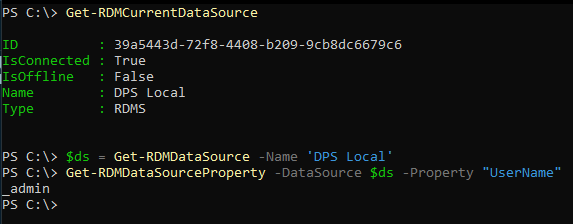
Best regards,
Érica Poirier
72ddf59c-7dae-4a0b-ba73-f8bea3dc3063.png
Hello Erica,
it is a Microsoft SQL Server Datasource.
The Authenticaton method is "Integrated Security (Active Directory)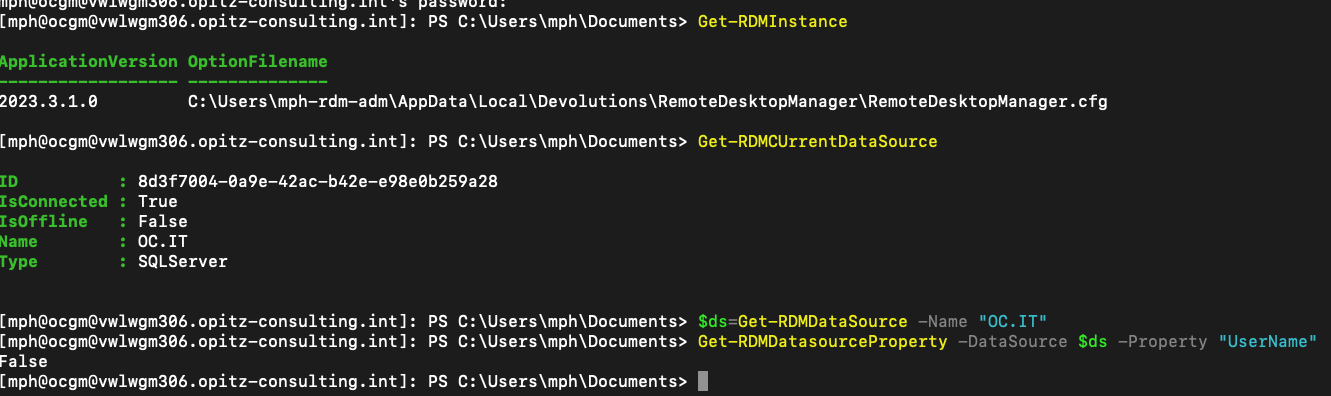
Screenshot 2023-11-20 at 09.49.19.png
Hello,
Thank you for your feedback.
In PowerShell, are you connected with User1 or User2? The whoami command will provide that information.
As the data source is set with Integrated Security, no matter which profile you load, it will connect with the current logon user.
Best regards,
Érica Poirier
Hello,
in PowerShell I am connected with User1. Isn´t it possible to pass the username which connects to the data source?
Hello,
The only method, if you want to use a specific user, is to specifically save the username in the data source settings.
If it's set to Integrated Security, to modify the user context in PowerShell, you need to start the PowerShell command prompt as another user.
Best regards,
Érica Poirier