Unable to configure Microsoft SQL Server Connection

Hi everyone,
we try to implement the RDP Manager the first time on a Mac. I´ve successfully installed the application and I tried to configure the Data Source like on my windows system.
When I try to connect to the Server I get the attached error message. Any hints?
Kind regards,
Matthias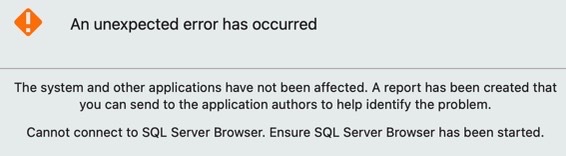
8AAAA6AA-762E-47ED-9103-C5499FD35D7C_4_5005_c.jpeg
All Comments (7)
Hi,
This is an error report window, there should be an arrow at the bottom to expand the content of the report. Could you share this with us, or send the report?
Best regards,
Xavier Fortin
Exception - Cannot connect to SQL Server Browser. Ensure SQL Server Browser has been started.
at System.Data.SqlClient.SNI.SSRP.GetPortByInstanceName (System.String browserHostName, System.String instanceName) [0x00026] in <9e35da55d0c84f978492d9c7655ca264>:0
at System.Data.SqlClient.SNI.SNIProxy.CreateTcpHandle (System.Data.SqlClient.SNI.DataSource details, System.Int64 timerExpire, System.Object callbackObject, System.Boolean parallel) [0x00047] in <9e35da55d0c84f978492d9c7655ca264>:0
at System.Data.SqlClient.SNI.SNIProxy.CreateConnectionHandle (System.Object callbackObject, System.String fullServerName, System.Boolean ignoreSniOpenTimeout, System.Int64 timerExpire, System.Byte[]& instanceName, System.Byte[]& spnBuffer, System.Boolean flushCache, System.Boolean async, System.Boolean parallel, System.Boolean isIntegratedSecurity) [0x0004f] in <9e35da55d0c84f978492d9c7655ca264>:0
at System.Data.SqlClient.SNI.TdsParserStateObjectManaged.CreatePhysicalSNIHandle (System.String serverName, System.Boolean ignoreSniOpenTimeout, System.Int64 timerExpire, System.Byte[]& instanceName, System.Byte[]& spnBuffer, System.Boolean flushCache, System.Boolean async, System.Boolean parallel, System.Boolean isIntegratedSecurity) [0x00000] in <9e35da55d0c84f978492d9c7655ca264>:0
at System.Data.SqlClient.TdsParser.Connect (System.Data.SqlClient.ServerInfo serverInfo, System.Data.SqlClient.SqlInternalConnectionTds connHandler, System.Boolean ignoreSniOpenTimeout, System.Int64 timerExpire, System.Boolean encrypt, System.Boolean trustServerCert, System.Boolean integratedSecurity, System.Boolean withFailover) [0x000a6] in <9e35da55d0c84f978492d9c7655ca264>:0
at System.Data.SqlClient.SqlInternalConnectionTds.AttemptOneLogin (System.Data.SqlClient.ServerInfo serverInfo, System.String newPassword, System.Security.SecureString newSecurePassword, System.Boolean ignoreSniOpenTimeout, System.Data.ProviderBase.TimeoutTimer timeout, System.Boolean withFailover) [0x0004a] in <9e35da55d0c84f978492d9c7655ca264>:0
at System.Data.SqlClient.SqlInternalConnectionTds.LoginNoFailover (System.Data.SqlClient.ServerInfo serverInfo, System.String newPassword, System.Security.SecureString newSecurePassword, System.Boolean redirectedUserInstance, System.Data.SqlClient.SqlConnectionString connectionOptions, System.Data.SqlClient.SqlCredential credential, System.Data.ProviderBase.TimeoutTimer timeout) [0x000c4] in <9e35da55d0c84f978492d9c7655ca264>:0
at System.Data.SqlClient.SqlInternalConnectionTds.OpenLoginEnlist (System.Data.ProviderBase.TimeoutTimer timeout, System.Data.SqlClient.SqlConnectionString connectionOptions, System.Data.SqlClient.SqlCredential credential, System.String newPassword, System.Security.SecureString newSecurePassword, System.Boolean redirectedUserInstance) [0x000b9] in <9e35da55d0c84f978492d9c7655ca264>:0
at System.Data.SqlClient.SqlInternalConnectionTds..ctor (System.Data.ProviderBase.DbConnectionPoolIdentity identity, System.Data.SqlClient.SqlConnectionString connectionOptions, System.Data.SqlClient.SqlCredential credential, System.Object providerInfo, System.String newPassword, System.Security.SecureString newSecurePassword, System.Boolean redirectedUserInstance, System.Data.SqlClient.SqlConnectionString userConnectionOptions, System.Data.SqlClient.SessionData reconnectSessionData, System.Boolean applyTransientFaultHandling, System.String accessToken) [0x00145] in <9e35da55d0c84f978492d9c7655ca264>:0
at System.Data.SqlClient.SqlConnectionFactory.CreateConnection (System.Data.Common.DbConnectionOptions options, System.Data.Common.DbConnectionPoolKey poolKey, System.Object poolGroupProviderInfo, System.Data.ProviderBase.DbConnectionPool pool, System.Data.Common.DbConnection owningConnection, System.Data.Common.DbConnectionOptions userOptions) [0x00159] in <9e35da55d0c84f978492d9c7655ca264>:0
at System.Data.ProviderBase.DbConnectionFactory.CreatePooledConnection (System.Data.ProviderBase.DbConnectionPool pool, System.Data.Common.DbConnection owningObject, System.Data.Common.DbConnectionOptions options, System.Data.Common.DbConnectionPoolKey poolKey, System.Data.Common.DbConnectionOptions userOptions) [0x0000c] in <9e35da55d0c84f978492d9c7655ca264>:0
at System.Data.ProviderBase.DbConnectionPool.CreateObject (System.Data.Common.DbConnection owningObject, System.Data.Common.DbConnectionOptions userOptions, System.Data.ProviderBase.DbConnectionInternal oldConnection) [0x00184] in <9e35da55d0c84f978492d9c7655ca264>:0
at System.Data.ProviderBase.DbConnectionPool.UserCreateRequest (System.Data.Common.DbConnection owningObject, System.Data.Common.DbConnectionOptions userOptions, System.Data.ProviderBase.DbConnectionInternal oldConnection) [0x00040] in <9e35da55d0c84f978492d9c7655ca264>:0
at System.Data.ProviderBase.DbConnectionPool.TryGetConnection (System.Data.Common.DbConnection owningObject, System.UInt32 waitForMultipleObjectsTimeout, System.Boolean allowCreate, System.Boolean onlyOneCheckConnection, System.Data.Common.DbConnectionOptions userOptions, System.Data.ProviderBase.DbConnectionInternal& connection) [0x000a4] in <9e35da55d0c84f978492d9c7655ca264>:0
at System.Data.ProviderBase.DbConnectionPool.TryGetConnection (System.Data.Common.DbConnection owningObject, System.Threading.Tasks.TaskCompletionSource`1[TResult] retry, System.Data.Common.DbConnectionOptions userOptions, System.Data.ProviderBase.DbConnectionInternal& connection) [0x00026] in <9e35da55d0c84f978492d9c7655ca264>:0
at System.Data.ProviderBase.DbConnectionFactory.TryGetConnection (System.Data.Common.DbConnection owningConnection, System.Threading.Tasks.TaskCompletionSource`1[TResult] retry, System.Data.Common.DbConnectionOptions userOptions, System.Data.ProviderBase.DbConnectionInternal oldConnection, System.Data.ProviderBase.DbConnectionInternal& connection) [0x0021d] in <9e35da55d0c84f978492d9c7655ca264>:0
at System.Data.ProviderBase.DbConnectionInternal.TryOpenConnectionInternal (System.Data.Common.DbConnection outerConnection, System.Data.ProviderBase.DbConnectionFactory connectionFactory, System.Threading.Tasks.TaskCompletionSource`1[TResult] retry, System.Data.Common.DbConnectionOptions userOptions) [0x00036] in <9e35da55d0c84f978492d9c7655ca264>:0
at System.Data.ProviderBase.DbConnectionClosed.TryOpenConnection (System.Data.Common.DbConnection outerConnection, System.Data.ProviderBase.DbConnectionFactory connectionFactory, System.Threading.Tasks.TaskCompletionSource`1[TResult] retry, System.Data.Common.DbConnectionOptions userOptions) [0x00000] in <9e35da55d0c84f978492d9c7655ca264>:0
at System.Data.SqlClient.SqlConnection.TryOpen (System.Threading.Tasks.TaskCompletionSource`1[TResult] retry) [0x0005d] in <9e35da55d0c84f978492d9c7655ca264>:0
at System.Data.SqlClient.SqlConnection.Open () [0x0003b] in <9e35da55d0c84f978492d9c7655ca264>:0
at Devolutions.RemoteDesktopManager.Business.DataSources.SQLServerConnectionDataSource.CreateDbConnection (System.String connectionString, System.Boolean openConnection) [0x00197] in <e23064c9cde84a76a242df971eb8afaa>:0
at Devolutions.RemoteDesktopManager.Business.DataSources.SQLServerConnectionDataSource.CreateDbConnection (System.String connectionString) [0x00000] in <e23064c9cde84a76a242df971eb8afaa>:0
at Devolutions.RemoteDesktopManager.Business.DataSources.DatabaseConnectionDataSource.CreateDbConnection (System.Boolean master, System.Nullable`1[T] connectTimeout) [0x00045] in <e23064c9cde84a76a242df971eb8afaa>:0
at Devolutions.RemoteDesktopManager.Business.DataSources.SQLServerConnectionDataSource.CreateDbConnection (System.Boolean master, System.Nullable`1[T] connectTimeout) [0x0003f] in <e23064c9cde84a76a242df971eb8afaa>:0
at Devolutions.RemoteDesktopManager.Business.DataSources.DatabaseConnectionDataSource.CreateDbConnection (System.Nullable`1[T] connectTimeout) [0x00000] in <e23064c9cde84a76a242df971eb8afaa>:0
at Devolutions.RemoteDesktopManager.Business.DataSources.DatabaseConnectionDataSource.GetData (System.String sql, System.Data.IDbDataParameter[] parameters) [0x00010] in <e23064c9cde84a76a242df971eb8afaa>:0
at Devolutions.RemoteDesktopManager.Business.DataSources.DatabaseConnectionDataSource.GetData (System.String sql, System.Data.IDbDataParameter[] parameters, System.Data.IDbTransaction dbTransaction) [0x00003] in <e23064c9cde84a76a242df971eb8afaa>:0
at Devolutions.RemoteDesktopManager.Business.DataSources.DatabaseConnectionDataSource.c1e3e098748c6efd7f005032d264f60b2 (System.Data.IDbTransaction cb0e84463dceab1dc0c9748e2f11fdfc1) [0x0003f] in <e23064c9cde84a76a242df971eb8afaa>:0
at Devolutions.RemoteDesktopManager.Business.DataSources.DatabaseConnectionDataSource.GetDataSourceSettings () [0x00000] in <e23064c9cde84a76a242df971eb8afaa>:0
at Devolutions.RemoteDesktopManager.Managers.ConnectionManager.cca44e7b409894de57ef01c51d223624f (Devolutions.RemoteDesktopManager.Business.DataSources.BaseConnectionDataSource cf92249fb171d54e031580709bdd89675) [0x00031] in <b89236e82feb4eb797922af408a6e2f8>:0
at Devolutions.RemoteDesktopManager.Managers.ConnectionManager.cc215c098d9d30db01ad4833019a25cf4 (Devolutions.RemoteDesktopManager.Business.DataSources.BaseConnectionDataSource cf92249fb171d54e031580709bdd89675, System.Boolean c96a7bc363d8d2129b9f77a24d058260b) [0x0007c] in <b89236e82feb4eb797922af408a6e2f8>:0
at Devolutions.RemoteDesktopManager.Managers.ConnectionManager.LoadConnections (Devolutions.RemoteDesktopManager.Business.DataSources.BaseConnectionDataSource dataSource) [0x002d9] in <b89236e82feb4eb797922af408a6e2f8>:0
------------------------------------------
SocketException - Could not resolve host 'mssql-db5'
at System.Net.Dns.Error_11001 (System.String hostName) [0x00015] in <079e0be24b7147ccaf9d0444926d8e4d>:0
at System.Net.Dns.GetHostByName (System.String hostName) [0x00021] in <079e0be24b7147ccaf9d0444926d8e4d>:0
at System.Net.Dns.GetHostEntry (System.String hostNameOrAddress) [0x00052] in <079e0be24b7147ccaf9d0444926d8e4d>:0
at System.Net.Dns.GetHostAddresses (System.String hostNameOrAddress) [0x00056] in <079e0be24b7147ccaf9d0444926d8e4d>:0
at System.Net.Sockets.UdpClient.BeginSend (System.Byte[] datagram, System.Int32 bytes, System.String hostname, System.Int32 port, System.AsyncCallback requestCallback, System.Object state) [0x00028] in <079e0be24b7147ccaf9d0444926d8e4d>:0
at System.Net.Sockets.UdpClient+<>c__DisplayClass64_0.<SendAsync>b__0 (System.AsyncCallback callback, System.Object state) [0x00000] in <079e0be24b7147ccaf9d0444926d8e4d>:0
at System.Threading.Tasks.TaskFactory`1[TResult].FromAsyncImpl (System.Func`3[T1,T2,TResult] beginMethod, System.Func`2[T,TResult] endFunction, System.Action`1[T] endAction, System.Object state, System.Threading.Tasks.TaskCreationOptions creationOptions) [0x000f6] in <de05cb45d8d6408ca26ba061daa32cf1>:0
at System.Threading.Tasks.TaskFactory`1[TResult].FromAsync (System.Func`3[T1,T2,TResult] beginMethod, System.Func`2[T,TResult] endMethod, System.Object state) [0x00000] in <de05cb45d8d6408ca26ba061daa32cf1>:0
at System.Net.Sockets.UdpClient.SendAsync (System.Byte[] datagram, System.Int32 bytes, System.String hostname, System.Int32 port) [0x0002f] in <079e0be24b7147ccaf9d0444926d8e4d>:0
at System.Data.SqlClient.SNI.SSRP.SendUDPRequest (System.String browserHostname, System.Int32 port, System.Byte[] requestPacket) [0x0001d] in <9e35da55d0c84f978492d9c7655ca264>:0
at System.Data.SqlClient.SNI.SSRP.GetPortByInstanceName (System.String browserHostName, System.String instanceName) [0x00009] in <9e35da55d0c84f978492d9c7655ca264>:0
RDM seems unable to resolve the hostname: "SocketException - Could not resolve host 'mssql-db5'"
Is "mssql-db5" the host you've configured in your SQL Server data source? Have you made sure that the host is reachable from your Mac with that name (i.e. "ping mssql-db5" in Terminal)? Often, Mac works with fully qualified domain name (e.g. "mssql-db5.organization.loc"), and does not work well with simplified hostname. This could be your issue, though I don't know why you are getting an error report out of this (as opposed to a regular connection error).
Best regards,
Xavier Fortin
Ok, first problem is solved. When I work with the IP i´m able to reach the host. But the next error is(I use Integrated Security (Active Directory)):
Unable to connect to the serverCannot authenticate using Kerberos. Ensure Kerberos has been initialized on the client with 'kinit' and a Service Principal Name has been registered for the SQL Server to allow Kerberos authentication.
ErrorCode=InternalError, Exception=Interop+NetSecurityNative+GssApiException: GSSAPI operation failed with error - An unsupported mechanism was requested.
at System.Net.Security.NegotiateStreamPal.GssInitSecurityContext (Microsoft.Win32.SafeHandles.SafeGssContextHandle& context, Microsoft.Win32.SafeHandles.SafeGssCredHandle credential, System.Boolean isNtlm, Microsoft.Win32.SafeHandles.SafeGssNameHandle targetName, Interop+NetSecurityNative+GssFlags inFlags, System.Byte[] buffer, System.Byte[]& outputBuffer, System.UInt32& outFlags, System.Int32& isNtlmUsed) [0x0004a] in <079e0be24b7147ccaf9d0444926d8e4d>:0
at System.Net.Security.NegotiateStreamPal.EstablishSecurityContext (System.Net.Security.SafeFreeNegoCredentials credential, System.Net.Security.SafeDeleteContext& context, System.String targetName, System.Net.ContextFlagsPal inFlags, System.Net.Security.SecurityBuffer inputBuffer, System.Net.Security.SecurityBuffer outputBuffer, System.Net.ContextFlagsPal& outFlags) [0x0004c] in <079e0be24b7147ccaf9d0444926d8e4d>:0
at System.Data.SqlClient.SNI.SNIProxy.GenSspiClientContext (System.Data.SqlClient.SNI.SspiClientContextStatus sspiClientContextStatus, System.Byte[] receivedBuff, System.Byte[]& sendBuff, System.Byte[] serverName) [0x00111] in <9e35da55d0c84f978492d9c7655ca264>:0
at System.Data.SqlClient.SNI.TdsParserStateObjectManaged.GenerateSspiClientContext (System.Byte[] receivedBuff, System.UInt32 receivedLength, System.Byte[]& sendBuff, System.UInt32& sendLength, System.Byte[] _sniSpnBuffer) [0x00000] in <9e35da55d0c84f978492d9c7655ca264>:0
at System.Data.SqlClient.TdsParser.SNISSPIData (System.Byte[] receivedBuff, System.UInt32 receivedLength, System.Byte[]& sendBuff, System.UInt32& sendLength) [0x00007] in <9e35da55d0c84f978492d9c7655ca264>:0
Cannot authenticate using Kerberos. Ensure Kerberos has been initialized on the client with 'kinit' and a Service Principal Name has been registered for the SQL Server to allow Kerberos authentication.
ErrorCode=InternalError, Exception=Interop+NetSecurityNative+GssApiException: GSSAPI operation failed with error - An unsupported mechanism was requested.
at System.Net.Security.NegotiateStreamPal.GssInitSecurityContext (Microsoft.Win32.SafeHandles.SafeGssContextHandle& context, Microsoft.Win32.SafeHandles.SafeGssCredHandle credential, System.Boolean isNtlm, Microsoft.Win32.SafeHandles.SafeGssNameHandle targetName, Interop+NetSecurityNative+GssFlags inFlags, System.Byte[] buffer, System.Byte[]& outputBuffer, System.UInt32& outFlags, System.Int32& isNtlmUsed) [0x0004a] in <079e0be24b7147ccaf9d0444926d8e4d>:0
at System.Net.Security.NegotiateStreamPal.EstablishSecurityContext (System.Net.Security.SafeFreeNegoCredentials credential, System.Net.Security.SafeDeleteContext& context, System.String targetName, System.Net.ContextFlagsPal inFlags, System.Net.Security.SecurityBuffer inputBuffer, System.Net.Security.SecurityBuffer outputBuffer, System.Net.ContextFlagsPal& outFlags) [0x0004c] in <079e0be24b7147ccaf9d0444926d8e4d>:0
at System.Data.SqlClient.SNI.SNIProxy.GenSspiClientContext (System.Data.SqlClient.SNI.SspiClientContextStatus sspiClientContextStatus, System.Byte[] receivedBuff, System.Byte[]& sendBuff, System.Byte[] serverName) [0x00111] in <9e35da55d0c84f978492d9c7655ca264>:0
at System.Data.SqlClient.SNI.TdsParserStateObjectManaged.GenerateSspiClientContext (System.Byte[] receivedBuff, System.UInt32 receivedLength, System.Byte[]& sendBuff, System.UInt32& sendLength, System.Byte[] _sniSpnBuffer) [0x00000] in <9e35da55d0c84f978492d9c7655ca264>:0
at System.Data.SqlClient.TdsParser.SNISSPIData (System.Byte[] receivedBuff, System.UInt32 receivedLength, System.Byte[]& sendBuff, System.UInt32& sendLength) [0x00007] in <9e35da55d0c84f978492d9c7655ca264>:0
When you choose Integrated Security, there should be a "?" buttons in the configuration view that will open a page showing how to generate Kerberos ticket on a Mac. Note that the feature (Integrated Security) is experimental (we've had a lot of issues in the past with the previous iteration of it). We can't be sure it will work in your case (it didn't for another user, see this forum post and the following one: https://forum.devolutions.net/topics/30175/integrated-security-on-sql-server-data-source-doesnt-work-with-rdm-mac#146875).
Best regards,
Xavier Fortin
Hm, I was able to generate Kerberos Ticket, but login is still not possible...
Unable to connect to the serverCannot authenticate using Kerberos. Ensure Kerberos has been initialized on the client with 'kinit' and a Service Principal Name has been registered for the SQL Server to allow Kerberos authentication.
ErrorCode=InternalError, Exception=Interop+NetSecurityNative+GssApiException: GSSAPI operation failed with error - An unsupported mechanism was requested.
at System.Net.Security.NegotiateStreamPal.GssInitSecurityContext (Microsoft.Win32.SafeHandles.SafeGssContextHandle& context, Microsoft.Win32.SafeHandles.SafeGssCredHandle credential, System.Boolean isNtlm, Microsoft.Win32.SafeHandles.SafeGssNameHandle targetName, Interop+NetSecurityNative+GssFlags inFlags, System.Byte[] buffer, System.Byte[]& outputBuffer, System.UInt32& outFlags, System.Int32& isNtlmUsed) [0x0004a] in <079e0be24b7147ccaf9d0444926d8e4d>:0
at System.Net.Security.NegotiateStreamPal.EstablishSecurityContext (System.Net.Security.SafeFreeNegoCredentials credential, System.Net.Security.SafeDeleteContext& context, System.String targetName, System.Net.ContextFlagsPal inFlags, System.Net.Security.SecurityBuffer inputBuffer, System.Net.Security.SecurityBuffer outputBuffer, System.Net.ContextFlagsPal& outFlags) [0x0004c] in <079e0be24b7147ccaf9d0444926d8e4d>:0
at System.Data.SqlClient.SNI.SNIProxy.GenSspiClientContext (System.Data.SqlClient.SNI.SspiClientContextStatus sspiClientContextStatus, System.Byte[] receivedBuff, System.Byte[]& sendBuff, System.Byte[] serverName) [0x00111] in <9e35da55d0c84f978492d9c7655ca264>:0
at System.Data.SqlClient.SNI.TdsParserStateObjectManaged.GenerateSspiClientContext (System.Byte[] receivedBuff, System.UInt32 receivedLength, System.Byte[]& sendBuff, System.UInt32& sendLength, System.Byte[] _sniSpnBuffer) [0x00000] in <9e35da55d0c84f978492d9c7655ca264>:0
at System.Data.SqlClient.TdsParser.SNISSPIData (System.Byte[] receivedBuff, System.UInt32 receivedLength, System.Byte[]& sendBuff, System.UInt32& sendLength) [0x00007] in <9e35da55d0c84f978492d9c7655ca264>:0
Cannot authenticate using Kerberos. Ensure Kerberos has been initialized on the client with 'kinit' and a Service Principal Name has been registered for the SQL Server to allow Kerberos authentication.
ErrorCode=InternalError, Exception=Interop+NetSecurityNative+GssApiException: GSSAPI operation failed with error - An unsupported mechanism was requested.
at System.Net.Security.NegotiateStreamPal.GssInitSecurityContext (Microsoft.Win32.SafeHandles.SafeGssContextHandle& context, Microsoft.Win32.SafeHandles.SafeGssCredHandle credential, System.Boolean isNtlm, Microsoft.Win32.SafeHandles.SafeGssNameHandle targetName, Interop+NetSecurityNative+GssFlags inFlags, System.Byte[] buffer, System.Byte[]& outputBuffer, System.UInt32& outFlags, System.Int32& isNtlmUsed) [0x0004a] in <079e0be24b7147ccaf9d0444926d8e4d>:0
at System.Net.Security.NegotiateStreamPal.EstablishSecurityContext (System.Net.Security.SafeFreeNegoCredentials credential, System.Net.Security.SafeDeleteContext& context, System.String targetName, System.Net.ContextFlagsPal inFlags, System.Net.Security.SecurityBuffer inputBuffer, System.Net.Security.SecurityBuffer outputBuffer, System.Net.ContextFlagsPal& outFlags) [0x0004c] in <079e0be24b7147ccaf9d0444926d8e4d>:0
at System.Data.SqlClient.SNI.SNIProxy.GenSspiClientContext (System.Data.SqlClient.SNI.SspiClientContextStatus sspiClientContextStatus, System.Byte[] receivedBuff, System.Byte[]& sendBuff, System.Byte[] serverName) [0x00111] in <9e35da55d0c84f978492d9c7655ca264>:0
at System.Data.SqlClient.SNI.TdsParserStateObjectManaged.GenerateSspiClientContext (System.Byte[] receivedBuff, System.UInt32 receivedLength, System.Byte[]& sendBuff, System.UInt32& sendLength, System.Byte[] _sniSpnBuffer) [0x00000] in <9e35da55d0c84f978492d9c7655ca264>:0
at System.Data.SqlClient.TdsParser.SNISSPIData (System.Byte[] receivedBuff, System.UInt32 receivedLength, System.Byte[]& sendBuff, System.UInt32& sendLength) [0x00007] in <9e35da55d0c84f978492d9c7655ca264>:0
So it looks like if we have to accept and keep working on the windows systems...
If you need to use Integrated Security, I would say so. It's at best very clunky from a Mac, and as I've pointed out to Sylvain in the linked post, even with vscode-mssql (Microsoft own extension for VS Code), it did not work for him, which make this issue pretty much out of our control. It is possible that there are more configuration required or that we are overlooking something while setting up Kerberos, but if so, I'm unaware of what.
Xavier Fortin