Integrated Security on SQL Server data source doesn't work with RDM Mac 5.5.0.0
Integrated Security on SQL Server data source doesn't work with RDM Mac 5.5.0.0
@everyone,
The Integrated Security authentication method on SQL Server data source is broken in RDM Mac 5.5.0.0, because of a change made by Microsoft inside the framework Xamarin.Mac. We are waiting for a fix from their end. For more details on the issue, please consult https://github.com/mono/mono/issues/9028
As of now, the workaround would be to use database User to authenticate on the data source or rollback to RDM 5.4.0.0.
This version can be downloaded here https://cdn.devolutions.net/download/Mac/Devolutions.RemoteDesktopManager.Mac.5.4.0.0.dmg
I will update this post later when we will get more information's about the situation.
Best regards,
Jeff Dagenais
All Comments (24)
Please note that you will encounter the same issue using RDM iOS or RDM Android since they are sharing the same technology.
Jeff Dagenais
@everyone,
For those who need to work with integrated security, version 4.3 of RDM Android is available for download on our web site.
Here is the link: https://remotedesktopmanager.com/home/download#android
Best regards,
Jeff Dagenais

Hi Jean-Francois
I Try to launch RDM 6.2.1.0 on MacOSX 10.14.3 and I encounter the same issue.
I've got a valide enterprise licence and I try to connect my Mac with AD account on SQL Server. It's not possible to our company to modify the authenticate process, AD is mandatory.
Do you know when the issue will solved?
Thanx a lot in advance
BR,
Clement
@clement,
Unfortunately, the issue is still present in the latest version of RDM Mac.
I suggest following this thread on that subject, we will post it here and there when it would be resolved
https://forum.devolutions.net/topic29862-ios--cannot-connect-to-mssql-using-integrated-security.aspx
Please
Jeff Dagenais
Hello, my name is David Nicolas.
Is there a solution to use new relewase version RDM Mac with SQL Server 2016?
Is there a date to?
Thanks
Hello David,
Could you please follow the thread at https://forum.devolutions.net/messages.aspx?TopicID=29862&Page=1&MessageID=126573#post126573 , I just update it with the latest information from Xamarin/mono.
Best regards,
David Grandolfo
So Great News, David !
Waiting for. Thank you very much.
Best regards,
David Nicolas
Hi,
I just downloaded the latest RDM version 2019.1.6.0 but the issue is still present :(
I'can't run the 5.x version with my company license.
It's not possible for me to connect to the SQL server with an other way than M$ LDAP authentification.
Can you help me or should I give up the RDM solution?
Hi,
Alas, our hands are tied by Microsoft. The issue is fixed in the latest version of Mono (though it will require further configuration on the Mac computer: https://github.com/microsoft/vscode-mssql/wiki/how-to-enable-integrated-authentication-on-macos-and-linux-using-kerberos), but it has not been included in the Xamarin.Mac, Xamarin.iOS and Xamarin.Android frameworks. I've built a version of RDM with the Unsupported Frameworks to allow building concurrently with Mono 5.20 and it still failed. I'm assuming this is a compatibility issue between Xamarin.Mac and Mono 5.20 and we'll need to wait for official support in Xamarin.
I just want to stress again how using Integrated Security from a device other than a Windows PC joined to the domain is in itself highly irregular and therefore it is not surprising that it is not the focus of neither the Mono nor the Microsoft/Xamarin team.
Best regards,
Xavier Fortin
I've been working in IT for 20 years, a massive portion of IT professionals use Macs and Linux. Along with that, centralized authentication is a security must for auditing and controls. Unfortunately your software gives us very little flexibility to work around this cost effectively, I can certainly use your Devolutions Server product to fix this issue but you're asking us to nearly double our spend on your product to which we dont use to its full capability becuase of its integration into our environment.
By saying this use is irregular, makes me worry that the developers are making decisions about the usefulness of features that users are clearly telling you we use. And I can't stress enough how much money Devolutions is tossing away by not finding another solution, I'm not willing to purchase new licensing for 2/3 of our company who are on Macs since we are stuck in mid 2018. Maybe if you want to cut us a deal on licensing costs in lieu of this issue and just abandon the SQL Integrated Auth model it would help some of us move forward and into using the Password Server solution.
I'm always up for a conversation with the powers that be over this but I'd want to have somone reach out who is familiar with this issue.
--
Eric Sakariasen
Connetic IT Support
Hi,
I understand your worry, but I'd like you to keep in mind that we were offering the feature since it was conveniently (and quite simply) provided in the Mono framework originally. As the name implies, this authentication mode is deeply integrated in the Windows SQL Server architecture and it is not a simple matter to "fix" it for third party developpers.
When I say irregular, I simply mean that the integration of this feature in RDM Mac, iOS and Android was never the intended usage of the Integrated Security as designed by Microsoft. As mentioned earlier, this is an authentication mode that is intended to be used from a Windows device to a SQL Server that are both part of the same domain. Simply passing the Username, Domain and Password to it were in itself sort of a hack (you'll note that this is not even available in RDM Windows).
This feature is pretty much a nightmare for us to support as, as I've previously mentioned, we are entirely dependent on Mono/Microsoft whim. To give you an idea of where we're at now. Even the "fix" implemented in Mono to resolve the issue isn't without its own hassle. For instance, any Mac client that intend to use integrated security will have to configure Kerberos on their device (as descriped here https://github.com/microsoft/vscode-mssql/wiki/how-to-enable-integrated-authentication-on-macos-and-linux-using-kerberos) and we will need to generate an expiring Kerberos ticket if one hasn't yet been generated before any connection attempt. And this is only for Mac, we have as of yet no idea how to implement this in iOS or Android.
While (for Mac) this is not an insurmountable barriers, we still need to wait for an update to Xamarin.Mac as building RDM Mac with the currently released version of Xamarin.Mac and Mono 5.20 was not resolving the issue (even with the mentioned configuration of Kerberos). Considering the speed at which such issue are resolved by either Mono or Xamarin.Mac (it took approximately one year between the initial report of the bug to Mono and an its fix (such as it is) to be available in a released version of Mono), I'd definitely not hold my breath.
We are genuinely sorry for all the inconvenience this caused. We'd like to simply roll out a fix, but the powers that be over this are outside of our jurisdiction.
Best regards,
Xavier Fortin
Hello, is it possible now to connect to a SQL database with a domain user account?
Thanks for your replies
Sylvain
No. We've never received a reply from the Mono team on the latest issue. And considering the general flimsiness of the support around this feature, we have not invested particular efforts in re-integrating it. On a maintenance standpoint, it was the source of more trouble than benefit.
That being said, I have reopened a ticket on our side to investigate this (you are not the first user to inquire about this. This is not a high priority issue though, so I can't provide any ETA. I can't provide any guarantee either as this all depends on the level of support in the Mono framework itself.
Best regards,
Xavier Fortin
Thanks Xavier for your answer. I'm planning to buy and use at work a Macbook air M1 (I'm a IT admin), maybe that's not a good idea afterwards...
Hi,
You mean in regard to RDM Mac? If you depend on the use of the Integrated Security (domain user) feature with SQL Server. At the moment, and for the foreseeable future, this is not possible with RDM Mac. In this case, I wouldn't recommend it (if that is what you intend to do with the device).
Best regards,
Xavier Fortin
Yes exactly. My only option is to connect to the database with a local database user, not really good! Thanks anyway
Hi,
Alright, since there has been a recent resurgence of interest in this, I've decided to make the time for it. It appears that the bug has since been resolved. I've re-integrated the feature into RDM, although it now works differently. It requires Kerberos to be configured on the Mac client and a ticket to be generated, this can be achieve by following the Setup Kerberos on Mac guide (ignoring step 3).
For anyone following this thread, I would greatly appreciate feedback, I only tested a very limited use case and I'd like to confirm this works for regular uses.
Note that the option is labelled as "Experimental". This is to reflect the general unreliability surrounding the support of this feature in the past. We do not have reasons to believe this feature will stop being supported, but we really can't know.
Here's a preview of the version for anyone wanting to test it: https://www.dropbox.com/s/qqzyuxht9rp50kp/Devolutions.RemoteDesktopManager.Mac.2020.3.2.1607003740.dmg?dl=0
Best regards,
Xavier Fortin
Hello Xavier,
Thanks to add this functionality :) I just tried and had an error unfortunately
Best regards,
Sylvain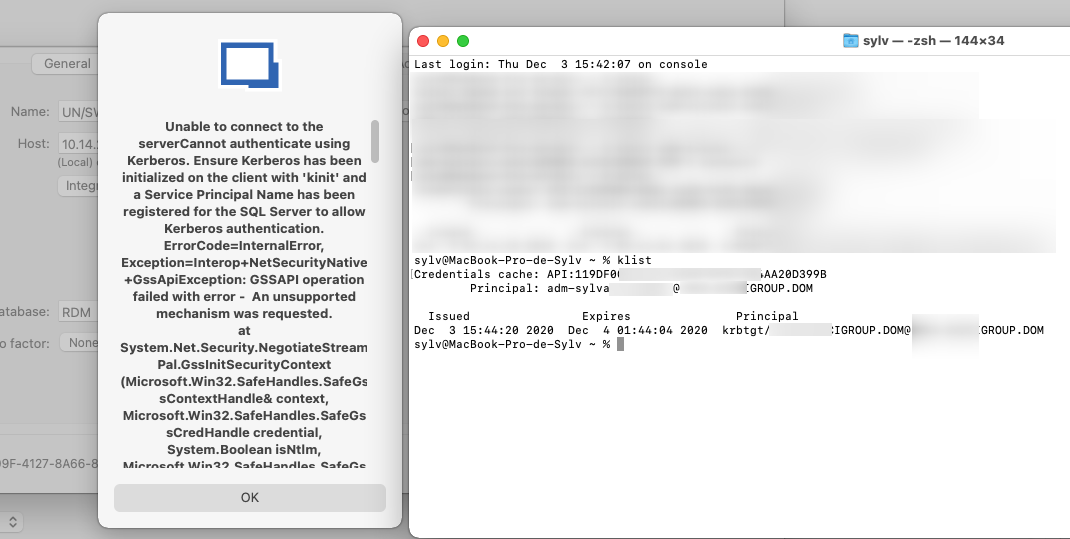
2020-12-03_16h16_45.png
Hi Sylvain,
Can you connect to your SQL Server with the Integrated authentication with vscode-mssql in Visual Studio Code?
I've attache a video showing how to test this.
Best regards,
Xavier Fortin
MSSQL - VSCode.mp4
Hi Xavier,
I just tried and I've got the same error, so maybe something is wrong with our SQL RDM Database...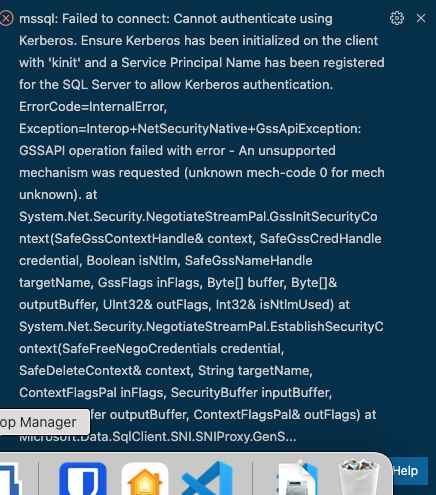
2020-12-04_09h01_42.png
Apparently it is because we are connected to our client from a VPN and cannot connect through a SQL database with integrated security AD. With RDM on Windows 10 we launch RDM app with a run as domain client admin user. I don't know if I can bypass this problem.
I'm honestly clueless here, this is well beyond my level of expertise on the subject. Especially since it's a very narrow and unusual use case (connecting to SQL Server with Integrated Security from a Mac). You could try to reach out to the Microsoft/SQL Server team to know if they have a solution for you or if they can help you troubleshoot it.
Xavier Fortin
Xavier,
I believe the errors being seen by peeps are due to the SPN not being set on the SQL Server. When SQL Server is run under a domain account there are certain steps a Windows Admin/SQL Server Admin has to do with the account to allow Kerberos Authentication.. Most companies don't do it because it will fall back to NTLM..
The Most important Step and one to be done by a professional at an Organization ( you can't screw this up lol, or Account could go haywire..) is allocating Permissions in Active Directory to the Service Account running SQL Server
1. Log into Domain Controller
2. Open ADSI Edit ( Extremely powerful Tool, dont screw this up) Domain Admins etc only have access
3. Find the account in question
4. Right Click Properties -> Security Tab
5.Select "SELF"
6.Click Advanced
7.Click Add
8.Click "Select Principal"
9. Search for Principal name ( What AD account runs SQL Server)
10.Scroll through and Make sure "Read servicePrincipalName" and "Read msDS-PrincipalName" are checkmarked
11.Click Ok
12.Click Apply
Steps needed to Verify if Account CHanged Worked
1. SQL Server Instance would then need to be restarted for it to take affect (Schedule a Change Control)
2.Connect to SQL SSMS or Azure Data Studio
3.Connect to Instance
4.Management -> SQL Server Logs
5.Right click the Log after the SQL Restart Time Frame -> View SQL Server Log
6.Looking for a log message that says "The SQL Server Network Interface library successfully registered the Service Principal Name (SPN) (More code in message specific to your environment)" in the message. If they don't see this then Kerberos will not work
There Mac Administrators also need to set up there krb5.conf ( https://web.mit.edu/kerberos/krb5-1.12/doc/admin/conf_files/krb5_conf.html) - there is an example and push it out to all macs ( Obviously you cannot help with this, nor would anyone on a forum, but someone in their organization should be able to )
Now I am using on MacOS Monterey ( Previously on older versions) w/ Enterprise Edition 2021.2.14-> With all this Set up When adding our License via the SQL Server Database we run into "UserLogin Required" if we choose Integrated Security (Active Directory) - Experimental.
Work Around:
1.Change it to SQL Login ( We create a SQL Login only for initial connection Only via the app itself with I believe RO or USer Rights ) - to bypass the User Login Required ( this is probably an issue with how your code calls the connection to save the Data source, but am not sure ) ( To save the initial Data Source) ( Basically has no rights inside of SQL At all, just public access)
2.We then Modify the DataSource for this back to "Integrated Security (Active Directory) - Experimental" and Kerberos Connections Are working ( Verified on the SQL Server Itself) and able to connect to Other Windows Instances etc with credentials etc
Hope this Helps
~SQLMuggle~
Hi SQLMuggle,
Thanks for the detailed post! This might very well help someone else!
Best regards,
Xavier Fortin