
RpR
RDM crash on start with Devolutions Cloud
Hi,
I've installed the new version and then it came to ask to install .NET 9.0.3.
I did that and launched remote desktop manager and it works.
Download .NET 9.0 Desktop Runtime (v9.0.3) - Windows x64 Installer
On my other computer I've installed the .NET 9.0.3 first and tried to open remote desktop manager (2024.3.29.0) but it still crashes.
After that I've installed the 2025.1.24.0 version and then it worked on the other pc too.
So my problem is fixed. Thx for the great support!
RDM crash on start with Devolutions Cloud
Hi,
I've removed everything related to .net from my computer.
Remote desktop manager prompted me to install .net:
Download .NET 8.0 Desktop Runtime (v8.0.14) - Windows x64 Installer
After the installation the problem remains the same.
The webview2 is already installed and I can't find it in "add and remove software"
RDM crash on start with Devolutions Cloud
Last week I've upgrade my remote desktop manager to version: 2024.3.29.0.
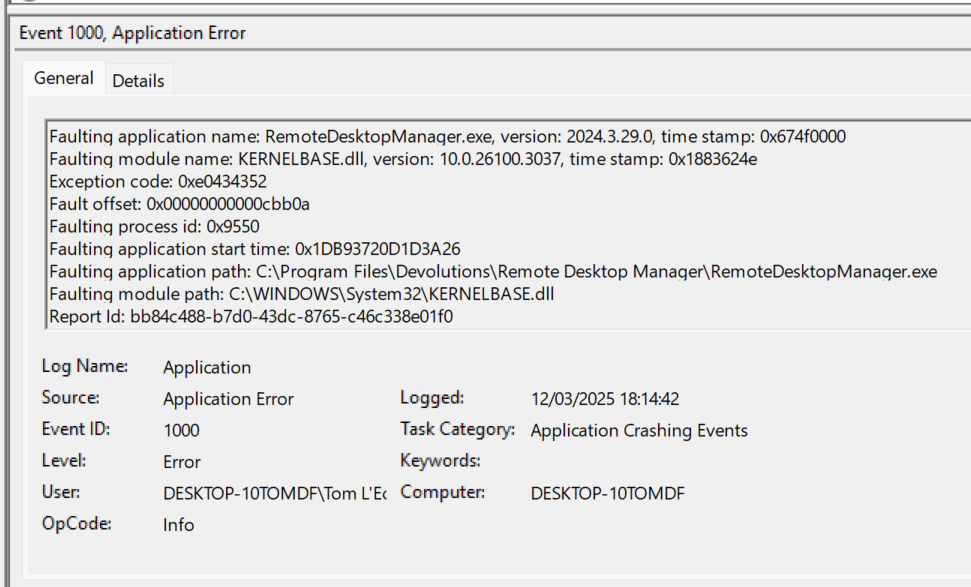
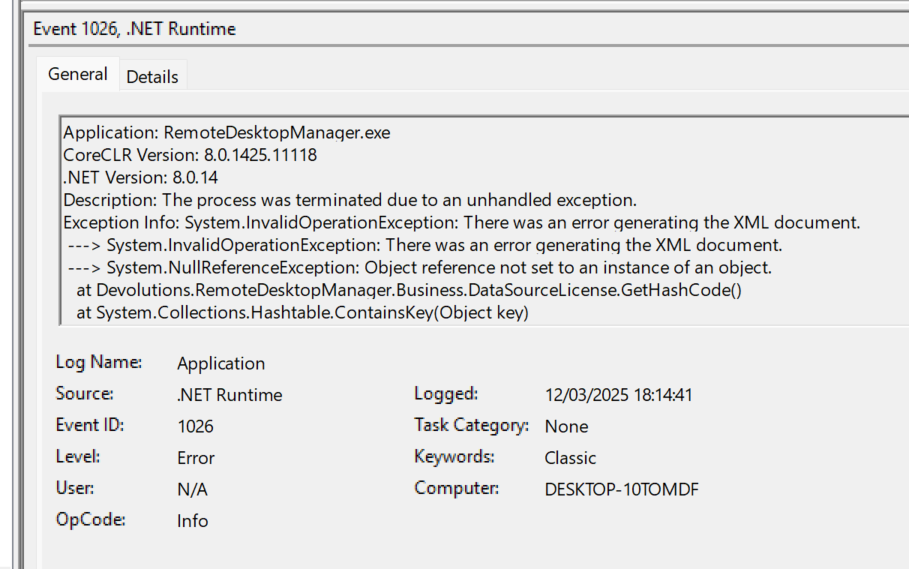
Been a week on vacation and now everytime when I open remote desktop manager it crashes when loading the Devolution Personal Hub datastore which was last edited 16 days ago.
I can see the entries and no error in the webversion.
I followed the following guide:
Remote Desktop Manager crashes from versions 2024.1 to 2024.3 - Devolutions Documentation
But it keeps crashing.
Even reinstalled an older version: 2024.02.21 but it also crashes so I think the problem has to do with the .NET version.
I've attached the eventlog screenshots.
Webpage autofill
Hi,
I am trying to test the browser autofill feature to log on to a web interface of a switch:

I've tried to follow this document:
It opens the page inside of a browser session in Remote Desktop but neither the login or password gets filled in.
I've used the discover function to locate the names of form elements. I've checked them in the html code and they are all correct.
Does this function require an add-on in a browser?
Passportal credential
Anyone has a link or short description how you can add a password credential from n-able passportal.
I've used it in the past but can't seem to create a new one and the old ones stopped working.
Connection to a Fortifient VPN on RDM Mac
There is an open source version of it:
GitHub - adrienverge/openfortivpn: Client for PPP+SSL VPN tunnel services
Implement openfortivpn
Any new about this?
Implement openfortivpn
Could you please implement openfortivpn as vpn option.
This would make fortissl vpn from mac available.
More info:
GitHub - adrienverge/openfortivpn: Client for PPP+SSL VPN tunnel services
Starting browser with specifc profile
I don't recognise the problems that you guys have.
How I find the correct launch parameter is quite easy.
Open the browser to the correct profile.
Pin it to the task bar.
Copy the taskbar icon to the desktop.
Watch the parameters on the icon.
I use 4 profiles:
Personal
Work 1
Work 2
Work 3
and it works everytime. In normale mode and incognito.
MS Edge Version 96.0.1054.43 (Official build) (64-bit
Starting browser with specifc profile
Hi,
this is the shortcut:
"C:\Program Files (x86)\Microsoft\Edge Dev\Application\msedge.exe" --profile-directory="Default"
Specific profiles. Name is always "Profile number"
--profile-directory="Profile 1"
--profile-directory="Profile 2"
Starting browser with specifc profile
Hi,
I am a IT consultant for multiple companies.
These multiple companies uses different tools for password managers.
I use MS Edge as my main browser and have multiple profiles for each company to only load the correct plugin for the correct profile. This to prevent 3 different password managers trying to fight for the password option.
Is there an option to make multiple edge browser options in the dropdownlist of the external webbrowser or to give a parameter option when opening Microsoft edge?
Passportal credential not working
I am running Remote Desktop Manager Enterprise Edition version 2020.2.20.0 64-bit
And using the Devolutions Online drive as data source.
Passportal credential not working
Hi,
I am trying to create a solarwinds passportal credential.

I enter in the e-mail / master password and Organization passphrase which I use to logon onto the site.
Then I got the 2 factor authentication window:

I enter the code but the results is empty:
