
Peter Cermak (POI)
Bitwarden Could not create SSL/TLS secure channel.
Thank you very much! that was it!
For others who might want to test ist:
curl https://your.url -svo /dev/null --tls-max 1.2
Something like this is bad:
* OpenSSL/3.0.10: error:0A00042E:SSL routines::tlsv1 alert protocol version
* Closing connection
Bitwarden Could not create SSL/TLS secure channel.
I use MSSQL as my Datasource - but why is this important for an cert issue?
My Version is
2023.1.1.5 on Kubuntu - here it's working perfectly as always
2023.3.35.0 64-bit on Windows10
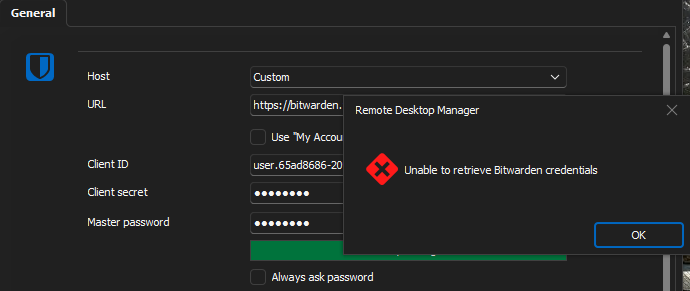
This is from my application log
PasswordManagerAccess.Common.NetworkErrorException: Network error has occurred ---> System.Net.Http.HttpRequestException: An error occurred while sending the request. ---> System.Net.WebException: The request was aborted: Could not create SSL/TLS secure channel.
at System.Net.HttpWebRequest.EndGetRequestStream(IAsyncResult asyncResult, TransportContext& context)
at System.Net.Http.HttpClientHandler.GetRequestStreamCallback(IAsyncResult ar)
--- End of inner exception stack trace ---
at System.Runtime.ExceptionServices.ExceptionDispatchInfo.Throw()
at PasswordManagerAccess.Common.RestTransport.MakeRequest[TContent](Uri uri, HttpMethod method, HttpContent content, IReadOnlyDictionary`2 headers, IReadOnlyDictionary`2 cookies, Int32 maxRedirectCount, RestResponse`1 allocatedResult)
--- End of inner exception stack trace ---
at PasswordManagerAccess.Bitwarden.Client.LoginCliApi(String clientId, String clientSecret, String deviceId, RestClient rest)
at PasswordManagerAccess.Bitwarden.Client.OpenVaultCliApi(String clientId, String clientSecret, String password, String deviceId, String baseUrl, IRestTransport transport)
at PasswordManagerAccess.Bitwarden.Vault.Open(ClientInfoCliApi clientInfo, String baseUrl)
at Devolutions.RemoteDesktopManager.Managers.BitwardenManager.InitializeAPIKey(String clientId, String clientSecret, String password, String customUrl, Boolean isSilent)
------------------------ extended stack ------------------------
at Devolutions.RemoteDesktopManager.Managers.LogManager.LogError(Exception e)
at Devolutions.RemoteDesktopManager.Managers.BitwardenManager.InitializeAPIKey(String clientId, String clientSecret, String password, String customUrl, Boolean isSilent)
at Devolutions.RemoteDesktopManager.Frames.CredentialSettings.FreCredentialResolverBitwardenSettings.BrowseCredentials()
at DevExpress.XtraEditors.Repository.RepositoryItemButtonEdit.RaiseButtonClick(ButtonPressedEventArgs e)
at DevExpress.XtraEditors.ButtonEdit.OnMouseUp(MouseEventArgs e)
at System.Windows.Forms.Control.WmMouseUp(Message& m, MouseButtons button, Int32 clicks)
at System.Windows.Forms.Control.WndProc(Message& m)
at DevExpress.XtraEditors.XtraControl.WndProc(Message& m)
at DevExpress.Utils.Controls.ControlBase.BaseWndProc(Message& m)
at DevExpress.XtraEditors.BaseControl.WndProc(Message& msg)
at DevExpress.XtraEditors.TextEdit.BaseEditWndProc(Message& msg)
at DevExpress.XtraEditors.TextEdit.AdvTextEditWorkingStrategy.WndProc(Message& msg)
at System.Windows.Forms.NativeWindow.Callback(IntPtr hWnd, Int32 msg, IntPtr wparam, IntPtr lparam)
at System.Windows.Forms.UnsafeNativeMethods.DispatchMessageW(MSG& msg)
at System.Windows.Forms.UnsafeNativeMethods.DispatchMessageW(MSG& msg)
at System.Windows.Forms.Application.ComponentManager.System.Windows.Forms.UnsafeNativeMethods.IMsoComponentManager.FPushMessageLoop(IntPtr dwComponentID, Int32 reason, Int32 pvLoopData)
at System.Windows.Forms.Application.ThreadContext.RunMessageLoopInner(Int32 reason, ApplicationContext context)
at System.Windows.Forms.Application.ThreadContext.RunMessageLoop(Int32 reason, ApplicationContext context)
at System.Windows.Forms.Form.ShowDialog(IWin32Window owner)
at Devolutions.RemoteDesktopManager.Managers.ActionManager.EditConnection(IConnectionSource source)
at Devolutions.RemoteDesktopManager.Managers.SessionMenuManager.MnuEditConnection_Click(Object sender, EventArgs e)
at DevExpress.XtraBars.BarItemLink.OnLinkClick()
at DevExpress.XtraBars.BarButtonItemLink.OnLinkAction(BarLinkAction action, Object actionArgs)
at DevExpress.XtraBars.ViewInfo.BarSelectionInfo.ClickLink(BarItemLink link)
at DevExpress.XtraBars.ViewInfo.BarSelectionInfo.UnPressLink(BarItemLink link)
at DevExpress.XtraBars.Controls.CustomLinksControl.OnMouseUp(MouseEventArgs e)
at System.Windows.Forms.Control.WmMouseUp(Message& m, MouseButtons button, Int32 clicks)
at System.Windows.Forms.Control.WndProc(Message& m)
at DevExpress.XtraEditors.XtraControl.WndProc(Message& m)
at DevExpress.XtraBars.Controls.CustomControl.WndProc(Message& msg)
at System.Windows.Forms.NativeWindow.Callback(IntPtr hWnd, Int32 msg, IntPtr wparam, IntPtr lparam)
at System.Windows.Forms.UnsafeNativeMethods.DispatchMessageW(MSG& msg)
at System.Windows.Forms.UnsafeNativeMethods.DispatchMessageW(MSG& msg)
at System.Windows.Forms.Application.ComponentManager.System.Windows.Forms.UnsafeNativeMethods.IMsoComponentManager.FPushMessageLoop(IntPtr dwComponentID, Int32 reason, Int32 pvLoopData)
at System.Windows.Forms.Application.ThreadContext.RunMessageLoopInner(Int32 reason, ApplicationContext context)
at System.Windows.Forms.Application.ThreadContext.RunMessageLoop(Int32 reason, ApplicationContext context)
at Devolutions.RemoteDesktopManager.Program.Main(String[] args)
Bitwarden Could not create SSL/TLS secure channel.
Hi,
I get an Error when i try to connect to my Bitwarden - only inside RDM
All apps, Android, Linuix, Windows and the webinterface accept the cert and work perfectly fine.
I even checkd the RDM Setting "ignore application certificate errors"
PasswordManagerAccess.Common.NetworkErrorException: Network error has occurred ---> System.Net.Http.HttpRequestException: An error occurred while sending the request. ---> System.Net.WebException: The request was aborted: Could not create SSL/TLS secure channel.
This message is mcuh longer but doesn't contain any useful information, for example WHAT the real problem for this TLS connection is!
This happened since i moved my Vaultwarden instance to a different Docker host. Before taht move it worked perfectly fine in RDM also.
Is there some kind of Cert cache inside RDM i could delete?
Can you please help me?
Regards
Peter
Powershell Run As AND Administrator (elevated) not working together
I solved my requirement by installing and using gsudo.
Powershell Run As AND Administrator (elevated) not working together
Hi
I'm usind RDM Version 2022.2.24.0 64-bit
I created a session to open a Powershell and my goal is:
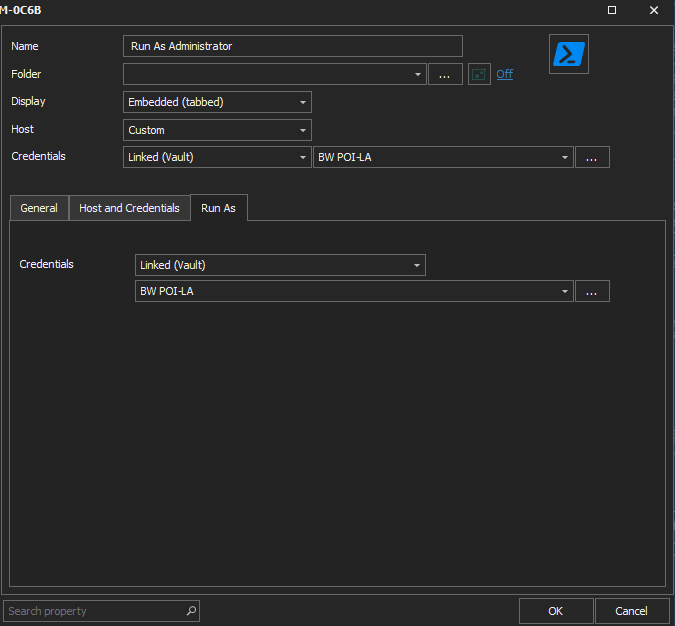
Use a saved credential AND get an elevated Powershell (of course wiht uac prompt) session running as this user from the saved credentials.
My Problem:
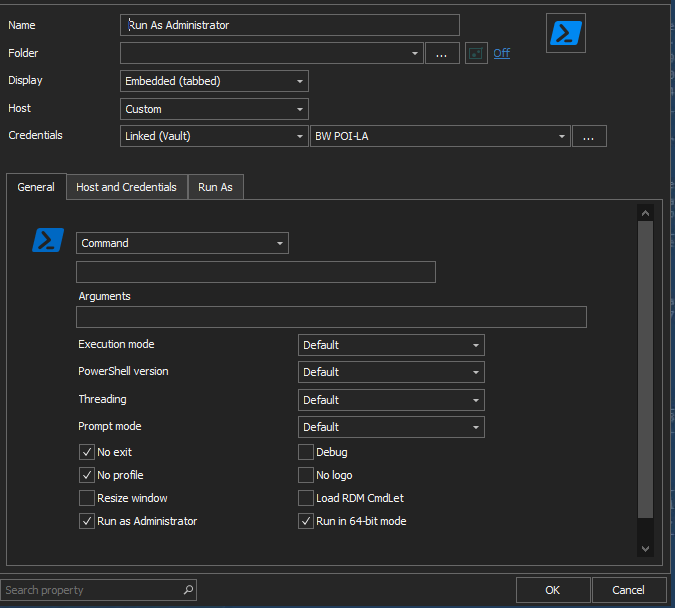
When i cofigure the Run As part the powershell starts as this user (which works as intended) but NOT elevated!
When i check the box "Run as Administrator" it as me f username and password. So the credentials are NOT used when i request an elevation.
See the screenshots how i configured the session. It "looks" ok, but it doesn't do what i configured / want.
Add Ctrl+Alt+End to Special Commands
Yes, of course!
With Multiple Layers of RDP Sessions this keys are caught by the first Session.
I wonder why nobody else is missing this!
Add Ctrl+Alt+End to Special Commands
Can you please add Ctrl+Alt+End to Special Commands?
It is required for many Sesssion in Session Operation.
Thanks Peter
Error in Powershell function Get-RDMUser
Thanks, that worked.
We use MSSQL as out datasource.
Could you please use the Powershell Version numbers correctly (it's still 1.0!!) insinde the pds1 files not just teh corresponding dll ?
And there are still Messageboxes when Errors occur - very bad for full automation!!
Error in Powershell function Get-RDMUser
I'm on version 20.19.2.16.0
When i ty to execute
Get-RDMUseri get this error
Get-RDMUser : Cannot retrieve the dynamic parameters for the cmdlet. Object reference not set to an instance of an object.
At line:1 char:13
+ $RDMUsers = Get-RDMUser
+ ~~~~~~~~~~~
+ CategoryInfo : InvalidArgument: (:) [Get-RDMUser], ParameterBindingException
+ FullyQualifiedErrorId : GetDynamicParametersException,RemoteDesktopManager.PowerShellModule.GetRDMUserCommand
Get-RDMSession and other cmdlets work fine.
RDM hangs after Tab-Switch
I upgraded to 20.19.2.16.0 then deleted my private vault and I have not had any issues.
RDM hangs after Tab-Switch
Hi,
My RDM freezes (i'm the only on in the Company using the latest version ) when i switch RDP Tabs - this can take up to 2 minutes.
With this version it's also hard to manage Users/Roles. There are all kind of strange mesages like - while editing / saving a user
Cannot find Login '' because it doesn't exist or you do not have permission...
SQL Schema Error 14.0.9.0 x64
i have this issue in this version: 2019.1.21.0
Can you please help me?
Integration SecretServer nach Update auf Version 13 funktioniert nicht mehr
Hi,
We have the same problem!!
Please make this urgent!
Thanks
Peter
session in private vault using a credential repository wich is in the "all entries"
Thank you!
Looking forward to get this feature back!
Regards
Peter
session in private vault using a credential repository wich is in the "all entries"
We want sessions in the private vault which connect with the normal shares central Credential Repository (Secret Server).
This has been working in previous versions (11.x)
session in private vault using a credential repository wich is in the "all entries"
Why?
We have users who want to connect to "their" machines using Credentials from the central Credential Repository (Secret Server).
This (Private Vault + Credential Repo) has been working in previous versions!
Can you make this working again please?!
thanks Peter
Recurring Error Boxes
Hi,
i tried as Administrator with Version 12.5.4.0 (Still waiting for Custom Installer for 12.6.0.0):
File - Export - Export All Entries (HTML)
Then every second i get the Popup like the screenshot. I suppose the message can come up to a few hundred times, can not be aborted and blocks RDM completely
Can you make a button like "Don't show this error anymore".
Feature Request: PowershellGallery
$objUser= Get-RDMUser -name "MyDomain\User"
$objUser.UserInfo.UserProfile.Department = "MyDepartment"
Set-RDMUser $objUser
Feature Request: PowershellGallery
I see your point. But nevertheless it would be easier if you had a "standard" module which just throws an error if RDM is not installed. Just like if a webservice is not available.
BTW: the annoying popus are still there if an Error in one of your powershell functions occur! <- So we cannot really automate the session management!
Feature Request: PowershellGallery
Hi,
At the moment you have Powershell module which is located in the RDM Install Directory.
We would like to manage/download the module via standard PowershellGet from https://www.powershellgallery.com
RDM 12.5: Focus Tab Group on Connection
This "new" default behavoiur ind the MAIN production version is indeed very annoying! Could you make a "working" version productive (not hide it in beta).
Powershell and the "WHY NOT"?
What about:
Remove-RDMSession opens an Error Message (blocking script) on permission issue, see screenshot
Can you somehow manage that PS-commands don't trigger Messageboxes from the Application?
Powershell and the "WHY NOT"?
It does NOT take 17 seconds if i load the module and datsource in an extra Powershell SessionHi,
Powershell and the "WHY NOT"?
My current Version: 12.0.8.0
Win10
[Executionpolicy]
It should work also with MachinePolicy RemoteSigned
Scope ExecutionPolicy
----- ---------------
MachinePolicy RemoteSigned
UserPolicy RemoteSigned
Process Undefined
CurrentUser Undefined
LocalMachine Bypass
Starting Powershell from the UI takes 17 seconds after displaying this message:
......
+ Set-ExecutionPolicy -Scope Process -ExecutionPolicy Bypass;
+ ~~~~~~~~~~~~~~~~~~~~~~~~~~~~~~~~~~~~~~~~~~~~~~~~~~~~~~~~~~
+ CategoryInfo : PermissionDenied: (:) [Set-ExecutionPolicy], SecurityException
+ FullyQualifiedErrorId : ExecutionPolicyOverride,Microsoft.PowerShell.Commands.SetExecutionPolicyCommand
P
Powershell and the "WHY NOT"?
How can i set the Department and other fields visible in the GUI with Get-RDMUser + Set-RDMUser ?
PS C:\Users\admcer> $rdmuSERS[16] |fl *
CreateSQLServerLogin : False
IntegratedSecurity : False
Name : MyDomain\User1
Password :
UserInfo : Devolutions.RemoteDesktopManager.Business.Entities.UserEntity
UserType : 3
CanAdd : True
CanDelete : False
CanEdit : True
ConnectionOverrides :
CreationDate : 01.01.0001 00:00:00
CustomSecurity : <?xml version="1.0"?>
<CustomSecurity>
<DenyAdd>
<string>4bb0fe61-7559-4959-866b-236f47e26e2c</string>
<string>60b51bb0-b84d-463a-8cf7-4dc68dec381b</string>
</DenyAdd>
<DenyDelete>
<string>4bb0fe61-7559-4959-866b-236f47e26e2c</string>
<string>4f1f6442-f947-4ce6-ac4a-1dd71b3a3e79</string>
<string>60b51bb0-b84d-463a-8cf7-4dc68dec381b</string>
<string>95acdac9-b646-43b1-9dde-22ce8bc57f0f</string>
<string>f533319a-9346-43d1-b411-f63adc210902</string>
</DenyDelete>
<DenyEdit>
<string>4bb0fe61-7559-4959-866b-236f47e26e2c</string>
</DenyEdit>
<IntegratedSecurity>true</IntegratedSecurity>
</CustomSecurity>
DataSourceID : 00000000-0000-0000-0000-000000000000
Description : ISW
Email : peter.cermak@porscheinformatik.at
LoginEmail :
FirstName : ISW
GroupInfos : {4f1f6442-f947-4ce6-ac4a-1dd71b3a3e79, 4bb0fe61-7559-4959-866b-236f47e26e2c, f533319a-9346-43d1-b411-f63adc210902,
95acdac9-b646-43b1-9dde-22ce8bc57f0f...}
ID : 8570949c-5387-4a25-a284-76e9b1e70360
IsAdministrator : False
IsEnabled : True
IsLockedOut : False
IsNew : False
IsOwner : False
IsTemplate : False
LastLockoutDate :
LastName :