
Bill Frisbee
Missing Sessions
Hello,
I would like to schedule a session with you to attempt to recreate the issue on my end. I will send you a link via email to request the session.
Best regards,
Thank you.
Missing Sessions
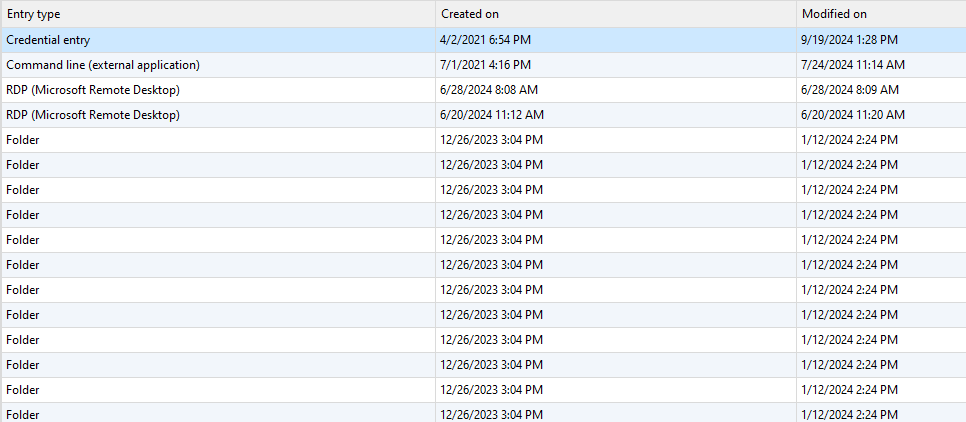
Nothing valid. Here is a partial. The entries that are MIA are from this year.
Missing Sessions
Most entries were created without a template. Some of the web pages were copied from existing entries.
They are not just website entries. Some are host entries in another vault.
RDM is version 2025.1.29.0.
I don't have a recording of the steps that led to the issue. They just disappeared. When I attempt to move an invisible entry and check the logs, there is nothing. I'm not seeing anything in the deleted entry list either. When I export all the items to a CSV, the missing one(s) remain MIA.
Going into powershell, I cannot see the missing entries there either. I know last week I added about 6 host session entries. I put a lot of information in the description and the entire entry is gone. I can only find them via multi-vault search. There were 6 entries that I created in the last week (3/28/2025). I can recreate them, so I deleted them. They appear in the deleted entries now. I restored them and they are now visible. Of note, when I deleted them, there were two other items that got deleted with them. The Folder and another entry (spreadsheet). I could now see them in deleted and restored them.
I have cleared my local cache, done database validation, update, test, all without errors.
Missing Sessions
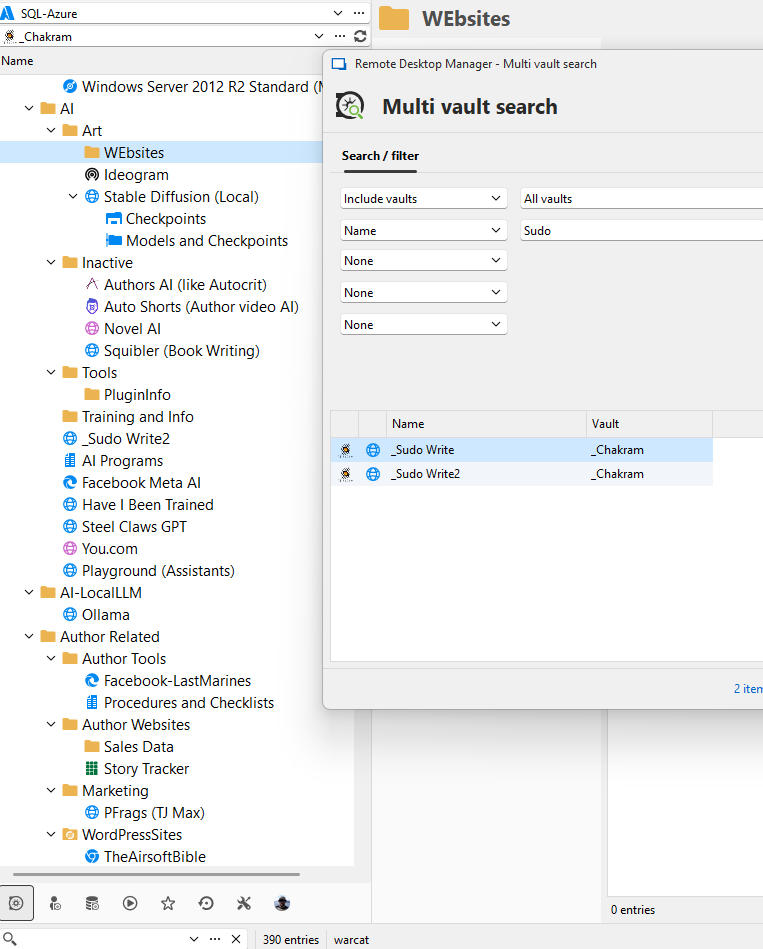
It should be noted that an export shows 446 entries to be exported, and the item down at the bottom shows 390 entries. When I import back into another vault, it does not show the missing items, even with a multi-vault search.
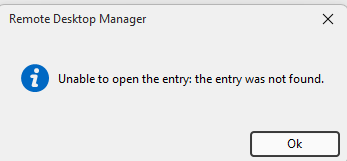
I have the same issue in another vault as well and this has occured after any db upgrades. In another vault these are host entries. When I try to find that entry in the vault I get this;
Missing Sessions
I have a problem in that a lot of my sessions have disappeared and I just realized this. For example I have a session called "_Sudo Write" (and about 20 others in this section). When I do a multi-vault search I see it, but it does not show up in my navigation pane. This is a SQL-Azure database. I am not auto-hiding archived or expired items. In the example below I found the "_Sudo Write" entry and duplicated it (the duplicate did not have the website). The duplicated item does appear here now, but the original does not.
Where have my other entries gone? How can I get them back? I've checked to see if they are archived. When I right click on the missing entry and go to properties, nothing happens. Furthermore this is occurring on multiple systems.
Any suggestions/ideas? Missing things like this is worrisome. They seem to be there but are invisible or corrupt.
Different Domain Authentication
I will intervene just in case I get lucky.
I remember when I wrote the help topic below, I was surprised that SSMS showed my local username rather than the remote, and I has discovered that you had to run a query to get the identity from the server itself "e.g. SELECT SUSER_NAME()"
Manual RunAs - Devolutions Documentation (two screenshots at the bottom)
You say that "but it still shows me as being in my domain and not the target domain.", it could be the same problem that I had. How did you confirm that you were running under the local identity?
I was able to do the "RunAs" and pointed it to cmd instead of RDM. Running the command "whoami" told me my user context. My first thought was to use RDM to launch another RDM instance in the proper context (netonly is cool) but it did not cooperate. Then I tried a command line, then powershell. No joy.
Different Domain Authentication
I am a consultant using Remote Desktop Manager. I have my own RDM license and I use it extensively. My laptop is on a different domain (there is no trust). I have an Active Directory account on the client's domain and that account should have permission to connect to their RDM SQL database.
Is there a way to add their data source to my current RDM installation so I can switch between mine and theirs? I've tried to run another instance with runas and /netonly but it still shows me as being in my domain and not the target domain. For reasons I do not think they would want to create a SQL server account.
Is this doable?
Thank you.
Run Powershell script against multiple Selections?
Allow me to clarify.
Is there a way to select multiple items in the navigation pane and then send that list of selected items to script OR dump them into a text file I can reference through a script? Using $HOST$ or something like that?
Run Powershell script against multiple Selections?
If this has been asked before, I apologize as my google fu is weak with the proper terms and I couldn't find anything.
My goal is simple. I would like to select multiple entries (in Navigation or Entries tab) and run a script against them. I would like a single script instead of multiple scripts, so that the script is fed a list of servers rather than running one script multiple times. For example, checking different servers for a certain user log on, or for a certain registry entry and the output is sent to one screen (or something like out-gridview)
Is this possible?
Thank you!
Adding tags (or IP addresses) enmasse
Here is the script that ended up working for me;
#Change to the correct vault
$Vault = Get-RDMVault -Name "VAULTNAME"
Set-RDMCurrentRepository -Repository $Vault
#Read the CSV, retrieve the associated entry, and update the tag
Import-Csv "C:\Temp\RDM\SessionList.csv" | ForEach-Object {
write-host "Running against: $_.Name"
$Session = Get-RDMSession -Name $_.Name
$tags = $Session.MetaInformation.Keywords
$tags = $tags += ' MCS '
$Session.MetaInformation.Keywords= $tags
Set-RDMSession $session
}
#refresh the entries
Update-RDMEntries
With the C:\Temp\RDM\SessionList.csv being formatted as follows:
Name
Session1
Session2
Session3
etc
Thank you!
Adding tags (or IP addresses) enmasse
Thank you very much. That is awesome. I will give it a try.
Adding tags (or IP addresses) enmasse
Awesome thank you.
To be a little more clear I'm not pulling the list of servers from RDM, I have a list there that is synchronized with Active Directory (and since DNS is borked it doesn't work well). I am exporting a list from a management console, or using a powershell command and dumping that list into an Excel file because that console allows me to identify specific properties of servers (such as manually provisioned versus cloned). Both system types are in various OU's and there is not a consistent naming pattern.
Perhaps I could export excel to XML and load that in the advanced search? If I could do that then I could easily tag them all in RDM.
Essentially, I dump a list of servers into excel, fliter on the properties I want and then I can cut and paste those systems into notepad or excel. So I need a method to match names from my list with names inside RDM and then apply the tag.
Is that doable?
Thank you.
Adding tags (or IP addresses) enmasse
An odd situation I'm not sure how to address.
I rely on the search feature with RDM as I have hundreds, sometimes thousands of session in different vaults. For example, I have one client with about 3K servers. I sync the servers into RDM which is great. However, there are some difference in these servers I would like to identify. I can add a tag and that helps, but when I need to add that tag to twenty servers in different OU's and locations, this becomes a very mind numbing task, especially if done one a regular basis.
Is there a way to feed a list of servers to either the GUI or using powershell so that I can identify these servers and then add a specific tag?
More details. Of the 3k servers, there are 40 of them that are manually provisioned. I may need to log onto these 40 servers to perform a certain task (like change a registry key) or run a script against. If I can type the tag into the search bar -poof! They are all listed where I need them, regardless of OU or location in the RDM structure.
I have other tools that I can export a list of the specific servers but I don't know how to integrate the knowledge from the other tool into the RDM. In theory, I could import them into a specific folder but then I have duplicates. It would also be nice if I could use that tool to replace the session host with an IP address because one client has a global DNS infrastructure that does not work very well.
Thank you.
Documentation pages gone missing
Hello Stéfane,
The chance of me using two different data sources are nil. I am using Duo MFA and Azure SQL. I live and breathe that database and connection. I cannot duplicate this issue at the moment and I'm not sure exactly when it disappeared, only that over a space of two days it did. I want to make sure I'm not going crazy because if it happens again this could be a very big problem, and I hope I'm not going crazy.
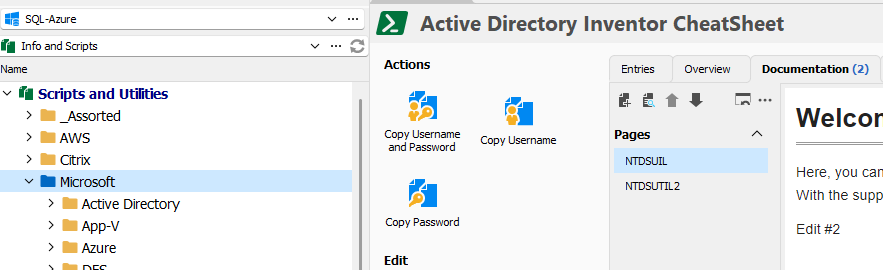
More details on my setup. I have several vaults in my database. Rarely do I use the instances to go into the same vault. One of these vaults is "Info and Scripts". In this case I am launching the RDM instance as User#1, making changes to the documentation for Microsoft folder as below. I make some changes, edit the documentation, save the changes.
On another Windows Desktop (Same computer just different virtual desktop), I run RDM as a different user so I can change the colors and keep track of the different things that I run. To my surprise actually, I go to instance #2 running as User#2 on desktop #2 and I see the changes are there without having to do a refresh (and I think I was in that vault already to test).
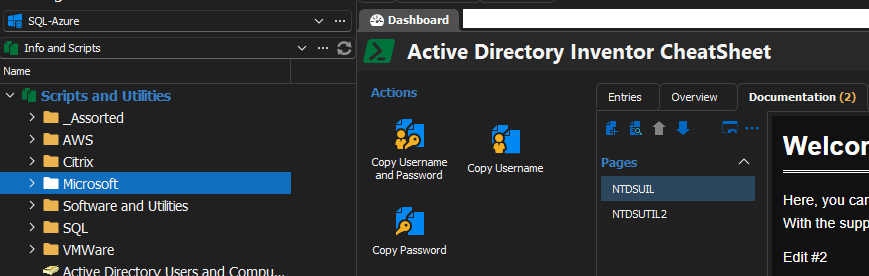
I change vaults go back and it is there.
Documentation pages gone missing
The version is 2023.2.22.0 64bit. The backend database is Azure SQL database. It wouldn't' surprise me if it is just me.
I MIGHT have seen it before. I'm not 100% and might have chalked it up to not saving or something like that.
I am a power user and use it in different ways, that might complicate things. RDM is my second brain. For example I use it for personal use and business use. I may run different instances on my computer and I may use it connected from a client (or two's) network, all simultaneously. On my regular PC I launch two instances, with one run as a different user (runas.exe)context so there is different profiles and such. I do use different vaults as well and I use different Windows desktops (one for work, for home).
So I'm wondering if it was cache related. The document was not uploaded to the cloud properly when I shut it down. Though I would think the cache it is using would be in the windows user profile but I'm not sure. I made the changes a day or three ago, and recently noticed it was gone.
Documentation pages gone missing
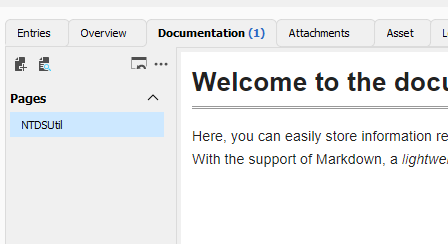
Major problem here and I'm not sure what happened but I put in some documentation. Lot of information. I'm loving the option. Several pages. There were several pages and I'm pretty sure I saved them. Has anyone else seen this?
HOWEVER, I just went back and the documents are gone. Just gone. The one document I was starting is reset to default but it kept the name. I went through the vault looking in case I put it somewhere else by accident. No.
This is several pages of docuimentation that disappeared. Nothing in deleted history. Now I've got the heebie jeebies about keeping documentation in the system. In the example below I had a bunch of NTDSUTIL commands, another page for some other AD commands. Nothing I can't google BUT to see the documentation disappear like that is a problem.
Remote Desktop Manager 2022.3 - BETA
Hello. One problem I'm encountering is the inability to type into some web pages, such as typing into the password field, or an OTP field. This occurs when the back end engine is chrome but MS Edge seems to work, however, I do think that I encountered it where I could not type into a MS Edge based website.
When this occurs it will not take any keyboard input BUT I can right click and paste into that field (but cannot CTRL + V)
Taking Notes
I might have found something that will work. The "Editor" Form section and "Rich Text Editor" seems to be functional. The document is created in the database but I don't seem to have to download it, make changes and then upload it again.
Thank you Min. You may have set me on the path. Not quite as polished as I would like but I think it will work well.
Taking Notes
Hey Bill,
try out the HTML Editor - maybe this is what you're looking for 😉
Regards,
Min
I'm not quite sure that works right, or I'm missing something. I have to open and edit the object to make any changes. I can VIEW it in a tab but can't make any changes. I want to make notes on a client or project and keep it in the vault, which can help with documentation. With logging on, I can open a note document when I start working and close it when done. Can help with billing and time management in that way, but it would be nice to have a tab.
Taking Notes
Has anyone found a good way to keep notes in a vault?
While the "Documentation" feature sort of works, sometimes I want a tab where I can open quickly, instantly start typing, maybe paste pictures and tables, etc.
A little background. I'm a computer consultant. I keep my database secured in an Azure database. I may jump into various client networks and use a portable version. I've experimented with using Onenote and using a web page for notes but that also seems a bit clunky and authentication tends to be a pain sometimes because every time I open the note I have to jump through hoops authenticating. Put in password, enter MFA, etc. Very unpleasant.
But I want to keep things integrated and mobile with RDM.
Any solutions/suggestions?
Thank you!
Embedded Script View for Script Repository
Wow. You guys are awesome! Thank you!
OTP as part of username
I agree with Travito. That hypen is important. It wouldn't surprise me if other companies used something similar. Thank you.
Azure SQL and outbound firewall lock downs
The entries I would connect to are RDP, maybe web, possibly SSH.
Devolutions Gateway is not an option unless it is free. This is a client I work with sometimes, and I'm not the only engineer. My use of RDM within my company is not exactly frowned upon, but certainly is not supported on scale. I pay for it out of my own pocket because it is that helpful. There may be other clients I work with that use high levels of security (A state prison is one example). I'm finding it more and more where they only allow outbound HTTPS, and even that is tightly controlled.
Azure SQL and outbound firewall lock downs
What is the best way to handle a situation where I have the RDM Database hosted in Azure (with IP lockdowns, MFA, etc) and I trying to access computers on a client's network from a jumpbox?
I can VPN into the network and I have full control of the Jumpbox. I had RDM installed there but for security reasons they closed outbound SQL. There are some severs on other subnets that I cannot access directly from the VPN tunnel.
I think my options are as follows;
Configure Azure SQL to accept incoming connections to port 443 and route them to 1433 on the instance. (Not sure if this can be done or how difficult it would be)
Use the RDM Agent on the Jumpbox (which sort of seems to work, but gets weird with OTP connections AND when RDM launches it whines about not connecting to the DB asking about a VPN connection). I may have to connect to multiple systems. This might work but gets peculiar as I have an RDM session in an RDM sesssion which can't really connect. Perhaps I don't fully understand how the agent works? This might also be an interesting conflict because connecting to target machines requires DOMAIN\USERNAME-$OTP$ for the username.
Are there any other options or recommendations?
Thank you.
Support 2FA on RDP session with OTP
James,
You're welcome. I'm a super big fan of Remote Desktop Manager. Been using it for years and love it. Keep up the good work and rock on!
-Bill