Documentation pages gone missing

Major problem here and I'm not sure what happened but I put in some documentation. Lot of information. I'm loving the option. Several pages. There were several pages and I'm pretty sure I saved them. Has anyone else seen this?
HOWEVER, I just went back and the documents are gone. Just gone. The one document I was starting is reset to default but it kept the name. I went through the vault looking in case I put it somewhere else by accident. No.
This is several pages of docuimentation that disappeared. Nothing in deleted history. Now I've got the heebie jeebies about keeping documentation in the system. In the example below I had a bunch of NTDSUTIL commands, another page for some other AD commands. Nothing I can't google BUT to see the documentation disappear like that is a problem.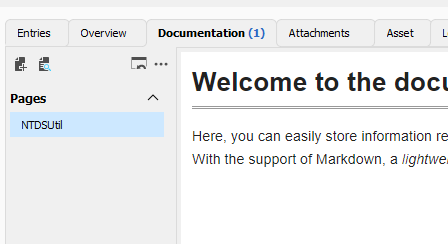
To say can't is to fail before you begin
40af4e5b-1e42-4eb6-b3a1-11c5b45e1cfc.png
All Comments (5)
Hello Bill,
Thank you for reaching out to Devolutions Support.
I have a few questions which you can hopefully answer.
- Which version of RDM are you using?
- Which type of data source are you using?
Do you have more than one entry affected by this, or did this occur on a single entry?
Let me know,
Best regards,
Samuel Dery
The version is 2023.2.22.0 64bit. The backend database is Azure SQL database. It wouldn't' surprise me if it is just me.
I MIGHT have seen it before. I'm not 100% and might have chalked it up to not saving or something like that.
I am a power user and use it in different ways, that might complicate things. RDM is my second brain. For example I use it for personal use and business use. I may run different instances on my computer and I may use it connected from a client (or two's) network, all simultaneously. On my regular PC I launch two instances, with one run as a different user (runas.exe)context so there is different profiles and such. I do use different vaults as well and I use different Windows desktops (one for work, for home).
So I'm wondering if it was cache related. The document was not uploaded to the cloud properly when I shut it down. Though I would think the cache it is using would be in the windows user profile but I'm not sure. I made the changes a day or three ago, and recently noticed it was gone.
To say can't is to fail before you begin
Hi Bill,
Thank you for the nice writeup. I think I have an idea what might be happening.
Could it be that you have two (or more data sources) configured within the same RDM? The reason I ask is I was able to reproduce something similar (lost some data) with the following steps:
- Connect to data source A (SQL Server)
- right-click > View > Documentation
- Change to data source B (SQL Server)
- Edit a page of documentation
- Back to data source A
- CTRL + refresh
- You should have lost the information
I will log this to be fixed.
Best regards,
Stéfane Lavergne
Hello Stéfane,
The chance of me using two different data sources are nil. I am using Duo MFA and Azure SQL. I live and breathe that database and connection. I cannot duplicate this issue at the moment and I'm not sure exactly when it disappeared, only that over a space of two days it did. I want to make sure I'm not going crazy because if it happens again this could be a very big problem, and I hope I'm not going crazy.
More details on my setup. I have several vaults in my database. Rarely do I use the instances to go into the same vault. One of these vaults is "Info and Scripts". In this case I am launching the RDM instance as User#1, making changes to the documentation for Microsoft folder as below. I make some changes, edit the documentation, save the changes.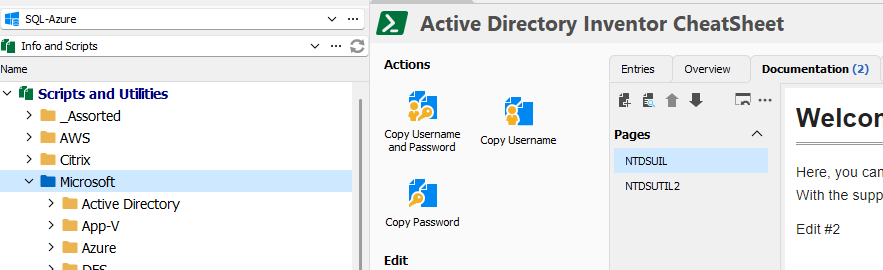
On another Windows Desktop (Same computer just different virtual desktop), I run RDM as a different user so I can change the colors and keep track of the different things that I run. To my surprise actually, I go to instance #2 running as User#2 on desktop #2 and I see the changes are there without having to do a refresh (and I think I was in that vault already to test).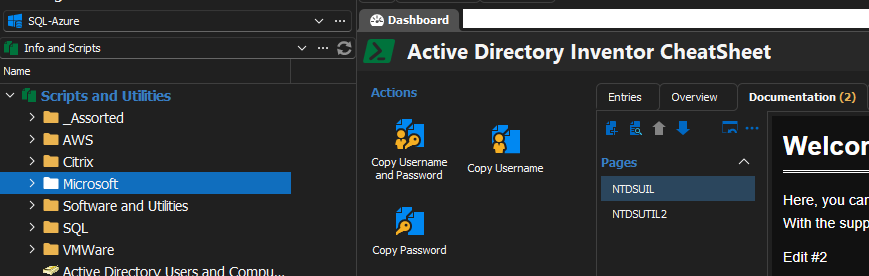
I change vaults go back and it is there.
To say can't is to fail before you begin
0fd83b7c-6ebc-40fb-8292-8240237f3ec0.png
71cea1b6-2727-4180-b575-de2aca32694a.png
Thank you for the information. We've added this information to our internal bug tracking system. I should be helpful in debugging the issue.
Best regards,
Stéfane Lavergne