Remote Desktop Manager 2022.3 - BETA
Hello everybody,
We are really happy to release RDM 2022.3 beta version.
This is a major update and requires a database update but the new database format is compatible with the previous version except for the sub connection (they now have their own row in the database).
However, please backup your database before installing this beta for a maximum of safety.
- Devolutions Server users: DVLS 2022.3 will be required and it will be soon available in beta. Please wait for for the release please.
- RDM Free and RDM Enterprise are now merged in the same installer. Just select the SQLite, DOD or Password Hub Personal to use the Free version. (Blog coming soon). We don't remove anything. This means that if your data source are no longer configure, don't worry your data must still be on your machine.
- There is no local registration anymore, everything is now in the ribbon Licenses and each user need an assigned license.
Download:
https://cdn.devolutions.net/download/Devolutions.RemoteDesktopManager.Bin.2022.3.12.0.zip
https://cdn.devolutions.net/download/Setup.RemoteDesktopManager.2022.3.12.0.exe
New features:
- Added Apple Remote Management connections support
- Added ARM64 support
- Added automatic antimalware file scanning feature
- Added Devolutions Gateway support in Hub Business
- Added key file security provider
- Added markdown WYSIWYG documentation editor
- Added native SMB connection type
- Added PAM vault navigation tab
- Added permission sets to RDM
- Added rz&sz command support to SSH and Telnet terminals
- Added Template Group management
- Added VNC support for RealVNC system authentication with encryption ("Always On") and Raspberry Pi connection
- Enhanced UI theme (Windows 11 look and feel)
- Implemented attachment and documentation support for sub connections
- Improved inventory management and remote management integration in the dashboard
- Improved the Quick Search with detail view
- Initial MSRDC Azure Virtual Desktop credential injection
Breaking changes:
- Enable "Log user vault activities" by default
- Marked XenServer Console as deprecated
- New default installation path in Program files instead of Program Files (x86)
- Removed Citrix ICA support
- Removed support for WebDav, FTP, SFTP, Web and S3 data sources
- Renamed RemoteDesktopManager64.exe to RemoteDesktopManager.exe
- Statusbar color no longer supported
- User license must be set in the data source
Security changes:
- Added on Application Lock Devolutions Web Login extension locks as well
- Fixed a security issue allowing to view shared credentials from the user vault
- Fixed issue in My Account Settings where Dashlane Password and KeePass Server Password were not obfuscated
- Fixed possible security issue with delete user in MySQL
Release notes:
https://devolutions.net/remote-desktop-manager/release-notes/beta
David Hervieux
All Comments (35)
Hello,
Please note that the RDM Beta is not yet compatible with Password Hub Business either. We will make an announcement once it is possible to connect to that type of data source.
Best regards,
Richard Boisvert
First of all, thanks for creating such a great product. I have been enjoying it for a couple of years.
I'm a RDM Free user. I installed the new version manually via browser, as the updater executable would only find the 2022.2.26.0 "free" version. My initial issues below caused me to have to roll back to 2022.2.26.0 version for the time being.
- The installer uninstalled the "free" version as expected to install the new merged version. The shortcut for the free version didn't get removed from the ProgramData folder.
- All of my host/credential entries showed up properly, however I have to re-acknowledge all of the SSH keys upon first connect.
- I have multiple SSH->SSH->RDP connections (connect to our datacenter, then to the client's datacenter, then to the RDP target). Those connections stopped working entirely. It would connect to the gateways properly, but the RDP session would say "Connecting to" instead of "Connecting to localhost:randomport". The connections would not complete and also didn't appear to timeout. There were no error messages.
- Previously working SSH connections stopped understanding CTRL+] (the telnet close connection) command. CTRL-Z and CTRL-C continue to work properly.
Now on the other hand, the app seems a bit snappier and I dig the new look (that I could see before I had to roll back) with the rounded tabs and whatnot.
I'm happy to do some additional testing if you like -- just let me know what you'd like to see. I made no changes at all in any of the hosts or the global settings before I attempted to do the things above, which all worked fine on 2022.2.26.0 vs. 2022.3.8.0.

Hi,
greate to see the you extend the Documentation pages.
We just did a test with a copy of our data source.
We have now the problem that all of our Markdown emoji markup do not work any more.
Here is an example code ... try in old and new RDM ..... totaly differen.
### Checkliste ( :printer: )
| Nr. | Checkbox | Beschreibung |
| :---: | :------: | :----------- |
| :one: | :black\_square\_button: | blabla blabla |
| :two: | :black\_square\_button: | blabla blabla |
thx Michael
Hi,
we found the same Problem as nivron.
Portforwarding for RDM via SSH does not work any more. (RDM-Client -> SSH (Portforwarding) -> Windows RDP).
The same configuration with SSH is working.
If you need more information contact me.
thx Michael
Hi,
problem with SSH and RDM could be solved.
thx Michael
Hello Nivron and Michael,
If I understand correctly, your RDP sessions have an "SSH" VPN Type in the "VPN/SSH/Gateway" section and that "SSH" VPN type is targeting an SSH Port Forward entry.
The entries with that specific setup have stopped working?
I have tried to reproduce the issue with the setup I just mentioned without success.
Would it be possible to send us an export of an entry which is not working (the full RDP and SSH setup) as to help us pinpoint the issue? You can do so safely through our filedrop here : https://devolutions.sharefile.com/filedrop
You do not need to export the credentials of your entries as we simply wish to see the general configuration. Make sure your file is named "Forum-38137" so our support department knows what to do with it.
Best Regards,
Michaël Beaudin
I have uploaded a file to the support department. I have a "SSH Tunnel" connection that is called by the RDP connection. The "SSH Tunnel" also uses a Gateway because of IP restrictions.
Using the new beta version, I can connect the SSH Tunnel fine manually, and via the RDP connection. When attempting to use the RDP connection in the beta, I get "Connecting to" infinitely as opposed to "Connecting to localhost:XXXXX" like I do in 2022.2.26.0.
Hello,
We have fixed many things in the new beta release and some others fixes are coming next week. Hub Business, Hub Personal and DOD are now supported with this release.
https://cdn.devolutions.net/download/Devolutions.RemoteDesktopManager.Bin.2022.3.10.0.zip
https://cdn.devolutions.net/download/Setup.RemoteDesktopManager.2022.3.10.0.exe
Regards
David Hervieux
Here is the blog about RDM Free and RDM Enterprise merge:
https://blog.devolutions.net/2022/10/news-remote-desktop-manager-is-changing-for-the-better/
David Hervieux
Breaking changes:
- Statusbar color no longer supported
I am curious: why?
Thanks.
Hello,
We have updated the theme and it's use a set of predefined color group and the taskbar use the same than the ribbon backcolor. So when we change the statusbar color, there is some ugly side effect that I can't avoid.
Here is an example:
It's not longer possible to just change the statubar backcolor and I go go back the previous theme.
Regards
David Hervieux
Hello,
We have fixed many things in the new beta release and some others fixes are coming next week. Hub Business, Hub Personal and DOD are now supported with this release.
https://cdn.devolutions.net/download/Devolutions.RemoteDesktopManager.Bin.2022.3.10.0.zip
https://cdn.devolutions.net/download/Setup.RemoteDesktopManager.2022.3.10.0.exe
Regards
Hello David,
I can conform that beta 2022.3.10.0 still contains the blurry SSH-display, as described in this thread.
Hello,
We have fixed many things in the new beta release and some others fixes are coming next week. Hub Business, Hub Personal and DOD are now supported with this release.
https://cdn.devolutions.net/download/Devolutions.RemoteDesktopManager.Bin.2022.3.10.0.zip
https://cdn.devolutions.net/download/Setup.RemoteDesktopManager.2022.3.10.0.exe
Regards
Good morning,
I have installed the new 2022.3.10.0 version. I can confirm that I still have all of the issues I posted previously (icon for "Free" doesn't get removed from ProgramData, SSH tunnel-->RDP doesn't work, CTRL+] doesn't work, etc.). I had previously submitted my RDM file for analysis. I will also send screenshots of a blank upgrade finish window (the one that has the "Launch RDM now" checkbox, along with a "Connecting to..." screenshot.
I don't know if this problem existed in .8, but when launching one of the RDP sessions that just continually sits in the "Connecting to" state, their tabs don't get focused like a connected session does. I seem to remember even the "Connecting to" part getting focus when launching it.
Hello Nivron,
Thank you for keeping us updated. We have received your export but have not had the time to work on this issue just yet. We will work on this as soon as possible and keep you updated on the progress.
Best Regards,
Michaël Beaudin
Hello,
If you are using Devolutions Server as a date source, the 2022.3 beta is now available: https://forum.devolutions.net/topics/38175/version-2022300-october-17th-2022
Let us know if you run into any issues!
Best regards,
Richard Boisvert
Hi Michael,
For the RDP -> SSH tunnel issue, could you please go in your SSH Tunnel settings, enable logging (tab Logs), retry the connection, and send us the resulting logs file ? We can't exactly replicate your issue at the moment, so this could be of great help.
Once that is done, could you go in File -> Options -> Types -> Terminal and enable the option "Use legacy terminal" at the very bottom. This could solve your issue, and if so would give us a better understanding of the cause.
Regards
Jonathan Del Signore
Has the Secret Server SAML Auth request made it into this beta yet? Thanks!
See: https://forum.devolutions.net/topics/37379/secret-server-mfa
Dan
Hello Dan,
The Secret Server SAML integration is not yet completed. We do not have an ETA yet when it will be available, unfortunately.
Best regards,
Richard Boisvert
Hi Michael,
For the RDP -> SSH tunnel issue, could you please go in your SSH Tunnel settings, enable logging (tab Logs), retry the connection, and send us the resulting logs file ? We can't exactly replicate your issue at the moment, so this could be of great help.
Once that is done, could you go in File -> Options -> Types -> Terminal and enable the option "Use legacy terminal" at the very bottom. This could solve your issue, and if so would give us a better understanding of the cause.
Regards
I've uploaded the gateway log.
I can confirm "Use legacy terminal" doesn't have the CTRL+] issue.
Hi Michael,
For the RDP -> SSH tunnel issue, could you please go in your SSH Tunnel settings, enable logging (tab Logs), retry the connection, and send us the resulting logs file ? We can't exactly replicate your issue at the moment, so this could be of great help.
Once that is done, could you go in File -> Options -> Types -> Terminal and enable the option "Use legacy terminal" at the very bottom. This could solve your issue, and if so would give us a better understanding of the cause.
Regards
I've uploaded the gateway log.
I can confirm "Use legacy terminal" doesn't have the CTRL+] issue.
Also, I hadn't checked the application log before, but I get this every time I try to connect with 3.8 and 3.10. I also hadn't tested just a regular RDP connection, but those don't work either. It's not dependent on the SSH tunnel for the failure.
System.AccessViolationException: Attempted to read or write protected memory. This is often an indication that other memory is corrupt.
at MSTSCLib.IMsRdpClient9.Connect()
at AxMSTSCLib.AxMsRdpClient9NotSafeForScripting.Connect()
at Devolutions.RemoteDesktopManager.Frames.Embedded.FreEmbeddedRDP.Connect()
at Devolutions.RemoteDesktopManager.Managers.EmbeddedViewManager.OpenEmbedded(FreEmbeddedView frame, Connection connection, Boolean isConnected, OpenConnectionMode openConnectionMode, Image image, Image imageLarge, String svgName, Nullable`1 imagePaletteType)
at Devolutions.RemoteDesktopManager.Managers.EmbeddedViewManager.Open(Connection connection, FreEmbeddedView frame, Boolean isConnected, OpenConnectionMode openConnectionMode, Boolean undocked, Image image, Image imageLarge, String svgName, Nullable`1 imagePaletteType)
at Devolutions.RemoteDesktopManager.Business.Connectors.EmbeddedConnector.Connect(Connection connection, OpenConnectionMode openConnectionMode)
at Devolutions.RemoteDesktopManager.Managers.ConnectionManager.OpenConnection(Connection connection, OpenConnectionParameter parameter)
at Devolutions.RemoteDesktopManager.Managers.ConnectionManager.OpenConnections(Connection[] connectionList, OpenConnectionParameter parameter)
at Devolutions.RemoteDesktopManager.Managers.ActionManager.OpenConnections(OpenConnectionMode openConnectionMode, IConnectionSource source, Boolean checkOpenedConnection)
at Devolutions.RemoteDesktopManager.Frames.FreDashBoardBase.GalleryActions_ItemClick(Object sender, GalleryItemClickEventArgs e)
at DevExpress.XtraBars.Ribbon.Handler.GalleryControlHandlerBase.OnUnpressItem(DXMouseEventArgs e)
at DevExpress.XtraBars.Ribbon.Handler.GalleryControlHandlerBase.OnUnpress(DXMouseEventArgs e)
at DevExpress.XtraBars.Ribbon.Handler.GalleryControlHandlerBase.OnMouseUp(DXMouseEventArgs e)
at DevExpress.XtraBars.Ribbon.GalleryControl.OnMouseUp(MouseEventArgs e)
at System.Windows.Forms.Control.WmMouseUp(Message& m, MouseButtons button, Int32 clicks)
at System.Windows.Forms.Control.WndProc(Message& m)
at DevExpress.XtraEditors.XtraControl.WndProc(Message& m)
at DevExpress.Utils.Controls.ControlBase.BaseWndProc(Message& m)
at DevExpress.XtraEditors.BaseControl.WndProc(Message& msg)
at DevExpress.XtraBars.Ribbon.GalleryControl.WndProc(Message& m)
at System.Windows.Forms.NativeWindow.Callback(IntPtr hWnd, Int32 msg, IntPtr wparam, IntPtr lparam)
Alright thanks for sending the logs, this should help us clear things out. Could you go in File -> Options -> Types -> Remote Desktop, and set the option "Enable API hooking" to "Disabled". We've had an issue similar to this recently and that was the cause.
Regards
Jonathan Del Signore
Alright thanks for sending the logs, this should help us clear things out. Could you go in File -> Options -> Types -> Remote Desktop, and set the option "Enable API hooking" to "Disabled". We've had an issue similar to this recently and that was the cause.
Regards
That worked. I can get into local RDP sessions and the SSH tunneled ones now. Odd that I never had that issue on previous versions.
Hi Michael,
Glad we could at least get it working for you, but we'd still like to find the root cause of your issue. Would you mind sending us a screenshot of your RDP settings in File -> Options -> Types -> Remote Desktop ?
Thanks!
Jonathan Del Signore
Hi Michael,
Glad we could at least get it working for you, but we'd still like to find the root cause of your issue. Would you mind sending us a screenshot of your RDP settings in File -> Options -> Types -> Remote Desktop ?
Thanks!
Here are screenshotsof the RD settings.

Hello,
I noticed that this new version was always crashing when connecting to a server on a Lenovo X13s (arm64), I managed to fix the issue by disabling the API hooking.
See Application log below:
Application: RemoteDesktopManager.exe
Framework Version: v4.0.30319
Description: The process was terminated due to an unhandled exception.
Exception Info: exception code c000001d, exception address 00007FFB60005070
Stack:
   at System.Windows.Forms.UnsafeNativeMethods+IOleObject.DoVerb(Int32, IntPtr, IOleClientSite, Int32, IntPtr, COMRECT)
   at System.Windows.Forms.UnsafeNativeMethods+IOleObject.DoVerb(Int32, IntPtr, IOleClientSite, Int32, IntPtr, COMRECT)
   at System.Windows.Forms.AxHost.DoVerb(Int32)
   at System.Windows.Forms.AxHost.InPlaceActivate()
   at System.Windows.Forms.AxHost.TransitionUpTo(Int32)
   at System.Windows.Forms.AxHost.CreateHandle()
   at System.Windows.Forms.Control.CreateControl(Boolean)
   at System.Windows.Forms.Control.CreateControl(Boolean)
   at System.Windows.Forms.AxHost.EndInit()
   at Devolutions.RemoteDesktopManager.Frames.Embedded.FreEmbeddedRDP81.InitializeClient(Devolutions.RemoteDesktopManager.RDPVersion)
   at Devolutions.RemoteDesktopManager.Business.Connectors.EmbeddedRemoteDesktopConnector.NewFrameUnknown(Devolutions.RemoteDesktopManager.Business.Connectors.Results.EmbededConnectionResult)
   at Devolutions.RemoteDesktopManager.Business.Connectors.EmbeddedRemoteDesktopConnector.CreateFrame(Devolutions.RemoteDesktopManager.Business.Connectors.Results.EmbededConnectionResult)
   at Devolutions.RemoteDesktopManager.Business.Connectors.EmbeddedConnector.Connect(Devolutions.RemoteDesktopManager.Business.Connection, Devolutions.RemoteDesktopManager.OpenConnectionMode)
   at Devolutions.RemoteDesktopManager.Managers.ConnectionManager.OpenConnection(Devolutions.RemoteDesktopManager.Business.Connection, Devolutions.RemoteDesktopManager.Business.OpenConnectionParameter)
   at Devolutions.RemoteDesktopManager.Managers.ConnectionManager.OpenConnections(Devolutions.RemoteDesktopManager.Business.Connection[], Devolutions.RemoteDesktopManager.Business.OpenConnectionParameter)
   at Devolutions.RemoteDesktopManager.Managers.ActionManager.OpenConnections(Devolutions.RemoteDesktopManager.OpenConnectionMode, Devolutions.RemoteDesktopManager.IConnectionSource, Boolean)
   at Devolutions.RemoteDesktopManager.Frames.FreDashBoardBase.GalleryActions_ItemClick(System.Object, DevExpress.XtraBars.Ribbon.GalleryItemClickEventArgs)
   at DevExpress.XtraBars.Ribbon.Handler.GalleryControlHandlerBase.OnUnpressItem(DevExpress.Utils.DXMouseEventArgs)
   at DevExpress.XtraBars.Ribbon.Handler.GalleryControlHandlerBase.OnUnpress(DevExpress.Utils.DXMouseEventArgs)
   at DevExpress.XtraBars.Ribbon.Handler.GalleryControlHandlerBase.OnMouseUp(DevExpress.Utils.DXMouseEventArgs)
   at DevExpress.XtraBars.Ribbon.GalleryControl.OnMouseUp(System.Windows.Forms.MouseEventArgs)
   at System.Windows.Forms.Control.WmMouseUp(System.Windows.Forms.Message ByRef, System.Windows.Forms.MouseButtons, Int32)
   at System.Windows.Forms.Control.WndProc(System.Windows.Forms.Message ByRef)
   at DevExpress.XtraEditors.XtraControl.WndProc(System.Windows.Forms.Message ByRef)
   at DevExpress.Utils.Controls.ControlBase.BaseWndProc(System.Windows.Forms.Message ByRef)
   at DevExpress.XtraEditors.BaseControl.WndProc(System.Windows.Forms.Message ByRef)
   at DevExpress.XtraBars.Ribbon.GalleryControl.WndProc(System.Windows.Forms.Message ByRef)
   at System.Windows.Forms.NativeWindow.Callback(IntPtr, Int32, IntPtr, IntPtr)
   at DevExpress.Utils.Drawing.Helpers.NativeMethods+UnsafeNativeMethods.DefSubclassProc(IntPtr, IntPtr, IntPtr, IntPtr)
   at DevExpress.Utils.Drawing.Helpers.NativeMethods+UnsafeNativeMethods.DefSubclassProc(IntPtr, IntPtr, IntPtr, IntPtr)
   at DevExpress.Utils.Drawing.Helpers.Win32SubclasserFactory+Win32Subclasser.SubClassProcInner(IntPtr, IntPtr, IntPtr, IntPtr, IntPtr, IntPtr)
   at System.Windows.Forms.UnsafeNativeMethods.DispatchMessageW(MSG ByRef)
   at System.Windows.Forms.UnsafeNativeMethods.DispatchMessageW(MSG ByRef)
   at System.Windows.Forms.Application+ComponentManager.System.Windows.Forms.UnsafeNativeMethods.IMsoComponentManager.FPushMessageLoop(IntPtr, Int32, Int32)
   at System.Windows.Forms.Application+ThreadContext.RunMessageLoopInner(Int32, System.Windows.Forms.ApplicationContext)
   at System.Windows.Forms.Application+ThreadContext.RunMessageLoop(Int32, System.Windows.Forms.ApplicationContext)
   at Devolutions.RemoteDesktopManager.Program.Main(System.String[])
I also attached the Remote Desktop settings if this can help.
On a side note, is there any plan to make the application fully native to Arm64? It's currently a 64-bit app, see attached screenshot.
Many thanks
RDP-conf1.png
RDP-conf2.png
RDP-conf3.png
Architecture.png
Hi,
The issue causing the RDP API hooking crash has been identified, a fix will be included in the next RDM build
Best regards,
Marc-André Moreau
Hello. One problem I'm encountering is the inability to type into some web pages, such as typing into the password field, or an OTP field. This occurs when the back end engine is chrome but MS Edge seems to work, however, I do think that I encountered it where I could not type into a MS Edge based website.
When this occurs it will not take any keyboard input BUT I can right click and paste into that field (but cannot CTRL + V)
To say can't is to fail before you begin
Is there a Beta version of the new Powershell module available as this is no longer packaged with RDM?
Hi,
The new RDM PowerShell module is available on PSGallery.
https://www.powershellgallery.com/packages/RemoteDesktopManager/
Regards
Jonathan Lafontaine
Hi,
The new RDM PowerShell module is available on PSGallery.
https://www.powershellgallery.com/packages/RemoteDesktopManager/
Regards
Thanks Jonathan, The PSGallery link only has up to version 2022.2. This version does not seem to connect to either a DVLS or RDM datasource that is on version 2022.3. You just receive "ERROR SILENT WebAPI returned null" messages in the log. Is there currently a Beta version that is compatible with the 2022.3 beta?
Oh, sorry, I missed that.
There's no official beta version freely accessible online but I'll send you one privately.
Jonathan Lafontaine
Hello everybody,
RDM 2022.3.15.0 is now officially released
https://devolutions.net/remote-desktop-manager/home/download
Regards
David Hervieux
Hello,
I installed v2022.3.15.0 on 2 different PCs (Win10 and Win7), and the result is CATASTROPHIC on both !!!
As soon as launched, RDM also launches tons (more than 50 !) msedgewebview2 processes till the whole RAM (16GB !) is filled...
And of course, RDM is totally unresponsive !
With v2022.2.xx, there was also some (a dozen) msedgewebview processes, but none was swallowing RAM and processor resources...
RDM is simply now putting my computers on the knees...
Please, help !
On a side note, is there any plan to make the application fully native to Arm64? It's currently a 64-bit app, see attached screenshot.
Many thanks
Yes! Remote Desktop Manager 2022.3 now includes Windows ARM64 support. If you use the installer, it will automatically enable it, but if you use the .zip file, you need to run the OptimizeRDM.ps1 script as admin post-installation to enable native ARM64 execution for the Remote Desktop Manager .NET executable. All the native libraries used by RDM have been properly ported to ARM64: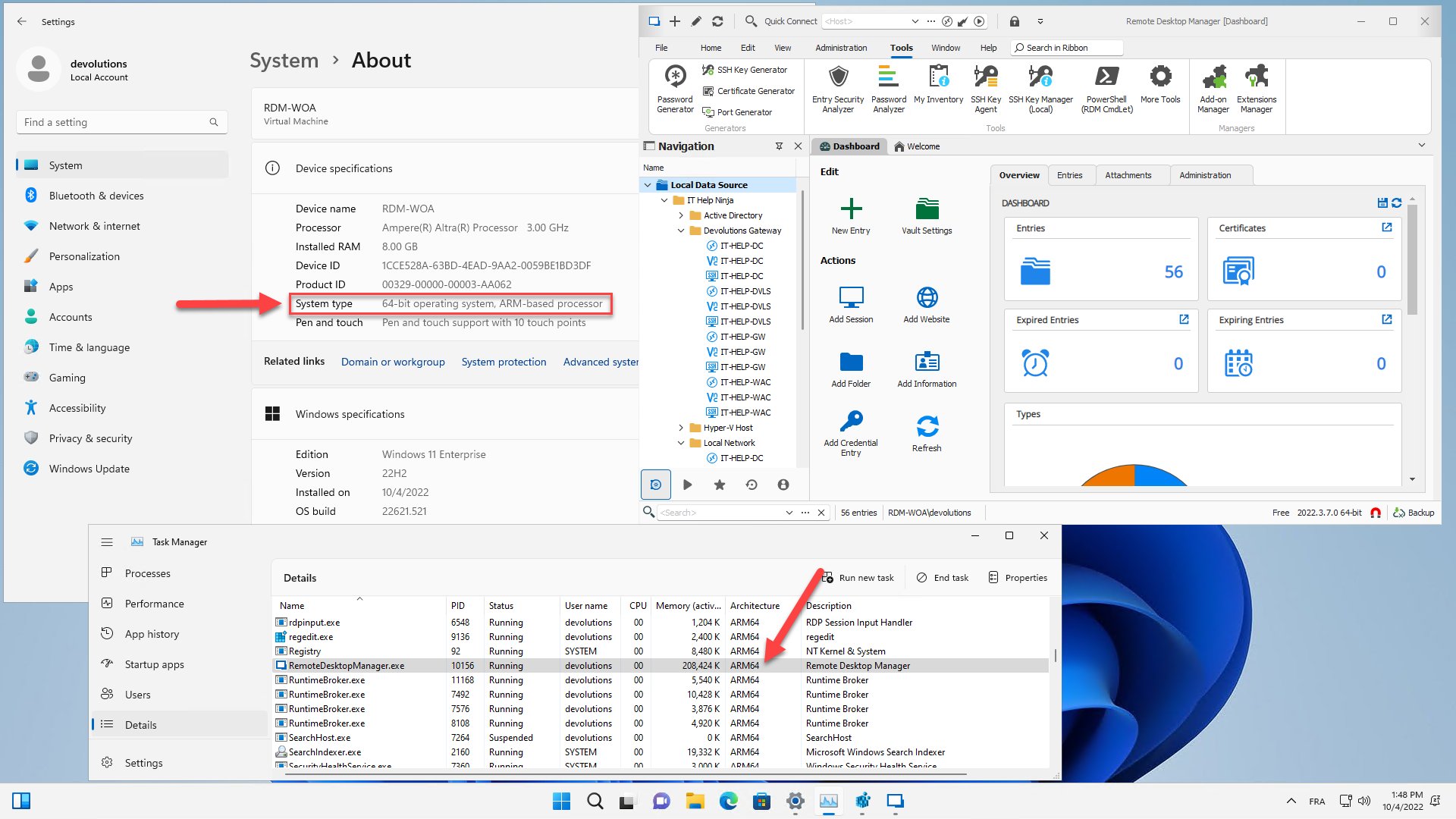
Marc-André Moreau
RDM_Windows_ARM64.jpg