Run Powershell script against multiple Selections?
Run Powershell script against multiple Selections?

If this has been asked before, I apologize as my google fu is weak with the proper terms and I couldn't find anything.
My goal is simple. I would like to select multiple entries (in Navigation or Entries tab) and run a script against them. I would like a single script instead of multiple scripts, so that the script is fed a list of servers rather than running one script multiple times. For example, checking different servers for a certain user log on, or for a certain registry entry and the output is sent to one screen (or something like out-gridview)
Is this possible?
Thank you!
To say can't is to fail before you begin
All Comments (3)
Hello Bill,
To run a script against multiple machines simultaneously, you cannot use a macro/script/tool. Instead, you need to use the RDM Agent, which is designed specifically for this purpose.
You can visit https://docs.devolutions.net/rdm/windows/commands/tools/tools/more-tools/rdm-agent/ to learn more about this tool.
Best regards,
Richard Boisvert
Allow me to clarify.
Is there a way to select multiple items in the navigation pane and then send that list of selected items to script OR dump them into a text file I can reference through a script? Using $HOST$ or something like that?
To say can't is to fail before you begin
Hello Bill,
You can copy the hosts field of the selected entry with the Ctrl+H shortcut.
If you prefer to copy the name of the entries, you can right-click after you select them and go to Clipboard > Copy Name: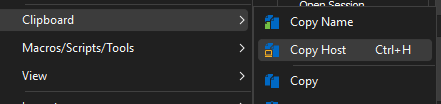
Best regards,
Richard Boisvert
0f2d0d79-5d3e-41eb-9254-dd9df872ad50.png