
blake
RDM v2026.3.5: "Sort Priority" is not respected for Map entries/folders
If possible, could you update your RDM to the latest version (2026.3.8.0) and see if the problem persists? This version should resolve your issue.
Latest Version: Download RDM
@Maxim Robert, that appears to have solved the problem, thank you!
RDM v2026.3.5: top and bottom of Navigation Pane flyout is cut off when set to "Auto-Hide"
Great, thank you so much
RDM v2026.3.5: top and bottom of Navigation Pane flyout is cut off when set to "Auto-Hide"
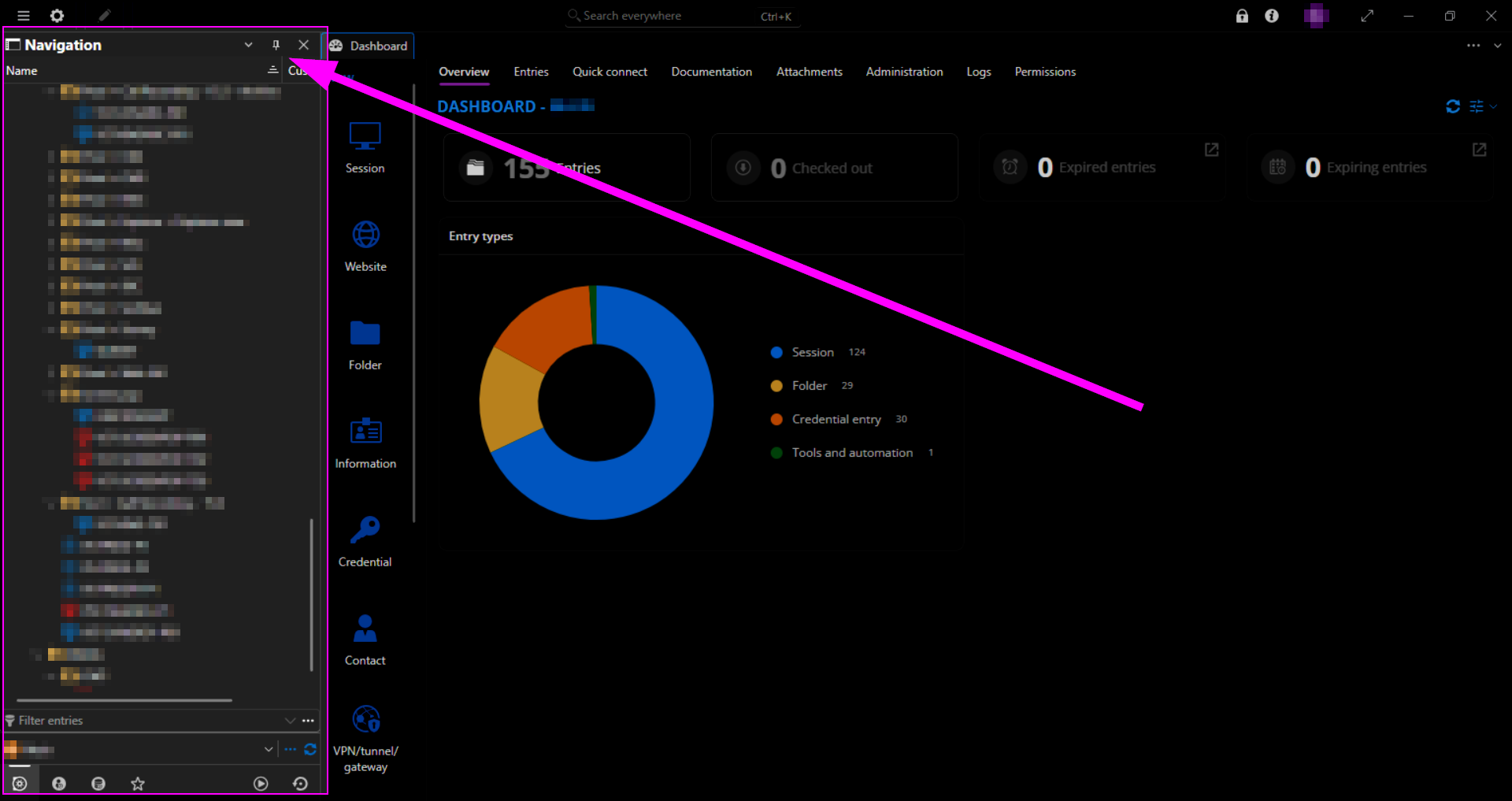
When I set the Navigation Pane to Auto-Hide, it collapses as it should:
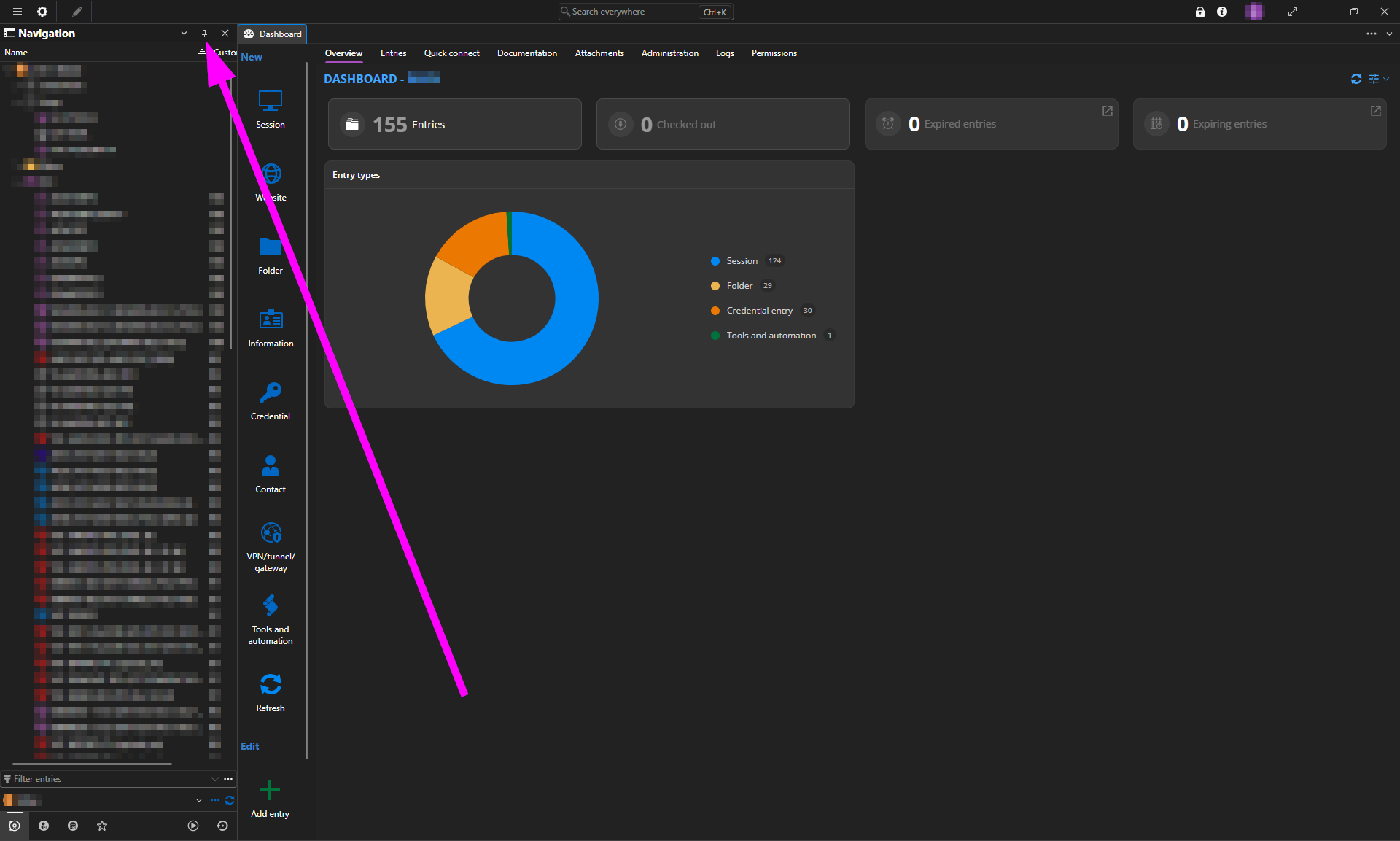
But then when clicking the Navigation Pane, the top and bottom is cut off.
As you can see in these two images, I'm scrolled all the way to the top and bottom within the Navigation Pane:
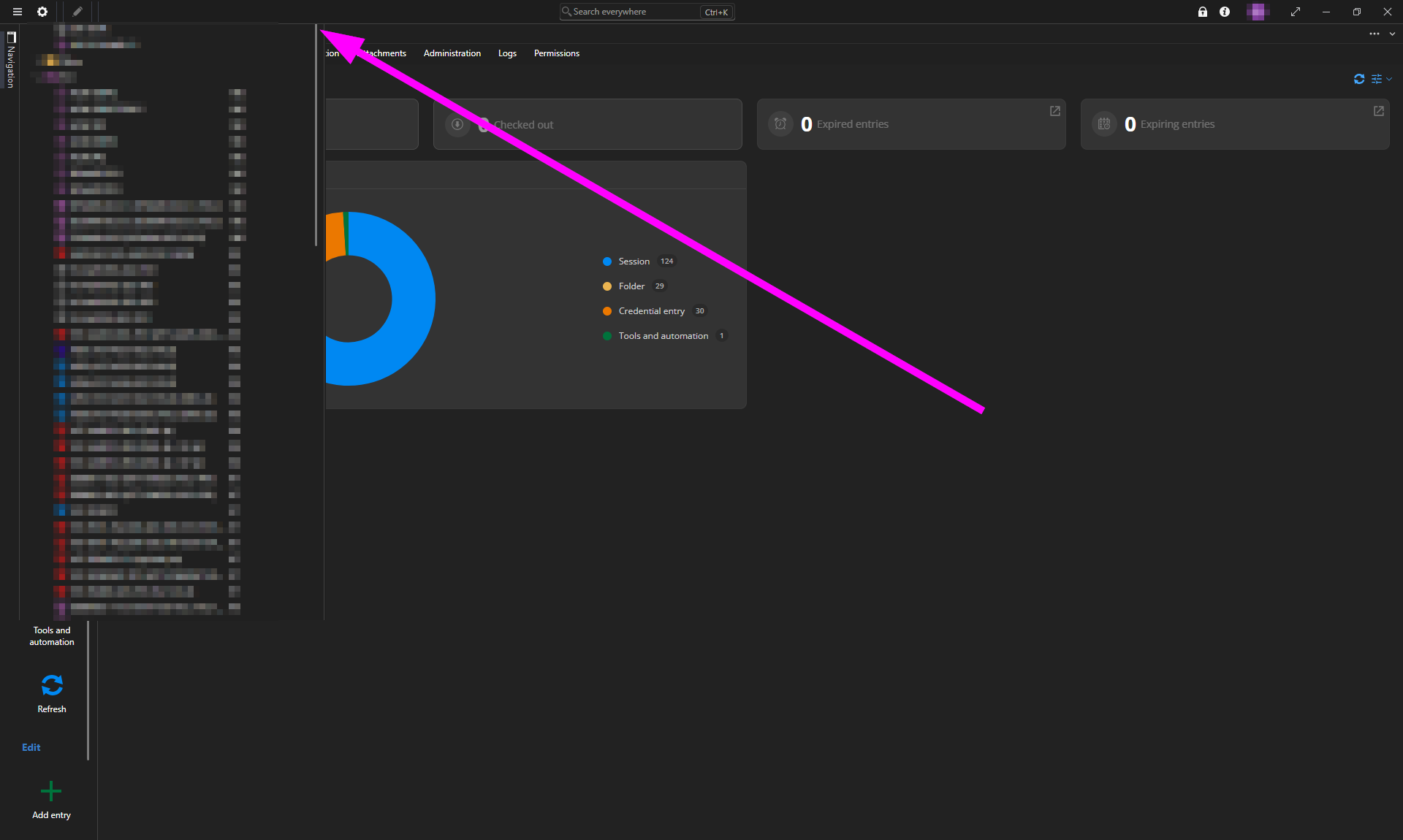
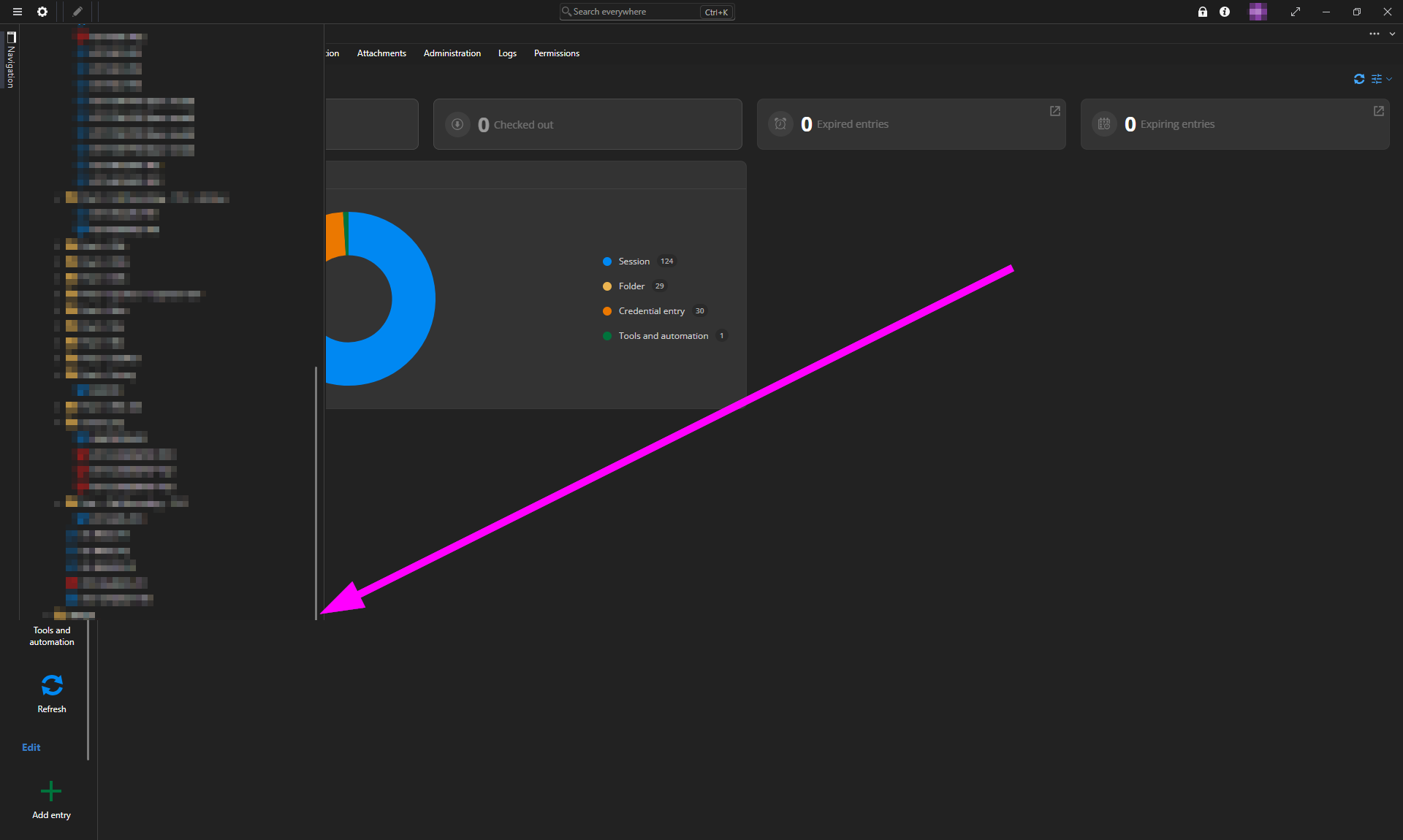
Notice that the top has enough cut off to prevent me from accessing the button to Pin the Navigation Pane again. Fortunately, restarting RDM does pin the Navigation Pane again upon launch.
Now what I discovered before I finished typing this up is that this issue only occurs on my two external displays—if I move RDM to my laptop's display (which is set as the main display in Windows Settings > System > Display), then the Navigation Pane's visibility is perfectly functional and normal. As you can see in the below image, no part of the Navigation Pane is cut off when I have RDM on my laptop's display:
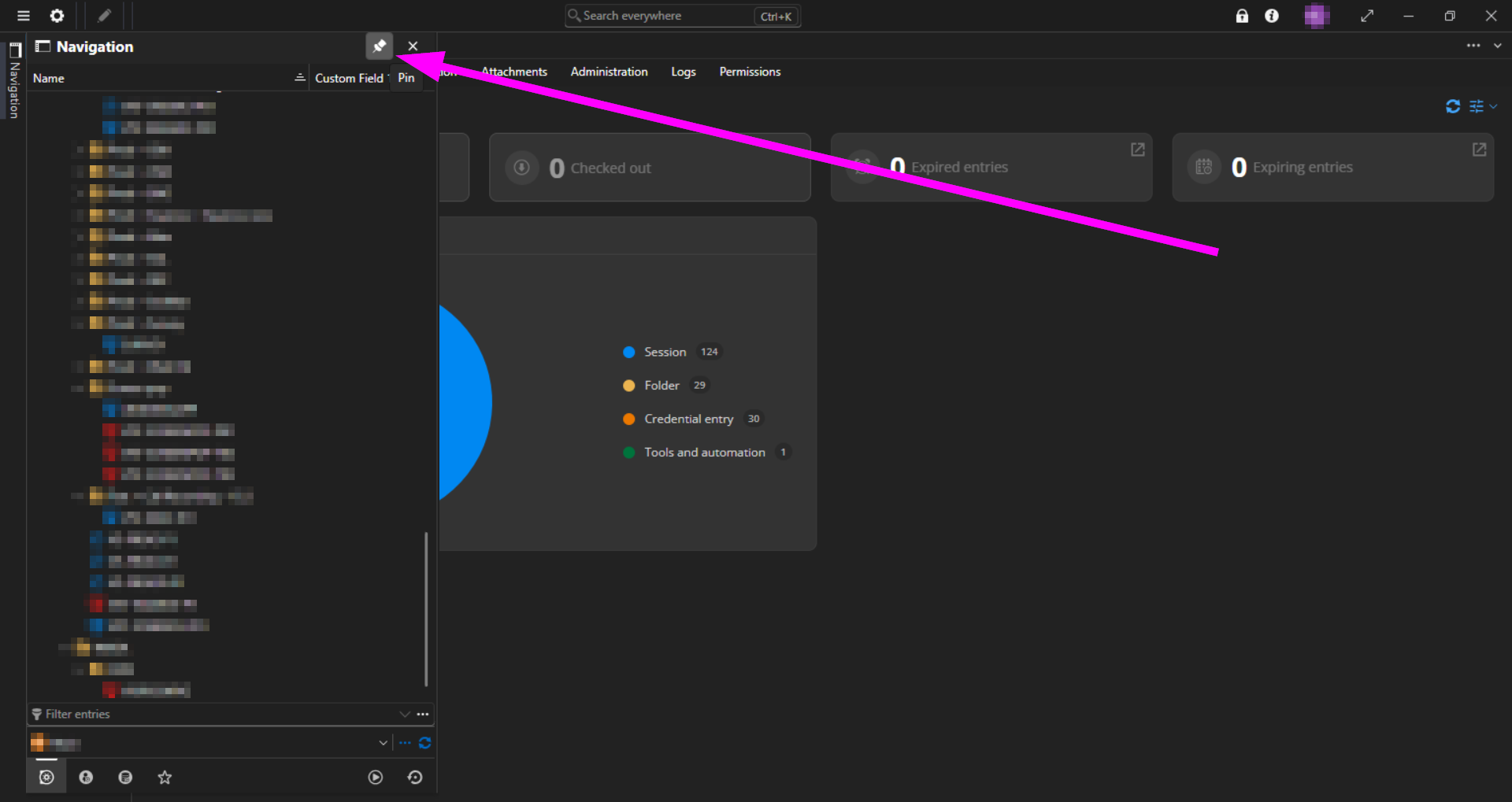
And this is after having just clicked the Pin button there:
No amount of moving RDM between my displays, toggling the Navigation Pane off and on, setting it to Float and back again, or restarting RDM has solved the issue—at this point, I have no other option but to move RDM back to my laptop's display in order to Pin the Navigation Pane again after setting it to Auto-Hide on either of my external displays.
——————————
I was just about to submit this post when I decided to try changing one of my external displays to be the Main Display in Windows Settings > System > Display. What I found is that as long as my laptop's display is not set as the Main Display, then the visibility of the Navigation Pane—including the Auto-Hide/Pin buttons—works correctly regardless of which display RDM is on and regardless of application restarts.
But when I set my laptop's display back to being the Main Display again, the problematic behavior returned, i.e. the top and bottom of the Navigation Pane is cut off while set to Auto-Hide while RDM is on either of my external displays.
RDM v2026.3.5: "Sort Priority" is not respected for Map entries/folders
Hello,
I've found and fixed the issue, the sort priority should work well with the upcoming 2026.3.7 version.
Regards,
Hi @Jafran Majeau, when should we expect version 2026.3.7 to release?
Cannot use keyboard shortcut to open multiple RDP entries
Hi Blake,
Do you use the overlapping navigation (Preferences -> User Interface -> User Interface -> General -> "Use overlapping navigation")?
Best regards,
No, I don't. What does that setting do?
Cannot use keyboard shortcut to open multiple RDP entries
Hi Blake,
Why Shift + Return? A simple Return on a multi selection seems to launch all the selected entries properly for me (as of the latest version, 2021.2.9.0).
Best regards,
A Return doesn't do anything either.
Cannot use keyboard shortcut to open multiple RDP entries
MacOS Big Sur — version 11.4
RDM Free for Mac — version 2021.2.9.0
I've been using RDM Free for Mac for a few years now. Up until several months to a year ago, I was always able to highlight 2 or more entries and then press Shift + Return, which allowed me open all the entries at once. But at some point, that ability for me to be able to open multiple entries at once via a keyboard shortcut stopped working, even though the Open Selection right click item still shows the Return symbol.
What can be done to resolve this?

Batch edit computer names to be FQDN
I am running the free version of RDM for Mac. I would like to use an AppleScript to rename the machines that don't already have my local domain appended to the computer names. Some of them already have the FQDN, though.
I would like to run an AppleScript similar to this but have it only append the domain name if the domain name is not already present in the computer name:
set _host to get value from _connection of property "Host"
set value of _connection of property "Host" to _host & ".mydomain.com"
save _connection
I imagine it would look something like this (I know this completely wrong syntax):
set _host to get value from _connection of property "Host"
set value of _connection of property "Host" to _host & ".mydomain.com" if "Host" does not equal "_host+.mydomain"
save _connection
Can someone tell me what AppleScript I can use that can accomplish what I'm after?
Creating/editing RDP Auto Typing Macro causes kernel panic
RDM did prompt me with an error window, but I don't recall what the error said, but it seemed totally irrelevant.
It didn't seem to be consistent. On the three separate crashes, it happened in a few different fields. In the case of the third crash, I was able to edit all of them, change to a different tab, then come back and try changing some of the values and that's when it crashed on me.
Creating/editing RDP Auto Typing Macro causes kernel panic
Let me know if you want me to provide any RDM-specific logs. I did try looking at the logs found in Menubar > Help > Application Logs but they didn't seem to show anything relevant.
Creating/editing RDP Auto Typing Macro causes kernel panic
TLDR; creating or editing auto typing macro has caused a kernel panic on my Mac three separate times now. The first time was inadvertent. The second and third times were me just trying to reproduce this issue before creating this bug report.
——————————
I tried creating an RDP Auto Typing Macro (After Connection) and as soon as I started typing in one of the fields, my computer froze and crashed. It went to a black screen and then said that my Mac had rebooted unexpectedly.
After booting back up, I attempted it again and the kernel panicked again. Just to be certain, I tried one more time. This time I got a little bit further in that it let me create the event rule. But before I saved it, I switched over to the Before Connection tab and then back to After Connection. When I tried to edit any field, the kernel panicked again and rebooted. I'm going to paste the MacOS kernel panic problem report details in case they help.
MacBook Pro (Retina, 15-inch, Mid 2015)
macOS Catalina 10.15.1
RDM Free Edition 2020.1.2.0
——————————
panic(cpu 6 caller 0xffffff801e062e0a): Kernel trap at 0xffffff7fa14c634e, type 6=invalid opcode, registers:
CR0: 0x000000008001003b, CR2: 0x000070000959ed54, CR3: 0x000000046a4f406a, CR4: 0x00000000001626e0
RAX: 0x0000000000000000, RBX: 0x0000000000000000, RCX: 0x0000000000000000, RDX: 0xffffff9232122ff0
RSP: 0xffffff9232123160, RBP: 0xffffff9232123160, RSI: 0x0000000000000503, RDI: 0xffffff8041442a00
R8: 0x0000000000000000, R9: 0x0000000000989680, R10: 0x0000000000000000, R11: 0x0000000000000005
R12: 0x0000000000000004, R13: 0xffffff8043684670, R14: 0xffffff9232123180, R15: 0xffffff8043684670
RFL: 0x0000000000010286, RIP: 0xffffff7fa14c634e, CS: 0x0000000000000008, SS: 0x0000000000000000
Fault CR2: 0x000070000959ed54, Error code: 0x0000000000000000, Fault CPU: 0x6, PL: 0, VF: 0
Backtrace (CPU 6), Frame : Return Address
0xffffff9232122bc0 : 0xffffff801df39a3b
0xffffff9232122c10 : 0xffffff801e070fe5
0xffffff9232122c50 : 0xffffff801e062a5e
0xffffff9232122ca0 : 0xffffff801dee0a40
0xffffff9232122cc0 : 0xffffff801df39127
0xffffff9232122dc0 : 0xffffff801df3950b
0xffffff9232122e10 : 0xffffff801e6d17f9
0xffffff9232122e80 : 0xffffff801e062e0a
0xffffff9232123000 : 0xffffff801e062b08
0xffffff9232123050 : 0xffffff801dee0a40
0xffffff9232123070 : 0xffffff7fa14c634e
0xffffff9232123160 : 0xffffff7fa1426490
0xffffff92321231a0 : 0xffffff7fa1434655
0xffffff92321231f0 : 0xffffff7fa13bd6db
0xffffff9232123260 : 0xffffff7f9f3cb966
0xffffff92321232b0 : 0xffffff7f9f3d9438
0xffffff92321232f0 : 0xffffff7f9f3d933b
0xffffff9232123320 : 0xffffff7f9f3f5bb0
0xffffff9232123390 : 0xffffff7fa13c309a
0xffffff92321233c0 : 0xffffff7fa13e73f9
0xffffff9232123400 : 0xffffff7fa13e76bf
0xffffff9232123430 : 0xffffff7fa13e50f4
0xffffff9232123450 : 0xffffff7fa13c5fa2
0xffffff9232123510 : 0xffffff7f9f3eabca
0xffffff9232123590 : 0xffffff7f9f3ea61f
0xffffff92321235b0 : 0xffffff7f9f3ecc5c
0xffffff92321235f0 : 0xffffff7fa13c9c43
0xffffff9232123610 : 0xffffff7fa13c8588
0xffffff92321236b0 : 0xffffff7f9f40a768
0xffffff92321236f0 : 0xffffff7f9f40aab1
0xffffff9232123990 : 0xffffff7f9f40bbfe
0xffffff9232123a20 : 0xffffff7f9f409d80
0xffffff9232123a80 : 0xffffff7f9f409b6d
0xffffff9232123ad0 : 0xffffff7f9f408bb7
0xffffff9232123b10 : 0xffffff801e6663fb
0xffffff9232123b60 : 0xffffff801e66f393
0xffffff9232123ca0 : 0xffffff801e020b92
0xffffff9232123db0 : 0xffffff801df3f8b8
0xffffff9232123e10 : 0xffffff801df16545
0xffffff9232123e70 : 0xffffff801df2cff5
0xffffff9232123f00 : 0xffffff801e049085
0xffffff9232123fa0 : 0xffffff801dee1226
Kernel Extensions in backtrace:
com.apple.iokit.IOAcceleratorFamily2(438.2.7)[72B8A0B5-E12C-3764-9187-0AC0E93416F9]@0xffffff7f9f3c7000->0xffffff7f9f48afff
dependency: com.apple.driver.AppleMobileFileIntegrity(1.0.5)[180FC5AB-0E47-35BC-91DF-609EBE8ED4A5]@0xffffff7f9f1ff000
dependency: com.apple.iokit.IOPCIFamily(2.9)[AA7C7A4F-9F5D-3533-9E78-177C3B6A72BF]@0xffffff7f9e940000
dependency: com.apple.iokit.IOSurface(269.6)[39DC4195-B168-3895-ACD5-E731581855F8]@0xffffff7f9f337000
dependency: com.apple.iokit.IOGraphicsFamily(568)[247C211E-C250-351C-BCE2-4DB9D3003E10]@0xffffff7f9f368000
dependency: com.apple.iokit.IOReportFamily(47)[2CCA7DD3-C33F-3CA4-A213-BC83D3D997B0]@0xffffff7f9ef36000
com.apple.kext.AMDRadeonX4000(3.0.2)[1E092428-A3E6-3063-B692-B943B1565B91]@0xffffff7fa13b4000->0xffffff7fa17f9fff
dependency: com.apple.iokit.IOPCIFamily(2.9)[AA7C7A4F-9F5D-3533-9E78-177C3B6A72BF]@0xffffff7f9e940000
dependency: com.apple.iokit.IOSurface(269.6)[39DC4195-B168-3895-ACD5-E731581855F8]@0xffffff7f9f337000
dependency: com.apple.iokit.IOGraphicsFamily(568)[247C211E-C250-351C-BCE2-4DB9D3003E10]@0xffffff7f9f368000
dependency: com.apple.iokit.IOAcceleratorFamily2(438.2.7)[72B8A0B5-E12C-3764-9187-0AC0E93416F9]@0xffffff7f9f3c7000
BSD process name corresponding to current thread: WindowServer
Mac OS version:
19B88
Kernel version:
Darwin Kernel Version 19.0.0: Thu Oct 17 16:17:15 PDT 2019; root:xnu-6153.41.3~29/RELEASE_X86_64
Kernel UUID: 7503CD47-851F-321E-8747-50DB4299165F
Kernel slide: 0x000000001dc00000
Kernel text base: 0xffffff801de00000
__HIB text base: 0xffffff801dd00000
System model name: MacBookPro11,5 (Mac-06F11F11946D27C5)
System shutdown begun: NO
Panic diags file available: YES (0x0)
System uptime in nanoseconds: 1298021777746
last loaded kext at 257004068177: @filesystems.msdosfs 1.10 (addr 0xffffff7f9f637000, size 69632)
last unloaded kext at 446574159253: >usb.!UHostPacketFilter 1.0 (addr 0xffffff7f9f90a000, size 24576)
loaded kexts:
com.github.kbfuse.filesystems.kbfuse 3.10.0
com.paloaltonetworks.kext.pangpd 1.0.0
com.sophos.kext.oas 9.9.4
com.sophos.kext.sfm 9.9.4
com.sophos.nke.swi 9.9.4
org.pqrs.driver.Karabiner.VirtualHIDDevice.v061000 6.10.0
com.intel.kext.intelhaxm 6.2.1
com.asix.driver.ax88179-178a 1.12.0
com.sophos.driver.devctrl 9.9.4
@filesystems.smbfs 3.4
@fileutil 20.036.15
@filesystems.autofs 3.0
>!AHDA 283.14
>AGPM 111.2.5
>!APlatformEnabler 2.7.0d0
>X86PlatformShim 1.0.0
>!AUpstreamUserClient 3.6.8
@kext.AMDFramebuffer 3.0.2
@kext.AMDRadeonX4000 3.0.2
@kext.AMDRadeonServiceManager 3.0.2
>!AGraphicsDevicePolicy 4.5.9
@AGDCPluginDisplayMetrics 4.5.9
>!AHV 1
|IOUserEthernet 1.0.1
>!A!IHD5000Graphics 14.0.2
|IO!BSerialManager 7.0.1f1
>pmtelemetry 1
>!ACameraInterface 7.6.0
@Dont_Steal_Mac_OS_X 7.0.0
|Broadcom!B20703USBTransport 7.0.1f1
>!A!ISlowAdaptiveClocking 4.0.0
>AGDCBacklightControl 4.5.9
@kext.AMD7000!C 3.0.2
>eficheck 1
>!A!IFramebufferAzul 14.0.2
>!ALPC 3.1
>!AMuxControl 4.5.9
>!AMCCSControl 1.13
>!ASMCLMU 212
>AudioAUUC 1.70
>!AThunderboltIP 3.1.3
>!ATopCaseHIDEventDriver 3410.1
>!UTopCaseDriver 3410.1
>!UCardReader 489.41.1
@filesystems.apfs 1412.41.1
>AirPort.BrcmNIC 1400.1.1
>!AAHCIPort 341.0.2
>!AVirtIO 1.0
@filesystems.hfs.kext 522.0.9
@!AFSCompression.!AFSCompressionTypeDataless 1.0.0d1
@BootCache 40
@!AFSCompression.!AFSCompressionTypeZlib 1.0.0
@private.KextAudit 1.0
>!ASmartBatteryManager 161.0.0
>!AACPIButtons 6.1
>!AHPET 1.8
>!ARTC 2.0
>!ASMBIOS 2.1
>!AACPIEC 6.1
>!AAPIC 1.7
$!AImage4 1
@nke.applicationfirewall 303
$TMSafetyNet 8
@!ASystemPolicy 2.0.0
|EndpointSecurity 1
@kext.triggers 1.0
>DspFuncLib 283.14
@kext.OSvKernDSPLib 529
@kext.AMDRadeonX4030HWLibs 1.0
@kext.AMDRadeonX4000HWServices 3.0.2
|IOAVB!F 800.17
>!ASSE 1.0
|Broadcom!BHost!CUSBTransport 7.0.1f1
|IO!BHost!CUSBTransport 7.0.1f1
|IO!BHost!CTransport 7.0.1f1
@!AGPUWrangler 4.5.9
|IOSlowAdaptiveClocking!F 1.0.0
@kext.AMDSupport 3.0.2
>X86PlatformPlugin 1.0.0
|IOAccelerator!F2 438.2.7
>IOPlatformPlugin!F 6.0.0d8
>!ABacklightExpert 1.1.0
|IONDRVSupport 568
@!AGraphicsDeviceControl 4.5.9
>!AGraphicsControl 4.5.9
>!AHDA!C 283.14
|IOHDA!F 283.14
>!ASMBus!C 1.0.18d1
|IOGraphics!F 568
@plugin.IOgPTPPlugin 810.1
|IOEthernetAVB!C 1.1.0
>!AActuatorDriver 3410.2
>!AHS!BDriver 3410.1
>IO!BHIDDriver 7.0.1f1
|IO!B!F 7.0.1f1
|IO!BPacketLogger 7.0.1f1
>!AMultitouchDriver 3410.2
>!AInputDeviceSupport 3410.1
>!AHIDKeyboard 209
>usb.IOUSBHostHIDDevice 1.2
>!UAudio 320.49
|IOAudio!F 300.2
@vecLib.kext 1.2.0
>usb.!UHub 1.2
>usb.networking 5.0.0
>usb.!UHostCompositeDevice 1.2
|IOAHCIBlock!S 316.40.3
|IO80211!F 1200.12.2b1
>mDNSOffloadUserClient 1.0.1b8
>corecapture 1.0.4
|IOSkywalk!F 1
>usb.!UXHCIPCI 1.2
>usb.!UXHCI 1.2
|IOAHCI!F 290.0.1
|IOSerial!F 11
|IOSurface 269.6
@filesystems.hfs.encodings.kext 1
>!AThunderboltPCIDownAdapter 2.5.2
>!AThunderboltDPInAdapter 6.2.3
>!AThunderboltDPAdapter!F 6.2.3
>!AThunderboltNHI 5.8.0
|IOThunderbolt!F 7.4.6
|IOUSB!F 900.4.2
>!AEFINVRAM 2.1
>!AEFIRuntime 2.1
|IOSMBus!F 1.1
|IOHID!F 2.0.0
$quarantine 4
$sandbox 300.0
@kext.!AMatch 1.0.0d1
>DiskImages 493.0.0
>!AFDEKeyStore 28.30
>!AEffaceable!S 1.0
>!AKeyStore 2
>!UTDM 489.41.1
|IOSCSIBlockCommandsDevice 422.0.2
>!ACredentialManager 1.0
>KernelRelayHost 1
>!ASEPManager 1.0.1
>IOSlaveProcessor 1
|IOUSBMass!SDriver 157.40.7
|IOSCSIArchitectureModel!F 422.0.2
|IOUSBHost!F 1.2
>!UHostMergeProperties 1.2
>usb.!UCommon 1.0
>!ABusPower!C 1.0
|CoreAnalytics!F 1
>!AMobileFileIntegrity 1.0.5
@kext.CoreTrust 1
|IOTimeSync!F 810.1
|IONetworking!F 3.4
|IOReport!F 47
|IO!S!F 2.1
>!AACPIPlatform 6.1
>!ASMC 3.1.9
>watchdog 1
|IOPCI!F 2.9
|IOACPI!F 1.4
@kec.pthread 1
@kec.corecrypto 1.0
@kec.Libm 1
Expand any given tree view session entry folder with a double-click
That would be great. Thank you.
Expand any given tree view session entry folder with a double-click
I have a few hundred RDP session entries sorted into many subfolders and it's very slow and inconvenient to have to click on the left expand arrow for each session entry folder I want to expand. I know there's an option to expand all, but that requires using the right-click context menu, plus I don't want to expand everything, just one folder at any time. And I want to be able to double-click any expanded folder and have it collapse as well.
I have searched everywhere in preferences and in properties for each folder and can't find a toggle to set the expand/collapse behavior of session entry folders in the left sidebar tree view.
Is this not a feature or am I just not finding the option?
MacOS Catalina 10.15.1
Remote Desktop Manager Free 2019.2.2.0
CTRL+C doesn't work. Shortcut refreshes connection
This is an issue for me on a fairly regular basis as well. It seems to happen 2 or 3 times a week. It's an issue for me with both Windows Server 2012 R2 and Server 2016. I've only ever been able to solve it by logging off the remote machine, not just disconnecting.
It happened just a few minutes ago so I decided to do some Googling. I came across this article where they suggest restarting rdpclip.exe on the remote machine. But since I found that after I had already logged off and back on, I haven't actually had the opportunity to test to see if that will solve the issue when I run into. I guess I won't know till it happens again.
If that does solve it (it's a workaround, not a solution), I guess that would mean it's an issue with Windows and not RDM. If that's the case, I wonder if something could be implemented in RDM to detect that behavior and automatically issue the command.
MacOS Catalina 10.15.1
Remote Desktop Manager Free 2019.2.2.0
RDP Engine: Modern
Batch Edit RDP Computer names to be the FQDN
MacOS 10.15
RDM Free Version 2019.1.9.0
So here are my steps:
I select highlight multiple entries or an entire folder of entries;
Then I right-click > Edit > Edit (Special Actions)... > Custom AppleScript > OK;

Then I copied and pasted the Applescript exactly as you have it and still get the same error when hitting compile.

And if I hit ok to try to run the script anyway, this is what I get:
SERVER01: error A property can’t go after this identifier.
number -2740
range {19, 8}
SERVER02: error A property can’t go after this identifier.
number -2740
range {19, 8}I am not sure if I'm doing something wrong or what. But it's strange that you can't reproduce it.
Batch Edit RDP Computer names to be the FQDN
Exactly like the question posed here, I would like to be able to batch edit the computer names of hundreds of RDP sessions to append my local domain to them so they will all be the FQDN. That topic was for the Windows RDM and I'm on the Mac RDM (free).
I know that I need to do Custom Applescript. But I can't seem to do it right (if it's even working).
Here's the sample Applescript given:
[b]set value of[/b] _connection of property "Name" to "ModifiedName"
[b]save[/b] _connection
And here's what I've attempted:
[b]set value of[/b] _connection of property "Host" to ".mydomain.com"
[b]save[/b] _connection
But whenever I hit compile beforehand to see if it will work, here's what I get:

Can someone tell me how to do this right?
[RDM Mac] Batch editing entries doesn't work
Thank you! It's working now!
[RDM Mac] Batch editing entries doesn't work
Could you please let me know as soon as the fix is released?
[RDM Mac] Batch editing entries doesn't work
[quote=Antoine Mauger]Hello,
we've been able to reproduce your issue and a ticket has been sent to the engineering team.[/quote]
Thank you for the quick reply, Antoine.
Do you have any idea of what kind of ETA I can expect on this to be fixed?
Thanks
[RDM Mac] Batch editing entries doesn't work
Greetings,
Similar to this old forum post, I am attempting to batch edit all of my rdp session entries. I have hundreds of rdp entries that I'd like to not have to modify one at a time.
Here's what I'm trying to do—
Highlight all rdp entry folders > Edit > Batch Edit > Edit Entries (Session Type Settings)...

Once there, I go to Local Resources. I'm trying to uncheck Windows Key Copy/Paste. I also want to check Send Num Lock key after connect as well as change the drop down for Control to be set to Windows as well as set the dropdown for Command to be set to Control.
Here's a screenshot of what I want to have set for every rdp session via Batch Edit:

I have done this a couple different times. Each time it will load. But then when I go to check any given individual Local Resource setting, none of the settings had applied on any rdp entry.
I don't have this issue if I edit each entry individually. But considering I have hundreds of rdp entries, I don't particularly like the idea of having to edit each and every one.
How can this be resolved? Am I doing something incorrectly?
————————————————————————
Mojave v. 10.14.4
MacBook Pro (Retina, 15-inch, Mid 2015)
Remote Desktop Manager v. 2019.1.5.0
————————————————————————