
VTScott
CyberArk Workspace session types
I was reviewing the documentation regarding using CyberArk as a Workspace data source.
My assumption is that it can only support limited session types. I also assume that there are other features that are not available when not using Devolutions Server.
Is my assumption correct? Thank you.
Documentation read screen
Got the link. I'll try to get it done tomorrow. Thanks.
Documentation read screen
If I leave the tab open and return later, the screen window is small again.
Documentation read screen
2026.2.15.0 does fix the screen size on load. I'm using Edge.
Documentation read screen
DVLS 2026.2.12.0
I've only recently starting to use DVLS directly for informal change logs.
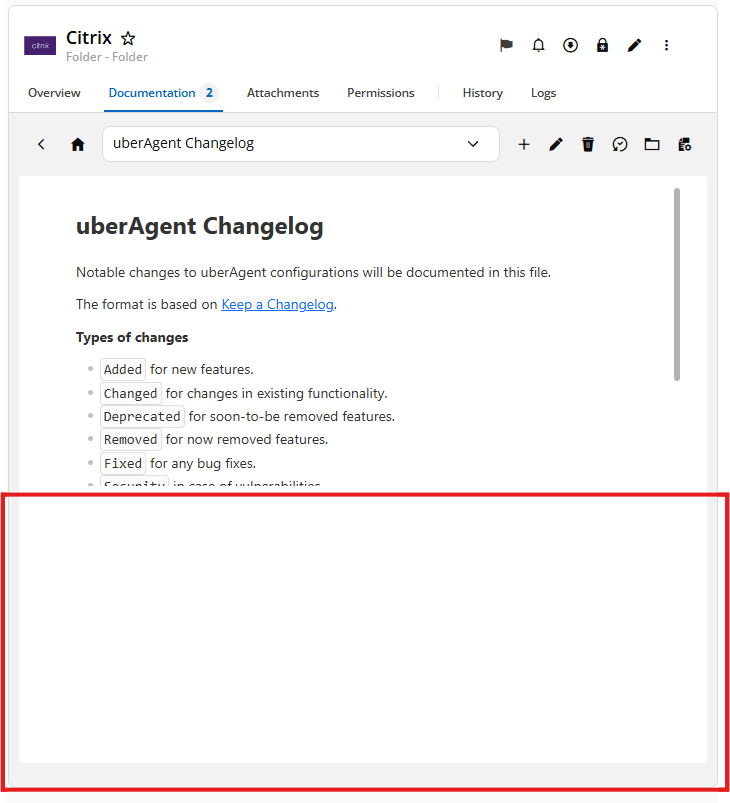
I've noticed that when viewing an entry, the panel does not fill completely.
The red rectangle is not used.
Password Manager for Firefox extension for MacOS shows previous passkey
Thank you.
I worked with the new extension today and it appears to be addressed.
Password Manager for Firefox extension for MacOS shows previous passkey
I'm using Devolutions Cloud.
If I click the extension icon, the drop down shows my entry for the password but does not update the passkey list.
If I cancel the process, and then cancel the attempt to use a QR code, the list updates with the current passkey.
Password Manager for Firefox extension for MacOS shows previous passkey
Currently running 2026.2.0.5 but this issue has been there for sometime.
When I attempt to use passkey authentication, the last passkey challenge site is given.
If you close the tab and go back then it shows the current tab. It feels like the search criteria to match the passkey is not using the active tab.
DVLS: Entry Expiry Notifications
Upgrade DVLS.
Unable to edit Playlist
RDM 2025.3.28 addressed the issue.
Is the DVLS bug fix pending?
Unable to edit Playlist
Thank you. I was able to edit with the resize trick.
Unable to edit Playlist
DVLS 2025.3.10.0
I went to edit an existing playlist in my user vault, and the edit page is malformed.

I tried to edit from RDM (version 2025.3.21 Windows) with same issue:

Switch tabs after xx seconds
Hello,
Thank you for your reply,
You can disregard my previous message, I have moved the existing thread to the feature request section.
Best regards,
@Samuel Dery
Thank you for moving it over.
Switch tabs after xx seconds
Hello,
Thank you for reaching out to us regarding this,
From my knowledge, there is not currently a way to perform this, however with your sessions open you can go under the "Window" section and use the "2x2" button or the drop-down menu under this button then -> "Manage" to have your sessions displayed in a grid, I'm not sure if that would be helpful in your case?
Best regards,
@Samuel Dery
I tried various custom Window layouts to get me part of the way there.
I would prefer a rotating option, but this will have to do.
Switch tabs after xx seconds
Is there a setting\way to have RDM switch tabs after a set number of seconds to cycle through monitoring tabs?
Change the SQL Server database name
Thanks for the confirmation.
Change the SQL Server database name
DVLS is using SQL Server as the database. When configured the server name was used to make the connection.
The database team has asked me to switch this from server name to an alias that is configured for the server.
Is this as simple as changing the configuration in the DVLS console?
Mail notification: certificate revocation
Working with my internal support team, we found an issue with the linking on the certificate.
Thank you for the assist.
Mail notification: certificate revocation
Thanks for the suggestions. The work week was crazy. I configured it to work with SSL till I can get to it next week.
Mail notification: certificate revocation
Windows 2022 with DVLS 2025.2.4
The SMTP server had it's SSL\TLS certificate renewed. The Windows local certificate management has the new root and intermediates.
When attempting to run a test of mail notification get the error:
SslHandshakeException - An error occurred while attempting to establish an SSL or TLS connection.
The server's SSL certificate could not be validated for the following reasons:
• The server certificate has the following errors:
• The revocation function was unable to check revocation for the certificate.
• The revocation function was unable to check revocation because the revocation server was offline.
• An intermediate certificate has the following errors:
• The revocation function was unable to check revocation for the certificate.
• The revocation function was unable to check revocation because the revocation server was offline.
at MailKit.Net.Smtp.SmtpClient.PostConnect(Stream stream, String host, Int32 port, SecureSocketOptions options, Boolean starttls, CancellationToken cancellationToken)
at MailKit.Net.Smtp.SmtpClient.Connect(String host, Int32 port, SecureSocketOptions options, CancellationToken cancellationToken)
at Devolutions.Server.V2.Application.SmtpService.CreateService(EmailConfigurationEntity emailConfiguration)
at Devolutions.Server.EmailManager.CreateService(EmailConfigurationEntity settings)
at Devolutions.Server.EmailManager.<>c__DisplayClass41_0.<DoSendEmail>b__0()
------------------------------------------
AuthenticationException - The remote certificate was rejected by the provided RemoteCertificateValidationCallback.
at System.Net.Security.SslStream.CompleteHandshake(SslAuthenticationOptions sslAuthenticationOptions)
at System.Net.Security.SslStream.ForceAuthenticationAsync[TIOAdapter](Boolean receiveFirst, Byte[] reAuthenticationData, CancellationToken cancellationToken)
at System.Net.Security.SslStream.AuthenticateAsClient(SslClientAuthenticationOptions sslClientAuthenticationOptions)
at MailKit.Net.Smtp.SmtpClient.PostConnect(Stream stream, String host, Int32 port, SecureSocketOptions options, Boolean starttls, CancellationToken cancellationToken)
Is there another certificate store that needs to be updated?
Safari update
Thank you, thank you, thank you.
I received the Safari extension this week.
Best Way to Setup Macro/Script/Tool to Run Remotely Using Alternate Credentials
Very interested in the direction this takes.
Having the same journey with defining best practice for the sharing in my organization.
Embedded Browser: Cannot set properties of null
One of the web admin tools that I use is from eg Innovations. During recent updates to Chrome and Edge the embedded browser session throws an error message when clicking links that create a new tab.

I've tried different session setting changes, but nothing addresses it. It could just be something I have to deal with.
Any thoughts?
Reset RDM ribbon
'Credential Copy Options' is set to "All Buttons." was the issue.
It was set to the 2 button option.
Thank you.
Reset RDM ribbon
Resetting the layout did not correct the issue.
RDM version 2024.3.14