Best Way to Setup Macro/Script/Tool to Run Remotely Using Alternate Credentials
Best Way to Setup Macro/Script/Tool to Run Remotely Using Alternate Credentials

Hello,
Looking for some help here. We've just started to play around with the macro/script/tool functionality which seems like it could be great! The only issue is, we have separate accounts for privileged and normal. So although I login to my workstation w/ my normal account (and thus that is the account I run RDM under), the vast majority of the sessions that I connect to are connected with alternate credentials (either my privileged account in this domain, or another domain, depending on the entry). The workflow is similar for my colleagues.
I've tried a couple different ways of how to get a script to run with the creds I used to connect to the session but nothing seems to work so far. In a command line or PowerShell, I can set it to "run as another user" however there is nowhere to actually set what user to run as. How does this setting work? I even see the "netonly" option (equivalent to the "runas" command "/netonly" CLI option I presume) but again, without being able to specify a user, this doesn't help much.
In the PowerShell (local) script I see there is an option to run with session creds. So I thought - perfect, that's exactly what I need! But, alas, it doesn't work =( Basically it just launches a local PS session on my machine. And furthermore, the command fails, even when I use the parameter with a default value of $HOST$ which should seemingly resolve to the hostname of the session I'm running it against, I would think? But the error indicates that no value was passed (i.e. the command was restart-computer -computername ""). Of course I could type the name in manually but then that sort of defeats the purpose of being able to easily execute it against a session. And ideally, I'd like to be able to execute this against multiple sessions at a time if needed (via right-click the sessions -> macro script tool menu) - not sure how I'd do that without manually entering each name in the parameter prompt though.
I know there are a couple threads related to this but nothing seemed to have a concrete answer. Can anyone provide some guidance here of what setup I could use to get this working please? My goal is a macro I can execute (via right-click menu) against one or more sessions to execute one or more commands (to start with, something very simple like a shutdown /r CMD command or restart-computer PowerShell command).
One more thing I will add - if I was doing this manually from the command line, in PowerShell I'd just use the -Credential parameter that most, but not all commands have. For the commands that don't have that, or for CMD commands, I'd run it in a shell running under alternate credentials via runas /netonly (which the script entry appears to have as an option - but again, nowhere to specify the username). Maybe this information will help someone who knows RDM better than me to come up with a solution that will work =)
Best regards! Any help is much appreciated!
David Willis
All Comments (17)
Hello David,
Thank you for reaching out to the Devolutions support team.
Anything that will be related to MMC will need to be run with a WinRM configuration.
This is a requirement by Microsoft.
Note that if you already have this configuration, you can use the Macros/Scripts/Tools tab from RDM directly under the RDP session.
(Note that it will take the credentials from your RDM connection, not the RDP session credentials.)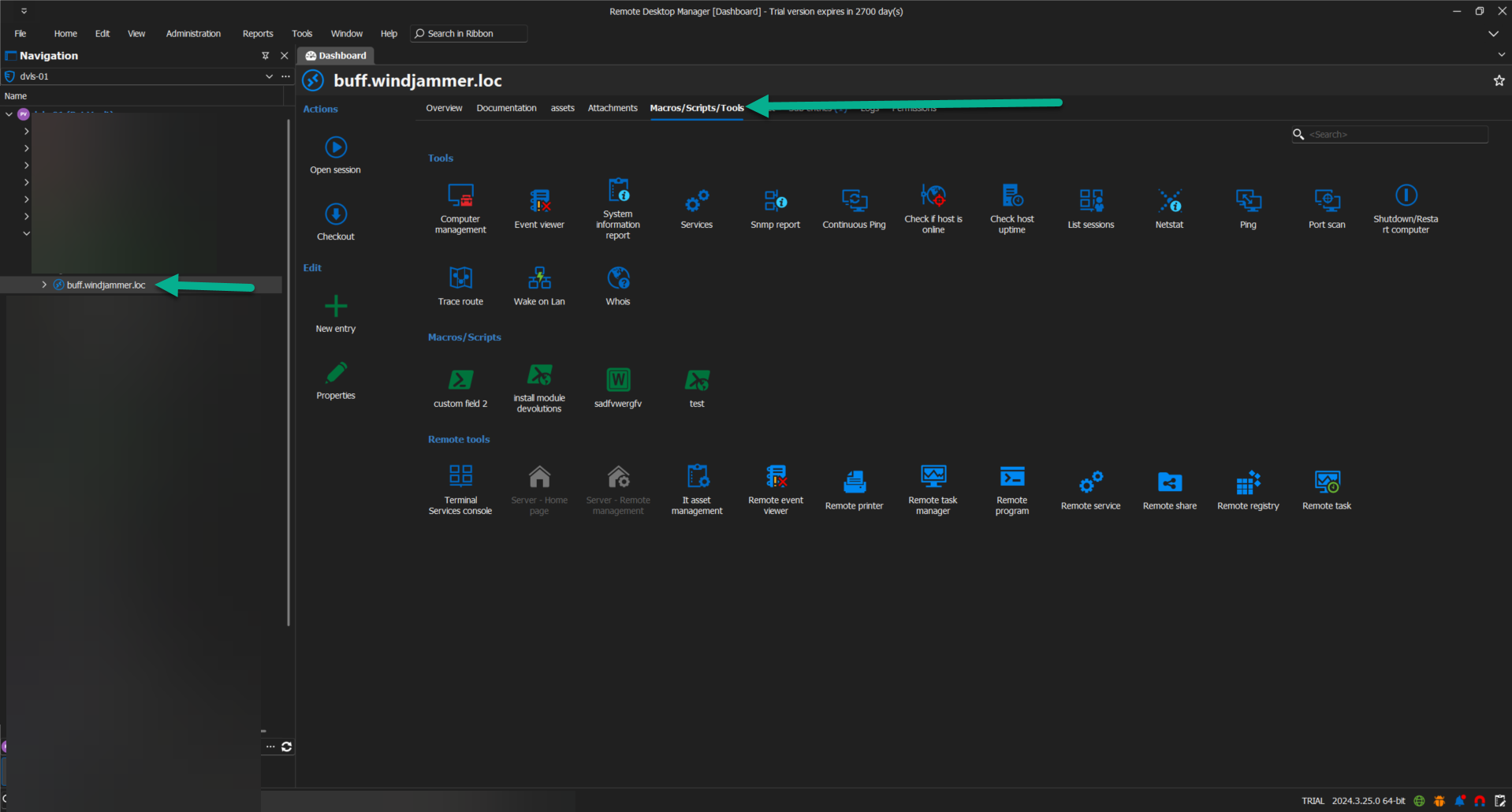
Another way will be to establish a connection to this server using a PowerShell remote session.
The run as admin will allow you to connect to this domain using another credential.
Also, the embedded script could automate every job you have to run with Powershell.
The cmd.exe run as/netonly or psexec could also be used in RDM like you usually do.
It will simply open another Powershell session outside of RDM.
The Macros have an option to be executed in the previous active windows, which will be useful in this case.
Let me know exactly how you want to execute and which script needs to be done, and I'll guide you through this process.
Best regards,
Patrick Ouimet
924873c6-1852-44cd-9472-823f89568ff4.png
Hello Patrick,
Thanks for the reply! Understood on the MMC tools - we do have the necessary WinRM configuration and firewall rules in place to allow those (and to allow remote PowerShell commands as well) so those aspects should not be an issue. The issues I ran into were all revolving around my user that I run RDM as not having permissions.
An example of the first roadblock I hit was just using the built-in "restart computer" - hoping I could just select a handful of sessions, right-click -> macro/scripts/tools -> reboot computer and reboot them all like that. But it failed because my user that I run RDM under in Windows does not have rights on those remote machines (because as mentioned I connect w/ alternate credentials, using a privileged account).
So that was what started my quest to find a solution to be able to execute a script or command against a session/entry with alternate credentials (ideally, with the same credentials used to connect to the session). Of course, once I find a solution to that I'd love to use it for much more than just rebooting machines, but for a starting point I can use the "reboot" workflow to test until I get a working process.
As for opening remote sessions - I can do that, and then of course just run the commands manually through those sessions to reboot a machine. But I was hoping to get to a point where I could right-click one or more selected entries, and use one of these predefined scripts/macros to easily execute it against those machines (as opposed to having to manually construct the machine list which I have to do when executing commands manually through PowerShell).
Best regards
David Willis
Hello David,
Thank you for your feedback.
I believe it would be beneficial to have a session together to explore this subject in more depth. Once we discover the best way for you to use RDM with remote tools and sessions, I will share the results of our discussion with the community.
Best regards,
Patrick Ouimet
Very interested in the direction this takes.
Having the same journey with defining best practice for the sharing in my organization.
Hello VTScott,
Given the recent cases we've encountered, we have decided to write an article on the topic.
The article will cover how to use PowerShell remote sessions with a privileged account, specifically running it as an administrator. Please note that WinRM must be configured with the listener set to HTTPS on port 5986. Additionally, the thumbprint used for this configuration cannot be a wildcard or a self-signed certificate.
I will share the documentation here once it becomes available in our knowledge base.
Best regards,
Patrick Ouimet
Hello,
This is the article i was talking about:
https://docs.devolutions.net/pam/kb/general-knowledge/management-tools-elevated-privileged-account/
Feel free to reach us if ever you have questions about this topic.
Best regards,
Patrick Ouimet
Hello Patrick,
Thanks so much for your help on this, both on the support ticket a few weeks back, and on this thread (and for writing up this article).
I had to do some more testing and tinkering to fully wrap my head around how it works but I think I pretty much have the hang of it now with PowerShell Script (remote) entry type. This is the main use case for me, as opening a remote PowerShell Terminal (interactively) and then having to type commands doesn't necessarily help my colleagues as much (who may not be as comfortable on the command line). So the goal was to setup some pre-configured scripts/commands/macros that they could just run against other machines as needed.
Fair warning, there's a lot of info below but hopefully it will be helpful either to the Devolutions team for bug fixes/improvements, and/or to anybody else who may run into the same problem.
To clarify, this is the PowerShell Script (remote) entry with the green icon. This is different from the PowerShell (remote) entry type (blue icon) that the article linked in the previous post refers to. The goal here is to be able to right-click an RDP entry in RDM and run a pre-configured script against it via Macros/Scripts/Tools context menu.
So with the PowerShell Script (remote) entry type, I found I can mostly achieve what I want via the following scenario:
- Set the
PowerShell Script (remote)entry to "use session credentials", and set the RDP entry I want to run it against credentials to "My privileged account".- Then it will use the creds configured for the session I run it against, which in most cases will be "my privileged account". As long as that account has rights on the remote machine, it seems to work.
- The nice thing about this is I (or my colleagues) can then right-click any RDP entry we have in our DB and run this sort of pre-saved command/script against it.
However, there are some things/potential bugs I noticed while testing:
- If I check the "run as administrator" box, it reverts back to connecting as my regular account (the account I run RDM as locally).
- Unfortunately this cancels out the above use case, so I leave "run as administrator" unchecked - it isn't a huge deal, because the majority of these things can be done against a remote machine without elevation (as long as its done under the correct credentials),. but if there was some way to make this work for remote PowerShell commands that would be awesome.
- I'm also curious about the "run as a different user" box (also in the
PowerShell Script (remote)entry options) - this setting really intrigues me.- From what I can tell, having this checked (or not checked) is what determines whether the credential configured in the RDP entry Management -> Tools page is used when the script is executed against that entry (I remember you showed me this page on our call).
- When "run as a different user" box is checked, it does appear to try to use that user - because for example if I have it set to "prompt for credentials" on the Management -> Tools page, it will indeed prompt when I run it (even if the main session credentials are set to something else like "none").
- Unfortunately though, when I try to actually select a credential from the list, it fails with the error below.
- I get the same results if I have Management -> Tools set to anything other than "use session credentials" or "use default credentials".
- Here is the snippet from the Application Logs when that happened:
System.ComponentModel.Win32Exception (0x80070057): An error occurred trying to start process 'conhost.exe' with working directory 'C:\Program Files\Devolutions\Remote Desktop Manager'. The parameter is incorrect.
   at System.Diagnostics.Process.StartWithCreateProcess(ProcessStartInfo startInfo)
   at System.Diagnostics.Process.Start(ProcessStartInfo startInfo)
   at Devolutions.RemoteDesktopManager.Business.Connectors.PowerShellConnector.DoRun(Connection connection, OpenConnectionMode openConnectionMode)
- Now the interesting thing is, when I set Management -> Tools to "use session credentials" on the RDP entry and have the
PowerShell Script (remote)entry set to "run as a different user", then it automatically uses my privileged account (and works) even if the main session credentials are set to "none".- I get the same exact behavior if I set Management -> Tools to "use default credentials".
- These are the only two settings I've gotten "run as a different user" to work with successfully - any setting on the Management -> Tools page for a host other than "use session credentials" or "use default credentials" will cause the
PowerShell Script (remote)entry with "run as a different user" to fail with the above error.
- Last thing - it seems when we select multiple RDP entries, and right-click them, go to Macros/Scripts/Tools and try to run the pre-configure PowerShell Script (remote) entry against them, it only runs against the first (or last?) RDP entry that was selected.
- In other words it does not properly execute when multiple entries are selected.
With all that said, I think I can make what I need work for now with the "use session credentials" option since the majority of our sessions use our privileged account.
However, I would very much appreciate if there was any way you could shed some light in particular on how the aforementioned "run as a different user" option works. And if it is not currently working as designed (e.g. if any of the above is a bug, which it seems like it might be due to the error but I didn't want to assume), would it be possible to put in for a fix for that? Because from what I can tell, if the "run as a different user" option was fully functional (or at least, the way I picture it being fully functional) it could be incredibly useful. Because then it would let us either "use session credentials" for remote scripts to use the same creds as the session OR we could set it to "run as a different user" and then set the user on the Management -> Tools page - that would give a ton of flexibility!
Also, if we could somehow get the macro/script/tool execution functionality to work against multiple RDP entries when multiple entries are selected, that would be great!
Again, thanks for all the help, and for bearing with me while I played around with this feature to learn it a little better!
Best regards,
David Willis
c6c183d7-7682-4d62-8ffa-5397d5234a79.png
Hello David,
Thank you for this detailed report.
After some tests, it looks like the session cannot be opened with anything other than the configured credentials.
The use of open with privileged credentials is a plus to this method.
I will open a report on this issue.
Best regards,
Patrick Ouimet
Thanks Patrick. Just to confirm, you're referring to the "run as another user" option in combination with the credentials set on the management -> tools page for a session right?
If so - if it would be possible to get that fully working (to where it would respect any credentials configured on the management -> tools page), that would be amazing!
Separately, would it be possible to allow to execute a macro/script/tool against multiple selected entries? Currently it seems it will only execute against the first or last one selected.
Best regards,
David Willis
Hello David,
Thank you for this feedback.
I was talking about a new feature (2025.1) that allows you to store another set of credentials under the entry properties -> Alternate -> Elevated Credentials.
Those credentials can be used to launch an entry by right-clicking -> Open with parameters, or Opening using elevated credentials.
For the run as, the Gsudo is now implemented to launch your session.
However, note that this option always asks you to type your password in the terminal.
Hope this makes sense!
Best regards,
Patrick Ouimet
On the newest version (v2025.1.33) I now suddenly get this popup when trying to run any macro/script/tool of type "PowerShell (remote)" even though I do not have the "run as administrator" box checked in the options: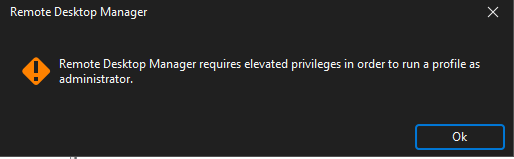
After clicking "OK", I then get an external Windows Terminal popup (even though the PowerShell (remote) is configured to run embedded) which ends up with an error like so:
(I cut off the "-EncodedCommand" parameter value because it goes on for quite a while but that's the end of the command and there's nothing more after that in the error message)
This happens seemingly regardless of what specific command the PowerShell (remote) entry is configured to run.
I have the "run as another user" box checked to try and use the scenario I described above. This was working as noted above - I believe I was on v2025.1.27 at that time.
I appreciate all the help on this so far!
Best,
David Willis
01a6ebf2-b88c-42ce-b6c7-7259a9eca011.png
22591327-ec25-4377-bbca-ebc0dd934468.png
Hello davidwillis,
When you run as an admin or as a different user, could you try using the Gsudo method and tell me if this works?
Also, is it still related to the elevated credential properties under your entries in RDM?
Best regards,
Patrick Ouimet
Hi Patrick,
I guess I'm a little confused by your question. I'm not familiar with the Gsudo method you are referring to (do you have any documentation on this?). But my most recent post was more of a report of an apparent regression, as this was working prior to the last update (as described in my earlier posts). It is related to my attempt to use separate/elevated credentials to run a macro/script/tool, yes.
In particular - this scenario is what I'm referring to, which had been working (with some caveats) until my latest update to v2025.1.33:
So with thePowerShell Script (remote)entry type, I found I can mostly achieve what I want via the following scenario:
Set thePowerShell Script (remote)entry to "use session credentials", and set the RDP entry I want to run it against credentials to "My privileged account".
Then it will use the creds configured for the session I run it against, which in most cases will be "my privileged account". As long as that account has rights on the remote machine, it seems to work.
The nice thing about this is I (or my colleagues) can then right-click any RDP entry we have in our DB and run this sort of pre-saved command/script against it.
Now, when I try to do the same I get this, even though I am not attempting to run as admin (the "run as administrator" box in the settings for the PowerShell Script (remote) entry is not checked):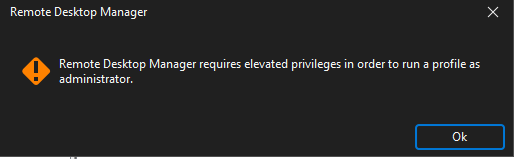
David Willis
22591327-ec25-4377-bbca-ebc0dd934468.png
Hey Patrick,
Just to follow up after our call the other day, it appears the above issue (RDM saying it requires elevated privilege even though the macro/script/tool I'm running isn't set to "run as administrator") is still occuring in the latest version (v2025.2.17). Also, I still don't see the PowerShell (remote) script option anymore either in this version.
Really appreciate your help on this!
Best,
David Willis
Hello davidwillis,
We've investigated how the powershell macro entry's Use session credentials option, and we can confirm that its intended behavior is to first take the Tools's section credentials, and should those yield nothing, then take then actual session's credentials. It is true that the option's name can be a little misleading, and we will change that.
That said, you can achieve having the correct credentials (session's) by setting it up in the Tools section. Please let us know if this is a blocking issue for your current workflow/setup, as we will then investigate for further development.
Regards,
Jafran Majeau
Hello Jafran,
That makes sense, thank you for explaining it! I can definitely work with that, now that I understand how it works. Just to confirm my understanding - based on your description, I presume that means if the credential setting in Management -> Tools is set to either "default" or "use session credentials", then it would fall back to the main credentials for the entry - is that correct?
If so, we would probably just leave the Management -> Tools set to default in most cases, since usually the main credentials for the session would be the same ones we'd want to use for a macro/script/tool. However, in the occasional scenario where we need to use different credentials for macro/script/tools, we could set those alternate creds in Management -> Tools. So this setup is very flexible and I think will work well.
Best regards,
David Willis
Hello,
Yes, that is exactly how it works. I am glad this structure can work well for you. Let us know if we can help with anything else.
Regards,
Jafran Majeau