Documentation read screen

DVLS 2026.2.12.0
I've only recently starting to use DVLS directly for informal change logs.
I've noticed that when viewing an entry, the panel does not fill completely.
The red rectangle is not used.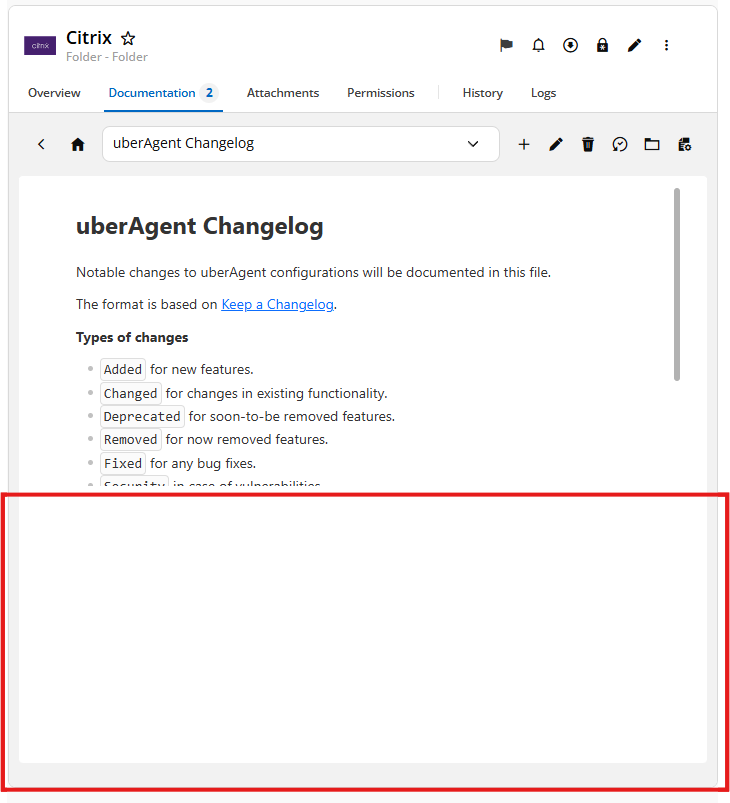
Screenshot 2026-07-28 124613.png
All Comments (6)
Hi,
Thank you for reporting this.
We have already identified this issue internally, and a fix is planned for the next release.
Thank you for your patience
Best regards
Marc-Andre Bouchard
Hello,
Thank you for being so patient!
I am pleased to inform you that the issue has been resolved in the latest Devolutions server version (2026.2.15.0):
https://docs.devolutions.net/server/getting-started/installation/upgrade-server
We also recommend that you first perform the update in a staging/test environment:
https://docs.devolutions.net/server/kb/how-to-articles/create-server-staging-instance
We also offer free upgrade sessions, during which we will update your Devolutions Server instance together. If you are interested in this, please send an email to service@devolutions.net
If the problem persists after the update, please let us know so we can inform our development team.
Best regards,
Maxim Robert
2026.2.15.0 does fix the screen size on load. I'm using Edge.
If I leave the tab open and return later, the screen window is small again.
Hello,
Thank you for your reply,
Would you be able to provide us with a recording of this behavior?
I will send you a private message so that you can provide us with the recording securely.
Best regards,
Samuel Dery
Got the link. I'll try to get it done tomorrow. Thanks.