thomas22
Devolutions Gateway Service – gMSA Support
Hi Richard,
in the meantime we have installed 2 more Gateways and want to make use of the GMSA. But unfortunately the service immediately stops after the initial start.
Start failed. Context=Start failed Cause=service_load Error=failed to setup logger: couldn’t create file appender: failed to create initial log file: Access is denied. (os error 5): Access is denied. (os error 5) Language=French Échec du démarrage. Contexte=Start failed Cause=service_load Erreur=failed to setup logger: couldn’t create file appender: failed to create initial log file: Access is denied. (os error 5): Access is denied. (os error 5) Language=German Start fehlgeschlagen. Kontext=Start failed Ursache=service_load Fehler=failed to setup logger: couldn’t create file appender: failed to create initial log file: Access is denied. (os error 5): Access is denied. (os error 5)
The User is installed correctly on the servers:
PS C:\Windows\system32> Test-ADServiceAccount -Identity gmsa.dvls
True
After granting the GMSA user modify rights to the path "C:\ProgramData\Devolutions\Gateway" everything is working fine.
When do you think the documentation or the feature will be available in the product ?
Br,
Thomas
Devolutions Gateway Service – gMSA Support
Hi Richard,
thank you very much for the detailed explanation. This clarifies the current situation quite well.
Our plan is to install and manage the Gateways through the Devolutions Server console, rather than using the Gateway MSI directly.
Regarding recording, we currently do not use the Gateway recording feature and there are no plans to enable it at the moment. From my understanding, recording should also be possible with a gMSA as long as the required permissions to the recording location are granted to the account.
If I understand you correctly, using a gMSA for the Devolutions Gateway service is technically possible today, and the main limitation is that the custom service account is currently not preserved during Gateway upgrades.
If that is the case, we will most likely go ahead with the gMSA approach for our new 3-node Gateway Farm anyway. Having to reconfigure the service account after an upgrade is something we can include in our maintenance procedure until proper support is implemented.
Would it be possible to document the required steps and permissions for using a gMSA with Devolutions Gateway somewhere in the official documentation in the meantime?
This would give us a supported reference for the necessary configuration until full gMSA/custom service account support is implemented in the installer and upgrade process.
Proper integration into the Devolutions Server console and automatically preserving the configured service account during upgrades would of course be the ideal solution in the future.
Thank you again for looking into this.
Best regards,
T
Devolutions Gateway Service – gMSA Support
Hi,
we are currently planning to migrate our existing standalone Devolutions Gateway to a 3-node Devolutions Gateway Farm.
As part of this implementation, we would like to run the Devolutions Gateway Windows service using a Group Managed Service Account (gMSA) instead of a regular domain service account.
I found official documentation regarding gMSA usage with Devolutions Server, but I could not find a clear statement regarding the Devolutions Gateway service.
Could you please confirm:
Is running the Devolutions Gateway service under a gMSA officially supported?
Can the same gMSA be used for all Gateway nodes within a Gateway Farm?
Are there any known limitations or additional configuration requirements when using a gMSA?
Is the configured gMSA preserved during Devolutions Gateway upgrades, or does the service account need to be configured again after an upgrade?
I would like to clarify this before implementing the configuration in our production environment.
Thank you! :-)
T
SSO not working
Hi,
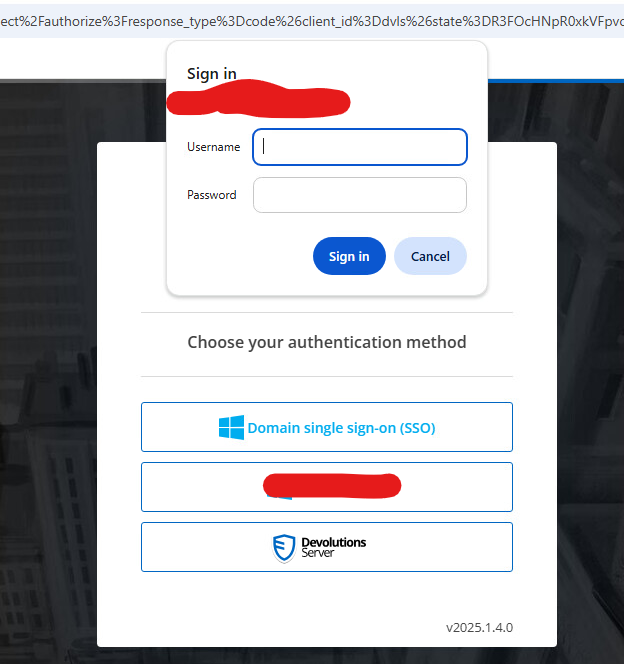
today I've tested the Domain Single Sign-On button on the DVLS logon Page.
Unfortunately when I click on the SSO button, I get a prompt where I have to enter my username and password.
I've already checked the following documentation https://docs.devolutions.net/server/kb/how-to-articles/configure-windows-authentication/ and everything seems to be well configured.
BR,
Thomas
RDM - Confluence - automatically create Page for each newly created Session
Hi,
As we are in a kind of reorganization process at the moment, we stumbled upon the topic of documentation.
Unfortunately, we currently have the condition that the documentation is not available in the quality and quantity as it should be.
There is an internal policy that no new system is allowed whose access data is not stored in RDM.
Therefore, the question has been asked whether it is possible to automatically create a Confluence (we still have Confluence on-premises) page when creating a new
RDP/SSH session?
BR,
Thomas
Rights on folders
Hi,
is there any plan that Hub will get a feature like that ? We have exactly the same situation in our environment and want to move to Hub.
BR,
Thomas
Update to latest version tells me Cannot grant, deny, or revoke permissions to sa, dbo, entity owner, information_schema, sys, or yourself. in the installation wizard
Hi,
yep the user does have db_owner rights.

Update to latest version tells me Cannot grant, deny, or revoke permissions to sa, dbo, entity owner, information_schema, sys, or yourself. in the installation wizard
Hi,
thank you for your reply.
Thats what I get when I try to Apply The Least Permissions for the Scheduler Service and the Web Application.


The Username field is prefilled with the Service User.

When I try to run the generated SQL Script, I get the same message in SQL Management Studio.

BR,
Thomas
Update to latest version tells me Cannot grant, deny, or revoke permissions to sa, dbo, entity owner, information_schema, sys, or yourself. in the installation wizard
Hi,
I've updated to the latest Build today morning and the installer told me that everything was installed but I have also received the following message in the log "Cannot grant, deny, or revoke permissions to sa, dbo, entity owner, information_schema, sys, or yourself.".
The Password Server is working fine on the new version, but what should I do with this message now ?
BR,
Thomas
Move entries between Vaults?
Hi James,
I tried the same procedure in our environment now. I can select the copy button in my private vault, but I can not paste it in our public vault.
Any ideas which permissions are needed to paste the object in the public vault ? In the the folder where I want to paste the object, I can create new objects manually.
Br,
Thomas
Assign Session Types by AD Groups
Hi Maurice,
thank you for your answer. Could you please update this thread as soon as you have any new information ?
BR,
T
Windows Authentication for web interface (Single Sign On)
Thank you :-)
Windows Authentication for web interface (Single Sign On)
Well, we would need this as well :-)
Windows Authentication for web interface (Single Sign On)
Hi,
I had the same request before some months and I got told that it is not possible and not planned to implement something like that ...
BR,
Thomas
Assign Session Types by AD Groups
Hi,
we want to provide the DPS service for all of our users.
As the most of them will only have a Private Vault, we want that they can only store Credentials and Websites in their Private Vault, because they will only get the Chrome Plugin. So far I found out that this can only be setup as a global setting for the whole server instance. As we also have more advanced users with RDM, we need RDP,SSH and so on for them in our normal Vaults as well.
It would be great if there was an option where you can specify that a group of users can only create Credentials and Websites in their Private Vault (maybe based on AD groups), and other users that can create any Session type they want in their Private Vault and also in their public Vaults.


The reason therefore is, that it makes no sense for normal users which only have the Chrome Plugin and a Private Vault to be able to create e.g. RDP Sessions and so on. BR, Thomas
Automatically link Chrome session to DPS
Thank you for your reply.
BR,
Thomas
Automatically link Chrome session to DPS
:\: I did not wait this answer...
Is there any plan to implement this to the plugin ?
Automatically link Chrome session to DPS
Hi,
we want to link the actual chrome session automatically to DPS when the user opens the browser. Our users will not have RDM installed, so the will only work with the chrome plugin.
If the users are logged in to windows, the should be automatically logged in to DPS in Chrome.
Could you please let me know, how to provide a working (fully automated) solution for our users ?
BR and thanks in advance,
Thomas
Can not create a 2019.1.35.0 install package
Thank you very much :-) Brilliant support - like always :-).
Can not create a 2019.1.35.0 install package
Hi,
after updating the Password Server and the RDM Client software to the latest versions I wanted to create a new installation package for my colleagues.
I can not find the actual version in the Installation Package Creation wizard. The latest version there is 2019.1.25.0. How can I create a new installer with the latest version ? There is also a link in the wizard that points to a website, but there is no addition / helpful information available.
Thank you :-)
Batch Edit - SSH - Advanced - Enable Logging
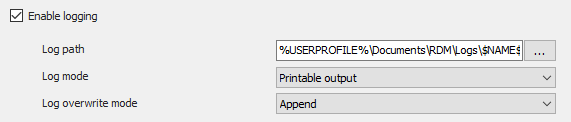
If you escape the variables $ sign with "`" it works :-).
$connection.Terminal.EnableLogging= "true"
$connection.Terminal.LogMode = "AllPrintableOutput"
$connection.Terminal.LogPath = "%USERPROFILE%\Documents\RDM\Logs\`$NAME`$\`$DATE_TEXT_ISO`$.log"
$connection.Terminal.LogOverwriteMode = "Append"
$RDM.Save();
Batch Edit - SSH - Advanced - Enable Logging
Thank you for your super fast answer :-)
I've changed the LogPath to "%USERPROFILE%\Documents\RDM\Logs\$NAME$\$DATE_TEXT_ISO$.log", but the Log path in the Session object looks like this now "%USERPROFILE%\Documents\RDM\Logs\$\$.log"
Any suggestions ?
Batch Edit - SSH - Advanced - Enable Logging
Hi,
we use RDM since 2 months now and it is unbelievable how powerful this software is.
We had a meeting today and one of my colleagues asked me if it is possible to have logging activated in SSH sessions by default. So I opened RDM and started playing with some test objects. Now I have everything setup (at least for my test connection) like we want to have it.
Unfortunately it is not possible to enable logging via bulk edit.
Can this be done via Batch Edit (Special - Powershell) ?
I found some samples here https://help.remotedesktopmanager.com/index.html?powershell_batchactionssamples.htm for example
$connection.Putty.RecordingMode = 1;
$connection.Putty.RecordingFileName = "C:\path\to\your\file.log"
$RDM.Save();
How do I have to modify the PS to get an output like this ?