Batch Edit - SSH - Advanced - Enable Logging

Hi,
we use RDM since 2 months now and it is unbelievable how powerful this software is.
We had a meeting today and one of my colleagues asked me if it is possible to have logging activated in SSH sessions by default. So I opened RDM and started playing with some test objects. Now I have everything setup (at least for my test connection) like we want to have it.
Unfortunately it is not possible to enable logging via bulk edit.
Can this be done via Batch Edit (Special - Powershell) ?
I found some samples here https://help.remotedesktopmanager.com/index.html?powershell_batchactionssamples.htm for example
$connection.Putty.RecordingMode = 1;
$connection.Putty.RecordingFileName = "C:\path\to\your\file.log"
$RDM.Save();
How do I have to modify the PS to get an output like this ?
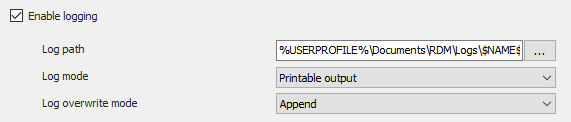
SSH_logging.png
All Comments (4)
Hi Thomas,
consulting the help site regarding the Powershell functions is a great start! ;)
In the Tips and tricks section you'll find additional informations how you get the required parameters. (Clipboard => Copy)
So in your case the required paramaters would be:
$connection.Terminal.EnableLogging= "true"
$connection.Terminal.LogMode = "AllPrintableOutput"
$connection.Terminal.LogPath = "%USERPROFILE%\Documents\RDM\"
$connection.Terminal.LogOverwriteMode = "Append"
$RDM.Save();
Regards,
Min
Thank you for your super fast answer :-)
I've changed the LogPath to "%USERPROFILE%\Documents\RDM\Logs\$NAME$\$DATE_TEXT_ISO$.log", but the Log path in the Session object looks like this now "%USERPROFILE%\Documents\RDM\Logs\$\$.log"
Any suggestions ?
If you escape the variables $ sign with "`" it works :-).
$connection.Terminal.EnableLogging= "true"
$connection.Terminal.LogMode = "AllPrintableOutput"
$connection.Terminal.LogPath = "%USERPROFILE%\Documents\RDM\Logs\`$NAME`$\`$DATE_TEXT_ISO`$.log"
$connection.Terminal.LogOverwriteMode = "Append"
$RDM.Save();
Hello,
Thank you for that solution about the back tick "`" to prevent parsing the $.
Another solution in PowerShell is to use single quote instead of double quotes. This way, PowerShell will not detect any variable and will keep all characters in the string.
$connection.Terminal.LogPath = '%USERPROFILE%\Documents\RDM\Logs\$NAME$\$DATE_TEXT_ISO$.log'
Here is a Microsoft article about Quoting Rules.
https://docs.microsoft.com/en-us/powershell/module/microsoft.powershell.core/about/about_quoting_rules?view=powershell-6
Best regards,
Érica Poirier