meelisn
Navigation pane display issue
having same problem. It only occurs when RDP session is established. With no active session, the navigation pane appears.
RDM v2026.3.5 - PowerShell embedded session window stays black
Updated to version 2026.3.8 and the problem seems to be gone. Maybe the RDP session problem fix affected also this problem.
RDM v2026.3.5 - PowerShell embedded session window stays black
PowerShell session with Windows Terminal, using embedded session, opens embedded tab but prompt never appears.
Session with Windows Terminal in external window or session with Classic application (conhost) in embedded window works.
RDP coonections are by default opened in very low resolution - v2026.3.5
that helped. thanks.
RDM [2026.3.4.0] - RDP Remote Desktop size set to auto open the RDP in a mini frame
same problem here. But when choosing Remote desktop size: Current work area size, the RDP sesssion size is monitor size, not current window size.
After changing Screen sizing mode from Smart Reconnect to Dynamic resolution, now RDP session opens correctly.
RDP coonections are by default opened in very low resolution - v2026.3.5
When using Open (embedded/tabbed), the RDP session fills the window size.
RDP coonections are by default opened in very low resolution - v2026.3.5
the RDP session settings state, that Remote desktop size is Automatic. How can I set it so, that (embedded) RDP session fills current window size, whatever it is?
RDP coonections are by default opened in very low resolution - v2026.3.5
when opening connection from workspace with updated database schema, the connection resolution is very tiny:

using Reconnect on opened connection restores normal resolution, but when opening connection again, the same tiny resolution is used
RDM version 2026.2.5 - PowerShell session with Windows Terminal problems
updated RDM to 2026.2.7, still same problem
RDM version 2026.2.5 - PowerShell session with Windows Terminal problems
This problem seems to be recurring. Almost all minor updates (when database schema need updating) curing a year or so reintroduce this problem in some form or another. Here we go again:
When PowerShell session uses WindowsTerminal as terminal application (as configured on picture),

The started WindowsTerminal reads Windows Terminal configuration from outside of RDM application and opens several terminal tabs.

Closing these tabs one by one leaves one additional (hidden) Windows terminal still running on background.

and no PowerShell sessions open any more, until that hanging WindowsTerminal process is killed.
When the PowerShell session is configured to run in external window, the 2 WindowsTerminal windows open.

RDM 2026.1.10 - PowerShell session with Windows Terminal restores previously saved tabs
I tested a bit. As soon as I changed Windows Terminal startup settings, there is any more no problem. Even when setting back the "Open windows from a previous session" setting.

Meanwhile, the RDM version was upgraded to 2016.1.14.0
RDM 2026.1.10 - PowerShell session with Windows Terminal restores previously saved tabs
Can't find anything relevant from Event Log. But Process Explorer shows, that WindowsTerminal.exe remains open with all its child processes.
When I close restored tabs one by one, then I can briefly see the desired terminal session, but it will disappear as RDM tab closes. The WindowsTerminal.exe will remain open with requested PowerShell child process. But that terminal is not reachable from the desktop.
RDM 2026.1.10 - PowerShell session with Windows Terminal restores previously saved tabs
The same problem occurs with Windows Terminal launched from Tools | Windows Terminal or Tools | PowerShell (RDM cmdlet). The opened tab contains only restored sessions and the Windows Terminal process is never stopped when tab is closed. And next time the tab appears only for couple of seconds.
RDM 2026.1.10 - PowerShell session with Windows Terminal restores previously saved tabs
When PowerShell session uses Windows Terminal external window, the 2 Windows Terminal windows start:
one window with restored sessions from Windows Terminal opened from OS
one window with configuration saved in RDM PowerShell session.
Both windows run in the same Windows Terminal process.
When PowerShell session uses Windows Terminal in embedded window, Windows Terminal opens all restored terminal tabs, but the new tab with requested configuration is not visible. Closing that embedded tab leaves Windows Terminal with all sessions running on the background and next time the embedded tab appears for couple of seconds and then disappears.
My Windows Terminal is configured to open windows from previous session, when starting.
PowerShell remote session with RDM v2025.3.20
No related errors in Application logs.
But now I can't any more reproduce the problem. The only difference from time before should be applying November Windows updates.
Error message when connecting to PowerShell Remote session
The .dll is searched for in PowerShell remote session. And that machine does not have RDM installed. So the error message is expected. But i don't understand, why that .dll is searched in remote machine. Or even more, why the scriptblock visible above is at all started in remote session.
The error only occurs when connecting to remote session for PowerShell 7 (configurationName PowerShell.7.*). But command history in remote session contains same command in remote PowerShell 5.1 session too.
Error message when connecting to PowerShell Remote session
The abovementioned error occurs inside the remote session. And there is no Remote Desktop Manager installed on remote machine. The code visible above is first command in remote session history (visible as result of Get-History -id 1)
And that code does not run in remote PowerShell 5.1 session, because in remote session, the variable PSEdition is not initialized and the type [System.Runtime.InteropServices.NativeLibrary] does not exist.
PowerShell remote session with RDM v2025.3.20
Updated to 2025.3.22, still same problem
Error message when connecting to PowerShell Remote session
did update to version 2025.3.22 . The error still exists.
Here is more detailed error description from PowerShell (result of Get-Error cmdlet):
Exception             :
    Type           : System.Management.Automation.MethodInvocationException
    ErrorRecord    :
        Exception             :
            Type    : System.Management.Automation.ParentContainsErrorRecordException
            Message : Exception calling "Load" with "1" argument(s): "Unable to load DLL 'C:\Program Files\Devolutions\
Remote Desktop Manager\runtimes\win-x64\native\jetify.dll' or one of its dependencies: The specified module could not b
e found. (0x8007007E)"
            HResult : -2146233087
        CategoryInfo          : NotSpecified: (:) [], ParentContainsErrorRecordException
        FullyQualifiedErrorId : DllNotFoundException
        InvocationInfo        :
            ScriptLineNumber : 1
            OffsetInLine     : 405
            HistoryId        : 1
            Line             : if ($PSEdition -eq 'Desktop') { Add-Type -Namespace System.Runtime.InteropServices -Name
 NativeLibrary -ErrorAction SilentlyContinue -MemberDefinition '[DllImport("Kernel32.dll", EntryPoint="LoadLibraryW", C
harSet=CharSet.Unicode, SetLastError=true)] public static extern IntPtr Load(string fileName);'};$JetifyDll="C:\Program
 Files\Devolutions\Remote Desktop Manager\runtimes\win-x64\native\jetify.dll";[System.Runtime.InteropServices.NativeLib
rary]::Load($JetifyDll);;$Username = 'myuser';$Password = 'mypassword';$SecurePassword =
 ConvertTo-SecureString $Password -AsPlainText -Force;$Credential = New-Object System.Management.Automation.PSCredentia
l @($Username, $SecurePassword);
            Statement        : [System.Runtime.InteropServices.NativeLibrary]::Load($JetifyDll)
            PositionMessage  : At line:1 char:405
                               + … jetify.dll";[System.Runtime.InteropServices.NativeLibrary]::Load($Jet …
                               +               ~~~~~~~~~~~~~~~~~~~~~~~~~~~~~~~~~~~~~~~~~~~~~~~~~~~~~~~~~
            CommandOrigin    : Internal
        ScriptStackTrace      : at <ScriptBlock>, <No file>: line 1
    TargetSite     :
        Name          : ConvertToMethodInvocationException
        DeclaringType : [System.Management.Automation.ExceptionHandlingOps]
        MemberType    : Method
        Module        : System.Management.Automation.dll
    Message        : Exception calling "Load" with "1" argument(s): "Unable to load DLL 'C:\Program Files\Devolutions\R
emote Desktop Manager\runtimes\win-x64\native\jetify.dll' or one of its dependencies: The specified module could not be
 found. (0x8007007E)"
    Data           : System.Collections.ListDictionaryInternal
    InnerException :
        Type       : System.DllNotFoundException
        Message    : Unable to load DLL 'C:\Program Files\Devolutions\Remote Desktop Manager\runtimes\win-x64\native\je
tify.dll' or one of its dependencies: The specified module could not be found. (0x8007007E)
        TargetSite :
            Name          : <LoadFromPath>g____PInvoke|1_0
            DeclaringType : [System.Runtime.InteropServices.NativeLibrary]
            MemberType    : Method
            Module        : System.Private.CoreLib.dll
        Source     : System.Private.CoreLib
        HResult    : -2146233052
        StackTrace :
   at System.Runtime.InteropServices.NativeLibrary.<LoadFromPath>g____PInvoke|1_0(UInt16* __libraryName_native, Int32 _
_throwOnError_native)
   at System.Runtime.InteropServices.NativeLibrary.<LoadFromPath>g____PInvoke|1_0(UInt16* __libraryName_native, Int32 _
_throwOnError_native)
   at CallSite.Target(Closure, CallSite, Type, Object)
    Source         : System.Management.Automation
    HResult        : -2146233087
    StackTrace     :
   at System.Management.Automation.ExceptionHandlingOps.ConvertToMethodInvocationException(Exception exception, Type ty
peToThrow, String methodName, Int32 numArgs, MemberInfo memberInfo)
   at CallSite.Target(Closure, CallSite, Type, Object)
   at System.Dynamic.UpdateDelegates.UpdateAndExecute2[T0,T1,TRet](CallSite site, T0 arg0, T1 arg1)
   at System.Management.Automation.Interpreter.DynamicInstruction`3.Run(InterpretedFrame frame)
   at System.Management.Automation.Interpreter.EnterTryCatchFinallyInstruction.Run(InterpretedFrame frame)
CategoryInfo          : NotSpecified: (:) [], MethodInvocationException
FullyQualifiedErrorId : DllNotFoundException
InvocationInfo        :
    ScriptLineNumber : 1
    OffsetInLine     : 405
    HistoryId        : 1
    Line             : if ($PSEdition -eq 'Desktop') { Add-Type -Namespace System.Runtime.InteropServices -Name NativeL
ibrary -ErrorAction SilentlyContinue -MemberDefinition '[DllImport("Kernel32.dll", EntryPoint="LoadLibraryW", CharSet=C
harSet.Unicode, SetLastError=true)] public static extern IntPtr Load(string fileName);'};$JetifyDll="C:\Program Files\D
evolutions\Remote Desktop Manager\runtimes\win-x64\native\jetify.dll";[System.Runtime.InteropServices.NativeLibrary]::L
oad($JetifyDll);;$Username = 'myuser';$Password = 'mypassword';$SecurePassword = Convert
To-SecureString $Password -AsPlainText -Force;$Credential = New-Object System.Management.Automation.PSCredential @($Use
rname, $SecurePassword);
    Statement        : [System.Runtime.InteropServices.NativeLibrary]::Load($JetifyDll)
    PositionMessage  : At line:1 char:405
                       + … jetify.dll";[System.Runtime.InteropServices.NativeLibrary]::Load($Jet …
                       +               ~~~~~~~~~~~~~~~~~~~~~~~~~~~~~~~~~~~~~~~~~~~~~~~~~~~~~~~~~
    CommandOrigin    : Internal
ScriptStackTrace : at <ScriptBlock>, <No file>: line 1PowerShell remote session with RDM v2025.3.20
no, it's different. The problem in other thread opens console window and then shows error message in PowerShell session. Here, the console window doesn't open at all.
Error message when connecting to PowerShell Remote session
portable installation has exactly the same problem, pointing to missing file in portable folder. And looking into folder, the mentioned file exists
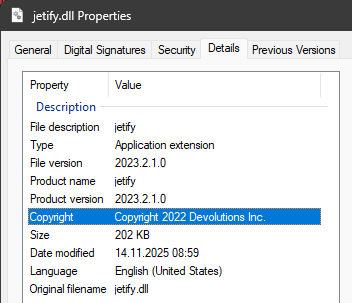
The same file exists in installed version folder
PowerShell remote session with RDM v2025.3.20
Actually, the same problem also occurs with local PowerShell session.
PowerShell remote session with RDM v2025.3.20
OS is Windows 11 23H2.
Error message when connecting to PowerShell Remote session
OS is Windows 11 v23H2
Error message when connecting to PowerShell Remote session
RDM version 2025.3.20
When connecting to PowerShell remote session, the following error message appears before remote machine prompt:
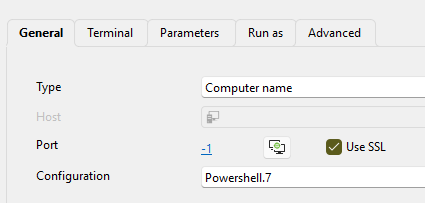
MethodInvocationException: Exception calling "Load" with "1" argument(s): "Unable to load DLL 'C:\Program Files\Devolutions\Remote Desktop Manager\runtimes\win-x64\native\jetify.dll' or one of its dependencies: The specified module could not be found. (0x8007007E)"The abovementioned error appears when connection is established using remote Powershell 7 configuration name. Using Windows PowerShell configuration, there is no error message.
In both cases, the local PowerShell that connects to remote machine, was PowerShell 7.5.4 .
The affected configuration choice in session: