
berno82
Edge brower extension not able to copy password/username
The eye works on https://hub.devolutions.com, but not in the extension
Edge brower extension not able to copy password/username
Not sure what you mean so here's my view of the two:
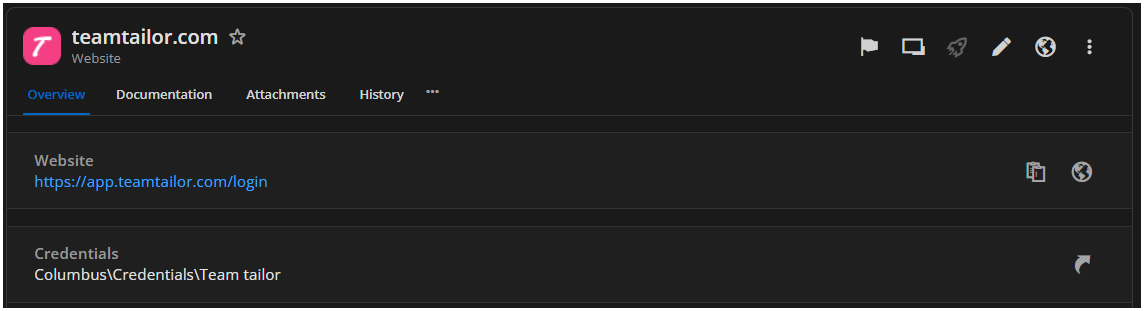
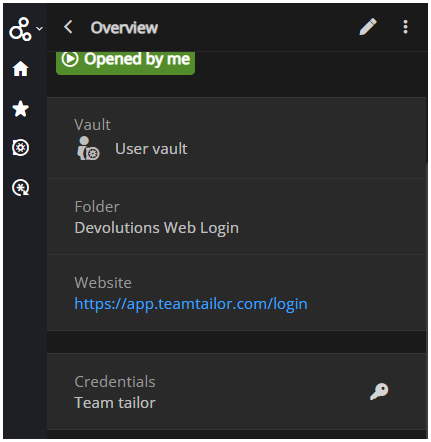
Only difference I really see is that the extension don't show the full path of the credential, but still it's able to get the correct username, with the copy function so it has it loaded in some extend.
Edge brower extension not able to copy password/username
Hi Olivier
The Credentials type I use mostly, is linked, to ordinary username/password Credentials created in RDM, but I do have some custom, but the case is the same, it's not like it's not able to resolve them, like I wrote it's able to manually copy the username, but autofill and password copy does not work, but then I can go to RDM and copy and it's copied.
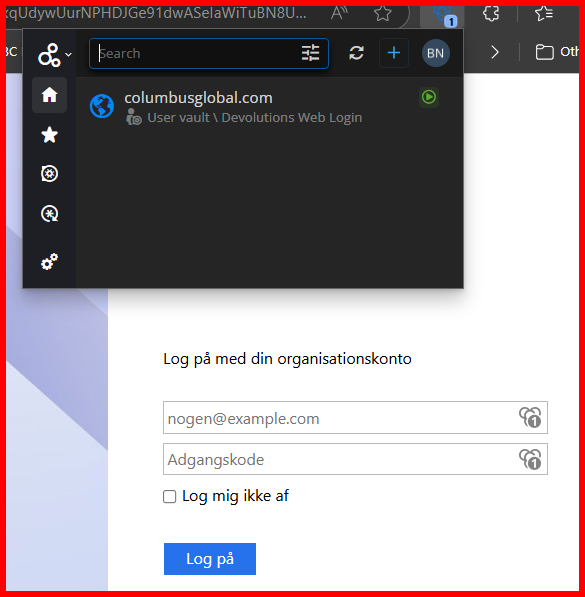
like this you see it has determined that a credential is detected, but I cannot auto fill, but I can use the copy of username (mostly, but this might be me, it has only happened a few times):
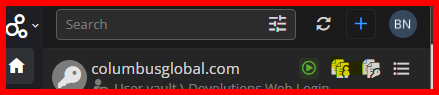
but the password just gives a blank clipboard.
Perhaps I should have made a separate case for the MS Authentication page, since this is also about RDM and not only the extension, but yes this is the page I'm talking about.
The autofill has had issues for a while on these, but then I was able to just use the copy username & password from RDM, but now that don't work anymore, using the button and pasting in the username box put's the password in, so it's like the page is tricking RDM to think it has already pasted the username.
But if the page is run in the the internal RDM browser autofill works just fine
Edge brower extension not able to copy password/username
When I connected my workspace extension to my personal hub instead of the RDM application I can no longer copy password and some times not username either.
For MS authentication dialogs, the ones that needs username and password IDs on the div, setup i RDM, is not able to autofill and copy username and password from RDM only seem to get the password, this is just an issue using external browsers, it still works fine within RDM
Tab error on open a new link with a connection
Hi Patrick
I will book a meeting, but I'm not sure I can reproduce it either, since it's not always a problem, but I will try for you to debug.
Tab error on open a new link with a connection
Done.
Tab error on open a new link with a connection
I some cases when opening a new tab within an active session opens a new tab as expected, but in the next second it disappears again and locks up the session only resolution is to close the session and try again though in most cases RDM needs to restart to get it working again.
RDM version 2024.1.25.0, but this error has been occurring through the last versions, but it seem particularly bad in this.
I made a video I can upload.
login with attached credential fail
I made the workaround, just by using the copy password feature while opening the page inside RDM and that works, so will just keep on doing that, was just wondering if it was an error in RDM, but guess not :)
login with attached credential fail
RDM ver. 2024.1.19.0
Devolutions vault is source.
website
login with attached credential fail
have setup a HTML control setup for a webpage and have linked credentials to the entry using the key button will enter the correct username then the press okay and the password prompt will appear and pressing the key button again will fill the password prompt, but not with the correct password, my thought was the credential entry, right clicking the web entry choosing copy password and insert it to the prompt access is allowed
Opening Cisco AnyConnect takes several minuts
the long delay persists on the portable version
Opening Cisco AnyConnect takes several minuts
Manually it take a few seconds, perhaps 5 when it's slow, before prompted for password.
Opening Cisco AnyConnect takes several minuts
Well... I mean the time problem never went away, so it's still only slightly more convenient to open it from RDM compared to open it manually and coping the password from RDM.
Opening Cisco AnyConnect takes several minuts
I'm running version 2023.3.39.0 which it says should be the newest available.
I have tried to recreate the connection and the connection time has not changed, but I'm 2 for 2 on successful connections, but if that's just beginners luck I don't.
Opening Cisco AnyConnect takes several minuts
lately when open a connection for Cisco AnyConnect it takes several minutes for the command prompt to appear and a successful execution of a connection happens just about 1/3 of the times especially the ones with a second password tends to fail.
The connections are old entries, but I don't seem to be able to see obvious settings that could optimizing the issue or has changed since they were made.
Locked out of RDM
any prognosis on the release of RDM starting version v2023.3.22 (or grater)?
I'm able to get in after 10-20 ok's to the 422 error
Freezes on Closing webpages with a Oauth2 authentication
when closing an Oauth2 webpage after authentication is done RDM freezes for about 20-40 seconds
RDM free in the newest version (2023.2.32.0)
Properties window open on main screen
Hi Patrick
No issue is that it's only the main RDM window that opens on the screen where it's last opened the properties window position is only saved during the current RDM session, when RDM is restarted the position is reset, to main screen/desktop, but after some time in a running session it happens, but I haven't found a pattern for when it does
Properties window open on main screen
When using multiple screens the sesison properties window opens on the main screen every time RDM is restarted, while RDM opens on the screen it was last opened
VPN settings on RDP session
I've installed the update and it now reads the VPN settings for session and it does not hang when shifting back and forth between settings
VPN settings on RDP session
Thank you, I'll let you know when the update arrives
VPN settings on RDP session
Okay.
If it helps with the reproduction of the error, the VPN setting was added before the "death" of the free client.
VPN settings on RDP session
This sounds great, does this include the blank tab, when opening the preferences for an exsisting connection and not only on changing types?
Any guess to when the new version could be expected to be released?
VPN settings on RDP session
For the Sonic example you are where right about the being enabled, but the session that this case orginated from it looks like this:

And now (after update to lates version) I can't use it at all either it's blank or it's stuck on the last other VPN option, here I tried FortiClient and swtiched it back to session.

VPN settings on RDP session
The picture was from 2022.3.26
the type is session (se picture)
But Now I have just updated to 2022.3.27 and the pane now looks like this

before I could change type and then enter settings, but now it's all grayed out, so tried to switch to sonic wall and this the result:

I'm not able to enter any data