
cdr01
Can I default rdp sessions to open in RDM?
Hello, is it possible to default RDP sessions to open in RDM? I am using a 3rd party app that I can right click on a computer and select RDP and it opens MS RDP. I'd rather that RDP session open by default in RDM. Using RDM 2025.1.41.0 64-bit (JIT)
Thanks!
When using Quick Connect and RDP, can I pass saved credentials and keyboard?
Thank Michael, but I am not seeing the same thing.
I created the template File > Templates > Entry templates. Clicked on Add template and entered my user\pass which is always the same, but when I click on the RDP button on the Quick Connect bar I dont have the option to select the template. The last option is VNC:
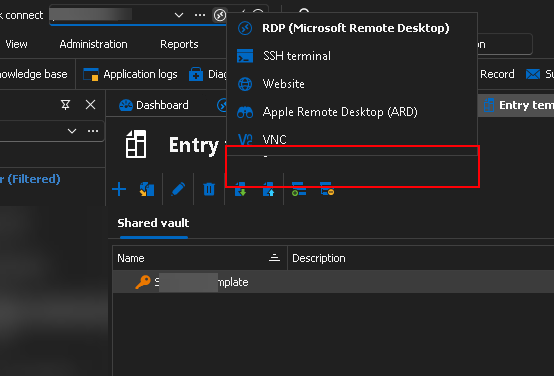
Also is this template saved anywhere where I can see it or do I always have to go to File > Templates > Entry templates in order to get to the window listing the template. And to confirm, no one else but my devolutions logon account can see this?
I would be interested in multiple options in that drop down since there are times where I might need to log in using a different account.
Also does this template override my current configurations on the RDP shortcuts where I go to Edit > Batch Edit > Edit Entries (user specific settings)? Here I enter my saved vault credentials as well as set smart reconnect and keyboard on remote computer.
When using Quick Connect and RDP, can I pass saved credentials and keyboard?
Hey everyone, as the subject states, when I use quick connect to RDP I have to enter my saved credentials and then the keyboard is not passed to the RDP connections.
I have regular RDP connections configured that way but wonder if possible to configure Quick Connect the same way.
Thanks!
Can I pass personal user vault credentials to a website session on user specific settings?
Hello,
Thank you for your reply,
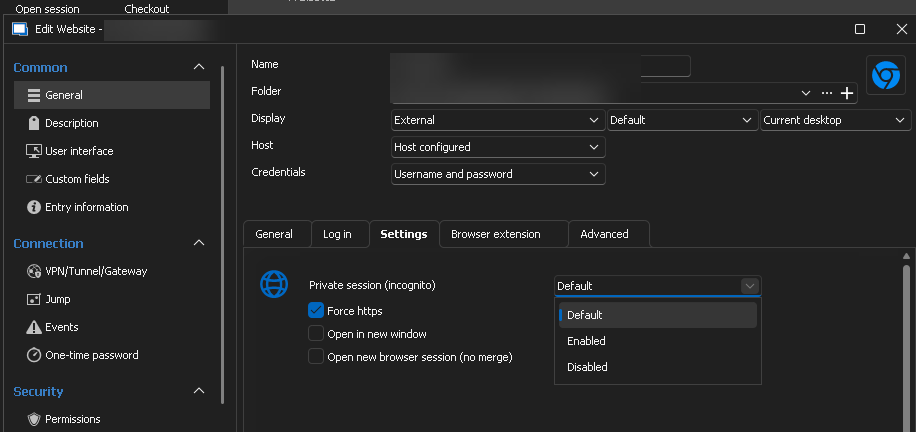
In your Website entry Properties under the "Settings" section, you can check "Ignore Certificate errors" for this issue.
Would you be able to provide me with a screenshot of the Inspect element result for the Username or Password field on the website where you are encountering this issue?
Let me know,
Best regards,
Hi, I dont see such settings under the Settings tab. Could this be a permission issue. I think I am currently set as an Administrator within the application.
Can I pass personal user vault credentials to a website session on user specific settings?
That being said, I am assuming that the Website entry is in "Embedded" display, would this be correct? If so, have you followed this knowledge base article for the configuration of the Username ID and Password ID Fields under the "HTML Control" section?
I went through that link and I was not able to populate with embedded or not. I checked the 3 autofill options with the delay bumped up to 10 secs.
I tried username and password within the General tab meaning all users that access this website connection would use the same cred and it didn't populate.
I then edited user specific settings and selected my saved credential in my vault (as pictured in my original post), tried again waited past 10 seconds on both embedded or not and no luck.
At the moment trying with a vcenter logon site. I did an inspect on the site and it uses "username" and "password". I populated those fields as well within the properties of the shortcut - followed the same steps as mentioned before and no luck with population. I have other sites I can test but need some additional time.
EDIT:
So it seems to work on a regular website, such as a shortcut connection that I have to the website whenIwork. When I use other internal device websites, we usually get the connection is not provide and you have click on Advanced and then on proceed to x.x.x.x.
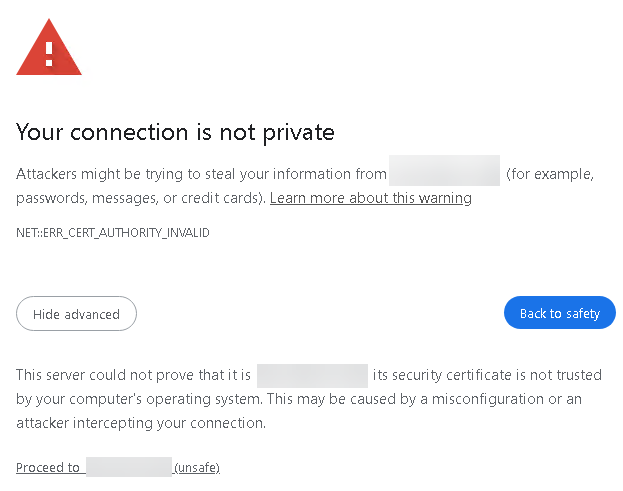
I did try a 10 second delay which gives enough time to click on the proceed to get to the user\pass logon but that doesn't seem to work.
Can anything be done for these sites?
thanks
Can I pass personal user vault credentials to a website session on user specific settings?
Hello,
Thank you for reaching out to us regarding this,
Could you please specify the version of RDM you are currently using?
What type of data source are you using?
That being said, I am assuming that the Website entry is in "Embedded" display, would this be correct? If so, have you followed this knowledge base article for the configuration of the Username ID and Password ID Fields under the "HTML Control" section?
Let me know,
Best regards,
version 2024.3.14.0 64-bit
we have tried external and also embedded display but it doesn't populate on either of the two. Reviewing your link now. thanks.
Can I pass personal user vault credentials to a website session on user specific settings?
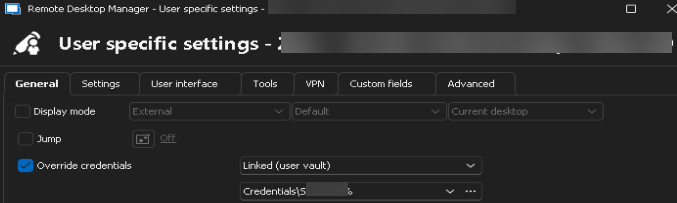
Hey everyone, we have plenty of webui devices we need to manage, trying to figure out if possible to pass Linked (user vault) to websites. I can do this with RDP connections but cant get it to work with websites.
If set these user specific settings it wont pass it to the webui of the device:
Thanks!
CSV import of Website sessions but instead it created RDP sessions!?
I cant upgrade since we have some sort of controlled client deployment matching our devolutions server version. In regards to a template to import, is the export the correct way to go about this that will give us all the headers and proper values to enter in the fields?
Just to confirm that I am exporting\importing using the correct options:
to import I use the Import generic CSV wizard
to export I use export special > export selection (.csv)
CSV import of Website sessions but instead it created RDP sessions!?
Hi Jacob, we're on 2024.3.14.0 and data source is an external SQL server
I realized what the problem was, under the HOST column it can't just be the ip address 4.5.6.7 it has to be the entire URL including port number if it has one, so I had to enter https://4.5.6.7:443.
Not sure what the PORT column does if it doesn't append it to the IP nor does it convert 4.5.6.7 to https://4.5.6.7 during import process
I used an export of a single website entry from our devolution instance and I used that as our sample to input the new website entries. Is it not exporting correctly? Or is there a better way to get a sample import file?
Thanks
CSV import of Website sessions but instead it created RDP sessions!?
Hey everyone,
I have the following csv file with 60+ unique website session entries:

During import I got the following
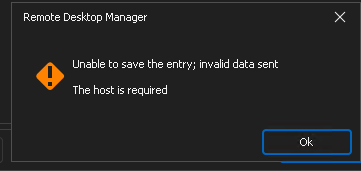
The entries were created but as RDP sessions
Is there something wrong the fields in the csv?
Exported a single session to use a template for importing new sessions - have a few questions.
Hi Maxim, I left that WebUrl column blank and was able to import successfully to the path I wanted to place these shortcuts.
I do have a follow up, the website shortcuts are not set to open to external display during import? an additional column?
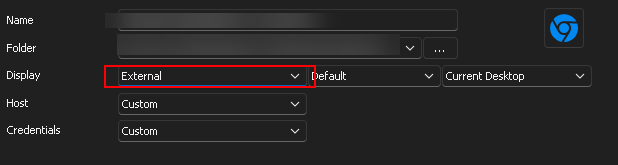
or is the only way is to highlight all shortcuts and edit > local specific settings (I want to change just on my user account, not for everyone else).
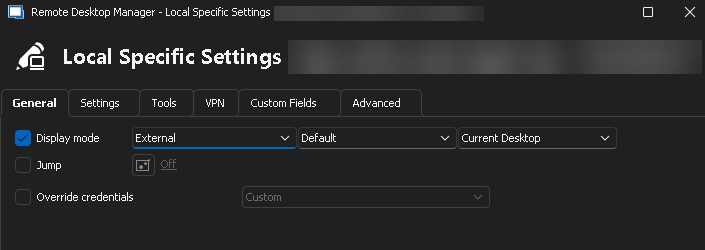
Or better yet, any way to set just my devolutions user account to open all web shortcuts in external display instead of tabbed?
Thanks!
Exported a single session to use a template for importing new sessions - have a few questions.
hello devolution pros.
I have to enter a bunch of web console and ssh sessions. I exported one of each from an existing session to use as a template and I can modify as needed and then import it back using the cvs import wizard.
I the web and ssh export the last column is a WebUrl with an rdm style url, I assume I leave that blank and once the sessions get imported rdm will automagically create those.

now these new entries are going to go within a subfolder of an existing path (header name is Group in the csv). will this new path be created during import of the csv or do I need to create the folder structure prior to import?
existing: folder1\folder2\
new: folder1\folder2\folder3 <this is what I am entering in the file to be imported, will folder 3 be created at import?
Thanks for the help!
How to run "Services" tool option on Workgroup servers
I did additional testing on a different workgroup server and it worked when it prompted for credentials.
So it seems like the server I was focused on testing is actually giving issues connecting remotely even from within Windows Services > Connect to another computer option, so that's something I'll have to look into.
Thank you for your help.
How to run "Services" tool option on Workgroup servers
Thanks for the info Erica.
I would be making the change for my account so I am editing the "User Specific Settings". I then went to the Tools tab and to test this I checked Override credentials > Linked (User Vault) > --- Prompt on connection ---
Now to try it out I go again to macros/scripts/tools > Services and I get the popup for Credential List
I select Custom tab and enter the credentials under username and password fields (not populating the domain field)
I get an access is denied message:
---------------------------
Services
---------------------------
Windows was unable to open service control manager database on 192.168.4.24.
Error 5: Access is denied.
---------------------------
OK
---------------------------
I have tried entering credentials in various ways:
username
.\username
ipaddress\username
Thanks.
How to run "Services" tool option on Workgroup servers
Hello everyone.
Curious question - we have a mixed environment of domain and workgroup servers. I use the Services tool (rt click on RDP shortcut > macros/scripts/tools > Services), and this works fine with the domain joined servers since I am logged into my workstation as a domain user. But this doesn't work for workgroup servers with error:
---------------------------
Services
---------------------------
Windows was unable to open service control manager database on 192.168.22.17.
Error 5: Access is denied.
---------------------------
OK
---------------------------
Is there a way to make this work by entering credentials somewhere that would allow the connection to the workgroup server and display the services window?
Thanks!
Can I automatically set user specific settings every time I create a new RDP connection?
well this sounds to me like a feature request, select a template from a duplicate entry :)
thanks for the info.
Can I automatically set user specific settings every time I create a new RDP connection?
Hi, whenever I create a new rdp setting I like to have user specific settings such as a private vault pw, override screen size, keyboard and hard drives.
I find myself having to set these every time I create a new rdp, can I set them globally somewhere just for my account so they're applied at every new rdp connection?
Note that for the most part I duplicate current rdp connectoins and I just edit the name, ip and folder location instead of creating new. So the ability to have this setting on a duplicate connection would be great. .
Thanks!
Pass keyboard shortcuts to embedded remote desktop session
Hello Cesar,
please see this post.
Regards,
Min
To put your answer on this thread from the post you linked to:
On the RDP entry=> Properties => Local Resources=> Keyboard => On the remote computer
Is it possible to make this change on all the rdp shortcuts already created or do I have to do this one-by-one?
Also, the rdp shortcuts are shared with other team members. If I make this change is it for everyone or just for my account?
thanks!
Pass keyboard shortcuts to embedded remote desktop session
So I use my windows keyboard shortcut (kbs) with frequency, yet when I am connected to an embedded tab rdp session the kbs doesn't pass through. Example, if I want to open the run box with win+r, it opens it on my local instead of the rdp session in devolutions.
How can I configure the console to send the kbs?
Thanks!