Exported a single session to use a template for importing new sessions - have a few questions.
Exported a single session to use a template for importing new sessions - have a few questions.

hello devolution pros.
I have to enter a bunch of web console and ssh sessions. I exported one of each from an existing session to use as a template and I can modify as needed and then import it back using the cvs import wizard.
I the web and ssh export the last column is a WebUrl with an rdm style url, I assume I leave that blank and once the sessions get imported rdm will automagically create those.
now these new entries are going to go within a subfolder of an existing path (header name is Group in the csv). will this new path be created during import of the csv or do I need to create the folder structure prior to import?
existing: folder1\folder2\
new: folder1\folder2\folder3 <this is what I am entering in the file to be imported, will folder 3 be created at import?
Thanks for the help!
devo-weburl.png
All Comments (3)
Hello Cdr01,
Thank you for contacting us on that matter!
You can leave the WebUrl column with a URL blank. When you import the sessions, RDM should automatically generate the necessary URLs.
For the folder structure, if you specify a new path in the "Group" column of the .CSV, after testing on my end, RDM will create a new folder, like the "folder3" in your example, during the import process. You do not need to create the folder structure manually beforehand.
If you have any other questions, feel free to let us know.
Best regards,
Maxim Robert
Hi Maxim, I left that WebUrl column blank and was able to import successfully to the path I wanted to place these shortcuts.
I do have a follow up, the website shortcuts are not set to open to external display during import? an additional column?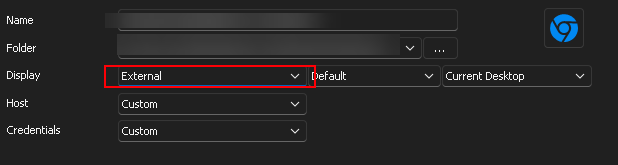
or is the only way is to highlight all shortcuts and edit > local specific settings (I want to change just on my user account, not for everyone else).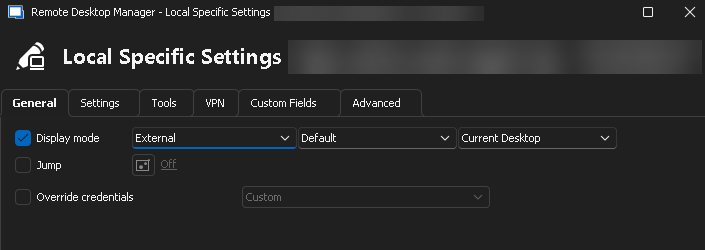
Or better yet, any way to set just my devolutions user account to open all web shortcuts in external display instead of tabbed?
Thanks!
976b7e36-8f9d-4df4-984d-d6224dd2f967.png
f20ebbec-d4e6-4fa6-9578-8a577c2047ca.png
Hello Cdr,
Sorry for the delay,
Under the settings of RDM (File > Setting > Sessions > Website), you can set the Web Browser to always open using a specific browser like Edge and Chrome. However, it does not specify whether it should always open externally or be embedded. If you select Firefox or Opera for this option, it should always open externally.
As you said in your last post, you can set the Display mode of the Local Specific Setting to External, and it should always open the Web Entry externally. This change will not impact other users. But you will need to set this setting for each created entry.
I've tried adding a column on my .csv to open the web entry externally when created, but I haven't made it work. I'm still investigating if this is possible.
If you have any other questions, feel free to let us know.
Best regards,
Maxim Robert