CSV import of Website sessions but instead it created RDP sessions!?
CSV import of Website sessions but instead it created RDP sessions!?

Hey everyone,
I have the following csv file with 60+ unique website session entries:
During import I got the following 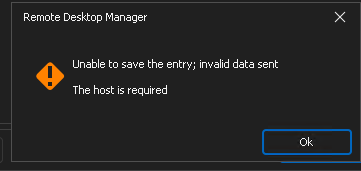
The entries were created but as RDP sessions
Is there something wrong the fields in the csv?
8623cd94-ee51-48d8-8ef6-07f00c326ccb.png
a71403f1-7454-41d7-aacf-7cff950172db.png
4f2f1339-4106-44a0-8823-080a295c8f89.png
All Comments (5)
Hello cdr01,
Thank you for reaching out.
I could not reproduce the error on the latest version of RDM (2024.3.18.0) using an SQL data source.
Please let me know the RDM version and data source type you are using. Additionally, please ensure that the IP in the host and URL columns are the same. (between HTTPS and the port)
Best regards,
Jacob
Jacob Lafrenière
Hi Jacob, we're on 2024.3.14.0 and data source is an external SQL server
I realized what the problem was, under the HOST column it can't just be the ip address 4.5.6.7 it has to be the entire URL including port number if it has one, so I had to enter https://4.5.6.7:443.
Not sure what the PORT column does if it doesn't append it to the IP nor does it convert 4.5.6.7 to https://4.5.6.7 during import process
I used an export of a single website entry from our devolution instance and I used that as our sample to input the new website entries. Is it not exporting correctly? Or is there a better way to get a sample import file?
Thanks
Hello cdr01,
I’m glad to hear that the issue has been resolved.
I attempted to replicate the problem using the latest version (2024.3.18.0) but could not reproduce it. I successfully exported a web entry and re-imported it without any issues.
I recommend updating RDM to the latest version. You can do this by navigating to Help > Check for Update in RDM or downloading it directly from our website: https://devolutions.net/remote-desktop-manager/download/.
Please don’t hesitate to reach out if you need further assistance.
Best regards,
Jacob Lafrenière
I cant upgrade since we have some sort of controlled client deployment matching our devolutions server version. In regards to a template to import, is the export the correct way to go about this that will give us all the headers and proper values to enter in the fields?
Just to confirm that I am exporting\importing using the correct options:
to import I use the Import generic CSV wizard
to export I use export special > export selection (.csv)
Hello CDR01,
This method will retrieve the CSV headers correctly and works with most of our entries. Additionally, I can share this documentation page from our website that provides more detailed guidance on headers for various entries:
https://docs.devolutions.net/rdm/commands/file/import/generic-csv-wizard/strategies-file-format/
Thank you for your time.
Best regards,
Jacob Lafrenière