
Bram
Policy to disable Update still allows to update through Winget
Thank you David, we will for now use the option in the datasource.
Policy to disable Update still allows to update through Winget
We have a policy set on our systems to disable update and auto update through Intune. This is working fine as we can not update RDM anymore through the app itself.
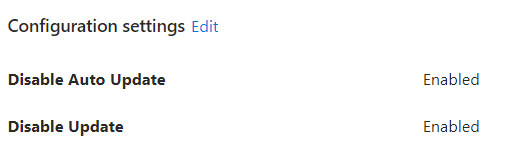
Except it is still possible to upgrade RDM through "winget upgrade --id Devolutions.RemoteDesktopManager". Is there some kind of setting to also diable to update Devoltuions RDM with Winget? In my understanding the Disable Update should have disabled the option to update the RDM package through also the installer, but that seems not to happen.
See below the winget output when manually trying to update, and it is working as I now updated from 2023.1.17 to 2023.1.20 and that is just the step we want to prevent as we have a lot of customizations in RDM and we dont want users to be able to update the Database before our application owner has tested it.

Import the Devolutions.admx files to Intune
Hi Christophe,
That is really good news! I'm excited to check this out once you are releasing the files.
Would it be possible to send them seperatly to me as we only release once in a few weeks / months a new version for our colleagues due to the database modifications and addons / templates my colleague has built into RDM.
Import the Devolutions.admx files to Intune
Do you maybe have an update as Microsoft is pushing me to arrange a meeting.
Import the Devolutions.admx files to Intune
I was in touch with Microsoft Support today and a new engineer as they finally transfered the case. We did a ScreenShare session with Microsoft and they told me the Reference not set to an instance of an object is caused by something in the ADMX file.
The Microsoft engineer wants to have a meeting with Devolutions, Microsoft and us. Is it possible to arrange a Teams Meeting with one of you guys and Microsoft? We can provide a Teams Meeting. Please let me know what is possible in this. Also we might have to discuss this by a case instead of the forums?
Import the Devolutions.admx files to Intune
Thank you Christophe, I will share your test results with Microsoft Support and get back as soon as I have more information from Microsoft. I will make sure to share the outcome!
Import the Devolutions.admx files to Intune
Yes we noticed this regkey and where able to fix it for now.
I'm also in touch with Microsoft Support via Intune to troubleshoot the issue. Except they dont really understand the issue or are not taking this seriously. The engineer didnt know the Windows.admx file was required, and now they are telling me "it is an issue with the admx file". I have asked them to be more clear on "what an issue should be".
I'm awaiting their response to see where it goes from here.
Import the Devolutions.admx files to Intune
No we only have Azure AD Joined devices, thats why we want to work with the Intune management. The main setting we want to disable is the AutoUpdate as we provide the packages made with the RDM package installer tool.
I'll look into the regedit part, we could provide that with a regkey and Intune
Import the Devolutions.admx files to Intune
I have made once a win32 app, but if you can provide me with the package that would be great. How do you suggest to enable the policy settings, in the same package or should we create an extra package to set some policies for RDM?
Import the Devolutions.admx files to Intune
Hi Richard,
Thank you for the reply. Is it possible to send me the fixed ADMX and ADML files as we just released the 2022.3.31.0 in our company?
Do you also have an update on the Intune import of the ADMX and ADML file(s)? Looking forward to hearing from you,
Best regards,
Import the Devolutions.admx files to Intune
Will the new ADMX file with the "S" issue be sumitted with a new installation / version of RDM? This because we are using the File Generator as we can provide the datasources within the Installer and keep everyone at the same version.
Import the Devolutions.admx files to Intune
We are trying to use the ADMX file (and ADML file) to import into Intune, but there are several errors while trying to import. First of all we had to upload the Windows.admx and Windows.adml file, but after that we had a Dictionary error. There was a ref="CAT_RDM_SESSIONS" defined but refered to as CAT_RDM_SESSION (the last "S" was missing). After editing it by notepad++ and then tried to upload again.
Now we are getting the error: Object Reference not set to an instance of an object. I'm not sure where this is coming from, I do read some blogs about just reuploading the admx and adml file, but that doesnt solve the issue.
Is there anyone else who managed to import the ADMX and ADML file into Intune so you can roll-out policies by Intune?
Please add Azure AD authentication to the mobile app
@Jeff, do you maybe have an update on the feature for AzureAD with MFA support on the iOS app? We are migrating more and more credentials into RDM, but it would be really usefull if we can access the Datasource (Azure SQL with AzureAD and MFA) trought our mobile phone in case of emergency.
Please add Azure AD authentication to the mobile app
Hello Mathieu,
Is there any update on Azure AD with SQL Azure? I have downloaded the latest version of the App but i'm not getting a proper connection.
Thank you,
User not able to login (SQL Azure database)
For us this issue is solved by updating to 14.0.4 version. We can now add users through RDM with AzureAD MFA (using MFA) and the users get created in the AzureSQL database as contained users.
For the non-working user we had to delete the user and recreate it.
Permissions for Read-Only user in SQL
Hello,
We are working on a Trial version of Remote Desktop Manager and testing out the system. Now we have AzureAD integration working thanks to the latest update to 14.0.4, thank you for that!
But the next issue we see is the following: If we make an User (AzureAD or even Database) and give this user "Read only User" permissions, the user gets created in the Azure SQL Database, if we check / verify the permission on the database, we see the user is added, but still has Edit / Delete permission on the whole database.
So when the user knows the password / or uses his AzureAD account and connects with SQL Server Management Studio directly to the RDM database, he still can edit / delete records and destroy the database.
I would expect, especially if RDM handles the creation of accounts in the database, that it would also check the permissions and not give a "Read Only" user "Delete" permissions.
How should we solve this issue / can you verify if this is expected behavior? A geek like person is able to destroy a database this way even if we think he only has Read Only permissions.
RDM hangs after double Azure SQL login popup's (auto went from offline > dialog to login)
Hi David,
Thank you for your reply, I do think it is related to the other post and think that should be solved first as the option you hightlight above are already set in my DataSource (I think by default as we have not modified those yet).
Thank you!
RDM hangs after double Azure SQL login popup's (auto went from offline > dialog to login)
Seems like we are dealing with the same issue. We are also trying to setup RDM with Azure AD integrated (MFA) but also have a good connection but when we try to close the window we are experiencing the same issue as Sander.
Going to follow this topic :)
User not able to login (SQL Azure database)
We might be experiencing the same issue. At least, we are running the Trial to see if we can get Azure AD authentication to work as this is one of the requirements for us. We created the database and when we try to add a user with the Administration --> User level and give him the account type Azure AD integration the user is not created in the database.
When we then maually create the user in the database he can login, but he has to use the Password option. Seems like for some reason the Azure AD Integration is not creating a user within Azure SQL database.