Import the Devolutions.admx files to Intune

We are trying to use the ADMX file (and ADML file) to import into Intune, but there are several errors while trying to import. First of all we had to upload the Windows.admx and Windows.adml file, but after that we had a Dictionary error. There was a ref="CAT_RDM_SESSIONS" defined but refered to as CAT_RDM_SESSION (the last "S" was missing). After editing it by notepad++ and then tried to upload again.
Now we are getting the error: Object Reference not set to an instance of an object. I'm not sure where this is coming from, I do read some blogs about just reuploading the admx and adml file, but that doesnt solve the issue.
Is there anyone else who managed to import the ADMX and ADML file into Intune so you can roll-out policies by Intune?
All Comments (25)
Hi,
I've asked our IT Team to look into this. We will get back to you shortly.
Maurice
Hello Bram,
Thanks for reporting the typo in our ADMX file, the error it produced on InTune was clear.
The missing "S" will be corrected shortly.
I corrected it on my side too and tried to import it on Intune.
I faced the same error : Object Reference not set to an instance of an object
I found someone else experiencing the same issue with another third-party ADMX file a few days ago but for now, still not solved.
To answer the other question you asked, YES, the Windows.admx file is the only dependency as the Microsoft documentation mentions.
We continue to investigate and will keep you informed.
Christophe Boyer
Will the new ADMX file with the "S" issue be sumitted with a new installation / version of RDM? This because we are using the File Generator as we can provide the datasources within the Installer and keep everyone at the same version.
Hello Bram,
The fixed ADMX file is planned for the next RDM release, 2022.3.34. 2022.3.33 was released yesterday, so it should not take too long, but we do not have an ETA.
Best regards,
Richard Boisvert
Hi Richard,
Thank you for the reply. Is it possible to send me the fixed ADMX and ADML files as we just released the 2022.3.31.0 in our company?
Do you also have an update on the Intune import of the ADMX and ADML file(s)? Looking forward to hearing from you,
Best regards,
Hello Bram,
For the updated files, the only change was adding the missing S, which you already did. No other changes were made.
As for Intune, it is still not working, but Chris is trying an alternative method that does not require an import. If it does not work, he will open a case with MS.
Best regards,
Richard Boisvert
Hi Bram,
1- Regarding Microsoft Support :
From the Intune portal, I cannot reach Microsoft's Support as it redirect me to Microsoft Partners, and I can't ask them for that kind of issue.
I tried from the Azure portal. At the end we are asked for which Microsoft platform the request is made. Selecting Intune, they redirect to the Intune portal.
We are in a useful loop!
2- ADMX ingestion :
It is possible to "ingest" ADMX using a custom Configuration profile. That can be done for third-party ADMX files but I am unfamiliar with this process. I gave it a try with mixed results.
https://learn.microsoft.com/en-us/troubleshoot/mem/intune/device-configuration/deploy-oma-uris-to-target-csp-via-intune
So here the preferred alternative:
3- Intune Windows app (Win32) :
Is it something you are familiar with?
I made an app using IntuneWinAppUtil.exe that copy the ADMX and ADML files in the right folders on computers.
That's a workaround to get Remote Desktop Manager's settings available from Group Policies.

Is it a solution that would fit your needs?
If yes, tell me if you need assist for the Intune app configuration.
Christophe Boyer
I have made once a win32 app, but if you can provide me with the package that would be great. How do you suggest to enable the policy settings, in the same package or should we create an extra package to set some policies for RDM?
Hi Bram,
I attached the file to deploy as win32 app.
Its content is :
- Devolutions.admx
- Devolutions.adml
- a .cmf file that includes those commands:
copy /Y .\Devolutions.admx %WINDIR%\PolicyDefinitions
copy /Y .\Devolutions.adml %WINDIR%\PolicyDefinitions\en-US
Please review and adapt it according to your needs.
In the app configuration, I have set the configuration as follow :
Program
Install command
copyDevolutionsFiles.cmd
Uninstall command
copyDevolutionsFiles.cmd
Detection rules
Rules format
Manually configure detection rules
Detection rules
File %WINDIR%\PolicyDefinitions
You can adjust the detection rule according to your preference. If some of your technicians already have these files on their computer, you will have to find a way to override them.
Do your machine are Azure Hybrid joined? I mean, can you control GPO with on-prem GPO?
If so, you can set policies by GPO.
I just set the "DisableAbout" to test the Registry Path.

Christophe Boyer
I have made once a win32 app, but if you can provide me with the package that would be great. How do you suggest to enable the policy settings, in the same package or should we create an extra package to set some policies for RDM?
Here is the .intunewin in the Zipped file.
Christophe Boyer
copyDevolutionsFiles.zip
No we only have Azure AD Joined devices, thats why we want to work with the Intune management. The main setting we want to disable is the AutoUpdate as we provide the packages made with the RDM package installer tool.
I'll look into the regedit part, we could provide that with a regkey and Intune
Alright, in that case you can set directly the following key :
Christophe Boyer
Yes we noticed this regkey and where able to fix it for now.
I'm also in touch with Microsoft Support via Intune to troubleshoot the issue. Except they dont really understand the issue or are not taking this seriously. The engineer didnt know the Windows.admx file was required, and now they are telling me "it is an issue with the admx file". I have asked them to be more clear on "what an issue should be".
I'm awaiting their response to see where it goes from here.
Thank you for your feedback.
As said in a previous post, I have made several test :
- with Firefox+Mozilla which does not require the Windows.admx, it worked
- with another third-party ADMX file that requires the Windows.admx, and it failed too
That lets me think that the problem does not come from the structure of our ADMX file.
Anyways, if I finally found the root cause and make it working, I will post it here.
Would you mind to do the same if you have the Microsoft answer?
Christophe Boyer
Thank you Christophe, I will share your test results with Microsoft Support and get back as soon as I have more information from Microsoft. I will make sure to share the outcome!
I was in touch with Microsoft Support today and a new engineer as they finally transfered the case. We did a ScreenShare session with Microsoft and they told me the Reference not set to an instance of an object is caused by something in the ADMX file.
The Microsoft engineer wants to have a meeting with Devolutions, Microsoft and us. Is it possible to arrange a Teams Meeting with one of you guys and Microsoft? We can provide a Teams Meeting. Please let me know what is possible in this. Also we might have to discuss this by a case instead of the forums?
Hello,
I have asked the engineer in charge of the ADMX if he would be able to attend, I will let you know once I hear back from him.
Best regards,
Richard Boisvert
Do you maybe have an update as Microsoft is pushing me to arrange a meeting.
Hello,
I have asked the engineer again to see if he is available, I will let you know as soon as I hear back from him.
Best regards,
Richard Boisvert
Hi Bram,
Did the Microsoft engineer checked the .admx and .adml content?
If the problem is something in the file structure, it should be able to detect it.
On my side, I struggle modifying the file in a way that it can be accepted by Intune.
If you plan a call with Microsoft, I will try to attend depending the time of the day.
We are America Eastern Time.
Christophe Boyer
Hi Bram, just to let you know that I have been able to upload an ADMX template for the AnyDesk software (I had to remove a huge quantity of policies because the file was too large for Intune - another problem).
We will compare it to our with Jafran and let you know (for a ggod new I hope).
Christophe Boyer
Hi Bram,
Jafran and me are glad to announce you that we finally "fixed" our files to make them Intune compliant.
As you can see on the image, I just set one parameter to test it, and it works.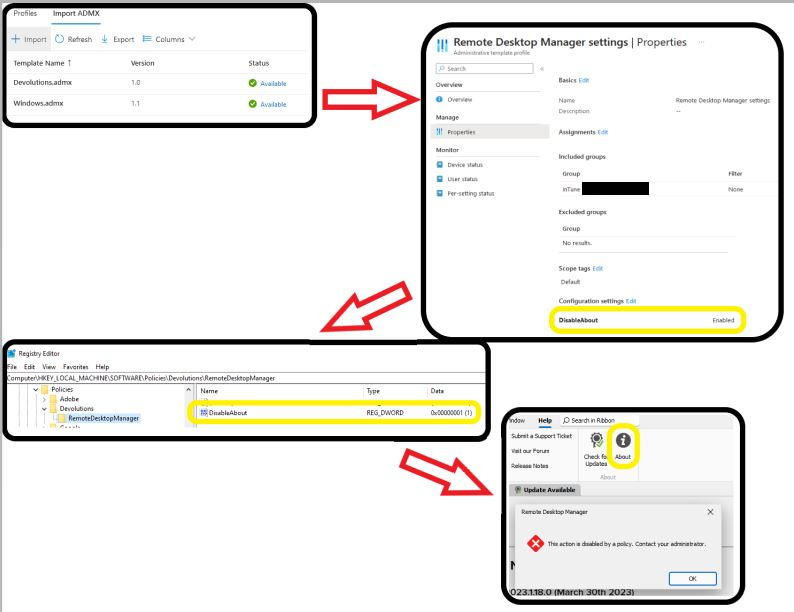
Once it is validated for Production, we will tell you in which version those files are distributed or we will send them directly to you.
Christophe Boyer
admx profile.png
Hi Christophe,
That is really good news! I'm excited to check this out once you are releasing the files.
Would it be possible to send them seperatly to me as we only release once in a few weeks / months a new version for our colleagues due to the database modifications and addons / templates my colleague has built into RDM.
Hi Bram,
I will sent you a link to download the files in a few minutes.
It is not an official version so I suggest you to check for the files coming with the future versions of RDM.
Thanks again for your involvement.
Christophe Boyer
Hello,
In our latest release of RDM, 2023.1.20.0, the policy files should have the fix to make them work with Intune.
In addition, I've also attached a zip file containing them to this post, in case other users encounter this problem and are looking for a quick fix.
Regards,
Hubert Mireault
Policies.zip