
sredden
ability to manage syntax highlighting on data sources
I don't personally use or know what the 'vault' layer is - so my preference would be data source. Or the ability to reference it in a Default.CFG if need be => we also manage this and force acceptance via GPO.
ability to manage syntax highlighting on data sources
I'd like to be able to control the default xml for syntax highlighting, so that brand new users can take advantage of highlighting without having to manually import.
We specifically use a SQL data source.
Can we move the options out of personal cfg and into something like the Shared Template functionality? that way it can be stored at the data source.
And then finally, the ability for personalization: specifically the enabling/disabling of individual rules. Noted in thread ("ability to make syntax highlighting enabled/disabled").
ability to make syntax highlighting enabled/disabled
Seconding
RDM Desktop Icon install flag?
Was there a change in behavior though, right? I recall previous versions creating desktop icons.
RDM Desktop Icon install flag?
My recent installs (and upgrades) using the standard RDM .msi seem to not create a desktop icon for users anymore. (In the case of upgrades, it outright REMOVES the desktop icon). Do we now need to include some flags in order to create+preserve the desktop icon?
ex. 2019.2.24.0
RDM - Support Multiple Credentials for CyberArk
I do not use the default CyberArk credential sessions, rather I use a custom credential session and just use PowerShell to make the API calls to CyberArk, and choosing our values based on Custom Fields on the remote sessions (available as a variable):
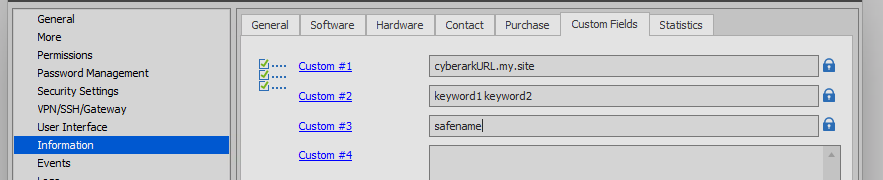
Very rough POC code of the custom credential session - you can easily clean it up:

RDP.KeyboardHook - Create a config-level (user-based) Default
We don't let our users edit sessions.
We do allow our users to have user-specific overrides.
However, we also refresh our SQL database/data source twice a month. This means if someone wants to change the Keyboard Hook, they'll have to do this twice a month.
Is it possible to create a "Default" option here:

So that the user could set their own default in their .cfg?
I'm not 100% sure how to link up the File > Default Type Template > Session > RDP to use the users' templates...
Application Close: Script / Action
I would like the same script to run on startup in case the shutdown script gets missed. So adding this ability to both would be useful.
Application Close: Script / Action
Just one data source.
I’d like to purge some temporary, cached files that are generated using other custom scripts.
Application Close: Script / Action
I would like for some cleanup to occur on RDM application close. I would like to choose a script to be run. Maybe referenced by file path, or perhaps execute a session (command line or powershell script session type) within the RDM database itself.
Create hyperlink in 'throw' command of custom credential (powershell)
So, not currently possible?
I was specifically hoping to throw specific errors and provide a hyperlink to a webpage for my users so they can troubleshoot on their own:
...

...

Create hyperlink in 'throw' command of custom credential (powershell)
I'd like to embed a hyperlink in my thrown errors of a Custom Credential (powershell-based) popup:


Is there a particular way you're handling the thrown text, that it could support a hyperlink?
When using a MSSQL Advanced Data Source, where are activity/access logs stored?
I’m actually hoping to find where they’re saved, not restrict access to them (at this time).
I’m hoping to find a way to get the activity logs into a system like Splunk. Wondering if there is a particular SQL table they live in that I could query for events. I will also check out the database tomorrow - but hoping for a quick answer or best practice.
Thank you!
When using a MSSQL Advanced Data Source, where are activity/access logs stored?
https://help.remotedesktopmanager.com/view_logs_global.htm
When using a Microsoft SQL Server data source, anyone can right-click on a particular session and do View > Logs
Are these events stored in a particular SQL table when the MSSQL Data Source?
Session>Events: Implement "Wait for Exit" for more types
I would like for a Before|After [Dis]Connect task to execute to completion before opening the session.
This is available for Command Line and Script, but not the PowerShell or Macro/Script/Tools. I would like this to be available for those as well.
Problem with Powershell New-RDMUser
Hello,
I attempted the fix against the account as a dbower and sa, but the account still has permission issues, apparently.
Should I open a support ticket instead of the forum?
Problem with Powershell New-RDMUser
I see a custom login as a barrier: won't that require an additional password to authenticate to the RDM application? More information in-depth would be great - the blog and guides do not go into much detail.
I am indeed logging in as an application admin:

But get a similar error, then "Done":


No changes when creating/updating users.
Problem with Powershell New-RDMUser
New-RDMUser -Login 'domain\user' -IntegratedSecurity -SkipCreateSQLServerLogin -Email "x@y.z" -SetUser
Or
$User = New-RDMUser -Login 'domain\user' -IntegratedSecurity -SkipCreateSQLServerLogin -Email "x@y.z"
Set-RDMUser -User $User
Full process:
Import Module, Check Data Source, Refresh for "fun," ensure user exists in domain, format my user's Login, validate the output

Create the $RDMUser variable with New-RDMUser, Verify an object was created, Attempt to Set-RDMUser
Hit error:

Update-RDMUI again (because I'm no longer connected to the data source for some reason?), attempt to find user object against the data source: it is created successfully.

One thing: we are skipping SQL Server Login creation because we have added an AD Group as a login on the SQL server, for which all RDM users are a member of. I hope it's not trying to check the database for said Server Login.
Problem with Powershell New-RDMUser
Using a MSQL Database:
It seems like Set-RDMUser (or New-RDMUser with the -SetUser flag) disassociates from the database. I'm trying to create users using the -IntegratedSecurity and -SkipCreateSQLServerLogin and it complains every single time with a popup that it cannot identify the user.
"Cannot find the login 'domain\user', because it does not exist or you do not have permission."
However, it does successfully create it in the user tab.
I've added a "Update-RDMUI" after each call to Set-RDMUser so work around this annoyance. But a root cause would be nice.
Version 2019.1.38.0 64-bit
.NET Runtime: v4.0.30319
.NET Version: 4.7.2 or better
Setting the embedded script in a PowerShell Session
Very helpful!
For anyone trying to update an XML file from an RDM Session Export (File > Export > Selection: myexport.rdm), you can convert the bytearray from the above Get-CompressedBytes function to base64 and save it in the XML.
ex:
$CompressedBytes = Get-CompressedByteArray -byteArray $Bytes
$XMLNode.PowerShell.EmbeddedScriptCompressed = [string]([Convert]::ToBase64String($CompressedBytes))
Ability to 'Copy Password' from several "keynote" sessions via hotkey
Hello,
This would be 2 to 3 "keynotes" per Data Source. We'd essentially like to have the passwords that are retrieved via several different Credential-Repository-Type-sessions at our fingertips (via global hotkey) when in any other session, RDP included.
-Steve
Ability to 'Copy Password' from several "keynote" sessions via hotkey
My users operate with many accounts in their day to day. Within a single RDP session they may use multiple credentials: One to auth to the server (AD credentials), and another to auth to an application.
I have configured credential-based sessions that retrieve their passwords from our vaults.
We understand that we can Copy Password of the OPENED/CURRENT tab (RDP session) with a global hotkey (Options > UI > Keyboard > Actions > Clipboard - Copy Password). However, we would like to expand the Action functionality to ALSO be able to copy another (non-active) credential repository's password.
We need a way to define "keynote" sessions that are accessible by hotkeys. These keynote sessions live in the Navigation Pane as credential repository sessions. If I could globally define one to five "keynote" sessions, then I could create a hotkey to "Clipboard - Copy Password - Keynote 1" - and my users could quickly retrieve their other credentials.
This saves time from having to: expand the navigation pane, find the appropriate credential session, right click, copy password.
Clean up "Duplicate groups"
Coming back to this, I have >8000 duplicate groups now (says Database Diagnostics). Can you create a SQL Agent Job or something to delete these that comes with the product? Still unsure how to delete these, or if they're actually problematic.
Add an 'inactivity' component to "Automatically close session after n minutes" (RDP Sessions)
I think that would be a great start. Closing a tab that hasn't been focused in a while would be a good first step to help solve this programmatically.
We're struggling with RAM resources but have done comparisons between RDM and regular mstsc.exe, and the consumption is similar, so it's really just a matter of getting our admins to close/disconnect/log off their RDP sessions.
Add an 'inactivity' component to "Automatically close session after n minutes" (RDP Sessions)
The current implementation of "Automatically close session after n minutes" has no regard for if the user is actively interacting with the session. For example, if you set this to 1 minute, and I'm actively typing and interacting with the remote desktop, I still get disconnected 60seconds after connection. I don't see a great use for this feature in it's current state.
What would be better would be if RDM could detect if the user is interacting / has focus / something with the session, and reset the timer if interaction takes places. I don't want to be kicking people off for no reason other than an arbitrary time limit (except maybe on April Fool's), but I do want to disconnect (not log off) their sessions to reduce memory consumption of the product.