RDM - Support Multiple Credentials for CyberArk
0 vote

Hello,
We are using CyberArk PSM and Devolutions RDM Enterprise and as it seems the RDM doesn't support multiple "My Personal credentials" for CyberArk. The only option seems to prompt with list, but it's not actually helpful when you have hundreds of servers and accounts.
Any plans on adding this feature?
BR,
All Comments (6)
Hello,
Could you detail what do you mean by multiple My personal credentials? Are you using a Password list in your My Personal credentials?
Regards,
David Grandolfo
Hello,
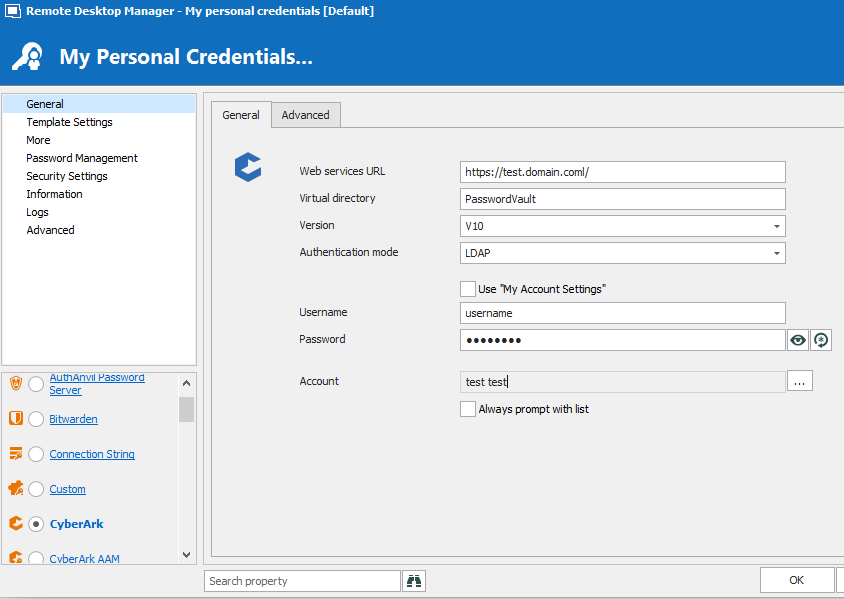
As shown in the image we have CyberArk configured in My Personal Credentials with username/password of the logon account to CyberArk, but it also needs a specific account saved (for example "test test"). This account will have access on specific hosts (if not only in one), then when we try to log in to another entry, it will prompt for password, because this account won't work. As it seems the only way to work around this is to enable "Always prompt with list", then i have to choose the Safe in CyberArk and then the proper account to logon, but this action can't actually work when you have +500 accounts on CyberArk.
What i mean by multiple accounts, is to be able to save on each entry the appropriate account from CyberArk on the field "Account" in the image.
Hope this helped better
BR
cyberark.PNG
Hello,
I think that Alex in your support ticket has talked about Private Vault search. I think that it could do what you want with the multiple credential. He is supposed to show you a Proof of Concept on how to configure it. You could save in your private vault an entry for each account. I might not understand exactly what we could do and I will let Alex explain it to me after the POC.
Regards
David Hervieux
Hello,
The solutions that the support team provided to @g14 was filling the requirement.
Here's the solution he chose :
The point here would be to set the CyberArk Credential entries IN the users' Private Vault.
Then, RDP entries (or any other that requires CyberArk Account) would point towards the credential entries through a PV Search.
In their Private Vaults, users would have, as mentioned, An entry of Type CyberArk, configured on the proper server and with the predefined name (for the search to work). Users can then Set their CyberArk Account Username and password directly in the entry(ies).
Make sure The Private Vault entry has the setting global availability : available
Thanks!
Best regards,
Alex Belisle
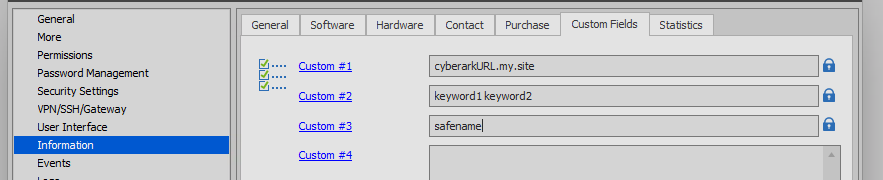
I do not use the default CyberArk credential sessions, rather I use a custom credential session and just use PowerShell to make the API calls to CyberArk, and choosing our values based on Custom Fields on the remote sessions (available as a variable):
Very rough POC code of the custom credential session - you can easily clean it up:

2020-01-21 09_19_36-Window.png
2020-01-21 09_14_20-Windows 10 - Test Lab.png
Hello,
This seems like a good point, of course though, it assumes that you're using same LDAP credentials on your Windows Session AND CyberArk.
Thanks for this interesting addition!
Best regards,
Alex Belisle