
rob02
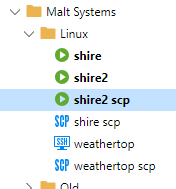
Sort order not quite what you'd expect
Thanks for that. It's a minor thing but always meant to mention it.
Sort order not quite what you'd expect
Personally, I'd expect the order to be shire, shire scp, shire2 & shire2 scp. By coincidence, I came across a similar issue in sorting in Access DB VBA a few days ago. Was to do the way the two strings are compared: text and binary. If you sort those four entries in Notepad++ you get the order above.
SCP upload not uploading entire file
On an associated issue about "Completed" messages on uploads. It also says "Completed" if you try and upload to a folder that the account doesn't have permissions on. Just spun up a new Ubuntu server logging on as the user account and trying to upload to /tmp again. However, this folder is only accessible but the root account. Do an upload and no errors but nothing actually gets transferred...
SCP upload not uploading entire file
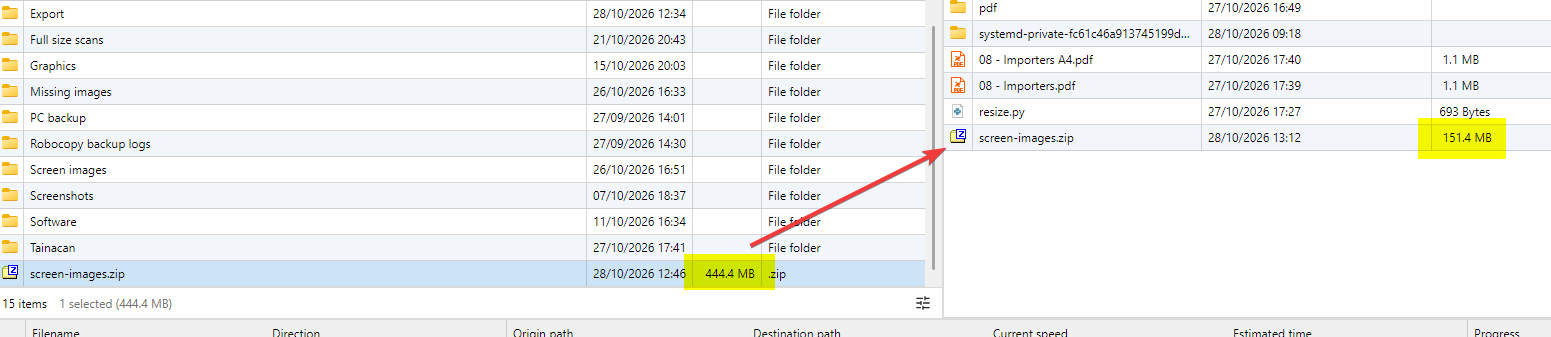
Ahh found the problem - on recent Ubuntu, /tmp is mounted on a separate small partition and it's full. Which is why it worked to /home/system. I never knew that! Always thought /tmp was part of the root file system volume.
However, it would be good if the upload could detect if the disk is full. Even if an error isn't returned during the SCP upload, check the file size after completion?
SCP upload not uploading entire file
I've trying to upload a 444MB file using SCP from my Windows PC to a Ubuntu server into the /tmp folder. The upload says it's completed but the target file is only 151.4MB big and won't unzip (not surprised if it's not the entire file). Any ideas?
Later... I managed to transfer the file using the Windows scp.exe command line utility but still like to know why RDP is struggling.
Later still... hmm, it's when I try to upload to the /tmp folder. Works fine when I upload to the /home/system folder. Weird.
Error after switching account on same laptop
The other bit of maybe pertinent information is that the old account was using a personal cloud and I suspect, due to timing, that the new account is using the new cloud mechanism (I've seen the prompts but can't remember the new name). The old account was using https://hub.devolutions.com but the new one was https://fr.devolutions.app/guid format.
Error after switching account on same laptop
Yes, that's the process I used to add the workspace. The correct address was entered. The version is 2026.2.9.0.
In the spirit of turn it off and back on again, I deleted the workspace entry and added it back. This has worked :-) The only obvious difference is that I left the name as "Devolution cloud". Previously, I'd changed it to "My cloud". Not sure this would have made any difference but don't want to remove and re-add to test as I've got it working :-)
Error after switching account on same laptop
I'm pretty sure it's something do with authentication. I've tried clearing all data in Edge browser.
Error after switching account on same laptop
A client has a laptop running RDM but they wanted to change the email address used for the Devolution account. As it's not possible to change the email address, the vault was exported, a new Devolutions account created with the plan to import the vault. Switching account wasn't easy in RDM - I could sign out of the old account and back in as new, but the old workspace was still there. Worked how to add a new workspace (host Url being the tricky point) but same error. In the end I renamed %localappdata\Devolutions and this went through the onboarding but same error.
If I install RDM on a new computer (virtual machine), it works fine so there is clearly something lingering from the previous account. BTW the previous account had a very different host address.
Status: 401
Response:
Stack:
at Devolutions.Hub.Clients.HubClient.PreLoginAsync(CancellationToken cancellationToken)
at Devolutions.Hub.Clients.HubClient.<PreLogin>b__36_0()
at Devolutions.Hub.Clients.HubClient.PreLogin()
at Devolutions.RemoteDesktopManager.Managers.DevolutionsHubDataSourceManager.Connect(HubConnectionDataSource dataSource, String privateKeyBase64Url, Byte[] privateKeyBytes, Boolean useEncryptionService)
Cached/Offline did not work for RDM with Devolutions Cloud Datasource
I've just done an export of the RDM file and added to the monthly maintenance checklist...
Cached/Offline did not work for RDM with Devolutions Cloud Datasource
Ended up here with exactly the same thought. Historically, the database was local with backup to cloud. That worked fine. But now we appear to be purely online only. I was offered an offline option but RDM didn't display any entries and then hung on what looked like a logon prompt.
Vast numbers of services relying on Cloudflare is a real bad idea... it's a single point of failure. Imagine a bad actor working out how to hurt most people at once...
Winget source needs updating
Smashing - can you merge posts on here?
Winget source needs updating
Tiny problem but winget repository needs updating. Just installed on new computer using:
winget install Devolutions.RemoteDesktopManagerAnd on running, it reports the above installed 2025.3.16.0 whereas 2025.3.22.0 is available.
The domain of the email address has been marked as spam by our system
I'm trying to create a Hub Personal account for a very small business and on sign-up it reports the above error message. I've checked the domain at https://check.spamhaus.org/ and it's reporting as clean. How does one contact support?
Edit files over SCP not uploading after edit
Thanks for the update. Will keep an eye in the next major update.
SCP Session not working properly [Manjaro]
Ohh this is crazy :-) I went out to grab a sandwich and when I got back, the RDM SCP session was still open - drag and drop worked!
SCP Session not working properly [Manjaro]
I've got a similar problem here using SCP to upload to Linux server - both CentOS but one hosted on Hyper-V on my PC and the other hosted on Azure. I'm pretty sure I used to be able to drag and drop from the left panel into the (say) /tmp folder. Nothing happens with the current version.

Edit files over SCP not uploading after edit
Thanks for the update. At the moment, the client is logging onto the Linux terminal and using Nano which works fine. But getting quick edits via RDM would be great.
Edit files over SCP not uploading after edit
The ticket for this is still open at on our ticketing system - it pops up every month and we check if the fault still occurs. So, no - no solution yet. Never got an answer as to how this mechanism works but I'm assuming my guess isn't far off the mark. FileZilla FTP client does something similar. When you edit, It downloads the file to a temporary folder and opens in the default editor (often Notepad++ for me). FileZilla monitors the timestamp on the temporary file and when it changes, prompts you to upload back via FTP.
As "Edit" is offered as an option in RDM, it would be nice if it worked :-)
.NET error when closing RDM
Thanks for the quick reply. Did a quick scan down to see if anyone else had reported but must have missed that one. Cheers, Rob.
.NET error when closing RDM
Anyone else getting this on Windows since the last update?

Locked out of RDM
I would just like to say that this is how you work with your customers, even the free edition freeloaders like myself. I have had so many bad experiences of support forums where the actual company doesn't engage with the forum themselves directly and every time things go bad with the product the forums just end up a toxic mess. Well Done Devolution, this is how its done properly!!
Seconded...
Locked out of RDM
@rob02, not sure about the beta upgrade but if I had to guess you will need to update manually (could be wrong)
IT support have said they'll email when the new version is available. Considering it's currently prompting to install the latest (broken) version, I'm guessing I will get prompted as well.
Locked out of RDM
Smashing, thanks for the quick fix. Will keep an eye out of the new version. BTW - I installed the beta today, will I have to manually upgrade or will auto upgrade from beta prompt still appear?
Locked out of RDM
Sadly not totally. I keep getting HTTP status code error (422) periodically but much pressing of cancel button appears to get around it. Guessing but it seems to be when the app has to talk to the personal hub.