SCP upload not uploading entire file
1 vote

I've trying to upload a 444MB file using SCP from my Windows PC to a Ubuntu server into the /tmp folder. The upload says it's completed but the target file is only 151.4MB big and won't unzip (not surprised if it's not the entire file). Any ideas?
Later... I managed to transfer the file using the Windows scp.exe command line utility but still like to know why RDP is struggling.
Later still... hmm, it's when I try to upload to the /tmp folder. Works fine when I upload to the /home/system folder. Weird.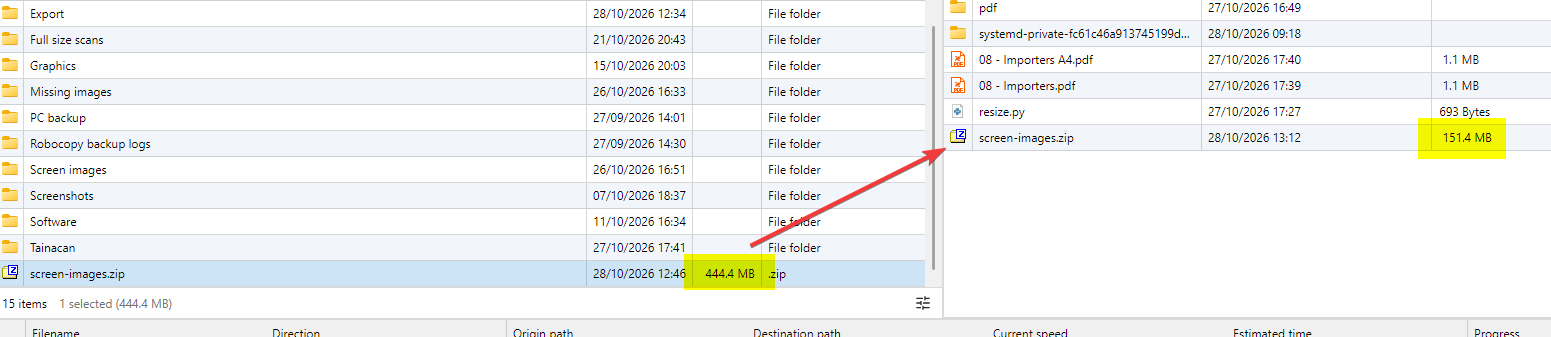
tCOv1EiatU.png
RemoteDesktopManager_4vkAYz7pdi.png
All Comments (4)
Ahh found the problem - on recent Ubuntu, /tmp is mounted on a separate small partition and it's full. Which is why it worked to /home/system. I never knew that! Always thought /tmp was part of the root file system volume.
However, it would be good if the upload could detect if the disk is full. Even if an error isn't returned during the SCP upload, check the file size after completion?
Hello,
Thanks for coming back with the root cause, and for spelling it out so clearly. It will help other users who hit the same thing.
You’re right that this should be handled better. If the destination runs out of space, Remote Desktop Manager shouldn’t report the upload as completed. It should tell you the disk is full, or at least catch the size mismatch once the transfer ends.
I’m moving this topic to the Feature Request section.
Thanks again for the feedback!
Best regards,
Carl Marien
On an associated issue about "Completed" messages on uploads. It also says "Completed" if you try and upload to a folder that the account doesn't have permissions on. Just spun up a new Ubuntu server logging on as the user account and trying to upload to /tmp again. However, this folder is only accessible but the root account. Do an upload and no errors but nothing actually gets transferred...
Hello Rob,
Thanks for the extra test, that’s very helpful.
This looks like the same underlying problem: when the server rejects the write (disk full or no permission on the destination folder), Remote Desktop Manager doesn’t show the error and still reports the transfer as completed.
I’ll update this thread as soon as I have news from the team.
Best regards,
Carl Marien