
magnus01
Problem getting Offline mode Read/Write to work
Hi Erica
Yes , changing from "In-Memory" to "File" solves my problem
Whats the difference between these options ?
Problem getting Offline mode Read/Write to work
Im having problem getting Read/Write Offline mode to work
I can´t seem to find where to change so the Offline mode goes to Read/Write instead of "Read-Only".
I think i have set all the settings correctly , so either i have missed some setting or i have a problem with my setup
RDM 2023.2.30.0
DVLS 2023.2.6.0

Problems with DVLS/RDM Notifications
Hi again
I have noticed that other notifications is not working.
I have set up to notify when a user is created/locked/deleted but i don´t get notified when a user is created from Azure AD (Auto create on first login)
If I go and create a user manually in the Admin GUI I get the notifications for this.

Problems with DVLS/RDM Notifications
Hi
Yes , i got the notice about that version today and noticed the information about the fixes.
Have installed and tried it and can confirm that it works now
The current vault has a large number of entries, which may impact performance.
Is there a way to hide this message by default ?
And if hidden , how can i remove the setting so i will get the warning information again ?
Problems with DVLS/RDM Notifications
Hi again
Acctually I see that nothing gets added to that NotificationEvent table when i do the delete of the folder.
When creating a folder I see the information getting added
Problems with DVLS/RDM Notifications
Hi Erica
The table seems to be empty and yes I have restarted the service multiple times
I will email and schedule a support session
Problems with DVLS/RDM Notifications
How do I check the NotificationEvent table to see if it's empty or not ?
Problems with DVLS/RDM Notifications
Hi Erica
Well i guess ther Scheduler service is running properly since if i only have like this configured at least i get an email notification that it is created
No notification though when I delete the folder
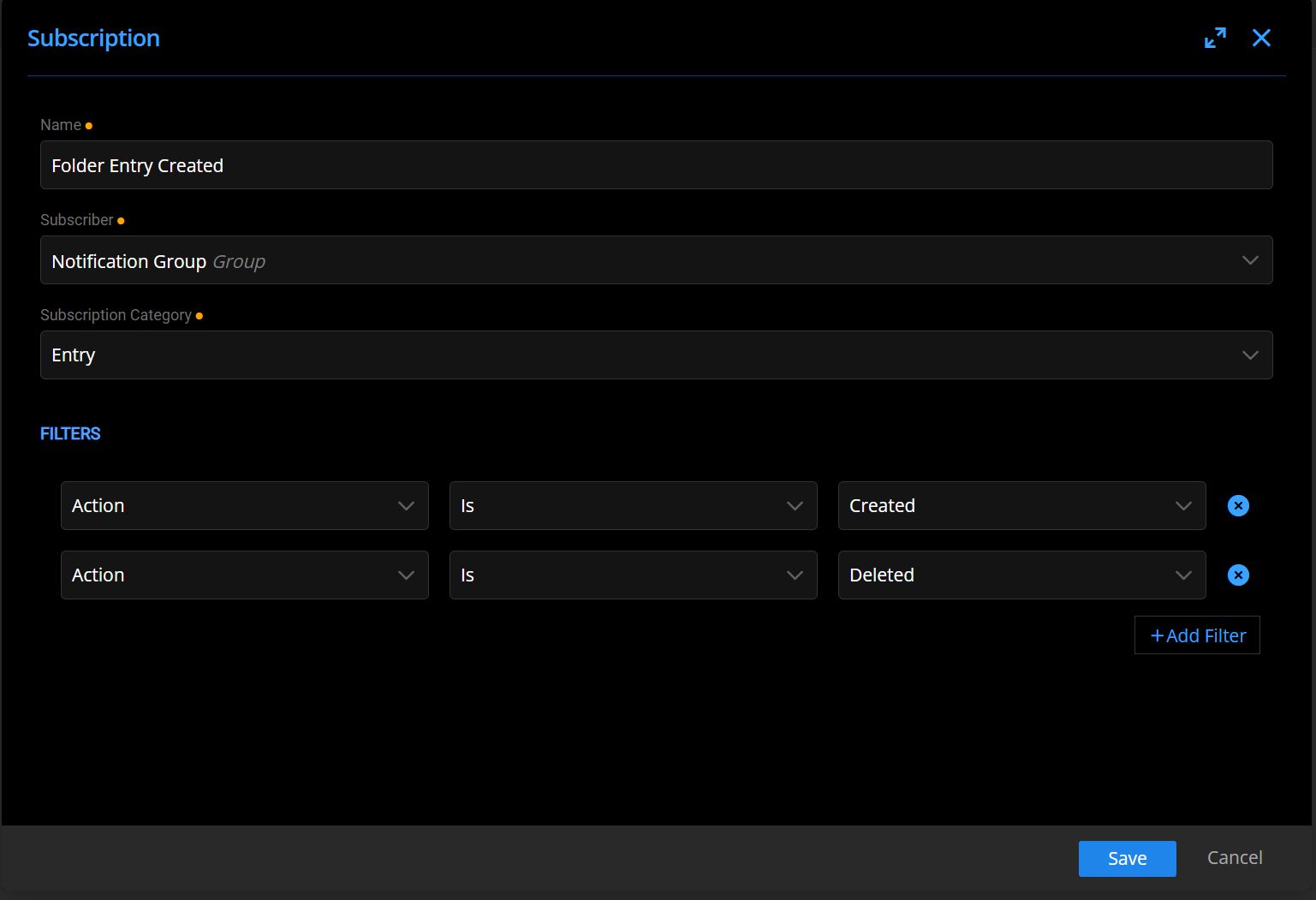
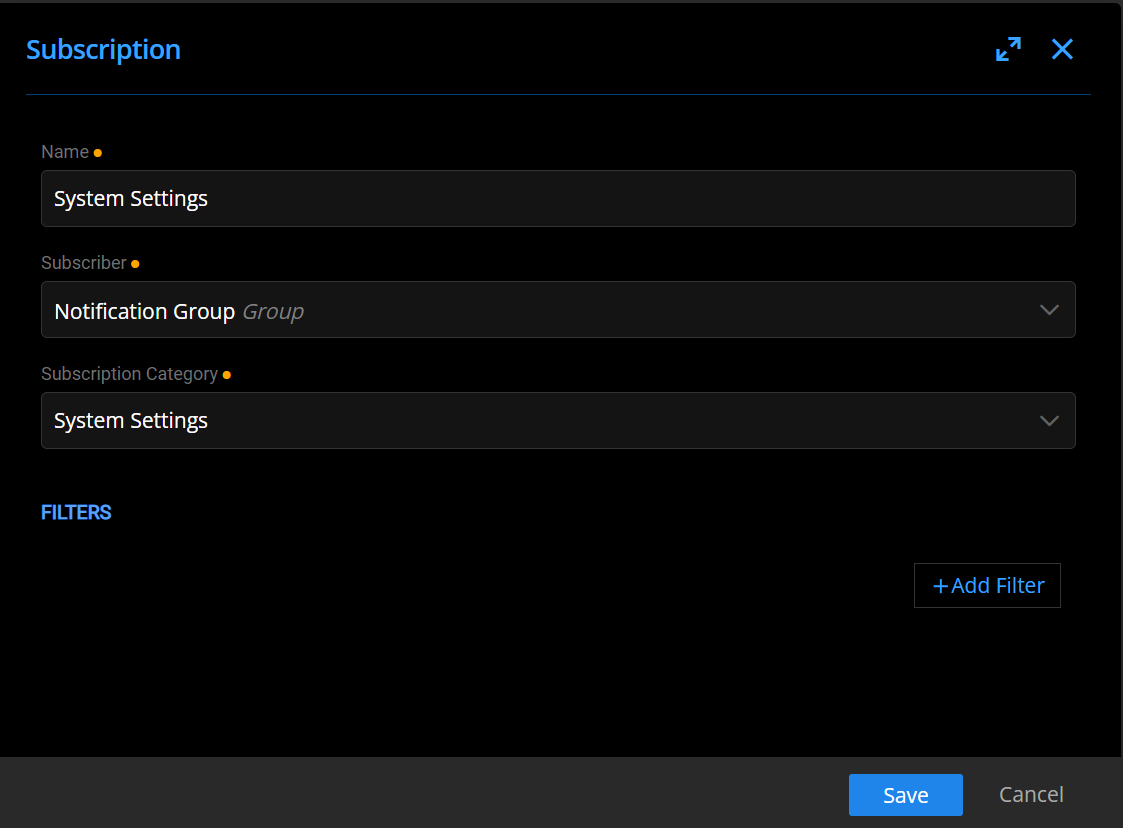
And also , I have this notification set up and here I get email notification when doing changes to "System settings"
Problems with DVLS/RDM Notifications
Hi
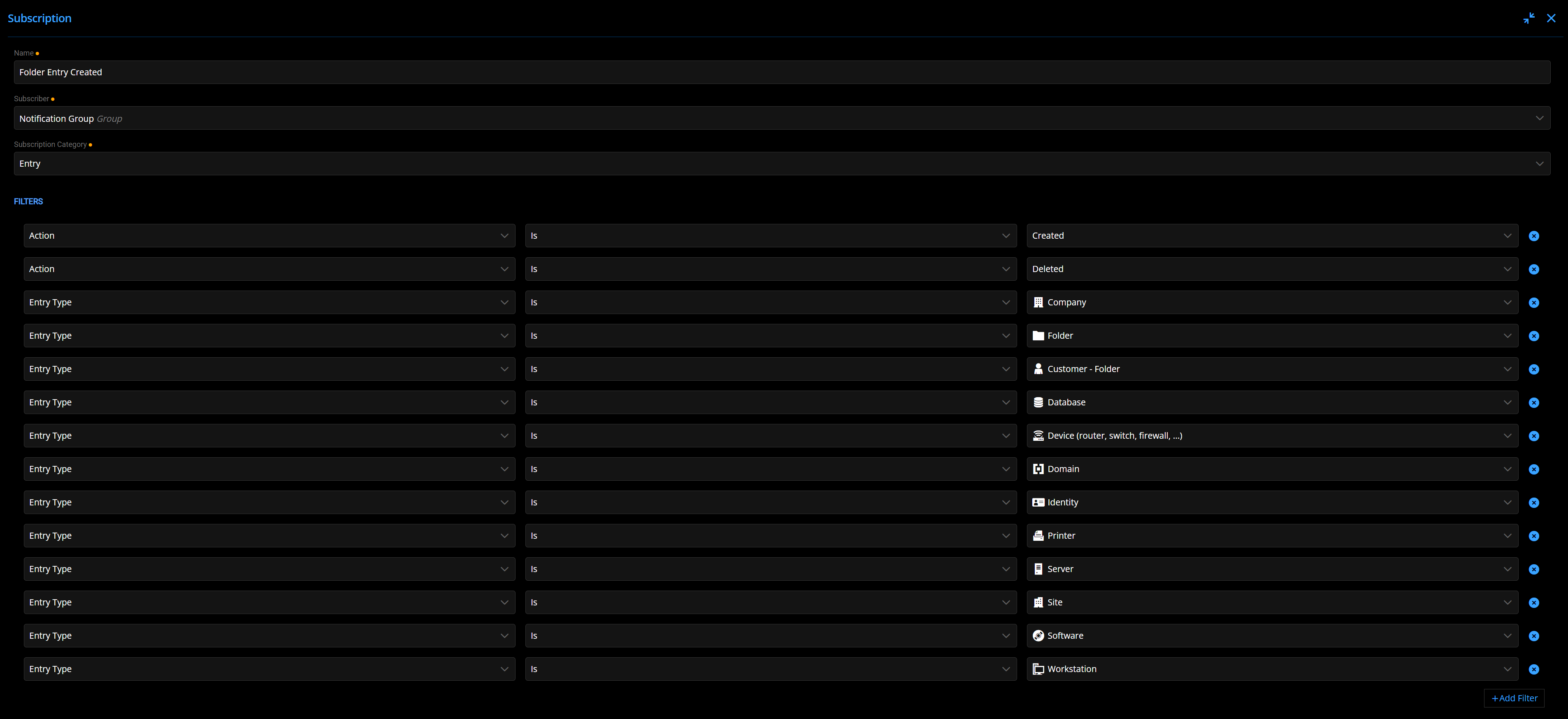
When testing I have used the standard "Folder" when creating and added "Folder" to the subscription.
I have now added all 12 but still not notification , removing these filters and i get the notification
Problems with DVLS/RDM Notifications
There seems to be strange behaviors regarding this.
I have set up to send notifications when entry type folders are created or deleted but I only recieve email notification for creted folder entry IF i don´t have any more filter added than "Action is Created".
If i add a filter that the entry type should be "Folder" i don´t get any email when a folder is created
Also , i don´t get any email when an entry is deleted with a notification setup for this.
Is there any log i can check if something acctually happens when it is supposed to ? Like i want to se if the system has tried to send a notification
Running DVLS 2023.1.7.0 and RDM 2023.1.23.0
Session recording problems
Is there a way to force the entry to use "Embedded" always , because when i set it to "Embedded" on the entry I can bypass that by setting the Display mode for Remote Desktop in the settings for RDM client in "File - Options - Types"
And with force the setting i mean so our end users cant´t change and bypass the setting that is set on the entry
Session recording problems
We have set up Session Recording on our new DVLS instance (2023.1.6.0 )
Sessions is recorded and saved OK to the server but i have noticed some problems!?
It seems that the session is only recorded if the session is opened as "Emebedded" , at least if im trying with RDP session. If i set it to open "outside" of RDM client in regular RDP windows I get the question if i want to record or nor (if set to ask before) but there is nothing saved once the session is closed. Changing to embedded it works fine. Is this by design o should it work ?
When i right click on the session entry and choose "View" there is a section with Recorings but I don´t see any of the saved recordings there in the list (RDM client on the DVLS server)
Doing the same on my client laptop with RDM client installed the option of View - Recordings don´t appear at all, but i quess thats because I don´t have access to the filearea where the recordings is stored (locally on the DVLS server)
Export entries with permission and then import them to other database
Ahh ok. Didn´t think of doing a copy of the database :) Worked fine by doing that and no problem at all doing that since it all a new set up.
One more thing though that i noticed.
We are using a lot of Groups to set premissions but when i look in the Administration page and User groups it only lists 10 groups, there is no next page or anything like that. I need to start typing in the "filter" to find other groups than the first 10 ones
Export entries with permission and then import them to other database
yes, the groups is imoprted before trying to import the entries.
both instanes run 2023.1.6.0
Export entries with permission and then import them to other database
We are setting up two new DVLS instances , one PROD and one TEST
We have set up all in TEST database with a structure and permissions set to this with Azure AD groups.
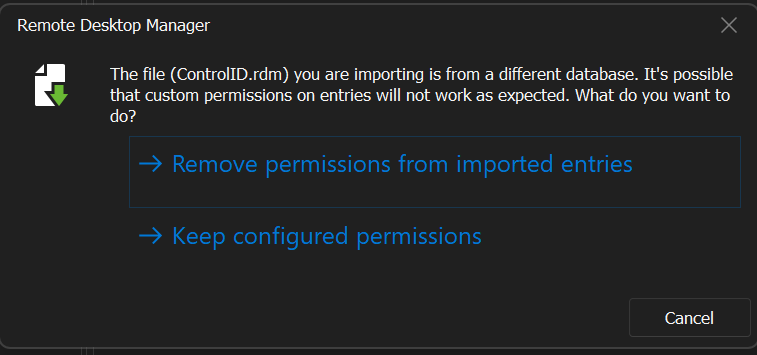
When i export entires and import this to the PROD database the permissions are gone. Is there a way to export and import and retaining the permissions that is set ?
Both instances uses the sam Azure AD and groups.
When importing i get this information but choosing "Keep configured permissions" still leaves the entry with no permissions set
After upgrading DVLS to 2022.3.2.0 we are experiencing error emails after logging in
Hi Erica
So i have tried with version 2022.3..7 now and i still get error but i get another information error, "Data is Null. This method or property cannot be called on Null values."
Activating encryption at rest...
Validating current instance requirements...
Stopping Application Pool...
ReEncrypting Attachments...
Data is Null. This method or property cannot be called on Null values.
Encryption at rest activation failed. Please manually restore the database and restart the app pool and scheduler service.
Starting Application Pool...
If the encryption at rest activation completed with errors, please restore your database to the backup taken prior the operation.
After upgrading DVLS to 2022.3.2.0 we are experiencing error emails after logging in
Hi Erica
Any news regarding the issue with non encrypted attachments ?
After upgrading DVLS to 2022.3.2.0 we are experiencing error emails after logging in
Did a try with new fresh restore of PROD database and removed the attachments that i had located.
But i still get this new error now "Length of the data to decrypt is invalid."
Activating encryption at rest...
Validating current instance requirements...
Stopping Application Pool...
ReEncrypting Attachments...
Length of the data to decrypt is invalid.
Encryption at rest activation failed. Please manually restore the database and restart the app pool and scheduler service.
Starting Application Pool...
If the encryption at rest activation completed with errors, please restore your database to the backup taken prior the operation.
After upgrading DVLS to 2022.3.2.0 we are experiencing error emails after logging in
Hi
Ok , so i have run the SQL query and go the entries where attachments are found
I have gone through them and found some that i couldn´t open and some RTF documents (i recall this being obsolete a while back?)
After removing these i do get another error now
I haven´t yet restarted with a fresh copy of the orginal PROD datbase , i just tried again after i got the first error and the removed a few attachments entries and tried to do the "Activate Encryption At Rest" again.
Activating encryption at rest...
Validating current instance requirements...
Stopping Application Pool...
ReEncrypting Attachments...
Length of the data to decrypt is invalid.
Encryption at rest activation failed. Please manually restore the database and restart the app pool and scheduler service.
Starting Application Pool...
If the encryption at rest activation completed with errors, please restore your database to the backup taken prior the operation.
After upgrading DVLS to 2022.3.2.0 we are experiencing error emails after logging in
Ahh no worries :)
I will update then so i will stop recieving the emails
Is there any quick and easy way to se how many and which entries that has attachments ? We have over 3000 entries so i need to figure out which has attachments and then which attachment it is that causes the problem in step 10.
After upgrading DVLS to 2022.3.2.0 we are experiencing error emails after logging in
Hi
DVLS Console is updated to 2022.3.4.0
The instance is updated to 2022.3.4.0
But still the error appears at step 10
Activating encryption at rest...
Validating current instance requirements...
Stopping Application Pool...
ReEncrypting Attachments...
Padding is invalid and cannot be removed.
Encryption at rest activation failed. Please manually restore the database and restart the app pool and scheduler service.
Starting Application Pool...
If the encryption at rest activation completed with errors, please restore your database to the backup taken prior the operation.
After upgrading DVLS to 2022.3.2.0 we are experiencing error emails after logging in
Hi
I have set up another instance with a new copy of the database and i recieve error when removing the Security Provider https://kb.devolutions.net/dps_removesecurityprovider.html
It´s after step 10 that I get the following error
Activating encryption at rest...
Validating current instance requirements...
Stopping Application Pool...
ReEncrypting Attachments...
Padding is invalid and cannot be removed.
Encryption at rest activation failed. Please manually restore the database and restart the app pool and scheduler service.
Starting Application Pool...
If the encryption at rest activation completed with errors, please restore your database to the backup taken prior the operation.
upgrade to 2022.3.0 - with Web Error HTTP Error 500.30 - ASP.NET Core app failed to start
Hi
I had the same error when installation a new instance, i had missed to set the correct user under "Process Model" - Identity under Application Pools
After upgrading DVLS to 2022.3.2.0 we are experiencing error emails after logging in
After upgrading DVLS to 2022.3.2.0 we are experiencing error when logging in.
Everytime someone logs in i revievce an error report with the following information (2 emails)
It doesn´t matter if it´s with the RDM client or with the DVLS web
If the admin user logs in i don´t get these error mails (difference here is that admin is a "Devolutions Server" user and all others are "Domain" users)
One thing i can think of is that during upgrade I get notice of "Your instance is using a Security Provider. It is highly recommended to remove the Security Provider and implement
the Encryption at REST"
https://kb.devolutions.net/dps_removesecurityprovider.html
I haven´t done this in PRODUCTION because last time i did that it went bad and i had to do a restore (I have lost my notices about what the problem was though)
Email 1 (missing info regaring user)
The following error was received by at 11/09/2022 08:07:42
Error:
DevolutionsCryptoException - NativeError : InvalidSignature ===Original Mes-sage=== Exception of type 'Devolu-tions.Cryptography.DevolutionsCryptoException' was thrown. ===Original StackTrace=== at Devolutions.Cryptography.Utils.HandleError(Int64 error-Code) at Devolutions.Cryptography.Managed.Decrypt(Byte[] data, Byte[] key, ILegacyDecryptor legacyDecryptor) at Devolu-tions.Server.AttachmentManager.DecryptAttachment(Guid attachmentID, Byte[] bytes) --- Attachment
Source:
Devolutions.Crypto
Email 2 (has the info regaring user)
The following error was received by mf at 11/09/2022 08:07:41
Error:
DevolutionsCryptoException - NativeError : InvalidSignature ===Original Mes-sage=== Exception of type 'Devolu-tions.Cryptography.DevolutionsCryptoException' was thrown. ===Original StackTrace=== at Devolutions.Cryptography.Utils.HandleError(Int64 error-Code) at Devolutions.Cryptography.Managed.Decrypt(Byte[] data, Byte[] key, ILegacyDecryptor legacyDecryptor) at Devolu-tions.Server.AttachmentManager.DecryptAttachment(Guid attachmentID, Byte[] bytes) --- Attachment
Source:
Devolutions.Crypto