upgrade to 2022.3.0 - with Web Error HTTP Error 500.30 - ASP.NET Core app failed to start
upgrade to 2022.3.0 - with Web Error HTTP Error 500.30 - ASP.NET Core app failed to start

Just upgraded to 2022.3.0, from Server Console everything is showing fine. Check IIS diagnostics and that is all green as well. Also checked DB tests, and they all went well.
I also checked I am at 240 for the config of aspNetCore - https://kb.devolutions.net/http-error-500_30.html
Any ideas on what to try next?
All Comments (12)
Hello,
Just to confirm, were you trying to upgrade to the initial beta (2022.3.0), or the latest version (2022.3.3), which was released earlier today? https://devolutions.net/server/release-notes
Could you go to the Event Viewer on the server hosting the Devolutions Server, expand the Windows Logs folder, and select the Application event log. In it, there will be more details on the 500.30 error.
You can can take a screenshot of the 2-3 errors and either post them here, or send them to service@devolutions.net
Best regards,
Richard Boisvert
sorry subject line was misleading. Upgrade to 2022.3.3 (released today). I will send over the app log, I am not seeing any of the 500 errors in there.
Hello,
Just to confirm, were you trying to upgrade to the initial beta (2022.3.0), or the latest version (2022.3.3), which was released earlier today? https://devolutions.net/server/release-notes
Could you go to the Event Viewer on the server hosting the Devolutions Server, expand the Windows Logs folder, and select the Application event log. In it, there will be more details on the 500.30 error.
You can can take a screenshot of the 2-3 errors and either post them here, or send them to service@devolutions.net
Best regards,
Hi
I had the same error when installation a new instance, i had missed to set the correct user under "Process Model" - Identity under Application Pools
Hello,
Thank you for your feedback @magnus01, it will hopefully help someone that encounters the issue!
@ksilva fixed the issue by re-applying the update and using the download option instead of using the .zip offline installer.
Best regards,
Richard Boisvert
Hi, i have now the same error (did upgrade to 2023.3.8.0).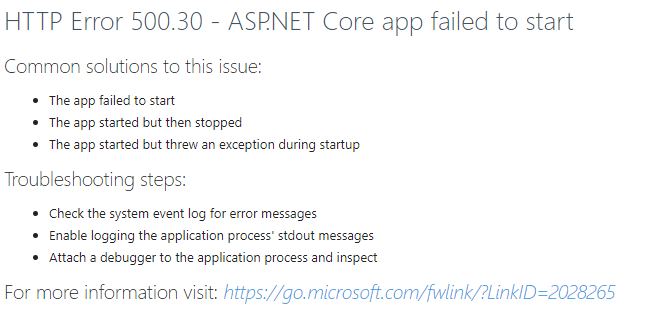
any ideas, how to fix it?
kind regards
Noah
2ae22b67-c851-4e5e-ad07-06922870a677.png
with this error in the event log:
Application '/LM/W3SVC/1/ROOT/dvls' with physical root 'D:\DVLS\' hit unexpected managed exception, exception code = '0xe0434352'. First 30KB characters of captured stdout and stderr logs:
Unhandled exception. System.BadImageFormatException: Es wurde versucht, eine Datei mit einem falschen Format zu laden. (0x8007000B)
at System.Runtime.InteropServices.NativeLibrary.LoadFromPath(String libraryName, Boolean throwOnError)
at System.Runtime.InteropServices.NativeLibrary.Load(String libraryPath)
at DevolutionsProtocols.DevolutionsProtocolsLoader.LoadLibrary()
at Devolutions.Server.Startup.ConfigureBusiness(IServiceProvider serviceProvider)
at Devolutions.Server.Startup.Configure(IApplicationBuilder app, IWebHostEnvironment env)
at System.RuntimeMethodHandle.InvokeMethod(Object target, Span`1& arguments, Signature sig, Boolean constructor, Boolean wrapExceptions)
at System.Reflection.RuntimeMethodInfo.Invoke(Object obj, BindingFlags invokeAttr, Binder binder, Object[] parameters, CultureInfo culture)
at Microsoft.AspNetCore.Hosting.ConfigureBuilder.Invoke(Object instance, IApplicationBuilder builder)
at Microsoft.AspNetCore.Hosting.ConfigureBuilder.<>c__DisplayClass4_0.<Build>b__0(IApplicationBuilder builder)
at Microsoft.AspNetCore.Hosting.GenericWebHostBuilder.<>c__DisplayClass15_0.<UseStartup>b__1(IApplicationBuilder app)
at Microsoft.AspNetCore.Authentication.Negotiate.Internal.NegotiateOptionsValidationStartupFilter.<>c__DisplayClass2_0.<Configure>b__0(IApplicationBuilder builder)
at Microsoft.AspNetCore.Mvc.Filters.MiddlewareFilterBuilderStartupFilter.<>c__DisplayClass0_0.<Configure>g__MiddlewareFilterBuilder|0(IApplicationBuilder builder)
at Microsoft.AspNetCore.Server.IIS.Core.IISServerSetupFilter.<>c__DisplayClass2_0.<Configure>b__0(IApplicationBuilder app)
at Microsoft.AspNetCore.HostFilteringStartupFilter.<>c__DisplayClass0_0.<Configure>b__0(IApplicationBuilder app)
at Microsoft.AspNetCore.Hosting.GenericWebHostService.StartAsync(CancellationToken cancellationToken)
at Microsoft.Extensions.Hosting.Internal.Host.StartAsync(CancellationToken cancellationToken)
at Microsoft.Extensions.Hosting.HostingAbstractionsHostExtensions.RunAsync(IHost host, CancellationToken token)
at Microsoft.Extensions.Hosting.HostingAbstractionsHostExtensions.RunAsync(IHost host, CancellationToken token)
at Microsoft.Extensions.Hosting.HostingAbstractionsHostExtensions.Run(IHost host)
at Devolutions.Server.Program.Main(String[] args)
Hello Noah,
Thank you for reporting this issue.
Could you please verify in the DVLS application pool advanced settings in IIS Manager if the Enable 32-Bit Applications is set to False?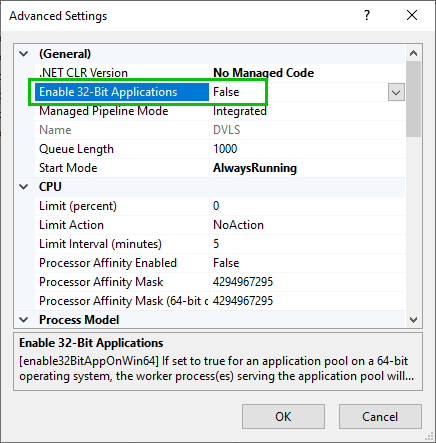
If that's already set to false, ensure that the service account designated as the Application Pool Identity in the DVLS application pool has enough rights on the App_Data subfolder in the DVLS web application folder.
Finally, ensure that the APS.Net Core module Hostin Bundle installed on the server where DVLS is hosted is at the latest version. Here is the direct download link to get it.
If you still get the 500.30 error after solving these, please open a ticket by sending an email to service@devolutions.net with reference to this forum's thread. We will then take over this issue in a support session.
Best regards,
Érica Poirier
d3e14e74-f340-4216-aae3-222e7694ea0a.png
Hello Erica
That was the solution -> i had to set "Enable 32-Bit-Applications" to False.
Thank you for your quick feedback.
You made my Day!
kind regards
Noah
Hello Noah,
Thank you for your feedback, and glad that the provided solution solved your issue!
Best regards,
Érica Poirier
HI @Erica Poirier
I have the same problem, but no solution has helped so far.
When I want to install the ancm module, PowerShell tells me that it is installed, but the IIS web server shows it as not installed.
Need some help.....
Some More Infos:
If I switch the authentication on IIS to Windows authentication, I can only enter a domain user, not the previously created Devolutions Admin.
When I switch the authentication to Basic, the following error occurs: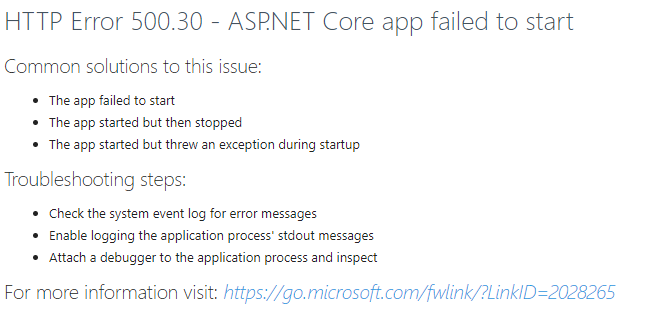
The Module is already Installed:
fdd92463-3acb-4ebd-9ebd-3a534507439e.png
ab42cb97-d65c-44be-87ae-2f831a97b3a5.png
Hello,
Since this is a rather old thread about an older version, it would be best to handle your issue separately.
I noticed you opened a new separate thread; we will continue the investigation there:
https://forum.devolutions.net/topics/52149/devolutions-instanz-nach-installation-nicht-aufrufbar#223808
Thnaks
Stephan