
John Bruhin
RDM 2026.3.17.0: Variables are not resolved in Overviefw
Hi there
I just saw, that in the Folder Entries Overview, Variables are not resolved:
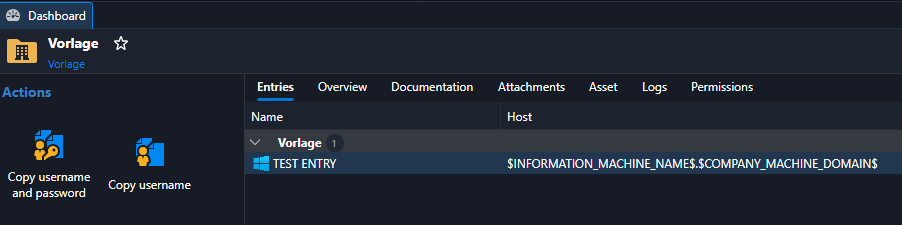
Everywhere else, the variable is resolved without issues.
Thanks for fixing.
Best regards, John
RDM 2026.3.15 to 17: Function "Open VPN only" on Website Entries not working
Hi there
We just found out, that the button "Open VPN only" does not work, when you click on it from a Website Entry. You can click, but nothing happens.
The same button on a RDP entry works fine.
Affected are, as far we know, RDM 2026.3.15 to 2026.3.17. With RDM 2026.3.10, it works as expected.
Best regards, John
Create IP-List with PowerShell
Hi Maxime
Thank you very much, I was able to implement your template in my script.
Best regards, John
Create IP-List with PowerShell
Hi Maxime
Is there also a way to set the following properties?
Name = Variable
Typ = Variable
Folder = Variable
IPListEntryMode = Dynamic
Keywords = EXCL_IP_LIST
FilterByFolder = True
FilterByKeywords = True
TagOperator = Exclude
Best regards, John
Create IP-List with PowerShell
Hi there
I tried to create the IP-List with PowerShell, but there is no EntryType for "IPList" (I found that information in an exported entry).
Please add the ability to add the IP-List with PowerShell.
Best regards, John
IP-List: More ways for group the view
Hi Jafran
Thank you very much.
Best regards, John
IP-List: More ways for group the view
Hi Maxim
Thank you, grouping works fine. Just one more thing, when I want to sort the entries per IP or hostname, it looks like this:
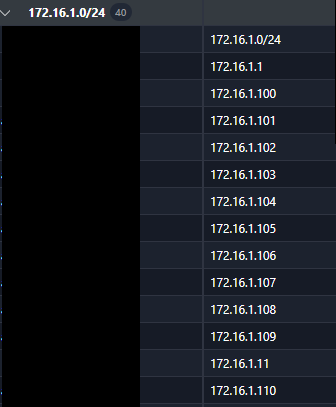
I would expect the IP addresses to be displayed in numerical order.
Best regards, John
Connect / Disconnect Tunnel with CLI for FortiClient IPSec VPN
Hi Luc
Thanks for the response. Regarding your answer, I prefer my solution because:
We don't have admin rights on our endpoints
Running RDM as Administrator is a no go for us
My solution does not care about spaces in the tunnel name
Most of our IPSec tunnels use SAML authentication and therefore, pass of credentials is not possible anyway.
But maybe you can implement the FortiClient IPSec feature with my solution with the FortiVPN.exe.
Best regards
John
Copy Username and Password" button not working after update to 2026.3.5.0
I can confirm: Pasting username and password into a text file works fine, but pasting it into a actual password field does not work, it pastes only the username.
IP-List: More ways for group the view
Hi Jafran
You guys are amazing, thank you very much.
Best regards, John
Connect / Disconnect Tunnel with CLI for FortiClient IPSec VPN
Hi Luc
I tried several times to configure RDM with FortiClient and IPSec VPN Tunnels, but no matter what I try, nothing happens. With the custom CMD, all works fine
I tried with those settings without success:
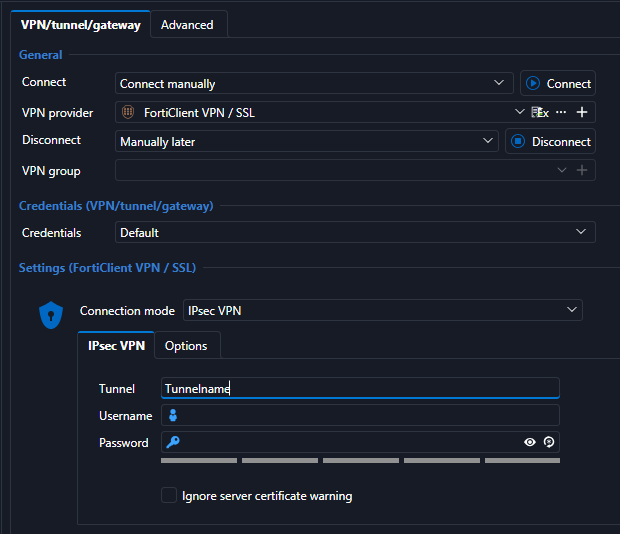
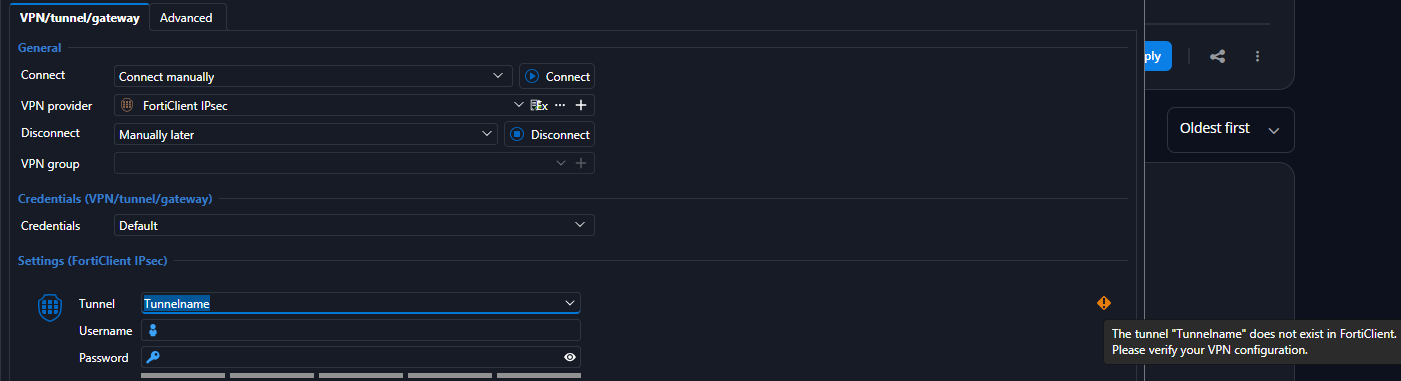
Is there something wrong in my configuration?
Best regards, John
Connect / Disconnect Tunnel with CLI for FortiClient IPSec VPN
Hi there
I just found out, that recent versions from Forticlient have a new CLI tool called FortiVPN.exe. From there, you can connect or disconnect IPSec VPN Profiles.
Here is my example:
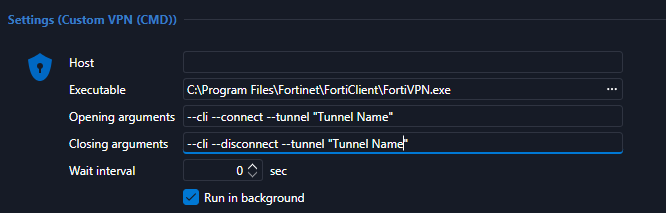
You cannot pass credentials, but at least you don't have to choose the VPN Tunnel within FortiClient anymore.
Best regards, John
IP-List: More ways for group the view
Hi Jafran
Yes, that is correct.
Thank you.
Best regards, John
Native Passkey Support in Embedded Browsers for Microsoft Admin Center
We have the same use case, it would help a lot. Thank you!
Webhook Support for Expiring Entries
Hi Sebastien
Thank you very much 👍.
Best regards, John
IP-List: More ways for group the view
Hi there
One more thing: Is it possible to implement a view per IP Subnet? You could use the first 3 octets for selecting the IP-Addresses like:
192.168.1 or
10.10.12
and list all IPs within that subnet in the group.
Webhook Support for Expiring Entries
Hi there
We use the "Expiring" feature a lot. E-Mails are fine, but we would appreciate a notification with Webhooks. Can you implement something like that?
Best regards, John
IP-List: More ways for group the view
Hi Jafran
Thank you. I just checked it out with the current beta. Setting the grouping to "none" and taking the field "IP" to the first row works like charm and does fully cover our needs.
Best regards, John
IP-List: More ways for group the view
Hi Hubert
Thats fine, thank you for answering.
Best regards, John
IP-List: More ways for group the view
Hi David
Any news on this?
Best regards, John
IP-List: More ways for group the view
Hello David,
A new view with a different grouping would be more helpful. The existing search function is already satisfactory.
IP-List: More ways for group the view
Hi David
Were you able to discuss this request?
Best regards, John
IP-List: More ways for group the view
Hi David
Currently, the view looks like this. Grouping is done by Foldername:

In large environments, this makes it hard to find if an IP Address from a specific IP range is free or already used.
It would help, to group per IP which can look like this:

In this case, you see all IPs sorted by value in one view.
Does this help to understand my aproach?
Best regards, John
IP-List: More ways for group the view
Hello everyone,
We’re already making extensive use of the dynamic IP list. While the list requires very little maintenance, we’d like to see a few more grouping and sorting options.
Example: Grouping is currently limited to the folder structure. We have many devices that are located within the same folder but are on different subnets. It would be ideal if we could still have a view that shows all devices within each subnet.
The benefit: This way, we can see which IP addresses are actually in use per subnet and don't have to keep searching for them.
Thank you.
Best regards, John
Cross-Vault Intelligent Folder
Hi Hubert
Yes, we are using mainly RDM.
Best regards, John