Connect / Disconnect Tunnel with CLI for FortiClient IPSec VPN
Connect / Disconnect Tunnel with CLI for FortiClient IPSec VPN
1 vote

Hi there
I just found out, that recent versions from Forticlient have a new CLI tool called FortiVPN.exe. From there, you can connect or disconnect IPSec VPN Profiles.
Here is my example: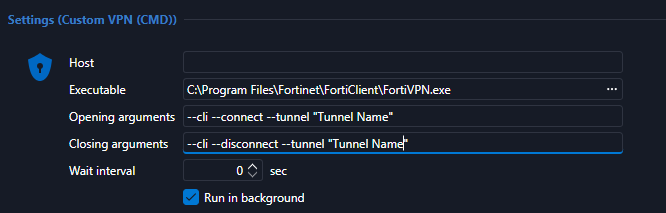
You cannot pass credentials, but at least you don't have to choose the VPN Tunnel within FortiClient anymore.
Best regards, John
829175b9-638f-4d88-b872-dcbda80deea5.png
All Comments (3)
Hi @John Bruhin,
In our current FortiClient IPSec client, its already possible to select which tunnel to use, what is it exactly you would like to achieve with the CLI that we don't currently support?
Cheers,
Luc Fauvel
Hi Luc
I tried several times to configure RDM with FortiClient and IPSec VPN Tunnels, but no matter what I try, nothing happens. With the custom CMD, all works fine
I tried with those settings without success: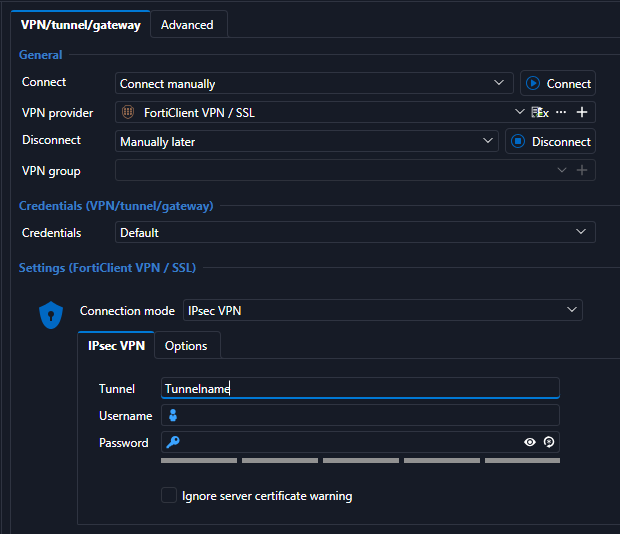
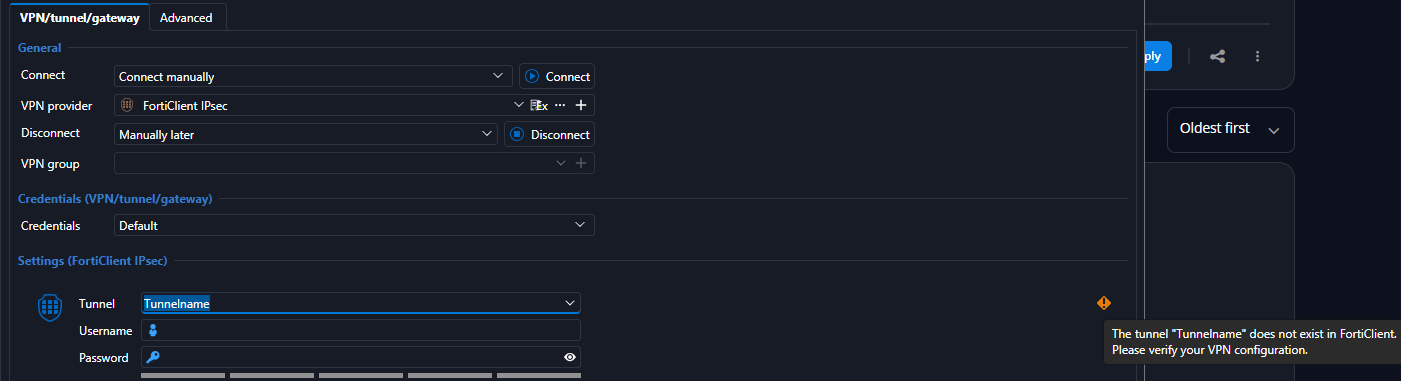
Is there something wrong in my configuration?
Best regards, John
f4bad2c5-ed4a-48fb-b5e7-034b4654f1cb.png
a0fb3800-3e0a-4bd0-9153-7e7a1eb436fb.png
In order for the implementation to work the following conditions need to be fiiled:
- RDM must run as administrator
- FortiClient must be running and its COM server registered. RDM looks for a FortiTray or FortiClientSecurity process. If neither is running, it tries to start FortiClientSecurity.exe --start --service fa_scheduler using the FortiClient path set in RDM's installation path options.
- The tunnel must already exist in FortiClient
- The tunnel name can't contain spaces
- XAuth credentials must be configured or linked to the VPN configurations.
Let us know if you still have issues.
Cheers,
Luc Fauvel