IP-List: More ways for group the view
1 vote

Hello everyone,
We’re already making extensive use of the dynamic IP list. While the list requires very little maintenance, we’d like to see a few more grouping and sorting options.
Example: Grouping is currently limited to the folder structure. We have many devices that are located within the same folder but are on different subnets. It would be ideal if we could still have a view that shows all devices within each subnet.
The benefit: This way, we can see which IP addresses are actually in use per subnet and don't have to keep searching for them.
Thank you.
Best regards, John
All Comments (19)
Hello,
Would you mind posting a screenshot of the view you are talking about? I just want to make sure we are discussing the same thing.
Regards
David Hervieux
Hi David
Currently, the view looks like this. Grouping is done by Foldername:
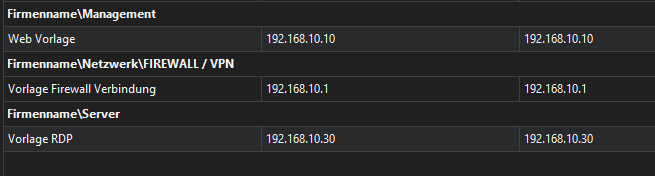
In large environments, this makes it hard to find if an IP Address from a specific IP range is free or already used.
It would help, to group per IP which can look like this:
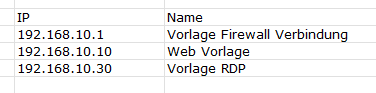
In this case, you see all IPs sorted by value in one view.
Does this help to understand my aproach?
Best regards, John
Hi David
Were you able to discuss this request?
Best regards, John
Hello,
I have a question for you. Do you need a new view with a different grouping or better search functionality with range search? Maybe both, but if we had to prioritize, which one should come first?
Regards
David Hervieux
Hello David,
A new view with a different grouping would be more helpful. The existing search function is already satisfactory.
Hi David
Any news on this?
Best regards, John
Hello,
This is still in our task list. Currently, David is on vacation, but if he has any progress on this he will get back to you when he's available.
Regards,
Hubert Mireault
Hi Hubert
Thats fine, thank you for answering.
Best regards, John
Hello,
We've added additional customization options to the grouping for the IP List entry. This includes Host, IP, Folder and removing the grouping altogether. These can be accessed through the context menu (right click). This will be available with the upcoming 2026.3.3 version.
Regards,
Jafran Majeau
Hi Jafran
Thank you. I just checked it out with the current beta. Setting the grouping to "none" and taking the field "IP" to the first row works like charm and does fully cover our needs.
Best regards, John
Hi there
One more thing: Is it possible to implement a view per IP Subnet? You could use the first 3 octets for selecting the IP-Addresses like:
192.168.1 or
10.10.12
and list all IPs within that subnet in the group.
Hello,
I'll investigate this and come back to you. Just to be clear, you're asking if we can add a new grouping option, which would group results by matching Subnet, is that correct?
Regards,
Jafran Majeau
Hi Jafran
Yes, that is correct.
Thank you.
Best regards, John
Hello,
I've added the possibility to group the IP list results by Subnet, this will be available with the upcoming 2026.3.16 version.
Regards,
Jafran Majeau
Hi Jafran
You guys are amazing, thank you very much.
Best regards, John
Hello,
Thank you for your patience while our team looked into the issue you reported.
I'm happy to let you know that the latest version of Remote Desktop Manager (2026.3.16.0) includes a fix for this problem. You can download it from our website here:
https://devolutions.net/remote-desktop-manager/download/
Once you have installed the update, could you please test it in your environment and confirm that everything now works as expected? If the issue persists or if you notice anything unusual related to the same original problem, just reply to this message with a few details, and we will be glad to look into it further.
Thank you for your collaboration.
Best regards,
Maxim Robert