
David Grandolfo
Malware Detected When Upgrading to 2024.3.17.0 (64-bit)
Hello James,
My name is David, and I'm working in the CyberSecurity department at Devolutions. I reviewed the update process of RDM and can confirm that the file name (msib02.tmp) under c:\windows\installer is expected by RDM.
Without the HASH of the file, I cannot confirm that the file is a Devolutions file, but regarding your question, the Check Point alert seems to be a false positive.
If you have any security questions or concerns, feel free to contact us at security@devolutions.net
Best regards,
Intune installl and uninstall command for RemoteDesktopManager.exe
Hello,
If you are using the .exe package with Intune, you will need to create a PowerShell script and include it in the .intunewin file to perform the uninstallation.
However, the simplest option is to use the MSI file for Remote Desktop Manager, which you can download from Remote Desktop Manager - Devolutions.
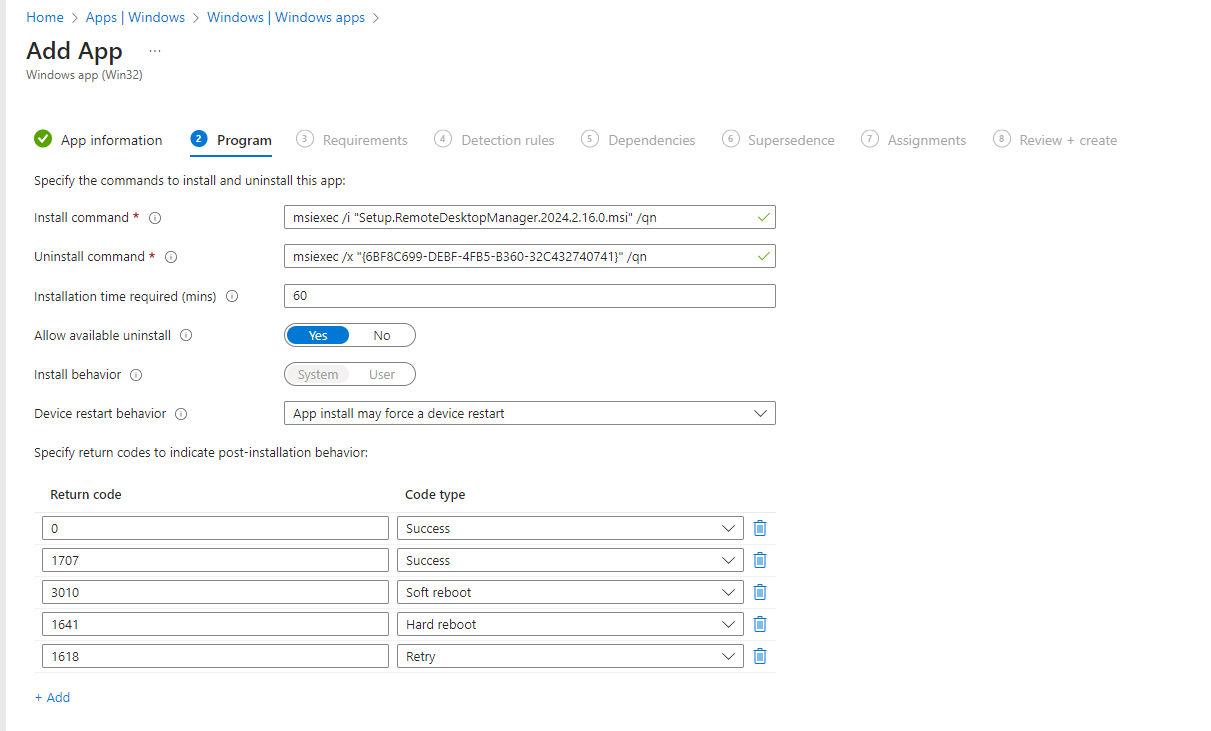
Then, use the Win32 Content Prep tool to create the .intunewin file. Here is an example of the configuration I used to create my .intunewin file.
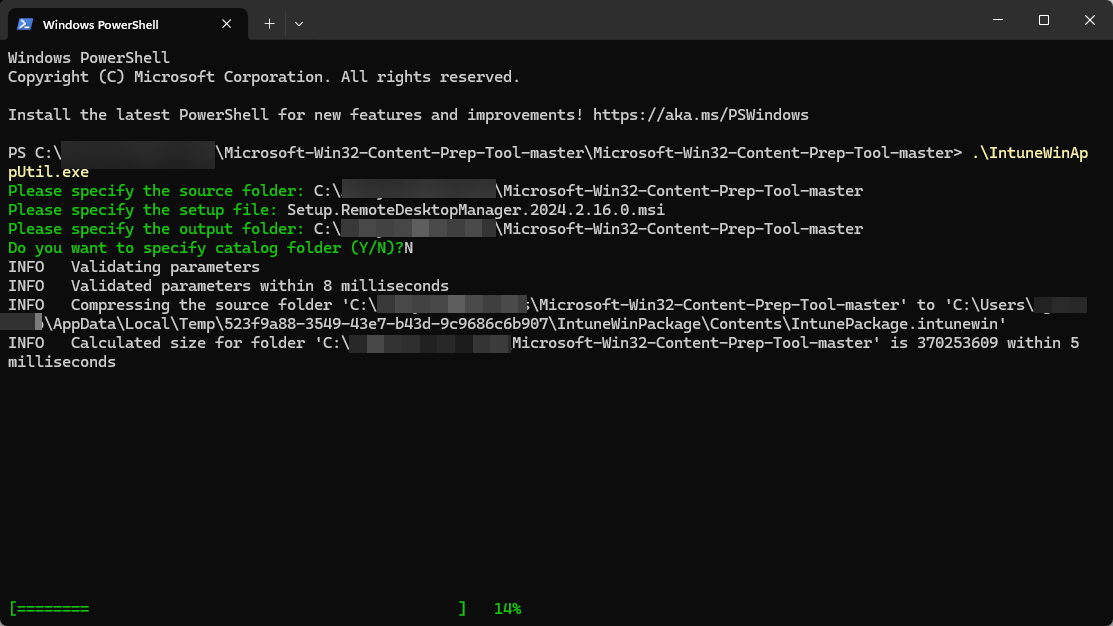
The install and uninstall commands will then appear automatically.
Best regards,
Virus alert while updating to 2024.2.10.0
Hello Olivier,
First please apologies for this issue, I have look at the Devolutions.Updater.exe in the latest version of RDM and no AV are flagging it as being a Virus VirusTotal - File - d25f8e07970a8669da110187a8cf2e364bc33360390906ab8b97e5fdee547fa2
That said, I would like to look with you about this specific issue.
If you click on "More Options" Do you have the SHA256 or any HASH information?
Or if you have a specific report that Avast is giving could you send it at security@devolutions.net ?
Thanks and I'll wait your answer.
Powershell Credentials
Hello,
We appreciate that you contact us regarding a security incident. And Of course we will address the information.
As the information you mentioned seems to be sensible I will hide the information on your post and I will contact you directly from security@devolutions.net
Please feel free to contact us for further request or bug at security@devolutions.net
BIG BUG - Security ISSUE!
Hello Max,
We tried to send you an email, but sadly, it seems your system rejected it and marked it as spam.
Could you have a look with your team?
Best regards,
BIG BUG - Security ISSUE!
Hello,
We appreciate that you contact us regarding a security incident. And Of course we will address the information.
As the information you mentioned seems to be sensible I will hide the information on your post and I will contact you directly from security@devolutions.net
Please feel free to contact us for further request or bug at security@devolutions.net
Security risk on this website
Good morning,
Thank you for contacting us, I just verified with the website you sent us and everything seems to be good. See the attachment.
The website isn't flagged as phishing and I don't know what happens. Let me reassure you that our site is not malicious and is not a phishing site.
That said, I don't know what happens with Palo Alto probably it is a false positive

RDM Update server blocked by Synology Safe Access?
Hi Solmssen,
My name is David from the security department.
Thanks a lot for flagging the issue with the RDM update server and Synology Safe Access.
We appreciate you taking the time to let us know. It's super helpful.
We're planning to get in touch with Microsoft to see how we can sort this out.
If you've got any more insights or questions, feel free to drop us a message.
Regards,
Security Advisories Affected OS's
Hello Ryan,
Thanks for the question, I had a nice chat internally about your question.
First, these vulnerabilities are for Windows only.
Secondly, we are gonna improve our CVE and include the platform for Remote Desktop Manager and Devolutions Workspace. As the version depends on the platform.
Best regards and thanks again for your question.
Web login Chrome extension
Bonjour,
Le comportement de Chrome semble identique au problème documenté ici https://support.google.com/chrome/a/thread/169257651/chrome-extensions-keep-getting-re-installed-and-erasing-user-preferences?hl=en
Selon Google, ce problème est connu pour Chrome V103. Votre version est probablement plus récente mais pourriez vous vérifier ce forum ainsi que celui de Google pour vérifier si des informations pourrais aider?
Merci
Web login Chrome extension
Bonjour Matthieu,
J'ai discuté avec mon collègue Olivier et j'aurais quelques questions concernant votre situation. J'ai plusieurs années d'expérience avec les GPOs et des problèmes bizarres j'en vis souvent ;)
Pourriez-vous m'informer si l'extension s'efface aussi sur un poste suite à l'installation locale de l'extension?
Quel système d'exploitation est utilisé sur le ou les postes que cela arrive?
Une fois l'extension effacée, si vous effectuer gpupdate /force, est-ce que l'extension se réinstalle?
Merci
Import server list from VMware vSphere
No problem, thanks for the update.
MySQL without SSL?
Hi,
First, let's start with MySQL and AD Integration. AD Integrated is supported with MS SQL and Devolutions Server only. I know that a module exists to
integrate MySQL to AD, sadly we aren't supporting it.
Then having the data on a dedicated infrastructure is more secure than having then on a shared infrastructure. I personally don't like the idea of having my company password on a shared server.
Sure, the data are encrypted in the database but you can't guarantee that someone is taking a copy of the database or create a user in the same database.
Now about the concerns;
1. Databases can be encrypted with the "Security providers" feature, this will encrypt sensitive information. The database itself isn't fully encrypted, some information as the entry name is stored in clear text.
The procedure to implement security provider can be followed at https://help.remotedesktopmanager.com/administration_securityproviders.html?q=security+providers
2. Using MySQL without SSL encryption isn't recommended I found in MySQL documentation (https://dev.mysql.com/doc/refman/5.7/en/encrypted-connections.html) this text that perfectly explains the reason why.
"With an unencrypted connection between the MySQL client and the server, someone with access to the network could watch all your traffic and inspect the data being sent or received between client and server."
MySQL doesn't explain what kind of traffic is listening in this text but we know that the authentication process isn't the best when SSL isn't enabled.
3. In this concern the security provider will be required to decrypt the database information. So if you only have a database login, you won't be able to see sensitive information in the database. As explained in point 1 some field in the database isn't encrypted. I recommend that your browser a staging database configure are you are looking for and to confirm that you accept the risk with the information in cleartext.
4. We aren't supporting SQL to MySQL migration. The schema used in the SQL database isn't completely identical to MySQL's schema. To migration the database you have to export the database using the export and import option in RDM https://help.remotedesktopmanager.com/file_export.html?q=export.
These steps are needed for the shared vault and each private vault. So each user will have to perform an export and import.
All the security configurations (users, roles, and groups) will need to be recreated.
Also during my research, I found an amazing article about MySQL's communication. In this article, we can read a paragraph that fairly explains how
SSL is important with MySQL:
"Despite the added improvements, do not feel complacent about the security of the new protocol. It is still recommended to block access to the MySQL port on the firewall, and if this is not possible, require the clients to use SSL."
The article link is https://www.oreilly.com/library/view/understanding-mysql-internals/0596009577/ch04.html
That said, with the number of users you have, other options could be a great alternative. If you want MySQL, using an AWS dedicated infrastructure keep security and privacy at a high level of confidence.
Another option is to use a SAAS service with Azure for hosting an MS SQL database.
Otherwise, you can look at Devolutions Password Hub which can be a great SAAS solution for up to 15 users (https://password.devolutions.net/fr)
I hope this answers well the questions. Feel free to ask for further explanation if something isn't clear.
cant connect to an VM with AAD Users
Hi Andi,
If you are using VMware Workstation to connect to this VM, could you try our entry VMware (Player, Workstations, vSphere) and select VMware Workstations as the Application.
If it's a private entry, you can then enter your credentials directly in the Username/Password Fields.

If this answer isn't what you are looking for, please apologize. Could you provide us a print screen of the VMware Workstations configuration?
Regards,
2020.1.20 Terminal Services Console - recurring error messages
Good evening Min,
In the latest version of RDM 2020.3.23.0 (perhaps before) this issue is fixed.
If RDM isn't able to reach the server the error Unable to retrieve Terminal sessions, verify your credentials. will appear and the Auto-refresh option will uncheck himself automatically.
Regards,
hyper-v with failover cluster
Hi,
We don't have any mechanism in RDM that could do that, I'm even not sure if Microsoft has a method of doing this without using Remote Power shell.
If you find any way of doing it please feel free to guide us with the documentation and we could look if it's a feature we can integrate.
Regards,
SSH Session CPU
Hi,
Thanks for the follow-up, it's always a pleasure to know that it works well for you now.
Regards,
VPN chaining?
Thanks for the feedback, I'm glad that the secure gateway is the solution for your needs.
Regards,
VPN chaining?
Hello Pat,
We automated the process of creating a Socks 5 tunnel between an SSH Tunnel and an RDP session. The RDP can also be replaced by an SSH or Web Browser.
Could you please review our documentation on the feature Secure Gateway at https://blog.devolutions.net/2020/02/how-to-configure-a-secure-gateway-in-remote-desktop-manager ?
Regards,
Database Schema Error | Can't delete Server Entry
Hello,
Is it possible that someone installed the new version of RDM and then update the database?
To confirm go to File -- My data source information, and look at the database version. For RDM 13.0.6.0 the version should be 387.
Regards,
Add website that only supports Chrome or Firefox
Hi,
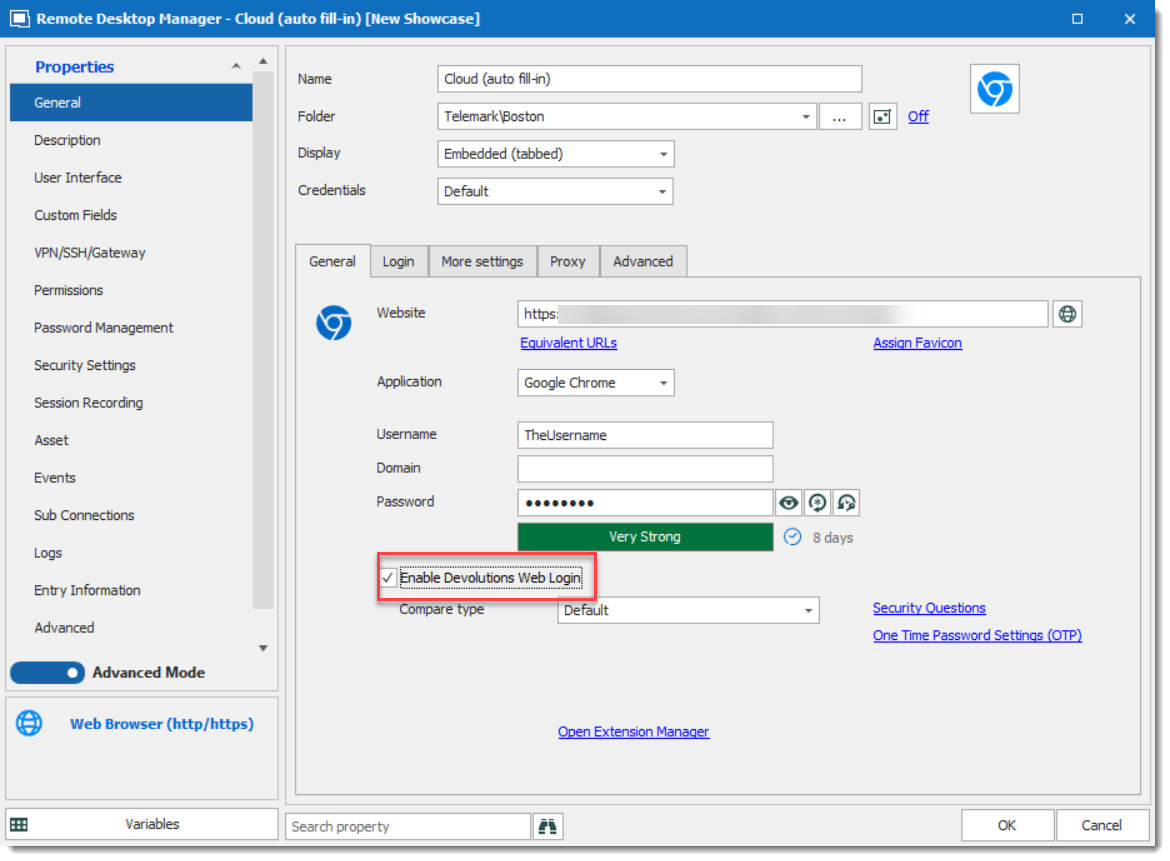
Auto fill can be used in embedded mode (including undocked) or in external mode.
If you would like to use it in embedded/undocked mode please look at our help topic which will explain how to configure it ( https://help.remotedesktopmanager.com/troubleshooting_webauthentication.html?q=web+authentication )
However, for the external mode you only need to check Enable Devolutions Web login in the Web Browser or Website entry.
Regards,
Add website that only supports Chrome or Firefox
Hello,
Is the session started in embedded mode (inside RDM) or you are starting the session in the local browser and them try to fill up the credentials with our Devolutions Web Login tools?
Also, could you please tell us the version of RDM that you are using (available under Help -- About -- Version)
Regards,
Automatically import PAM credentials after scan
Hello Ben,
The Sebastian question is regarding the PAM feature of Devolutions Password Server.
When you combine RDM and DPS, you obtain the possibility to use privileged accounts directly in RDM. So users could ask for approval, add a reason or not and then DPS will manage the password rotation automatically with AD, SSH or SQL integration.
If you would like to read a bit about our features, you can review the blog https://blog.devolutions.net/2019/05/update-devolutions-pam-platform-for-smbs or please have a look at our video.
Overview of Devolutions Password Server - Privileged Access Management Solution for SMBs
[Tutorial] Privileged Access Management with Devolutions Password Server
https://www.youtube.com/watch?v=zxdZHAqv-rw
Regards,
SSH Shell - run command on BEFORE DISCONNECT
Thanks Michael for the follow-up.
We are glad that everything works well for your team.
Regards,
port knock from RDM
Hi,
Thanks for the clarification I opened a ticket with the engineering department to add a feature.
That said, as edwillson said (thanks) this github script can be adjusted and fit in the BeforeConnect PowerShell type and AfterDisconnect to close the port knocking.
If you need help, please let me know.
Regards,