
[DC]
KeePass plugin installation failed. Error
Hi,
The function works correctly.
THX.
KeePass plugin installation failed. Error
Hi,
Maybe limiting to 1000 entries in KeePass DB?
This information is for this problem...
Where do you see this screen?
Im using local keepass and im not able to choose keepass as credential entry.
Even removed and reinstalled RDM but it didnt help
User Vault > Add Credential Entry > KeePass
I'm trying to look up credentials in the KeePass database
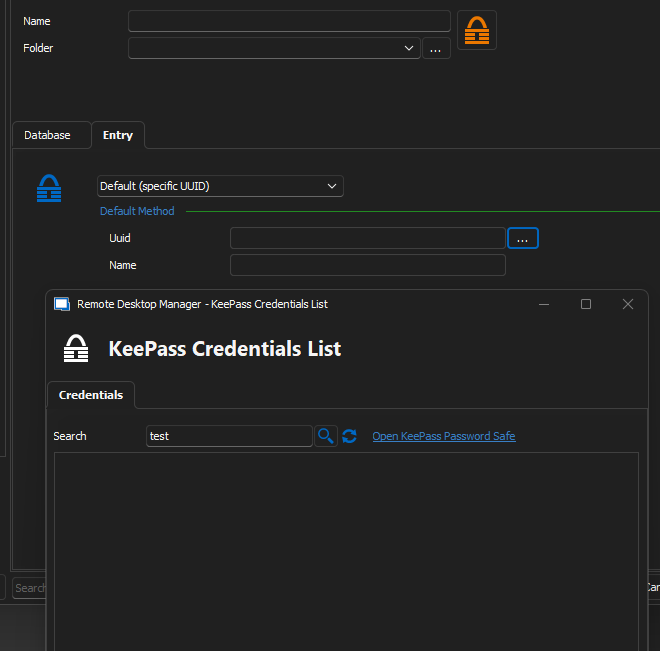
If the database has less than 1000 entries plugin display credential, if more then 1000 plugin not working, but direct connection to Keppass is working for KeePassDB with more then 1000 entries.
KeePass plugin installation failed. Error
Hi,
Maybe limiting to 1000 entries in KeePass DB?
This information is for this problem...
KeePass plugin installation failed. Error
Hi,
Maybe limiting to 1000 entries in KeePass DB?
KeePass plugin installation failed. Error
Hi,
Version RDM 2023.1.17.0
Keepass Plugin 2023.3.23
Still unable to search for credentials in large KeePass database.

KeePass plugin installation failed. Error
Hi,
The problem concerns the configuration when we use the plugin and a large number of entries in the KeePass database.
Why?
Test1)
Plugin + KeePass DB with 1678 entries (search is not working)
Test2)
Plugin + KeePass DB with 54 entries (is OK, i can search, the data are visible in "KeePass Crendetial List" Window)
Test3)
Direct Connection to KeePass DB with 1678 entries from Test1 (Is working)
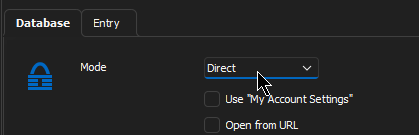
But, if you have KeePass DB with Yubikey security key option we can't use DirectConnection :(
KeePass plugin installation failed. Error
Hello,
The directory was empty, but I ran the installation again and selected the repair option. After that, the indicated file appeared.
I copy all content zip file to the C:\Program Files\KeePass Password Safe 2\.
KeePass dosn't show error when runing, but if i want add entry to the vault from KeePass i can'd search anything.
After that the c:\Program Files\Devolutions\Remote Desktop Manager\Applications\ is empty again.
In user vault i choose add credential entry > KeePass
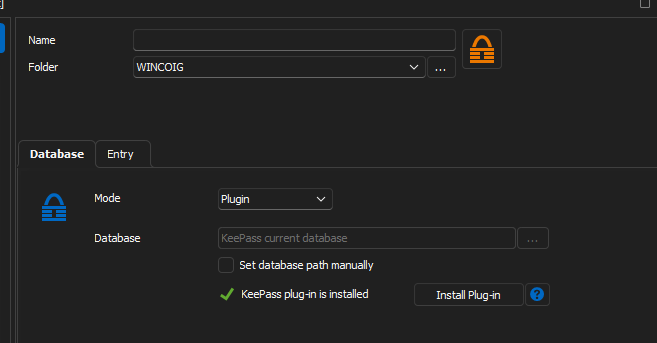
and ...
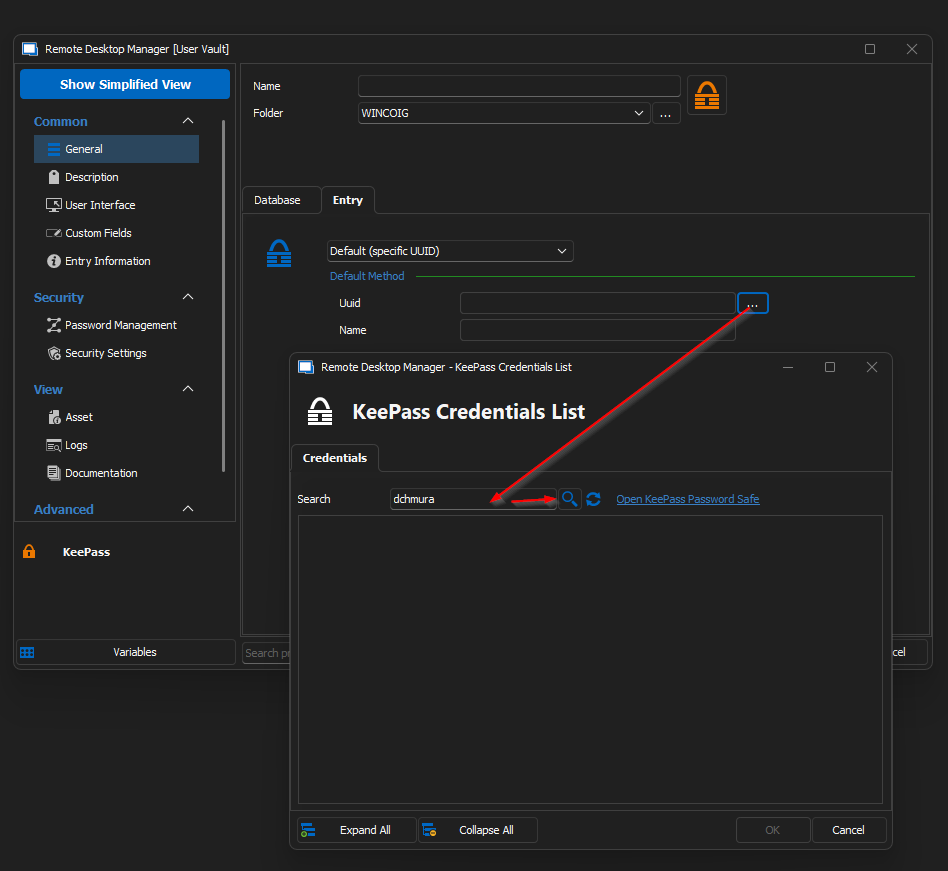
The search returns no results?
KeePass plugin installation failed. Error
Hello,
RDM 2023.1.14.0 64-bit
After updating the application to version 2023.1.14.0 I had a problem with connections using credentials in the form saved in the KeePass database.
The application did not see the open KeePass base
Attempting to reinstall plugin.
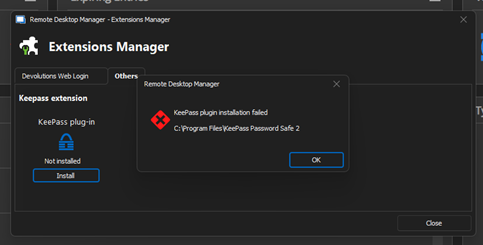
When use a RDM connetion with KeePass credentials i have alert The KeePass plugin not installed. Would you like to install ?
Finally application try install plugin and i have the same alert as above. Installation failed.
Copy dll files from another PC with RDM in the same version to my location: c:\Program Files\KeePass Password Safe 2\
c:\Program Files\KeePass Password Safe 2\Devolutions.Ipc.dll
c:\Program Files\KeePass Password Safe 2\Devolutions.Utils.dll
c:\Program Files\KeePass Password Safe 2\Devolutions.Utils.Windows.dll
c:\Program Files\KeePass Password Safe 2\DevolutionsKeepassPlugin.dll
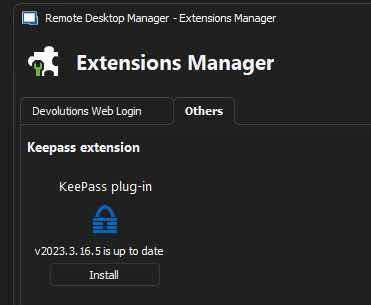
DevolutionsKeepassPlugin.dll version 2023.3.16.5
After launching the KeePass application, we receive a message
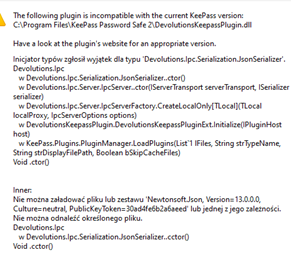
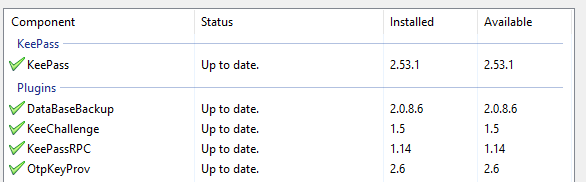
KeePass version with plugins is up to date:
Remote desktop manager freezes when remote connections are closed (SSH Shell)
Hello,
Can you confirm what type of server your are using? I will have a ticket open in order to see if when could reproduce the behavior on our side!
Best Regards,
Hello,
Red Hat Enterprise Linux release 8.7 (Ootpa) and Centos7/8
Best Regards,
Remote desktop manager freezes when remote connections are closed (SSH Shell)
CustomLogs:
[24.11.2022 09:38:07] Disconnection in progress
[24.11.2022 09:38:07] Sending channel close request: 0/0
[24.11.2022 09:38:07] Bytes sent: 1532, Bytes received: 2833
[24.11.2022 09:38:07] Packets sent: 19, Packets received: 22
[24.11.2022 09:38:07] Kex completed: 1
[24.11.2022 09:38:07] Disconnecting
Remote desktop manager freezes when remote connections are closed (SSH Shell)
Hi,
I have the same problem as:
SSH Shell - connet to server, reboot server from terminal. The application displays an error and freezes.
The OK button is not responsive.
Changes display error option and Close after disconnect dosn't working.
I can only kill remote-desktop process on windows system.
Connection to the same server by Putty [deprecated] works fine


RDM Version: 2022.3.23.0 64-bit
Uncheck option "Always prompt for passphrase" from powershell
Hi,
Does anyone know how to uncheck the option "Always prompt for passphrase" from powershell RDM.Powershell module ?
rmd://open ... on the screen
Hello,
"Reset Layout" > Close > Open app once again > Worked !
Regards,
DC
rmd://open ... on the screen
This is intresting.
1. I don't see this option in my settings 2022.2.17.0 64-bit
2. This "window" is visible only on hi-resolution second monitor, but on laptop display no. It looks like it's docked in this position

Regards,
DC
rmd://open ... on the screen
Hi,
Does anyone know what is this?

SFTP on SSH session doesn't allow going to parent folder
The workarround

You can change directory level, but you start from root level, not home directory
tab groups - don't switch back to "All" every time
It's working in version 11.5.0.0. Thx.
tab groups - don't switch back to "All" every time
How I can adjust the interface, if only after the disconnection of the session in the tab group, focus stayed in this tab group?