
christoph
Use Remote Desktop Gateway if Network Adapter not found not working
Hi,
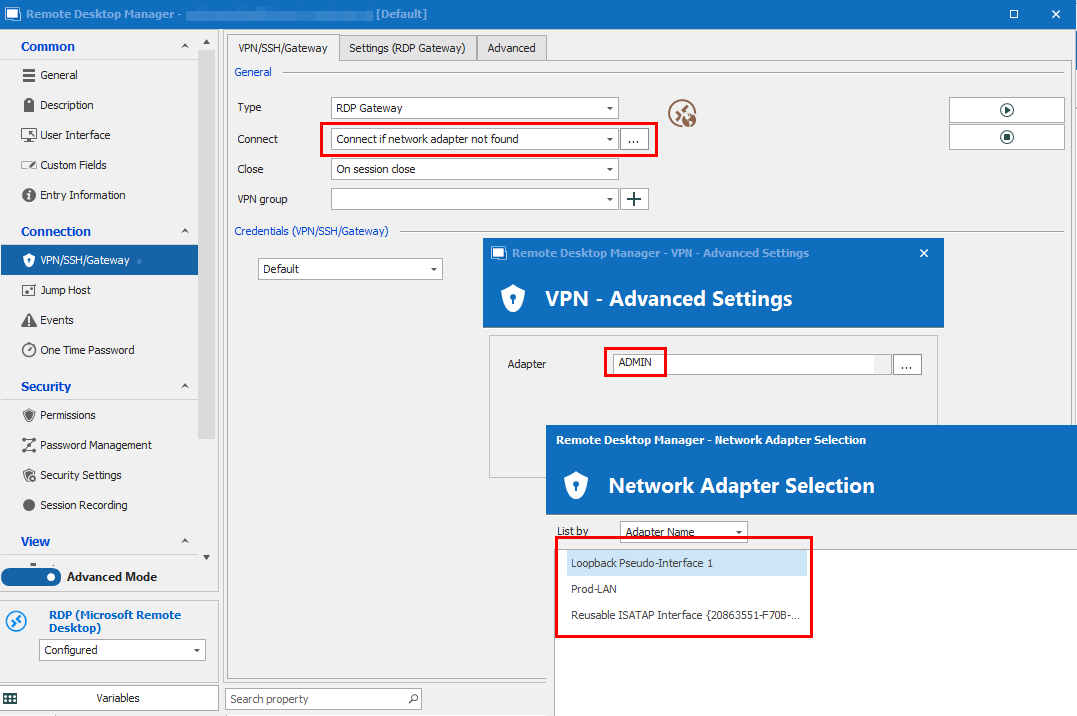
I think we have found the reason for the issue. When the adapter ADMIN (or whatever is configured in that matter) is present (meaning go direct - no RDS gateway), RDM tries to additionally ping the target before attempting the connection, if the ping fails the connection fails as well, although the adapter is present and the system would be directly reachable. We have many systems where ping is blocked on the firewall for security reasons but RDP connections will succeed. Is there an option to just have RDM connect if the adapter is present whichout checking if the system is pingable additionally?
This means for all hosts which we are able to ping from the systems with the ADMIN network connection it works as desired, for systems where ping is blocked on the firewall it fails.
Regards
Use Remote Desktop Gateway if Network Adapter not found not working
Hi team,
The feature to only use a RDP Gateway for a specific connection if the Network Adapter isn't found doesn't seem to be working using 2022.1.27. We have two different Jump Environments using the same Datasource, one jumpserver environment requires each connection to be established through an RDS Gateway, while the other can directly reach the target RDP hosts. The jumphost which is able to directly reach the target hosts has a NIC called ADMIN while the other has not. Therefore all connections are set to use the defined RDS Gateway only if the network adapter ADMIN is not found, however unless we set it to "Always connect" the feature seems to be non-functional and the RDS gateway is never connected.
As you can see in the screenshot, there is indeed no adapter ADMIN however the Gateway isn't connected and the connection fails unless "Always connect" is used.
Regards
Remote Desktop Gateway re-connection crash
Hi Erica,
Thanks for checking. We will schedule an update in the environment and I'll update this post afterwards.
Regards
Remote Desktop Gateway re-connection crash
Hi,
This bug is reproducible in 2022.1.27.0 but also in many previous versions.
When re-connecting to an RDP session via RD Gateway via rightclick on an open RDP tab (=session is still connected), everything is working normally. When doing the same in the list view on the right, the user is asked for username and password to the RD gateway. If the prompt is cancelled RDM crashes.
Regards
Remote Desktop Gateway not working if not set to Always Connect
Hi,
Since upgrading to 2021.2.28.0 conditions for connecting the Remote Desktop Gateway stopped working - the Gateway is basically always the same. Depending on where RDM is executed by the user it either is able to reach the target directly or must use the RDS gateway. Regardless if "Connect only if unable to ping/port-scan" or "Connect if network adapater not found" is selected, the connection will never attempt to use the RDS Gateway defined. If we select "Always Connect" then connection succeeds without issue.
Interrestingly it works if "Prompt only if unable to ping/port-scan" is selected, however there is neither is ever a prompt nor would the system be able to reach it without using the RDS gateway. Somehow none of those options seems to do anything that is implied by its description.
Regards
Support Private Vault Credentials with SSH Gateway (jump Host) connection setting
Hi,
Please support credentials contained in a users private vault via private vault search for the SSH Gateway (jump Host) setting of the SSH Connection.
Currently only
Custom Credentials
My Personal Credentials
Credential Repository
are available, but no Private Vault search. This makes it more complicated for users in a shared environment to configure their personal accounts when connecting to the target host (we are speaking of over a thousand hosts). Meaning all other connections are utilizing Credentials from their Private Vault including for example RDS Gateway (authentication to RDS Gateway = Step 1 and authenticating to Target = Step 2), but SSH does not.
I am directly speaking of the SSH Gateway feature of the SSH connection, not of tunneling other types of traffic through an SSH tunnel.
Note.: We know that an explicit SSH tunnel connection type supports the Private Vault, but requires you to explicitly define the remote host making it unpractical when having over a thousand different remote targets and is not required since the feature is built natively into SSH and we don't want to proxy any other kind of protocol through the SSH tunnel.
Regards
Integrate RDM with Citrix Session Recording Custom Events
Hi,
We and I guess a lot of others are running RDM on a Citrix plattform which uses session recording for audit and security reasons. Since XenApp/Virtual Apps Release 7.15 and higher, it is possible for an application running on the VDA to include custom events containing text messages through a Citrix provided COM API into the session recording stream. Those custom messages then appear as bookmarks with timestamp in the recorded video file and the person reviewing the recorded audit log could directly jump to the bookmark in the video. It would be desirable if RDM would allow creating such a custom event/bookmark containing the name of the connection being launched. When viewing a recorded session, opening/closing new connections or maybe also switching between open connections would be presented as bookmark containing the connection name.
See here for details. https://support.citrix.com/article/CTX226844
Regards
RDM as Citrix Published app has black screen when selecting session
Hi,
What makes you think those are global only? Both Citrixs' own CAXTool as well as Citrix article https://support.citrix.com/article/CTX219996 list them as per application (window) flags.
Regards
RDM as Citrix Published app has black screen when selecting session
Hi Érica,
Many thanks. I can confirm this works. The black square which is visible in the original post is gone when opening a session.
If you apply the fix. Please make sure the the Window ID is in fact WindowsForms10.Window.0.app.0.<version> as WindowHistory for ex. shows
WindowsForms10.Window.8.app.<version> for the main window. The seamless flag option to set is 0x1000 as outlined in the article, which can conveniently be done using the CAXTool or manually in the registry https://support.citrix.com/article/CTX222592
Option Explanation:
FORCE MENU WINDOW TO HAVE OWNER
Value: 0x1000
Explanation: Specifies that Menu Windows will always be re-created on the ICA client with an owner window.
See the attached screenshot for the required CAXTool configuration.
Regards
Add Connections from Personal Vault to Favorites
Hi David,
Many thanks. The feature would be greatly appreciated.
Regards
Add Connections from Personal Vault to Favorites
Hi,
Is it possible to add connections from the Personal Vault to the favorites view? So users don't have to switch between connection tabs?
Regards
Storing offline.db for portable installation
Thanks
Storing offline.db for portable installation
Hi all,
I am having trouble storing the offline.db for a portable installation which is using a SQL datasource. I created the portable installation as per instructions on this site and all settings are saved in the folder .\_config via the override.cfg file. I also enabled Advanced options:
+Use application directory for offline cache
+Use application directory for local play list
I can see the SQLlite offline.db getting created in .\_config\<Some GUID>\offline.db and the size seems ok (2.5 MB). Now I choose go offline on computer A and put the USB stick containing RDM into computer B. When opening RDM it asks me if I want to go offline (I enabled that in the datasource). I choose "Yes" and then the list of sessions is gone and the offline.db is down to only 8KB in size.
The datasource has offline usage enabled (R/W) and I tried both simple and intelligent caching. However the list of session on the other computer is always empty.
I also cleared %LOCALAPPDATA%\Devolutions on the computer A and when I reopen the portable installation there then the sessions are displayed but on computer B the offline.db is always overwritten (only 8KB) and the list is empty.
Using 10.5.4.0.
Any help appreciated.
Regards