Use Remote Desktop Gateway if Network Adapter not found not working
Use Remote Desktop Gateway if Network Adapter not found not working

 Hi team,
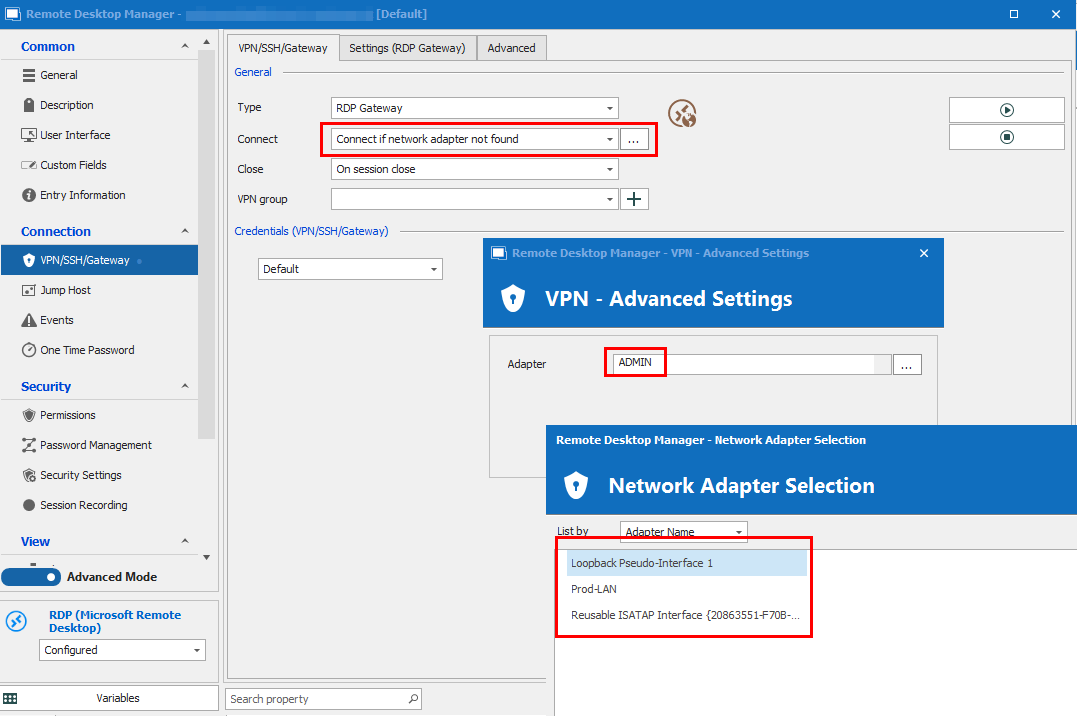
The feature to only use a RDP Gateway for a specific connection if the Network Adapter isn't found doesn't seem to be working using 2022.1.27. We have two different Jump Environments using the same Datasource, one jumpserver environment requires each connection to be established through an RDS Gateway, while the other can directly reach the target RDP hosts. The jumphost which is able to directly reach the target hosts has a NIC called ADMIN while the other has not. Therefore all connections are set to use the defined RDS Gateway only if the network adapter ADMIN is not found, however unless we set it to "Always connect" the feature seems to be non-functional and the RDS gateway is never connected.
As you can see in the screenshot, there is indeed no adapter ADMIN however the Gateway isn't connected and the connection fails unless "Always connect" is used.
Regards
RDS_Gateway.png
All Comments (3)
Hello Christoph,
Thank you for contacting us on that matter!
Would it be possible for you to create a portable installation of the latest version of RDM and see if this issue still occurs? To do so, you will need to do the following:
1- Download the .zip file below:
https://remotedesktopmanager.com/home/thankyou/rdmbin
2- Create a new folder on your Desktop
3- Extract the content of the .zip file into the folder created at #2
4- Go to this folder once the .zip file has been extracted and run remotedesktopmanager.exe
5- Use the local data source that is created by default to perform the test
Please note that you will need to register your RDM license under Administration - > Licenses
Best regards,
James Lafleur
Hi,
I think we have found the reason for the issue. When the adapter ADMIN (or whatever is configured in that matter) is present (meaning go direct - no RDS gateway), RDM tries to additionally ping the target before attempting the connection, if the ping fails the connection fails as well, although the adapter is present and the system would be directly reachable. We have many systems where ping is blocked on the firewall for security reasons but RDP connections will succeed. Is there an option to just have RDM connect if the adapter is present whichout checking if the system is pingable additionally?
This means for all hosts which we are able to ping from the systems with the ADMIN network connection it works as desired, for systems where ping is blocked on the firewall it fails.
Regards
Hello,
Thank you for your reply!
In that case, you could go into the properties of your RDP entry, under Management Tools -> Is Online (Ping/Port Scan) and set "Check if host is online" to "Off", doing this change should do the trick!
Let me know if that helps!
Best regards,
James Lafleur