
step
Generic icon on taskbar
When the RDM application is pinned to the taskbar, after a while the application icon is replaced by a generic one:
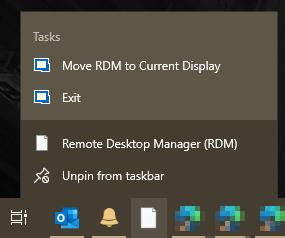
Unpinning and re-pinning the application restores the icon for a while, but it eventually reverts to the generic icon.
Database Templates missing
Thank you.
Database Templates missing
Hi Etienne,
Any updates on a timeframe for this one? It's been challenging to work around.
Regards,
- Step.
Database Templates missing
Hi Etienne,
Thanks, looking forward to it.
Database Templates missing
Hi Etienne,
Yes, there's a local templates tab, but none of my templates appear there. (They quickconnect are still visible in the quickconnect dropdown menu, and the session templates are still available for creating new sessions).
The database templates tab has been there since I started using the program about 5 years ago? Has worked great up until now. Is there any reason they can't be stored in the database? It always made more sense that everything should be kept together for backups.
Database Templates missing
Hi Etienne,
Running the "Remote Desktop Manager Enterprise (Single User)" version.
Database Templates missing
Hi Etienne,
I'm using SQLite, and updated to the latest version [2021.1.41.0] yesterday prior to posting.
Was running the most recent version prior to that, I think the issue popped up in one of the last couple of updates.
Regards,
- Step.
Re-open application without forcing reconnection to previous tabs
Often tabs are left open (but disconnected) for convenience. This is far easier that using favourites for machines that are currently being worked on as part of ongoing projects.
But when the application is opened, the only choice is close the tab or connect. It makes more sense to restore tabs as they were (connected or disconnected).
Database Templates missing
The database tab for templates has disappeared, the templates for QuickConnect are still appearing in the quick connect menu.
Complete list of command line switches
☺ Thanks, I'll keep an eye on the release notes.
Complete list of command line switches
Hi David,
In this case the RDP file is being dynamically generated through PowerShell before being opened.
It just means that the current title is always the full filename. Even if the file is just the server name, the title is still "Filename.rdp", all those ".rdp's" take up a lot of space in the row of tabs.
Complete list of command line switches
Hi Min,
Thanks for the quick response.
Does anyone know if /title can be mixed with and RDP file? It fails to launch anytime I add the /title argument. Tried all the combinations I can think of.
This works:
RemoteDesktopManager.exe "C:\PathTo\RDPFile.rdp"These all fail (application doesn't do anything):
RemoteDesktopManager.exe "C:\PathTo\RDPFile.rdp" /Title:"Test"
RemoteDesktopManager.exe "C:\PathTo\RDPFile.rdp" /Title:Test
RemoteDesktopManager.exe /Title:Test "C:\PathTo\RDPFile.rdp"
RemoteDesktopManager.exe /Title:"Test" "C:\PathTo\RDPFile.rdp"Complete list of command line switches
Is there a list of all the command line switches available when launching "RemoteDesktopManager.exe"?
In this specific case - I'm generating an ".rdp" file using PowerShell, and would like to be able to set the session title to something other than "Filename.rdp".
Quick Connect missing after upgrade to 2021.1.20.0
Hi Etienne,
That's correct, unchecking the option "Hide quick connect label" shows the entire Quick Connect box:

It takes effect immediately, even though there's a pop-up indicating that changes won't take effect until the application is restarted.
Quick Connect missing after upgrade to 2021.1.20.0
Hi Etienne,
Yes, I had that option enabled. It looks like that's now toggling the entire quick connect box, rather than just the label? A bug?
Quick Connect missing after upgrade to 2021.1.20.0
Hi Etienne,
Yes, the "Quick Connect" icon appears in the toolbar, and the icon can be toggled using the drop down menu, but it isn't showing the text field.
This is the icon that checkmark toggles:
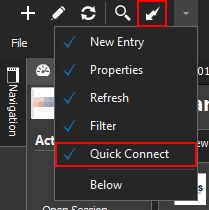
But this is how it appeared before the upgrade (this is from a screenshot on the Devolutions site):
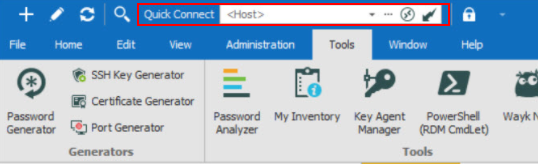
Not sure if there's a different way to add the full version, the icon wasn't appearing by default, only after adding it from the ribbon:
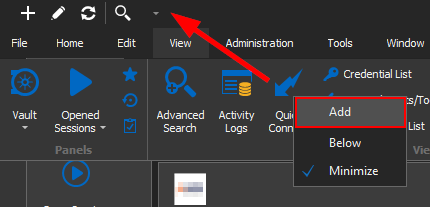
Quick Connect missing after upgrade to 2021.1.20.0
Hi Maurice,
Thanks for the suggestion, removing those files reset the layout, but Quick Connect is still missing.
Quick Connect missing after upgrade to 2021.1.20.0
Sure thing.
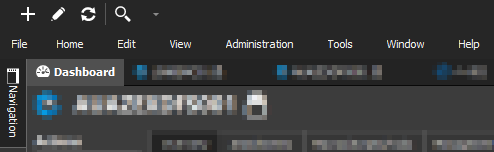
Here's the current top panel, after a "Reset Layout" and unpinning Navigation:
Quick Connect missing after upgrade to 2021.1.20.0
The Quick Connect box disappeared after the upgrade, it didn't reappear after performing a "Reset Layout"
Was CyberArk just removed from the PAID version?!
All my existing connections are now throwing a "Site license required" error.
That's a perfect way to start a Monday morning with your essential tool preventing access.
What's the work around for individual users?
Quick connection not using static host set in template.
Perfect, thanks for those. I now realise I'd disabled the "CyberArk PSM Connection" and "CyberArk PSM Server" session types at some point in the past (before we had CyberArk).
Works perfectly now.
Thanks again.
Quick connection not using static host set in template.
Hi Alex, thanks for the assistance. Any chance you could share a screenshot of the setup? I'm not entirely following.
Quick connection not using static host set in template.
I've created a template for RDP connections via a CyberArk host. The $Quick_Connect$ variable is used as part of the alternate shell rather than as the host, the host is static.
However when connecting it's still using the quick connect as the host. Anyone have any ideas on what I've done wrong?
Host setting:

Alternate Shell setting:

Eror and Favorites not displaying after update to 2019.1.27.0
That looks like it's fixed it, Thanks.
Eror and Favorites not displaying after update to 2019.1.27.0
After updating my favourites only shows two items (and the search bar is missing). The other items still show they are a favorite in tree view.
RDM throws and error when opening the Favourites tab:
at Devolutions.RemoteDesktopManager.Frames.ConnectionViews.FreConnectionTreeListView.c70816c1ba65850883606397de53b75af(Connection[] c8b9368e8e9d0e1c8ae5f4495ba89d50b) at Devolutions.RemoteDesktopManager.Frames.ConnectionViews.FreConnectionTreeListView.LoadConnectionList(Connection[] connections, ConnectionViewMode viewMode) at Devolutions.RemoteDesktopManager.Frames.FreFavoriteCustomConnections.LoadFavoriteConnections() at Devolutions.RemoteDesktopManager.Frames.FreFavoriteConnections.LoadFavoriteConnections() at Devolutions.RemoteDesktopManager.Forms.FrmMainRibbonBase.RefreshFavoritesConnectionView() at Devolutions.RemoteDesktopManager.Forms.FrmMainRibbonBase.RefreshView(Boolean checkOnline) at Devolutions.RemoteDesktopManager.Managers.UIManager.set_ViewMode(ViewMode value) at Devolutions.RemoteDesktopManager.Decorators.NavBarControlDecorator.c6be1afaf901ff3b246f997360ed83fdb(Object c19f185fd70cefc696ba148af1c4faf54, NavBarGroupEventArgs cf1018bb83ec7debd818319fd3cb4844e) at DevExpress.XtraNavBar.NavBarControl.RaiseGroupEvent(Object linkEvent, NavBarGroup group) at DevExpress.XtraNavBar.NavBarControl.RaiseActiveGroupChanged(NavBarGroup group) at DevExpress.XtraNavBar.NavBarControl.set_ActiveGroup(NavBarGroup value) at DevExpress.XtraNavBar.NavBarControl.ExpandGroupCore(NavBarGroup group, Boolean setExpanded) at DevExpress.XtraNavBar.NavBarGroup.set_Expanded(Boolean value) at DevExpress.XtraNavBar.ViewInfo.NavigationPaneViewInfo.DoOverflowPanelButtonClick(Int32 buttonIndex) at DevExpress.XtraNavBar.ViewInfo.NavigationPaneViewInfo.DoClick(NavBarHitInfo hitInfo) at DevExpress.XtraNavBar.ViewInfo.NavBarViewInfo.OnMouseUp(MouseEventArgs e) at DevExpress.XtraNavBar.NavBarControl.OnMouseUp(MouseEventArgs ev) at System.Windows.Forms.Control.WmMouseUp(Message& m, MouseButtons button, Int32 clicks) at System.Windows.Forms.Control.WndProc(Message& m) at DevExpress.XtraNavBar.NavBarControl.WndProc(Message& m) at System.Windows.Forms.Control.ControlNativeWindow.OnMessage(Message& m) at System.Windows.Forms.Control.ControlNativeWindow.WndProc(Message& m) at System.Windows.Forms.NativeWindow.Callback(IntPtr hWnd, Int32 msg, IntPtr wparam, IntPtr lparam)