Quick Connect missing after upgrade to 2021.1.20.0

The Quick Connect box disappeared after the upgrade, it didn't reappear after performing a "Reset Layout"
All Comments (11)
Hello,
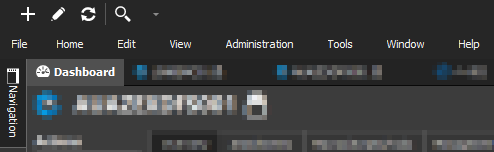
Could you send a Screenshot of how your Top Pane looks like?
Best Regards,
Etienne Lord
Sure thing.
Here's the current top panel, after a "Reset Layout" and unpinning Navigation:
Hello,
As per our KB at https://kb.devolutions.net/rdm_user_interface_error.html?q=reset+layout
The reset layout might not resolve all the issues. Close the application and delete the layout files (*.lyt) in %LocalAppData%\Devolutions\RemoteDesktopManager to completely restore the layout.
Please let us know if that solves the issue
Maurice
Hi Maurice,
Thanks for the suggestion, removing those files reset the layout, but Quick Connect is still missing.