Generic icon on taskbar

When the RDM application is pinned to the taskbar, after a while the application icon is replaced by a generic one:
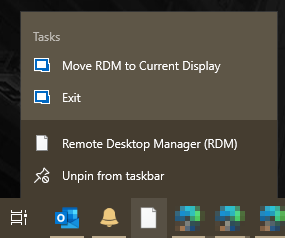
Unpinning and re-pinning the application restores the icon for a while, but it eventually reverts to the generic icon.
Icon_Generic.png
All Comments (4)
Hello,
It is a known issue, I will check with the engineering department.
Best Regards,
Etienne Lord
Hello,
Indeed this is know issue but not easy to fix. Windows is loosing the icon after an updater for some unknown reason. I'm still investigation the root cause for that.
Regards
David Hervieux
I don't know, just my few cents on what observed some time. When running the installer, do you let it remove the old .exe first and then place a new one? Maybe Windows doesn't like this. Could you try to replace it instead of remove?
For this same reason I don't have it pinned to the taskbar, annoys me a bit to see this generic icon. 😂
Pinned start menu items seem to work fine.
Hello,
Couldn't be that you installer framework setup the shortcut / Start Menu in a way the icon is pointing to the installer GUID?
With version 2022.2.14.0, the icon in the shortcut is pointing to
%SystemRoot%\Installer\{CC245783-18B7-4F85-BB48-E691DCDCD988}\RemoteDesktopManager64.exe
Now, if the GUID is changed in each version the path of course is not valid anymore. It will not affect the shortcut, which is recreated anyway by the installer, but the pinned shortcut loses constantly the icon (but not its function). Our conclusion is that Microsoft caches the icon target independently from the pinned shortcut, and indeed what we do is to start RDM after the update, wait for the main window to appear, and then go to the pinned shortcut, which now displays a blank icon. However by right clicking on that icon is clear that the icon should be there, as it is correctly drawn in the menu popped up, and in fact by unpinning the shortcut (while the app is running) and pinning it again restores the icon in the Windows' taskbar.
It may be possible that by making the shortcut icon pointing to the real executable, whose path does not change with the updates, could fix the improper behavior.