
wybrenb
Administration Users > 2FA pop up
Each time you do something with 'users' the 2FA pop up re-appears.
We are running the latest versions.
Steps to reproduce
Administration > Users (close the dialog)
2FA appears again
ServiceNow Import AddOn
Hi there,
We are also using ServiceNow, which has all the api possibility you will ever need.
Being able to Reset 2FA's, adding/removing entrys automatically would be awesome.
Let me know what can be possible!
im a developer/admin in ServiceNow with knowledge About API.
I can create and share update sets for other customers so they can use it.
Let me know!
Wybren
Webversion - Remote desktop manager
I've noticed when logging into the online version of RDM (Devolution server).
You can select all the entry's and press 'play', but every entry just sends you over to RDM instead.
Even the 'credentials' sends you to RDM.
So my feature request is being able to use the web-based version. (or atleast being able to use the credentials)
Funny enough, it even opens a second remote desktop manager instance.
Easier copying hostname
Better yet, make the context menu customization possible?
Add entry from 'All entries' in private fault
Hi there,
Feature request
1) Being able to Add credentials from the 'All entries' tab when editing User specific settings.
2) And when making a 'new entry' from the 'All entries' directly into your private fault (without being in the private fault)
*This is also handy for keeping the correct folder structure
See examples for Existing credential entry & Private entries


DVLS + 2FA Google prompts again when editing user specific settings/private fault
Looks like it's fixed with the DVLS 3.1 update! What a relieve ;)
Awesome work guys!
DVLS + 2FA Google prompts again when editing user specific settings/private fault
This bug has already been reported through e-mail, but I think it's important to get it out there on the forums as well.
When using DVLS and 2FA google, when editing user specific settings/credentials or private fault entries, the 2FA will prompt again.
Secure enough ;) but it is getting annoying when editing a lot of entries on a regular basis.
Array VPN add-on
@Sebastien
Works like a charm! thanks alot.
Can you update this in the add on manager?
Array VPN add-on
Sorry guys, I was off for holiday.
For: Hubert, it works!
Using the $USERNAME$ / $PASSWORD$ with the credential repository thanks.
Array VPN add-on
For the Custom VPN:
This is working:
-connect vpn.ams01.softlayer.com 443 wybren testpassword 1
This is also working
-connect $VPN_HOST$ 443 $VPN_USERNAME$ testpassword 1
But the password still doesn't get translated correctly.
Using the $PASSWORD$ or $VPN_PASSWORD$ it still does not work, either with credential repository or setting this default and filling in the fields.
Array VPN add-on
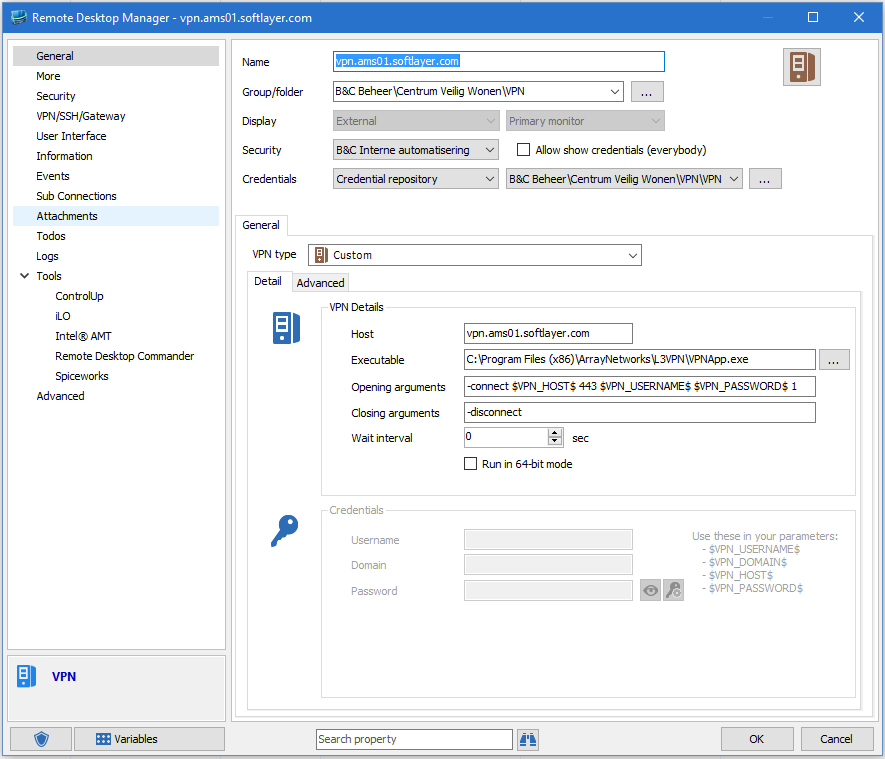
So I've tried using the Custom VPN entry aswell next to the IBM add on.
This still does not seem to translate the $VPN_PASSWORD$ correctly, the username and host do work correctly.
But the password still seems to fill in an incorrect one, not sure why.
If you guys need an test account, please let me know by sending a PM.
Array VPN add-on
I've tried a few things:
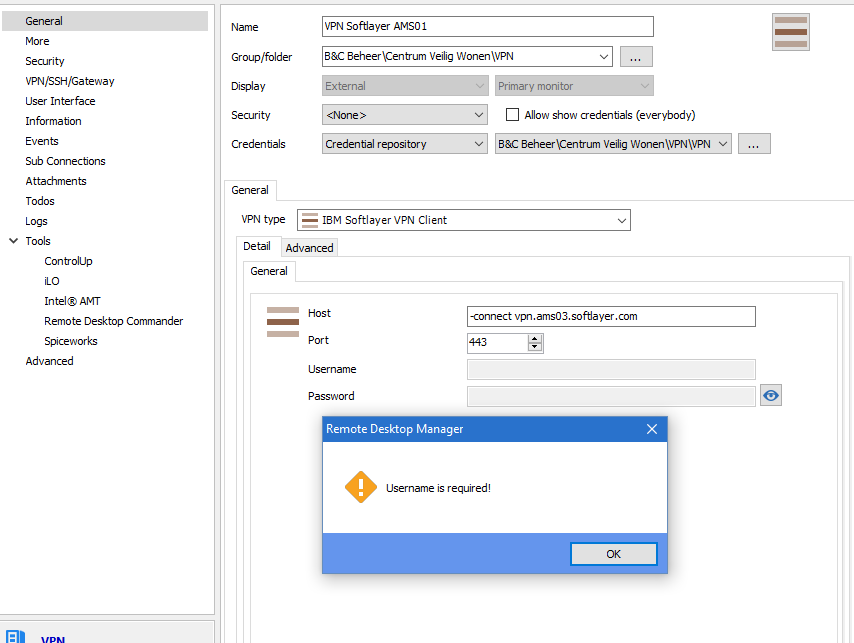
When trying to connect to the VPN, I am getting a pop up saying the variables are not correct.
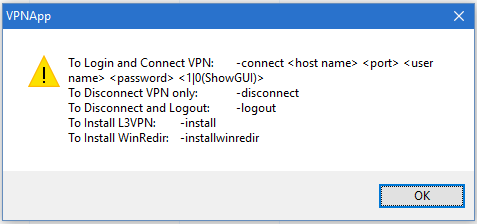
If I do add the -connect infront of the host it does seem to work, but I am getting a message 'Network is not available' but can't seem to find why since the GUID is off.
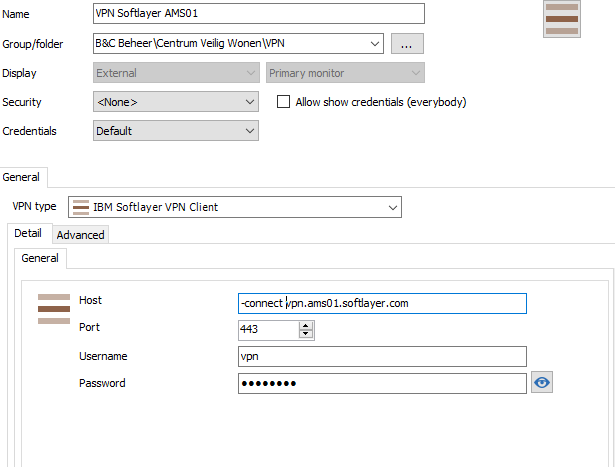
Another thing when using the credential repository or set credentials to none it keeps asking for the username.
Array VPN add-on
First of all thanks for the add-in :)
These are the installers for Array VPN:
2FA Devolution server on Mac not prompting
Good to hear, thanks!
Array VPN add-on
Some more information:
Run VpnApp from command line
You may run the VpnApp from the command line. Once the VpnApp is installed please find VpnApp.exe in your installation folder.
Usage:
To Install additional component: -install
To Login and Connect VPN: -connect hostname+port username password 1|0(ShowGUI)
To Disconnect VPN only: -disconnect
To Disconnect and Logout: -logout
For example:
vpnapp Cconnect www.myvpn.com 443 myname mypassword 1
This will connect and show the Array VpnApp GUI and Array icon at the system tray.
Array VPN add-on
Goodday all,
We're currently using IBM softlayer for many of our cliënts, but usually a VPN is needed to connect to the machines.
Aldo I did succeed in adding it through custom VPN, unfortunatly $variables$ is not being processed within the arguments.
Example:
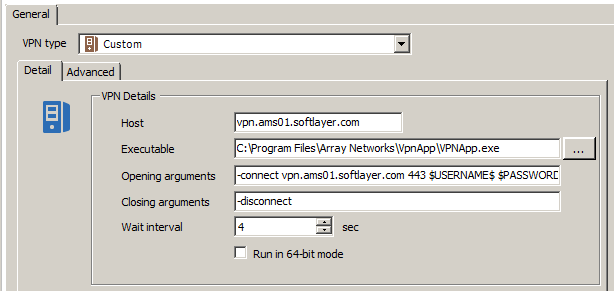
Opening argument
-connect vpn.ams01.softlayer.com 443 $USERNAME$ $PASSWORD$ 1
So you have to fill in the username and password directly into the argument, which leaves the option for multiple users unavailable.
2FA Devolution server on Mac not prompting
On Mac RDM there is no prompt for Google authenticator.
On windows RDM it's working just fine.
We forced google authenticator from the devolution server, not in the application itself.
We've got Devolution server 3.0.7.0
Mac RDM 3.0.7.0
Any idea why this is happening?