Array VPN add-on

Goodday all,
We're currently using IBM softlayer for many of our cliënts, but usually a VPN is needed to connect to the machines.
Aldo I did succeed in adding it through custom VPN, unfortunatly $variables$ is not being processed within the arguments.
Example:
Opening argument
-connect vpn.ams01.softlayer.com 443 $USERNAME$ $PASSWORD$ 1
So you have to fill in the username and password directly into the argument, which leaves the option for multiple users unavailable.
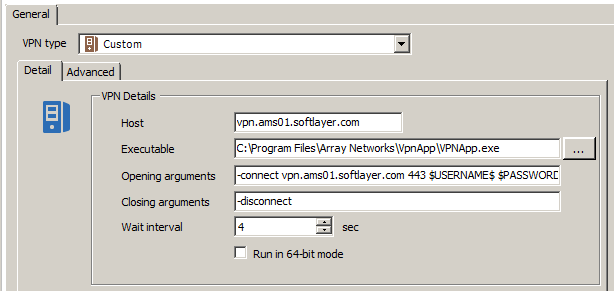
vpn.PNG
All Comments (15)
Some more information:
Run VpnApp from command line
You may run the VpnApp from the command line. Once the VpnApp is installed please find VpnApp.exe in your installation folder.
Usage:
To Install additional component: -install
To Login and Connect VPN: -connect hostname+port username password 1|0(ShowGUI)
To Disconnect VPN only: -disconnect
To Disconnect and Logout: -logout
For example:
vpnapp Cconnect www.myvpn.com 443 myname mypassword 1
This will connect and show the Array VpnApp GUI and Array icon at the system tray.
Hello,
This is a strange bug. I will assign it to Hubert and it will be fixed quickly.
David Hervieux
Hello,
There will be new variables for VPN credentials in the next version of RDM.
$VPN_USERNAME$
$VPN_PASSWORD$
$VPN_DOMAIN$
$VPN_HOST$
These will go fetch the username, password, domain and host of the VPN respectively. The label in the custom VPN will reflect this change.
If you use the $USERNAME$, $PASSWORD$ or $DOMAIN$ variables it will take the username, password and domain of the connection rather than the VPN inside the connection.
I think the addition of these new variables should fix your issue.
Regards,
Hubert Mireault
Hello,
We developed an add-on for the IBM Softlayer VPN. If you want to try it, it's available for download on our site http://remotedesktopmanager.com/Home/AddOn#VpnAddOn
If possible, could you give us some feedback if you do try it? Thank you.
Regards,
Hubert Mireault
First of all thanks for the add-in :)
These are the installers for Array VPN:
https://vpn.ams01.softlayer.com/prx/000/http/speedtest.dal05.networklayer.com/array/ArrayNetworksL3VPN_WIN.zip (32bit)
https://vpn.ams01.softlayer.com/prx/000/http/speedtest.dal05.networklayer.com/array/ArrayNetworksL3VPN_WIN64.zip (64bit)
https://vpn.ams01.softlayer.com/prx/000/http/speedtest.dal05.networklayer.com/array/ArrayNetworksL3VPN_MAC.zip (MacOSX)
https://vpn.ams01.softlayer.com/prx/000/http/speedtest.dal05.networklayer.com/array/ArrayNetworksL3VPN_LINUX.zip (Linux)
I've tried a few things:
When trying to connect to the VPN, I am getting a pop up saying the variables are not correct.
If I do add the -connect infront of the host it does seem to work, but I am getting a message 'Network is not available' but can't seem to find why since the GUID is off.
Another thing when using the credential repository or set credentials to none it keeps asking for the username.
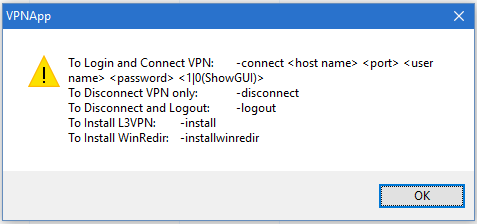
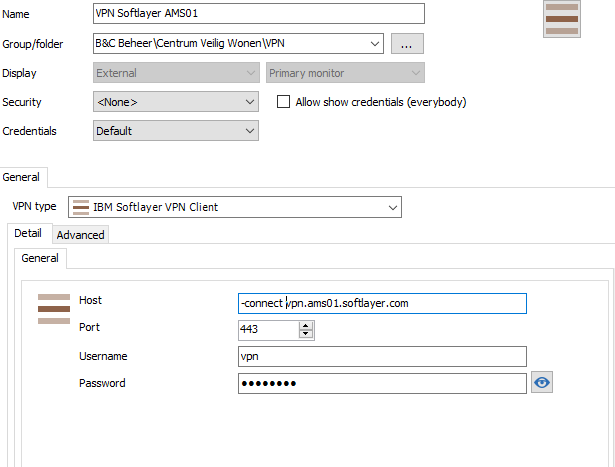
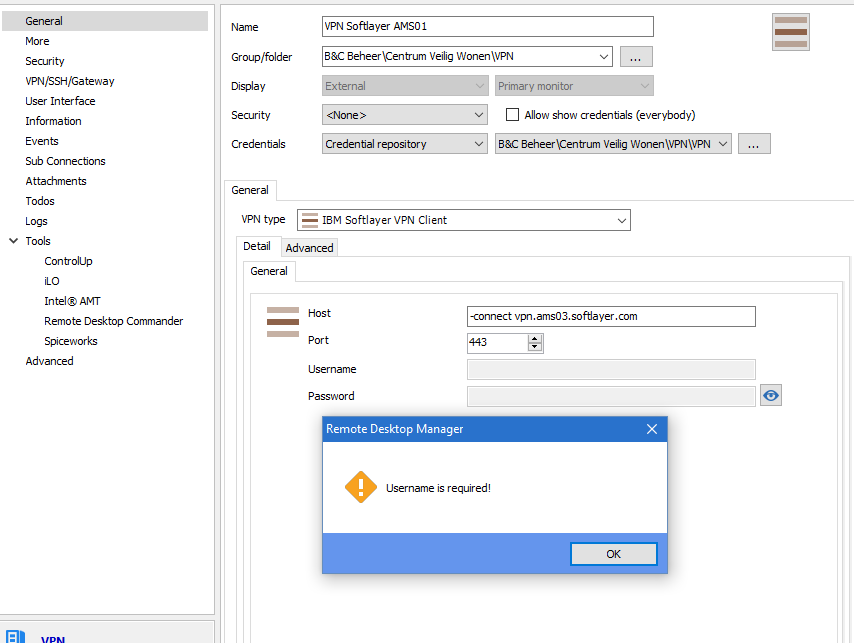
Username required.PNG
vpn[1].PNG
pop up.PNG
So I've tried using the Custom VPN entry aswell next to the IBM add on.
This still does not seem to translate the $VPN_PASSWORD$ correctly, the username and host do work correctly.
But the password still seems to fill in an incorrect one, not sure why.
If you guys need an test account, please let me know by sending a PM.
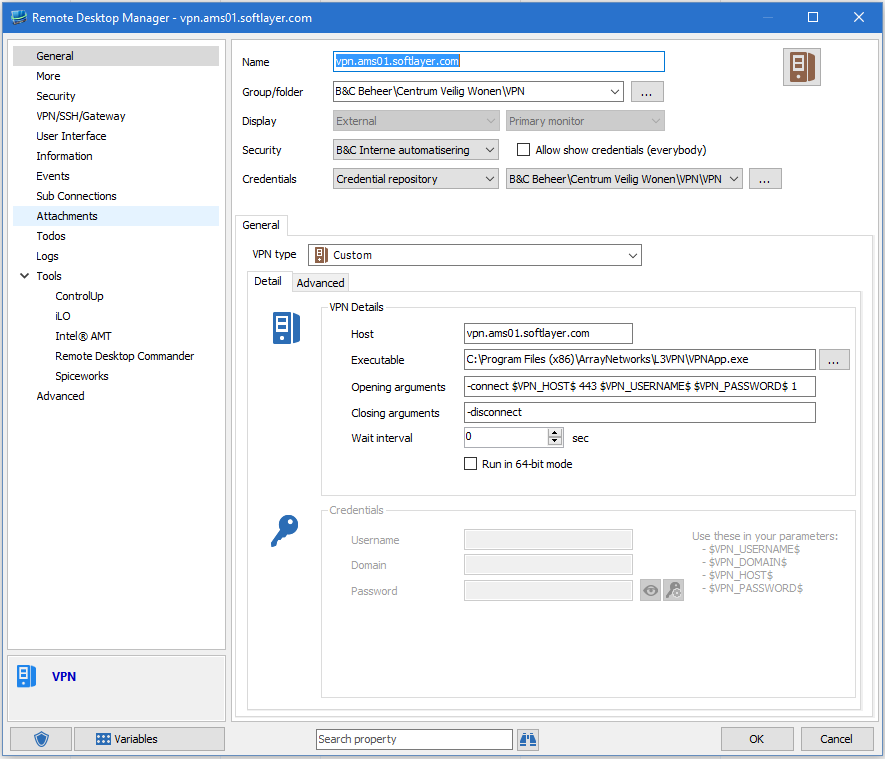
Custom.PNG
Hello,
Thank you for the feedback! I will take a look at the issue with the VPN variables. I think it might have to do with using the credential repository.
Could you try not using the repository and entering the values directly, as a test, and see if the variables work?
Further, by using the credential repository, could you try the normal $USERNAME$ and $PASSWORD$ variables?
As for the VPN, my colleague Sebastien will take a look at it.
Regards,
Hubert Mireault
For the Custom VPN:
This is working:
-connect vpn.ams01.softlayer.com 443 wybren testpassword 1
This is also working
-connect $VPN_HOST$ 443 $VPN_USERNAME$ testpassword 1
But the password still doesn't get translated correctly.
Using the $PASSWORD$ or $VPN_PASSWORD$ it still does not work, either with credential repository or setting this default and filling in the fields.
In both the custom VPN entry and in the credential you're using from the repository, could you check out the Security tab and check the "allow password in variable" checkbox? This is probably what is causing the issue.
Regards,
Hubert Mireault
Hi Wybren,
Can you please try again using the updated add-on attached to this message?
Both problems that you reported (connection + credential repository) should be fixed in this version.
To install the new version, use the Add-On Manager under the Tools menu in RDM and then select "Manual installation" after selecting the IBM Softlayer VPN AddOn.
Please let us know if you have any other issue.
Regards
Sébastien
IBMSoftlayerVPNAddOn.zip
Sorry guys, I was off for holiday.
For: Hubert, it works!
Using the $USERNAME$ / $PASSWORD$ with the credential repository thanks.
Hi Guest,
Did you try with the add-on attached to my previous post?
@Sebastien
Works like a charm! thanks alot.
Can you update this in the add on manager?
Hi Wybren,
the new version of the add-on is now available in the Add-On manager.
Best regards,