
devolutions
RDM randomly crashes
Success. Going in order, step 1 and step 2 made no difference. However, in step three, after disabling "Load plugins in Embedded mode" and restarting, it stopped crashing after logging out from a server. The problem is that I use plugins when testing/troubleshooting TSPrint and TSScan from TerminalWorks. I have verified that they are at the current versions. How can I get a list of plugins that get loaded with embedded RDP? I'd like to narrow down the offending plugin if it is not a recent RDM bug causing the problem with the TS products. Additionally, I wouldn't complain if, in the process, we can also speedup the starting of the RDM program itself. After launching, it takes just over 20 seconds to get to the point where it finally loads the navigation tree. That's forever in IT time. :)
RDM randomly crashes
Done. The exported config file has been uploaded to the link.
RDM randomly crashes
Local SQLite data source.
The portable version seems to work ok with the connections.db, but when I import my settings, it goes back to misbehaving. The application logs appear to be blank - even with debugging on. I am able to reproducible the silent crash, once I have the settings imported. I open a few servers via RDP. Once they have all gotten to their desktops, if I proceed to try to log a server out by clicking on their start menu and signing out, or disconnect, I can only get one server logged out or disconnected before RDM disappears on me. What should I look for in my settings related to Remote Desktop that might cause RDM to crash? I am going to do more testing without importing the settings to see if it crashes, but I think we're getting close. Thanks.
RDM randomly crashes
Ever since the update to 2026.1.18.0 (64-bit), I can barely log in to a few servers before the program crashes and disappears. I can even just launch it and let it sit in the background, and it will be gone a little while later. Is there a log file or anything I can review to find out why?
Event Viewer Log:
Faulting application name: RemoteDesktopManager.exe, version: 2026.1.18.0, time stamp: 0x69a70000
Faulting module name: ntdll.dll, version: 10.0.26100.7653, time stamp: 0x9bef4e47
Exception code: 0xc0000409
Fault offset: 0x0000000000121106
Faulting process id: 0x4CEC
Faulting application start time: 0x1DCD059FDA7F8F5
Faulting application path: C:\Program Files\Devolutions\Remote Desktop Manager\RemoteDesktopManager.exe
Faulting module path: C:\WINDOWS\SYSTEM32\ntdll.dll
Report Id: 3dd530e4-21b3-4c74-a2d0-36ccb20bb72d
Faulting package full name:
Faulting package-relative application ID: Click bleeds through RDM to application running behind it
Anywhere between 3 and 6 servers or so. All RDP sessions.
Click bleeds through RDM to application running behind it
RDM 2021.1.41.0 64-bit
Lately, a couple of odd times a day, while I am connected to several servers, my mouse click goes through to the desktop as if RDM was not there. It's the weirdest thing. I'll be working away when all of a sudden my mouse click brings up whatever application was directly behind RDM where my mouse clicked.
Any ideas?
Tab behavior when logging off.
Sorry. Should have included that. RDM Enterprise v14.1.3.0 (64-bit)
Windows 8.1 64-bit
My thinking is that a tab's focus should never get switched away because of activity in another tab.
Tab behavior when logging off.
Just checking in to see if there has been any progress on fixing the TAB behavior for Windows 8.1 yet. I was logged in to several servers at a client's site and due to the TAB focus changing as I went to log out of one server, I inadvertently logged out of a server I had a job running on. A good time was not had by all. :(
I'd like to use the native MS protocol, if possible.
RDM 14 Beta
That update (v13.9.13.0) did indeed fix the tab problem I was having in Windows 8.1. Thank you!!
RDM 14 Beta
Thank you. I will look for it.
RDM 14 Beta
Windows 8.1 and I'm running the 64bit version of RDM.
RDM 14 Beta
I just updated to 13.9.12.0 today and was hoping it would fix an issue I've been having the past few updates, but nope. If I double click on an entry, the tab appears for the session, but I am not able to click on it to get to the session. If I double click a second entry, and then click on its tab, and then the first tab, I can see the session. It is the same for any new entries I connect to after that. I have to click on an existing tab, and then the new one to get it to respond. Any ideas?
Tab behavior when logging off.
I can confirm that FreeRDP 7.0 "fixes" the tab problem until you can properly resolve it. What am I giving up by using FreeRDP 7.0 instead of the default?
Tab behavior when logging off.
Sorry to be late to the discussion. My OS is Win 8.1. I tried switching the RDP type to 7.0 and restarting RDM, but it did not fix it. Same jumping to leftmost tab when a server logs off, even if I had switched to another tab to work on another connection.
Side note: I have Win10 on my laptop and the tab goofiness does not happen on it.
Tab behavior when logging off.
I also experience this issue and it is very frustrating. Tab focus also jumps if I double click to open a session and then switch to another tab while I am waiting for it to log in, the tab focus switches from what I was working on to the new session as it is logging in. I am using RDM Enterprise 13.5.9.0 64 bit.
Hyper-V embedded RDP not using Virtual Machine Connection?
David, I do not understand the question. See below:
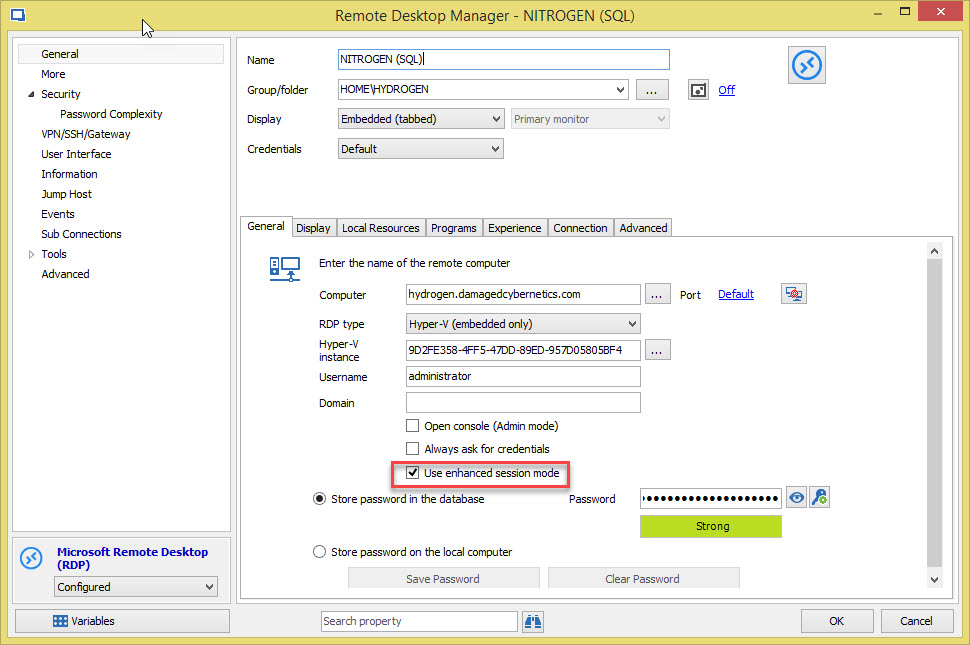
If enhanced session mode is checked, I cannot connect to a Hyper-V guest until it has finished booting and is online. If it is unchecked, I can connect at any time - even during a reboot.
Hyper-V embedded RDP not using Virtual Machine Connection?
I might be confused, but I thought the point of being able to remote in to a Hyper-V guest via the Hyper-V host was for the Virtual Machine Connection. This would allow you to connect to the session regardless of network status (e.g. offline, disabled nic, changing boot parameters before the guest OS has loaded, etc).
After experimenting, it appears I can do this, but only if I disable "Use enhanced session mode" - which limits the capabilities of the session. Is this the desired effect?
My test method was to tell my Hyper-V guest running Windows 2012R2 to boot into minimal safe mode (no network). My normal embedded Hyper-V connection would not connect. However, if I went in to the properties and unchecked "Use enhanced session mode" and then tried again, I was able to magically connect even though the guest was not on the network.
I am using RDM v12.4.8.0 64-bit.