Hyper-V embedded RDP not using Virtual Machine Connection?

I might be confused, but I thought the point of being able to remote in to a Hyper-V guest via the Hyper-V host was for the Virtual Machine Connection. This would allow you to connect to the session regardless of network status (e.g. offline, disabled nic, changing boot parameters before the guest OS has loaded, etc).
After experimenting, it appears I can do this, but only if I disable "Use enhanced session mode" - which limits the capabilities of the session. Is this the desired effect?
My test method was to tell my Hyper-V guest running Windows 2012R2 to boot into minimal safe mode (no network). My normal embedded Hyper-V connection would not connect. However, if I went in to the properties and unchecked "Use enhanced session mode" and then tried again, I was able to magically connect even though the guest was not on the network.
I am using RDM v12.4.8.0 64-bit.
All Comments (3)
Hi,
Are you able to see the difference when you disable the enhanced session mode? Could you verify if it's automatically disabled with vmconnect.
Regards
David Hervieux
David, I do not understand the question. See below:
If enhanced session mode is checked, I cannot connect to a Hyper-V guest until it has finished booting and is online. If it is unchecked, I can connect at any time - even during a reboot.
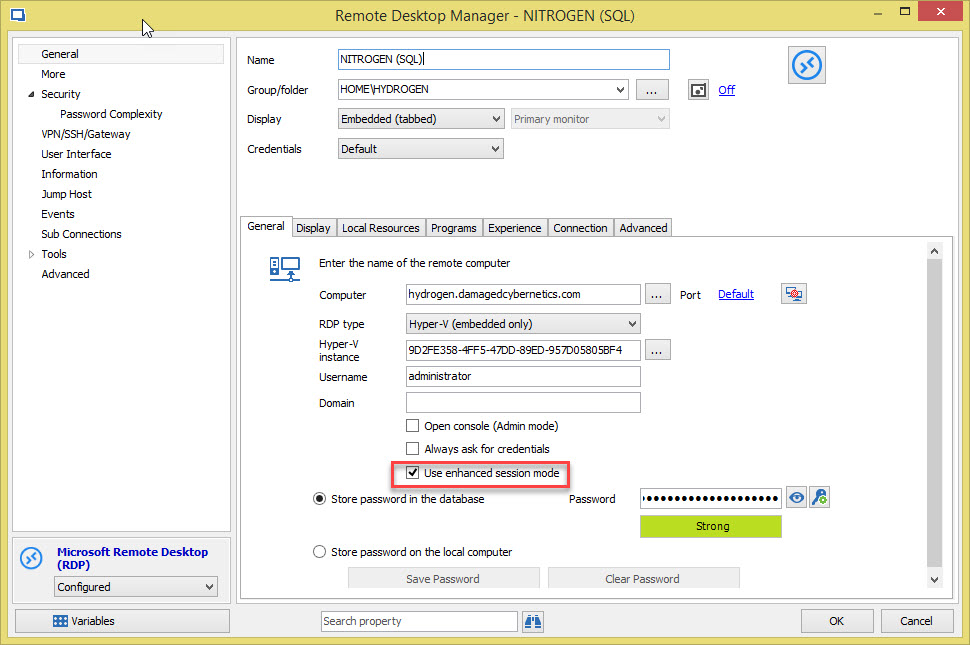
properties.jpg
Hi,
I'm pretty sure that this is not possible to use this mode if you are not directly on the Hyper-V machine:
http://windowsitpro.com/hyper-v/enhanced-session-mode-windows-server-2012-r2
David Hervieux