
pascal_verdieu
One Identity Safeguard Integration
The newest version of RDM is available with a new credential type, One Identity Safeguard for Privileged Passwords:
Superb! Merci!
Question, in the case of using Devolutions Server as back end, I will assume it is the Devolutions Server which will be doing the request over to Safeguard, or will it be the RDM client?
Password Send by Email
For future reference, on my network connectivity to some of the endpoints listed here (https://docs.devolutions.net/kb/devolutions-server/knowledge-base/internet-endpoints-server/) was blocked. We don't know which exactly (I suspect api.devolutions.com.) Once that was fixed the emails started flowing from both the DVLS server and RDM client.
Password Send by Email
Ah? That's new. No it wasn't checked (actually, the entire "Enable Internet Access" was unchecked)
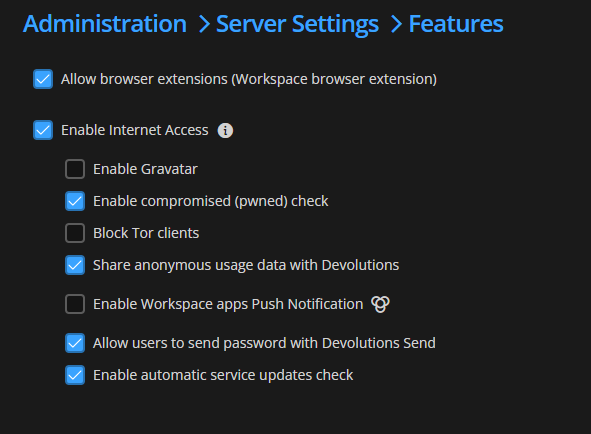
No change in the RDM client (says "sent successfully" but doesn't do anything), however on the web version it now gives out this...
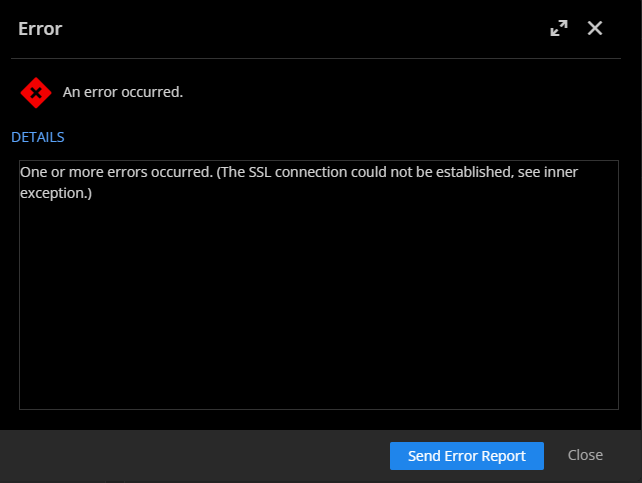
Password Send by Email
Hum, in the webpage it shows:
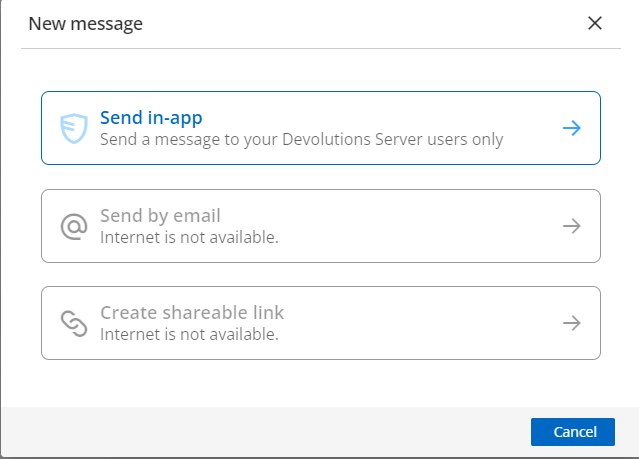
We're using a Hybrid OnPrem exchange server as SMTP server. As setup it doesn't allow it to send to external domains but right now I'm simply trying with members of my team (which are internal).
Shareable link works (on the RDM client)...
Password Send by Email
The email setting works, we get emails from RDM from time to time. And Yes, I am using an teams license (both RDM & DVLS)...
Password Send by Email
I love the new feature to securely send the password by email. Just wondering how the actual email sending works as I've tried it, it says success but the recipient didn't get anything. We're using Outlook / M365 as email client and it doesn't seem to use that (nothing in my sent emails). And maybe it helps/changes things but the Data Source is an RDM Server.
Can I set RDM to automatically change to the Vault tab when I click in the Search box?
We've added the Focus Main Vault when Filtering option which can be found in the Search Options on the filter. When toggled on, the main view will always switch to the main vault when inputting text in the filter. This will also work with the Filter window prompt that can be launched by double clicking the filter (the tree view will switch to the main vault after inputting text in the filter box). We've also updated the "hint text" as specified earlier. You can expect these changes for the next 2024 version.
NIIIICE!!!! Thanks
**frantically starts clicking Check For Updates**
So am I!
Can I set RDM to automatically change to the Vault tab when I click in the Search box?
That's what I was asking for in the original post. My Favorites list is very small. I would never need to filter it. My Main Vault has thousands of servers. That's where I always want the search/filter to apply.
Yes, this is also what I understood from your point and exactly my same pain point!
If you change the search/filter box to always target the Vault tab, then I wouldn't need to use the Quick Search. But setting the Global Hotkey for a specific key combination should override the Remote Commands box I'd think.
I think it would be a case by case / depends on who's using and how, hence my recommendation of an option to set which takes precedence. Microsoft has been adding more key combos, who says that Ctrl+Space won't be used by Windows 15?
Can I set RDM to automatically change to the Vault tab when I click in the Search box?
Thanks for explaining. We could add an option to force the filter to always target the main vault. Would this provide the behaviour you are looking for?
THAT would be perfect!!! Thanks! :D
Changing the "Search" text for "Filter" does feel like it would provide better accuracy in this context. I will open a ticket for both this and to investigate the "Apply Windows key combinations" on remote computers vs global hotkeys.
With an option somewhere to enable / disable allowing the "global hotkeys" to override the Windows Key combos on remote computers. As long as there aren't any collision between the 2 sets, there's no issue, but should (when?) this happen, want to be flexible...
Can I set RDM to automatically change to the Vault tab when I click in the Search box?
@Jafran Majeau
Simple, I want this UI widget (read arrow) to filter the vault (blue arrow), which is my understanding of the title of this thread.
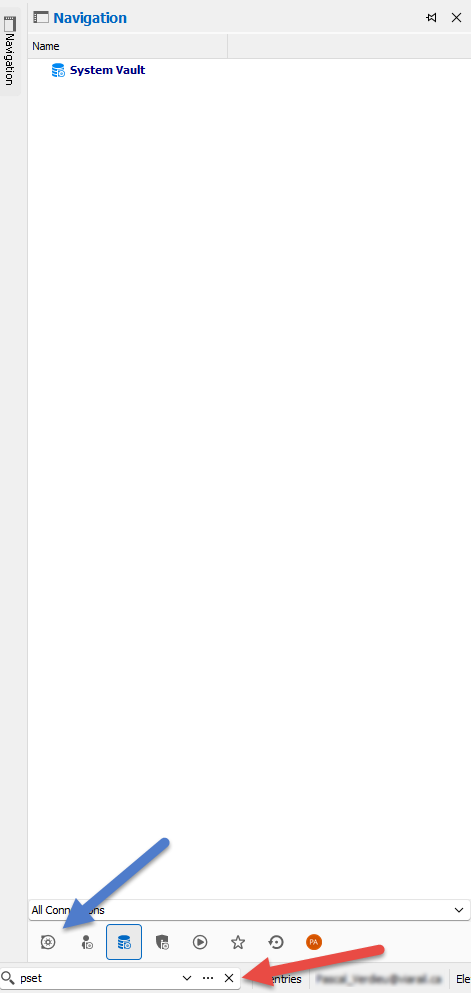
If the "Filter" is the solution, then have a way to get the "filter" use THAT spot in the GUI
Can I set RDM to automatically change to the Vault tab when I click in the Search box?
Upvote to have the capacity to "pin" the Quick Search to the vault
One Identity Safeguard Integration
(Je continues dans la langue de Shakespeare pour nos amis anglos)
Hence my proposal to upvote. If we`re enough to vote, resources should be easier to come by. ;) Quick scan of the forums shows another person interested so that makes 3 votes...
Merci en passant!
One Identity Safeguard Integration
Merci pour la réponse rapide!
Any way we can upvote this?
One Identity Safeguard Integration
Bumping up the thread. Our security team is looking into implementing this so would like to know how much we would be able to integrate with RDM...
RDM crashes when installed through an MDM
If the RDM application is installed though the MDM it crashes on startup but not if installed using the app store.
We had this issue for another app and our MDM provider pointed us to this issue.
https://github.com/xamarin/xamarin-macios/issues/10086
It would be interesting for you guys to look at the workaround listed for a future update...
iOS - Cannot Connect to MSSQL using Integrated Security
It hasn't been possible since early 2018 (Mono 5.10) and it is still not possible. For it to work, Microsoft has to fix the problem.
Bonjour Nicolas,
Is there a link to the MS GitHub issue about this (assuming there is one) so we can follow on it?
Merci!
Credential Management
Thanks David, but my question is more about restoring a modified credential in RDM when stored in an SQL Server DS. Is there a way to see the history?
Credential Management
Old post but it is my question now. The question was posted on the RDM thread but the response talks about PasswordManager. So we need another product (and cloud based, ahhh!!!!) to fix?
Regex Support in Advanced Search
BUMP
I also would like regex filtering :)
Ideas for enhanced variable processing functions
+1 on that idea!
Would also help this request as well I think
https://forum.devolutions.net/topic27765-variables-in-user-interface--possible-improvement.aspx
Hide "Expired" entries
Hi
I concur, individual entries do work with 12.0.2.0. Haven't tested with Folders though, but indeed would be nice.
Thanks!
Hide "Expired" entries
Nice
Do you have an ETA?
Hide "Expired" entries
Merci, c'est rapide!
Hide "Expired" entries
Hi
Doesn't seem to be working with version 12.0.1.0. I have enabled the "Hide Expired Entry" in the options, closed and reopened the app and the expired entries still persist. Screenshots added.
Regards
Hide "Expired" entries
Great, Tkx! Of course I will send feedback!