Can I set RDM to automatically change to the Vault tab when I click in the Search box?
Can I set RDM to automatically change to the Vault tab when I click in the Search box?

Hi,
I spend most of my time viewing my Favorites tab. However, when I want to connect to some other server, I click in the Search box and type part of the name. The problem I have is that this searches the tab I'm currently viewing. I have to manually click the Vault tab in order for my Search to actually show me the results I want.
Is there any way to have the Search box either search both tabs at once, or have it change me to the Vault tab automatically?
Thanks.
All Comments (41)
Hello Kelemvor,
Thanks for contacting us on that matter!
To see all the vaults in the search, you can check the option "All vaults" by clicking on the three dots next to the search bar.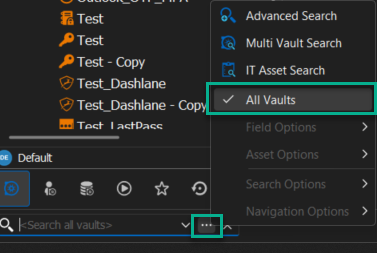
After, when you are in your Favorite tab, you will be able to search for an entry in another tab.
If you have any other questions, feel free to let us know.
Best regards,
Maxim Robert
2023-12-19_09-19-05.png
You seem to have different options in the ellipses menu than I do.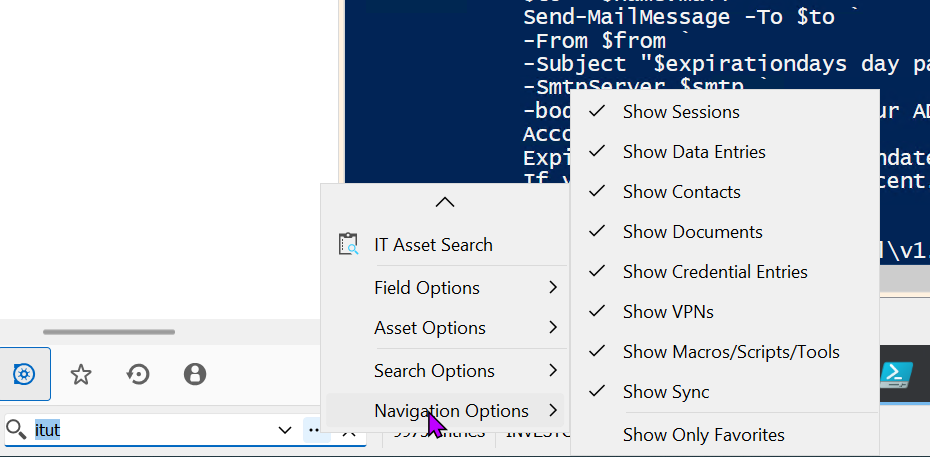
c375c8ac-858b-44ac-9587-24bd12028258.png
Hello,
Could you kindly provide us with the following information:
- A screenshot of your RDM dashboard.
- Your current RDM version.
- The data source you are utilizing.
- Any additional information you believe might be relevant.
Once we have this information, we will be better equipped to diagnose and resolve the issue.
Best regards,
Maxim Robert
2023.3.33.0
SQLite (Free version)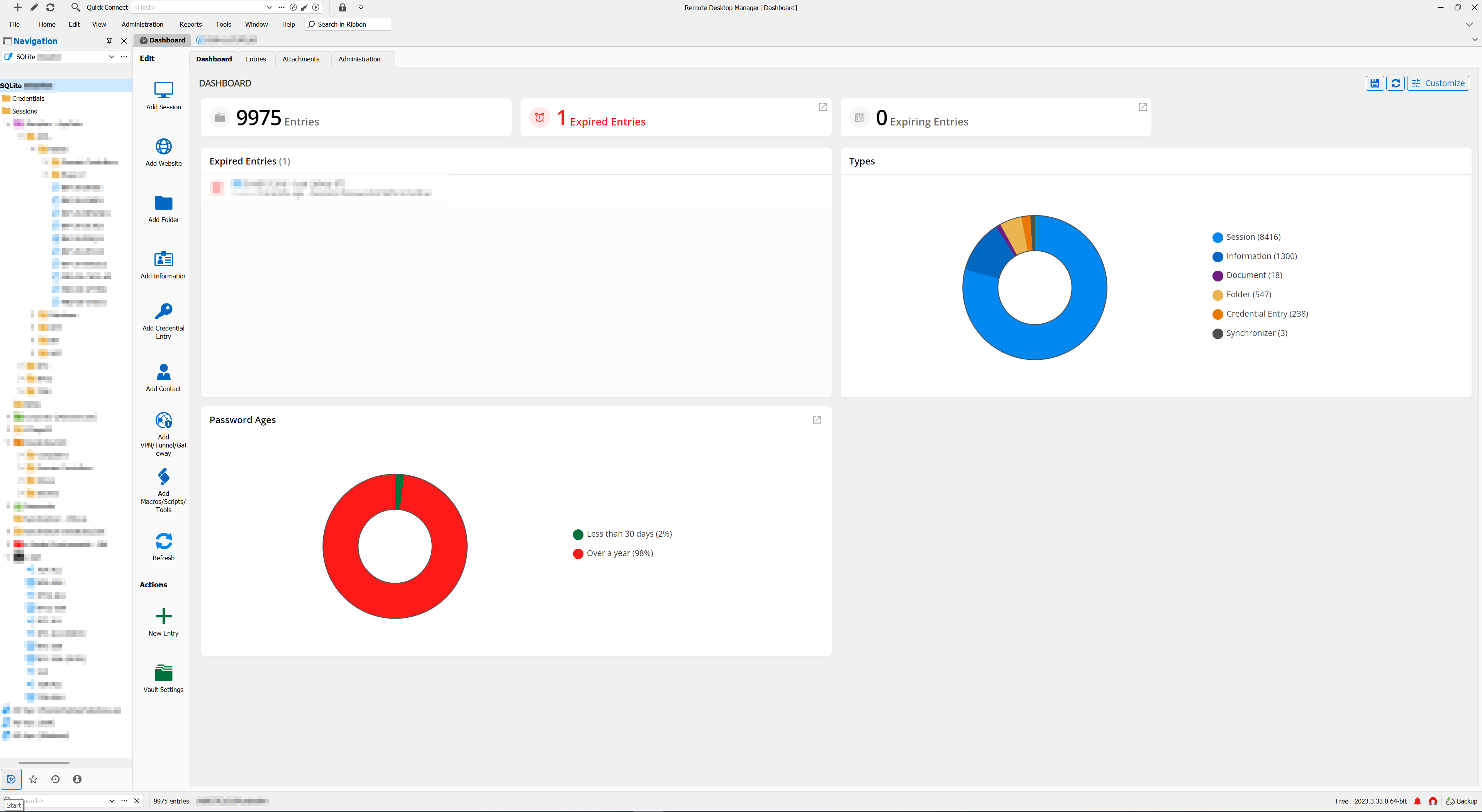
f7ab1fce-5f77-4ba7-9eaa-5f1d23910f29.png
Hello,
Thank you for your quick response!
I'm sorry that the free version of SQLite does not allow a search option between all tabs. On the other hand, the Microsoft SQL Server Data source does provide this option.
If you have any further questions or concerns, please don't hesitate to let me know.
Best regards,
Maxim Robert
Any other work-arounds? Or could you add this feature to the SQLite version since the Free version has been getting enhanced lately?
Hello Kelemvor,
We currently have a ticket open with our developer's team about this. I will update you as soon as possible.
If you have any other questions, feel free to let us know.
Best regards,
Maxim Robert
Hello,
We've implemented support for the filter to be used in the Favorites. This should be available for the next 2024 version.
Regards,
Jafran Majeau
Does that mean that if I type in the search / filter box, while on the Favorites tab, I'll see matches from the Vault Tab?
Hello,
Using the filter while in the favorites tab will filter the favorite tab itself.
Regards,
Jafran Majeau
OK. I was hoping for the ability so that when I type in the Search box, it would Search my vault and favorites at the same time so I don't manually have to change to the vault after typing what I'm looking for. My favorites list is very small, since it's only the connection I use all the time I don't need to be able to search/filter that list.
I spend most of my time on my Favorites tab. If I then want to connect to something else, I type the name of the server in the Search box, but then I have to click on the Vault tab to see the info. If typing in the Search box would override the tab I'm on, and show me all the search results, that's what I'd find most useful.
Thanks.
Hello,
While in any context (Main Vault or Favorites), you can use the Quick Search by inputting Ctrl + Space. With this you can quickly search available vaults (the concept of the filter is that is it contextually linked to the current view, with the exception of the All Vaults that is available on non-local datasources, the Quick Search however is meant to quickly access any entry that can usually be fetched by the current user). You can also enable options such as Launch of Enter through the menu in the Quick Search text field.
Could you let us know if this is what you were looking for?
Regards,
Jafran Majeau
Upvote to have the capacity to "pin" the Quick Search to the vault
I pressed Ctrl+Space and got this pop-up window. It sounds like RDM would grab a Ctrl+Space hotkey and not send it through to the machine I'm remoted into, so I clicked Yes. I did get a search pop up window the first time, but I have to click off the RDP window first.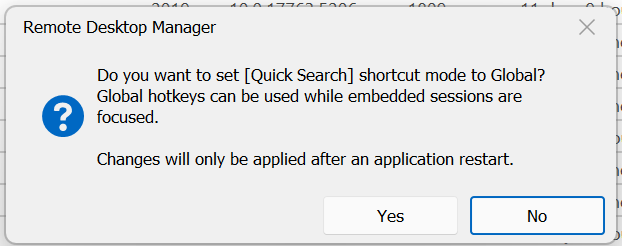
If I press Ctrl+Space, while remoted into a server, it sends it through and nothing happens in RDM. If I click in the Search box on the bottom left, and then press Ctrl+Space, I do get the search window to pop up and seems to do what I need. It would be nice if RDM could grab the Ctrl+Space even when I'm remoted into a servers since that's a key combination I would ever use normally.
cb1e6854-f54c-484f-b1d1-c5114ed0adb9.png
Hello Kelemvor,
I'm assuming that you've already restarted RDM once after the popup manifested itself (as the prompt suggests), if that is the case and you are still experiencing this issue, then try going to Files - Settings - User Interface - Keyboard, and by using the filter in the header, you can look up Quick Search, and check its "Mode". Set it to Global, and then restart RDM. I myself have just tried it and Ctrl + Space is properly catched even inside an embedded RDP session. If you are still experiencing issues, let us know so we can try to figure this out.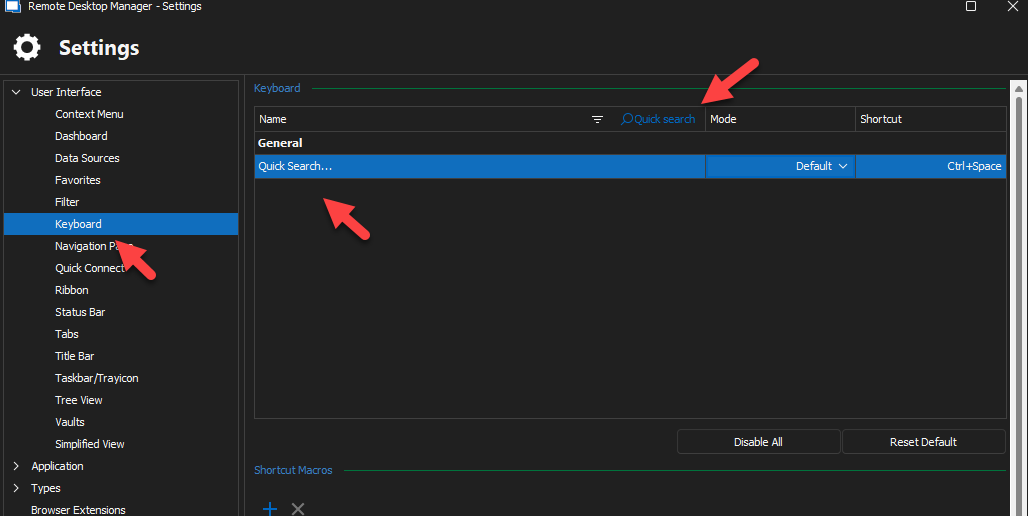
Hello pascal_verdieu,
Could you please elaborate on what exactly it is you are requesting? As stated previously, the Quick Search differs from the filter in how it isn't linked to a vault, it is its purpose. If you are looking to filter the vault specifically, you can use the Filter box instead (which you can quick access by using Ctrl + F by default, or by setting a keybind in the same section as I mentioned above).
Regards,
Jafran Majeau
8320239e-5b14-4b6e-aacf-76e1378b8ac6.png
@Jafran Majeau
Simple, I want this UI widget (read arrow) to filter the vault (blue arrow), which is my understanding of the title of this thread.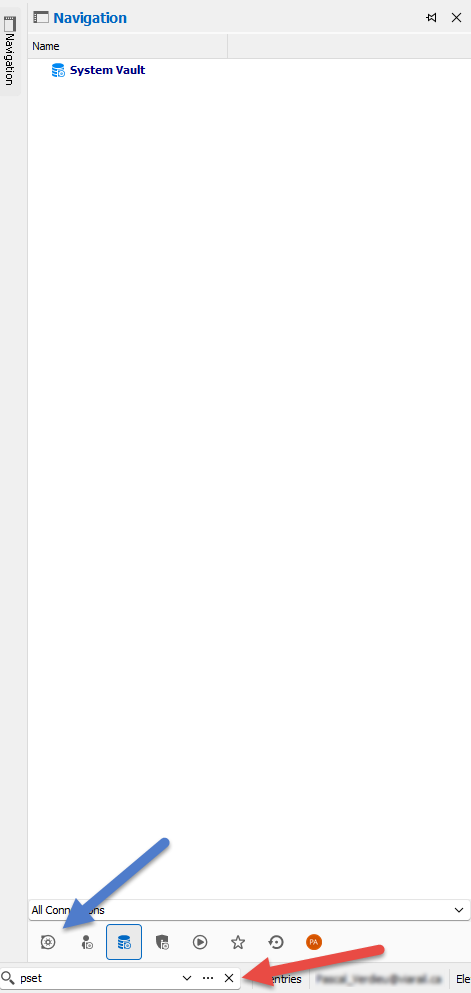
If the "Filter" is the solution, then have a way to get the "filter" use THAT spot in the GUI
1c65cf2a-471a-4c32-bd6c-569a78170998.png
One of the issues is that the box on the bottom left corner of the screen says <Search> in it, not <Filter>. So I assumed that box is for searching all my information. If it is really just for Filtering the tab I'm currently on (Vault vs Favorites vs whatever), then it should be renamed to <Filter> instead of <Search>.
Anyway, as far as the Ctrl+Space thing goes, I just closed and reopened RDM. I checked Options and Quick Search is set to Global hotkey and Ctrl+Space. However, if I'm remoted into a server, and I pres Ctrl+Space, it's sending that command through to the remote host instead if catching it.
Now, I do have all my sessions set with this setting: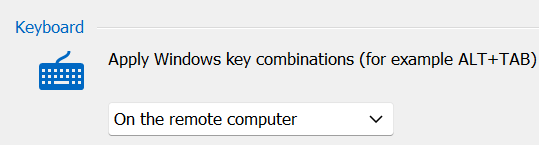
I don't know if the Global Hotkey setting should override this setting or not. If not, then that might be the problem.
ed4d6702-1527-45b3-a17f-97d3d33db6a6.png
Hello pascal_verdieu,
Thanks for explaining. We could add an option to force the filter to always target the main vault. Would this provide the behaviour you are looking for?
Hello kelemvor,
Changing the "Search" text for "Filter" does feel like it would provide better accuracy in this context. I will open a ticket for both this and to investigate the "Apply Windows key combinations" on remote computers vs global hotkeys.
Regards,
Jafran Majeau
Thanks for explaining. We could add an option to force the filter to always target the main vault. Would this provide the behaviour you are looking for?
THAT would be perfect!!! Thanks! :D
Changing the "Search" text for "Filter" does feel like it would provide better accuracy in this context. I will open a ticket for both this and to investigate the "Apply Windows key combinations" on remote computers vs global hotkeys.
With an option somewhere to enable / disable allowing the "global hotkeys" to override the Windows Key combos on remote computers. As long as there aren't any collision between the 2 sets, there's no issue, but should (when?) this happen, want to be flexible...
Hello pascal_verdieu,
Thanks for explaining. We could add an option to force the filter to always target the main vault. Would this provide the behaviour you are looking for?
That's what I was asking for in the original post. My Favorites list is very small. I would never need to filter it. My Main Vault has thousands of servers. That's where I always want the search/filter to apply.
Hello kelemvor,
Changing the "Search" text for "Filter" does feel like it would provide better accuracy in this context. I will open a ticket for both this and to investigate the "Apply Windows key combinations" on remote computers vs global hotkeys.
If you change the search/filter box to always target the Vault tab, then I wouldn't need to use the Quick Search. But setting the Global Hotkey for a specific key combination should override the Remote Commands box I'd think.
That's what I was asking for in the original post. My Favorites list is very small. I would never need to filter it. My Main Vault has thousands of servers. That's where I always want the search/filter to apply.
Yes, this is also what I understood from your point and exactly my same pain point!
If you change the search/filter box to always target the Vault tab, then I wouldn't need to use the Quick Search. But setting the Global Hotkey for a specific key combination should override the Remote Commands box I'd think.
I think it would be a case by case / depends on who's using and how, hence my recommendation of an option to set which takes precedence. Microsoft has been adding more key combos, who says that Ctrl+Space won't be used by Windows 15?
Hello,
We've added the Focus Main Vault when Filtering option which can be found in the Search Options on the filter. When toggled on, the main view will always switch to the main vault when inputting text in the filter. This will also work with the Filter window prompt that can be launched by double clicking the filter (the tree view will switch to the main vault after inputting text in the filter box). We've also updated the "hint text" as specified earlier. You can expect these changes for the next 2024 version.
After some discussion with other devs, we've opted not to change anything regarding the priority between global shortcuts and the entry's keyboard combination settings. There is the distinct possibility that we might add an option for this at a later date, but for now this will remain under investigation.
Regards,
Jafran Majeau
That first item sounds perfect and will make things so much easier for me.
Thanks!!
**frantically starts clicking Check For Updates**
We've added the Focus Main Vault when Filtering option which can be found in the Search Options on the filter. When toggled on, the main view will always switch to the main vault when inputting text in the filter. This will also work with the Filter window prompt that can be launched by double clicking the filter (the tree view will switch to the main vault after inputting text in the filter box). We've also updated the "hint text" as specified earlier. You can expect these changes for the next 2024 version.
NIIIICE!!!! Thanks
**frantically starts clicking Check For Updates**
So am I!
I just got prompted for 2023.3.39.0. I installed it but I don't see the Focus option. Did it maybe not make it into this version or am I missing something?
Hello,
That would likely be because this will be implemented for the next 2024 version (as stated in my last reply), which you can expect to be released as a beta very shortly (if it isn't already). It should also be our official version soon (barring unexpected complications).
Regards,
Jafran Majeau
Oh. I didn't notice the year. Is there a 2024 version out now? Since it said "Next" version, I didn't notice the 2024 since there isn't a first 2024 version yet. :) Unless I'm missing something.
Hello,
The 2024 version should be right around the corner. As I understand it, we won't be releasing any more 2023 version (barring exceptional circumstances), so you can expect it to reach live very soon.
Regards,
Jafran Majeau
Good afternoon,
Just thought I'd check and see if the 2024 version has an estimated release date yet.
Thanks!
@kelemor,
If everything goes well, version 2024.1 should be release on March 5th 2024.
Best regards,
Jeff Dagenais
Great. Thanks.
I just got the 2024.1 version, but I don't see this feature. Is it something I have to enable somewhere? I'm actually having a lot of trouble changing tabs so I'm going to make a new post about that.
Ah, I found it. Thanks.
Hello Kelemvor,
Thank you for your response! I'm glad to hear that the 2024.1 fixed your issue.
If you have any other questions, feel free to let us know.
Best regards,
Maxim Robert
I have one other request related to this. The way it currently works is if I"m on my7 Favorites tab, and I click in the Search box, as soon as I type the first character it changes to the Vault tab. This is great.
However, after I then later change back to my Favorites tab, the text is still in the search box, and it filters my favorites list which causes it to be blank. I then have to go clear the Search box to see any of my favorites.
I know there's a setting somewhere to clear the search box when changing tabs, but I'm not sure if that would break the change from Favorites to Vault or not. And I"M not sure where that setting is.
Any suggestions for either clearing the search box when I go from Vault to Favorites, or just having the Search box not apply to the Favorites tab even if there's text in the box?
Thanks.
Hello,
I've replicated what you've brought up. The search box should clear when switching to the favorites vault (from the main vault), and this should work without preventing the switch caused by using the search box while in favorite vault. I've opened a ticket and we will investigate this.
Regards,
Jafran Majeau
There's a setting somewhere in RDM that undoes the Clear when changing Tabs thing. I had that turned on in the past but could probably turn it off now due to this fix. Problem is, I'm not sure where that setting is. Any idea?
Hello,
You're referring to Clear filter on navigation pane tab change, which is located in File - Settings - User Interface - Filter. However the feature currently has issues with clearing properly when switching to the Favorite Vault. I've implemented the fix for this, and this should be effective for the 2024.1.18 version.
Regards,
Jafran Majeau
That's the setting. Yes. However, I may have found a slight bug. If I have something in the search box when I click from Favorites to Vault, it cleared is out. But, if I have something in the search box when I go from Vault to Favorites, it does NOT clear out. It seems like it's only doing that when I go To the Vault tab. If that could be fixed so it also clears it when I go to the Favorites tab, it will take care of the issue I have.
Thanks!
Hello,
Those are some of the issues I referred to in my previous comment, and they are addressed as part of the mentioned update.
Regards,
Jafran Majeau
Thanks. I somehow missed the second part of your post. I just upgraded to the latest version today and it seems to be fixed.