Philippe Paré
KeePass slow with new plugin
Hi larrygoodale,
Can you make sure Debug logging is enabled in Settings > Advanced > Debug Level (...) > Debug, then try open a few entries?
Regards,
KeePass slow with new plugin
Hi larrygoodale,
can you check if there's anything in the application logs (Tools > Application Logs)? There's a specific path in the code that logs an error when the communication between the two apps is not working as intended.
Regards,
KeePass slow with new plugin
Hi larrygoodale,
unfortunately, I am unable to reproduce the issue. Every time I open an SSH with a linked credential (username + password) that's a KeePass entry, it opens instantly. Do you keep KeePass opened (could be in tray, just "unlocked")?
Regards,
KeePass slow with new plugin
Hi larrygoodale,
Thank you for the information, I will try reproducing the error and reach out to you if I have any question or news about the issue.
Regards,
KeePass slow with new plugin
hi larrygoodale,
Can you tell me what kind of datasource you're using? Also, what kind of terminal session are you opening (SSH, Telnet, etc)? I will try to reproduce the issue as closely as possible.
Regards,
Latest KeePass plugin not compatible with current KeePass version 2.57
Hi klausondrich,
Thank you for the clarification. I'm glad this worked for you. Is it possible for you to tell me the reason you unpack the plugin files manually? Is there something RDM could do better?
Regards,
Latest KeePass plugin not compatible with current KeePass version 2.57
Hi klausondrich,
This issue is caused by our renaming of the main plugin file from "Keepass" to "KeePass". Keepass relies on the file name to look up information in the plugin file and this operation is case sensitive. We added a special case for this update specifically when you go through the Extensions Manager (Tools > Extensions Manager > KeePass Extension)
Unpacking the files manually instead of using RDM to update the plugin will most likely not update the casing of the file because the Windows file system is technically not case sensitive. You have 3 options here:
Rename the file manually from "DevolutionsKeepassPlugin.dll" to "DevolutionsKeePassPlugin.dll"
Delete the file and unpack it again if you can't use RDM to update
Use the Extensions Manager to force update/install the plugin. This method will actually delete the file first, then unpack the plugin files.
I hope this helps. Please reach out again if this doesn't fix your issue.
Regards,
2024.3 - Keepass integration not working
Hi cchilderhose,
You mentioned something about RDP that needed to be addressed, I might have misunderstood!
Regards,
2024.3 - Keepass integration not working
Hi again cchilderhose,
Glad this "fixes" your issue. I think it has to do with a small tweak we did renaming the file from "Keepass" to "KeePass". Our copy steps probably ignore the casing and KeePass is expecting something very precise. For your other issue, I would recommend creating an other thread so we can keep track of it more easily. I'll forward it to the appropriate team as soon as you create it.
Regards,
2024.3 - Keepass integration not working
hi cchilderhose,
can you try something for me? In your KeePass installation folder (usually ProgramFiles/KeePass Password Safe 2), In Plugins folder, you should see DevolutionsKeePassPlugin.dll. Delete it, then reinstall the plugin via RDM. If this solves your issue, I have a very good idea of what's causing it.
Regards,
CultureNotFoundException - Culture is not supported - Remote Desktop Manager
Hi swissbuechi,
Glad we could resolve your issue. Feel free to reach out if you need anything else.
Regards,
CultureNotFoundException - Culture is not supported - Remote Desktop Manager
Hi again swissbuechi,
I made a small mistake telling you to set the variable to "0". You should set it to "false" instead (according to Microsoft's documentation). I wouldn't be surprised if "0" worked, but if it doesn't, "false" should.
Regards,
CultureNotFoundException - Culture is not supported - Remote Desktop Manager
Hi swissbuechi,
Are you able to test by settings the system environment variable `DOTNET_SYSTEM_GLOBALIZATION_PREDEFINED_CULTURES_ONLY` to `0` ? This should allow any culture, valid or not. If this fixes your issue, we have a way of setting it globally in our application, and you wouldn't need the environment variable anymore. We would then publish this more permanent fix in the next release.
Regards,
Instant crash after .net update (KB5036452)
Hi hrcpascoal,
Thank you for getting back to me on this. I'm very glad this worked in the end. Not sure either what it was, but like you said, it's most likely a Microsoft issue.
I'll wait on w-money to see if I can close this.
Regards,
Instant crash after .net update (KB5036452)
Hi again w-money and hrcpascoal,
Microsoft just released a new version of the runtime. Are you able to test with 8.0.4?
https://dotnet.microsoft.com/en-us/download/dotnet/8.0
Regards,
Instant crash after .net update (KB5036452)
Hi w-money and hrcpascoal,
I'm wondering if there's anything in the application logs, and if it even reaches that point. Are you able to send me the RemoteDesktopManager.log.db if it exists?
When running from the "Bin" version (unziped), it should be in the same folder as RemoteDesktopManager.exe. For the installed application, it should be in %LocalAppData%\Devolutions\RemoteDesktopManager\. You can send it via https://devolutions.sharefile.com/filedrop.
Also, would any of you be available for a quick remote session to help diagnose this issue? Ideally, I would like to be able to reproduce on my development machine.
Regards,
Instant crash after .net update (KB5036452)
Hi Rainer Friedrich,
Thank you for getting back to us. I'm glad this fixed your issue. Please reach out if we can help in any other way.
Regards,
Instant crash after .net update (KB5036452)
Hi Rainer Friedrich,
Thank you for reaching out. A fix for this will be available in the next release (most likely tomorrow, as soon as we can).
Unfortunately, I don't think it's related to hrcpascoal's issue.
As for hrcpascoal, I'm still waiting on Microsoft for their response regarding your issue, radio silence for now sadly.
Regards,
Instant crash after .net update (KB5036452)
Hi again hrcpascoal,
Unfortunately, my reproduction method only worked once and I think it was an other issue related to my VM. Two updates for you:
I have reached out to Microsoft asking if they have any information to crashes that look like this. I'll keep you updated with their response.
It might be caused by your antivirus software (assuming you have one other than Windows Defender). If possible, I would try running it without the antivirus checking it, or simply disabled temporarily.
Also, the error logs mention a few files other than the ones you sent (Report.wer). Is it possible for you to check if they have different information than Report.wer and send that information to us? You can send it as a private message to me or send it to our support team via https://devolutions.sharefile.com/filedrop.
Thanks again for your patience,
Instant crash after .net update (KB5036452)
Hi hrcpascoal,
My colleague is telling me there were a few fixes regarding the dotnet runtime 8.0.2 vs 8.0.3 in the latest release (2024.1.20). Are you able to test with this version?
Thanks again,
Instant crash after .net update (KB5036452)
Hi again hrcpascoal,
quick message to let you know I was able to reproduce the crash in a test environment. I will keep you up to date regarding any fix or solution to the issue.
Thank you for your patience!
Instant crash after .net update (KB5036452)
Hi hrcpascoal,
Thank you for reaching out about this issue. I'm currently investigating the potential causes but I haven't been able to reproduce the crash yet. I will keep you up to date if anything comes to mind or if I need more information. You have provided a lot of valuable information but if you think of any other variable that could allow me to reproduce the issue, please let me know.
Regards,
Unable to update outdated keepass plugin
Hi Davide,
Gald this worked. We will be adding a check to make sure this is clearer in the future.
Thanks for the update.
Regards,
Unable to update outdated keepass plugin
Hi,
can you confirm that your KeePass application is fully closed (main window and tray icon)? This is the only way we were able to reproduce.
Regards,
Unable to update outdated keepass plugin
Hi Davide,
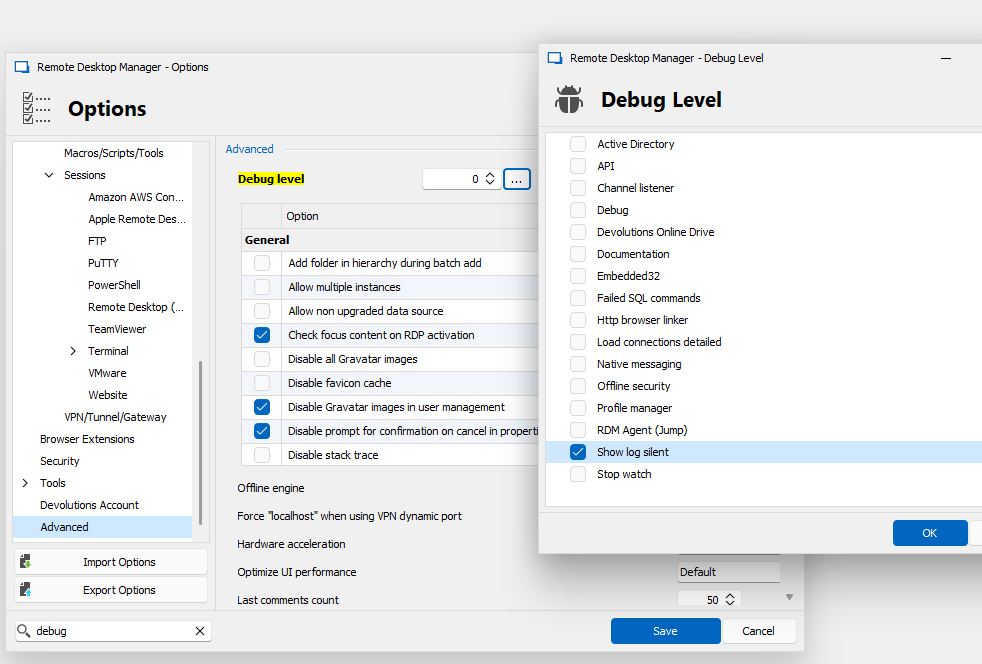
Can you enable "Show log silent" (see image below), restart RDM and try again? this should show a more detailed error. Also, can you see anything relating to KeePass or "Unzip" in the application logs?
Regards,